
1. Introducere
This manual provides essential instructions for the installation, operation, and maintenance of your HP Compaq 6005 Pro Socket AM3 System Motherboard (P/N 531966-001). This motherboard is designed for use in personal computers and supports AMD Socket AM3 processors. Please read this manual thoroughly before proceeding with installation or operation.
2. Informații de siguranță
Observe the following safety precautions to prevent damage to the motherboard or personal injury:
- Deconectați întotdeauna sursa de alimentare de la priza de perete înainte de a instala sau demonta orice componente.
- Wear an anti-static wrist strap and work on an anti-static mat to prevent electrostatic discharge (ESD) damage to sensitive components.
- Handle the motherboard by its edges, avoiding contact with components and connectors.
- Asigurați o ventilație adecvată în interiorul carcasei computerului pentru a preveni supraîncălzirea.
- If you are unsure about any installation step, consult a qualified technician.
3. Motherboard Components Overview
Familiarize yourself with the key components and connectors on your HP Compaq 6005 Pro motherboard.

Figura 3.1: De sus în jos view of the HP Compaq 6005 Pro motherboard, showing the CPU socket, RAM slots, and various chipsets.
The motherboard features an AMD Socket AM3 for compatible processors, four DDR3 DIMM slots for memory, and various expansion slots for additional cards. The rear I/O panel provides connectivity for peripherals.
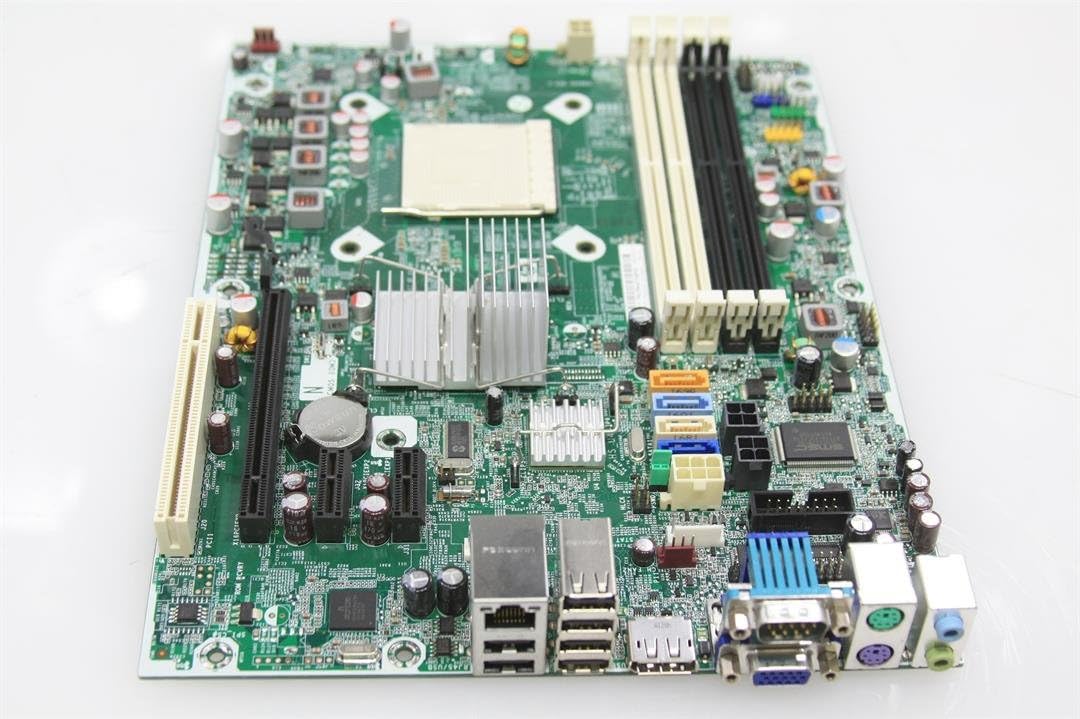
Figura 3.2: Rear I/O panel of the HP Compaq 6005 Pro motherboard, featuring VGA, DisplayPort, DVI, USB ports, Ethernet, and audio jacks.
Key areas include:
- Soclu CPU (AM3): For installing the central processing unit.
- DIMM Slots: For installing DDR3 memory modules.
- Sloturi PCIe: For graphics cards and other expansion cards.
- Porturi SATA: For connecting storage devices like hard drives and SSDs.
- Conectori de alimentare: Main 24-pin ATX and 4-pin CPU power connectors.
- Conectori panoului frontal: For case buttons, LEDs, and front USB/audio ports.

Figura 3.3: Another perspective of the HP Compaq 6005 Pro motherboard, highlighting expansion slots and internal connectors.
4. Configurare și instalare
Follow these steps to properly install your motherboard and its components.
4.1. Listă de verificare preinstalare
- Computer case with appropriate standoffs.
- Compatible AMD Socket AM3 processor.
- DDR3 memory modules.
- CPU cooler with thermal paste.
- Unitate de alimentare (PSU).
- Screwdriver and anti-static wrist strap.
4.2. Instalarea plăcii de bază
- Install the I/O shield into the computer case's rear opening.
- Așezați cu grijă placa de bază în carcasă, aliniind orificiile șuruburilor cu distanțierele.
- Fixați placa de bază cu șuruburi, asigurându-vă că este fixată ferm, dar nu prea strânsă.
4.3. Instalarea procesorului
- Lift the CPU socket lever.
- Aliniați marcajul triunghiular de pe procesor cu marcajul corespunzător de pe soclu.
- Introduceți ușor procesorul în soclu, fără a-l forța.
- Coborâți maneta soclului pentru a fixa procesorul.
- Apply a thin, even layer of thermal paste to the CPU's surface.
- Install the CPU cooler according to its manufacturer's instructions, ensuring good contact with the CPU.
4.4. Instalarea memoriei (RAM)
- Deschideți clemele de la ambele capete ale slotului DIMM.
- Aliniați crestătura de pe modulul de memorie DDR3 cu cheia din slotul DIMM.
- Apăsați ferm pe ambele capete ale modulului de memorie până când clemele se fixează în poziție.
4.5. Conexiuni de alimentare
- Connect the 24-pin ATX power cable from the PSU to the main power connector on the motherboard.
- Connect the 4-pin CPU power cable from the PSU to the CPU power connector near the CPU socket.
4.6. Storage Devices and Expansion Cards
- Connect SATA data cables from your storage devices (HDD/SSD) to the SATA ports on the motherboard.
- Install any necessary expansion cards (e.g., graphics card) into the appropriate PCIe slots and secure them with screws.
4.7. Panoul frontal și conexiunile periferice
- Connect the front panel cables (power button, reset button, HDD LED, power LED, front USB, front audio) to their respective headers on the motherboard. Refer to your case manual for specific pin assignments.
- Connect external peripherals such as keyboard, mouse, monitor, and network cable to the rear I/O ports.
5. Instrucțiuni de utilizare
5.1. Prima pornire
- After all components are installed and connected, connect the power cord to the PSU and turn on the power switch.
- Apăsați butonul de pornire/oprire de pe carcasa computerului.
- Sistemul ar trebui să pornească și ar trebui să vedeți un afișaj pe monitor.
5.2. Configurarea BIOS/UEFI
Pentru a accesa utilitarul de configurare BIOS/UEFI, apăsați tasta desemnată (de obicei F10 or F12 for HP systems) repeatedly during the initial boot sequence. In the BIOS/UEFI, you can configure system settings, boot order, and monitor hardware status.
5.3. Instalarea sistemului de operare
Once the system is booting correctly, you can proceed with installing your preferred operating system (e.g., Windows 10) from a bootable USB drive or DVD.
6. Întreținere
6.1. Curatenie
Regularly clean dust from the motherboard, CPU cooler, and case fans using compressed air. Ensure the system is powered off and unplugged before cleaning. Avoid using liquid cleaners directly on components.
6.2. Actualizări BIOS
Periodically check the official HP support website for BIOS/firmware updates. BIOS updates can improve system stability, compatibility, and performance. Follow HP's instructions carefully when performing a BIOS update to avoid system damage.
7. Depanare
Dacă întâmpinați probleme, consultați următorii pași comuni de depanare:
- Fără putere: Ensure all power cables (24-pin ATX, 4-pin CPU) are securely connected. Check the PSU switch and wall outlet.
- Fără afișare: Verify the monitor is connected to the correct video output (VGA, DVI, or DisplayPort) and is powered on. Reseat the graphics card (if applicable) and RAM modules.
- Bipuri de sistem: Listen for beep codes during startup. These codes often indicate specific hardware issues (e.g., memory failure, graphics card issue). Consult the HP support website for a list of beep codes for your model.
- Instabilitate/Blocaje ale sistemului: Check for overheating (monitor temperatures in BIOS). Ensure all drivers are up to date. Test memory modules individually.
- Componentă nedetectată: Reseat the component (e.g., hard drive, expansion card). Check cable connections. Verify BIOS settings.
8. Specificații
Detailed technical specifications for the HP Compaq 6005 Pro Motherboard (P/N 531966-001).
| Caracteristică | Caietul de sarcini |
|---|---|
| Marca | HP |
| Numele modelului | HP Compaq 6005 Pro |
| Numărul de model | 531966-001 |
| Soclu CPU | Socket AMD AM3 |
| Procesoare compatibile | AMD Phenom II, Athlon II, AMD FX |
| Tipul chipset-ului | AMD 760MP |
| Tehnologia memoriei RAM | DDR3 |
| Sloturi de memorie disponibile | 4 sloturi DIMM |
| Dimensiunea maximă a memoriei RAM | 16 GB |
| Viteza ceasului memoriei | Up to 2133 MHz (depending on CPU/RAM) |
| Interfața plăcii grafice | PCI Express x16 |
| Sloturi de expansiune | 1x PCIe x16, 2x PCIe x1, 1x PCI |
| Total SATA Ports | 4x SATA 2.0 |
| Tip conector de alimentare principal | ATX cu 24 de pini |
| Porturi I/O din spate | 6x USB 2.0, 1x VGA, 1x DVI-D, 1x DisplayPort, 1x RJ-45 Ethernet, Audio In/Out/Mic, 2x PS/2 |
| Dispozitive compatibile | Computer personal |
| Platformă | Windows 10 (și versiunile anterioare compatibile) |
| Factor de formă | Micro-ATX |
9. Informații despre garanție
For specific warranty terms and conditions related to your HP Compaq 6005 Pro Motherboard, please refer to the original purchase documentation or contact HP customer support directly. Warranty coverage may vary based on region and point of purchase.
10. Suport
For additional assistance, driver downloads, updated documentation, or to contact technical support, please visit the official HP support website:
When contacting support, please have your motherboard model number (531966-001) and any relevant system information ready.