
Inter-Tech 88887203
Inter-Tech 88887203 Case IPC Storage 4U-4410 Instruction Manual
Model: 88887203
Introducere
This manual provides detailed instructions for the installation, operation, and maintenance of the Inter-Tech 88887203 Case IPC Storage 4U-4410. This 4U rack-mountable chassis is designed for building robust storage systems, offering extensive drive capacity and efficient cooling solutions. Please read this manual thoroughly before proceeding with any installation or operation.
Informații de siguranță
- Always disconnect the power supply from the wall outlet before opening the chassis or performing any installation/maintenance.
- Handle components with care to avoid damage from electrostatic discharge (ESD). Use an anti-static wrist strap if available.
- Asigurați o ventilație adecvată în jurul șasiului pentru a preveni supraîncălzirea.
- Do not operate the chassis in environments with excessive dust, humidity, or extreme temperatures.
- Refer to the manuals of other components (motherboard, PSU, drives) for their specific safety guidelines.
Produs terminatview
The Inter-Tech 88887203 Case IPC Storage 4U-4410 is a versatile 4U rack-mountable chassis engineered for high-capacity storage applications. It features a robust design and ample space for various components.
Caracteristici cheie:
- Baile de mers: Up to ten 2.5" or 3.5" hot-swap hard drive bays, four internal 2.5" drive bays, and three external 5.25" drive bays.
- Sistem de racire: Three hot-swap 120mm fans located behind the drive brackets and two 80mm fans at the rear for optimal airflow.
- Compatibilitate placa de baza: Supports Mini ITX, µATX, ATX, eATX, SSI EEB motherboards.
- Conectivitate panou frontal: Includes one USB 2.0 port.
- Factor de formă: 4U rack-mountable.

Figura 1: Faţă view of the Inter-Tech 88887203 Case IPC Storage 4U-4410, showcasing the ten hot-swap drive bays and front panel controls.
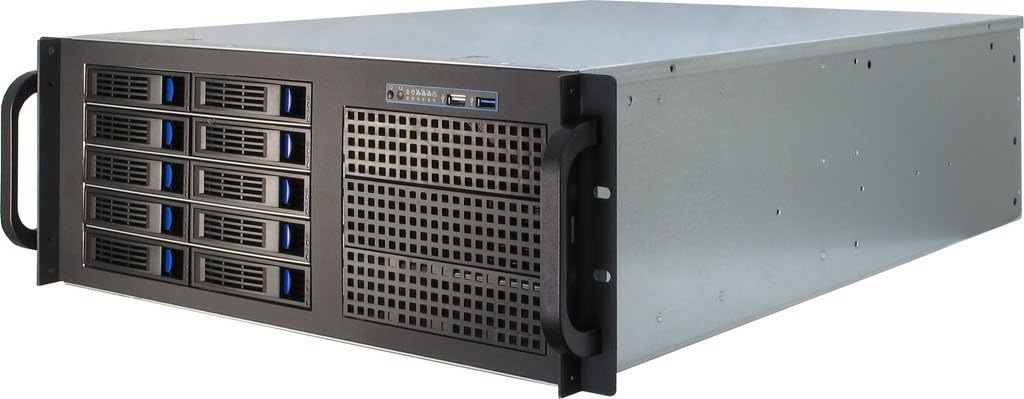
Figura 2: Față înclinată view of the chassis, highlighting its rack-mount handles and overall structure.
Configurare și instalare
1. Despachetarea și inspecția
- Carefully remove the chassis from its packaging.
- Inspect the chassis for any signs of damage during transit. Contact your vendor immediately if damage is found.
- Verify that all accessories, such as screws, cables, and adapter brackets, are present.
2. Removing the Top Cover
Locate and remove the screws securing the top cover of the chassis. Carefully slide the cover backward and lift it off to access the internal components.
3. Instalarea plăcii de bază
- Install the I/O shield into the rear panel opening.
- Align the motherboard with the standoffs inside the chassis. Ensure the screw holes on the motherboard match the standoffs.
- Fixați placa de bază folosind șuruburile furnizate.
4. Instalarea unității de alimentare (PSU)
This chassis does not include a power supply unit. Install your ATX power supply into the designated bay at the rear of the chassis. Secure it with screws. Adapter brackets are provided for specific PSU types if needed.
5. Instalarea unității
5.1. Hot-Swap 2.5"/3.5" Drives
- Open the latch on the desired hot-swap drive bay.
- Slide the drive tray out of the bay.
- Mount your 2.5" or 3.5" drive onto the tray using the appropriate screws.
- Glisați tava umplută înapoi în compartiment până când se fixează în siguranță în poziție cu un clic.
- Connect the necessary Molex power cables to the backplane for the hot-swap bays. Ensure sufficient power connections for all drives.

Figura 3: Față înclinată view showing several hot-swap drive bays partially open, illustrating the easy access for drive installation and removal.
5.2. Internal 2.5" Drives
Locate the internal 2.5" drive mounting points, typically near the bottom or side of the chassis. Secure your 2.5" drives using screws.
5.3. External 5.25" Devices
Remove the front bezel cover for the desired 5.25" bay. Slide your optical drive or other 5.25" device into the bay from the front and secure it with screws or the provided rails.
6. Fan Configuration and Cooling
The chassis comes pre-installed with three 120mm hot-swap fans at the front and two 80mm fans at the rear. These fans are designed to provide efficient airflow for cooling your components, especially the hard drives. The front 120mm fans are daisy-chained and powered by a single Molex connector. Ensure all fan power connectors are properly connected to your motherboard or power supply.
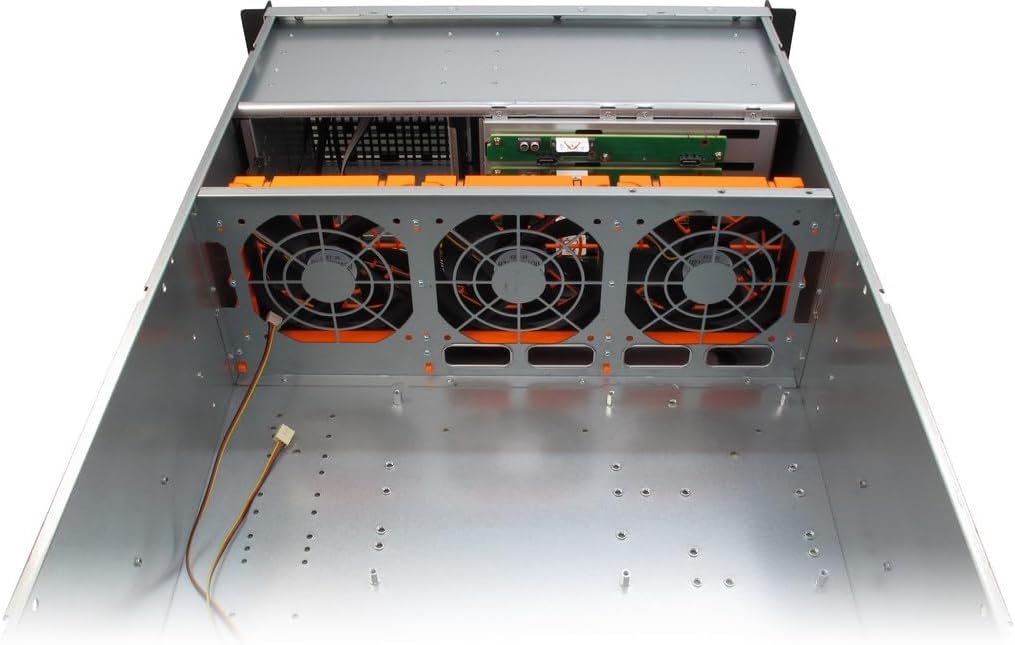
Figura 4: Internal top-down view, illustrating the placement of the three 120mm hot-swap fans at the front of the chassis, designed for optimal drive cooling.

Figura 5: Spate view of the chassis, showing the two 80mm fan mounts, I/O shield cutout, and expansion slots.

Figura 6: Partea interioara view of the chassis, showing the general layout, drive cages, and fan mounting areas.
7. Gestionarea cablurilor
Route all power and data cables neatly to ensure proper airflow and ease of future maintenance. Use cable ties if necessary.
8. Closing the Chassis
Once all components are installed and cables are managed, carefully slide the top cover back into place and secure it with the screws removed earlier.
Instrucțiuni de operare
1. Pornire
- Connect the power cable from your PSU to a wall outlet.
- Press the power button on the front panel of the chassis.
- Observe the power indicator lights and listen for system startup sounds.
2. Hot-Swap Drive Usage
The hot-swap drive bays allow for the removal and insertion of drives while the system is running, provided your operating system and HBA/RAID controller support hot-swapping. Always ensure the drive is safely ejected or unmounted from the operating system before physically removing it to prevent data loss.
Întreţinere
1. Curatenie
- Regularly clean dust from the chassis interior and fan filters (if present) to maintain optimal airflow and cooling performance.
- Use compressed air to remove dust from fans and heatsinks.
- Ștergeți suprafețele exterioare cu un material moale, damp pânză. Evitați curățarea abrazivă.
2. Înlocuirea ventilatorului
The front 120mm fans are hot-swappable. To replace a fan, ensure the system is powered off or the fan is safely disconnected from power if hot-swapping. Unclip the old fan and replace it with a new one, ensuring correct orientation for airflow.
3. Drive Replacement
For hot-swap drives, follow the hot-swap drive usage guidelines. For internal drives, power down the system, disconnect power, and then replace the drive.
Depanare
Probleme comune și soluții:
- Fără putere:
- Verificați dacă cablul de alimentare este conectat corect atât la sursa de alimentare, cât și la priza de perete.
- Asigurați-vă că comutatorul sursei de alimentare este în poziția „ON”.
- Verify all internal power connections (24-pin ATX, 8-pin CPU, etc.) are seated correctly.
- Zgomot excesiv al ventilatorului:
- Inspect fans for dust buildup and clean them.
- Asigurați-vă că niciun cablu nu obstrucționează palele ventilatorului.
- Consider replacing noisy fans if cleaning does not resolve the issue.
- Unități nedetectate:
- Verify that all SATA data and power cables are securely connected to the drives and motherboard/backplane.
- Ensure the Molex power connectors for the hot-swap backplane are properly connected.
- Check BIOS/UEFI settings to ensure SATA ports are enabled and configured correctly (e.g., AHCI mode for hot-swap).
- Ensure your HBA card is properly installed and drivers are loaded in the operating system.
Specificații
| Caracteristică | Detaliu |
|---|---|
| Marca | Inter-Tech |
| Numele modelului | Inter-Tech 88887203 Case IPC Storage 4U-4410, o.PSU |
| Numărul de model | 88887203 |
| Tipul cazului | 4U montabil pe rack |
| Compatibilitate cu placa de baza | Mini ITX, µATX, ATX, eATX, SSI EEB |
| Compartimente de unități hot-swap | 10 x 2.5"/3.5" |
| Locurile de unitate interne | 4 x 2.5" |
| Compartimente pentru unități externe | 3 x 5.25" |
| Metoda de răcire | Air (3x 120mm front hot-swap fans, 2x 80mm rear fans) |
| Front Panel USB Ports | 1 x USB 2.0 |
| Greutatea articolului | 14850 grame |
| Producător | A Plus Consulting GmbH |
Asistență și garanție
For technical support, warranty information, or further assistance, please visit the official Inter-Tech website or contact your local dealer. Keep your purchase receipt for warranty claims.
Official Inter-Tech Website: www.inter-tech.de
Ask a question about this manual
Ask about setup, troubleshooting, compatibility, parts, safety, or missing instructions. Manuals+ will review the question and use this page’s manual context to help answer it.