
Akuvox SP-R50P
Manual de utilizare a telefonului IP Akuvox SP-R50P
Model: SP-R50P
1. Introducere
This manual provides detailed instructions for the setup, operation, and maintenance of your Akuvox SP-R50P IP Phone. The SP-R50P is a high-definition voice IP phone designed for clear communication and efficient call management.
Caracteristicile cheie includ:
- HD Voice capability for superior audio quality.
- 2.6" 132x64 Graphical LCD with backlight for clear display.
- 31 Keys, including 4 soft keys and 10 programmable keys, for versatile control.
- Multiple connectivity options: 1 RJ9 Handset jack, 1 RJ9 Headset Jack, 2 RJ45 10/100m Ethernet Jacks.
- Power over Ethernet (PoE) support (IEEE 802.3af) for simplified installation.
- Support for 1 SIP account, call waiting, call forward, call transfer, call on hold, mute, auto-answer, redial, DND, local 3-way conference, volume adjustment, selectable ringtones, speed dial, hotline, and more.
2. Conținutul cutiei
Carefully unpack your Akuvox SP-R50P IP Phone and verify that all items listed below are present and in good condition. If any items are missing or damaged, please contact your reseller immediately.
- Akuvox SP-R50P Base Unit
- Telefon
- Handset Connector Cable
- Suport pentru telefon
- Ghid de pornire rapidă (consultați acest manual pentru detalii complete)
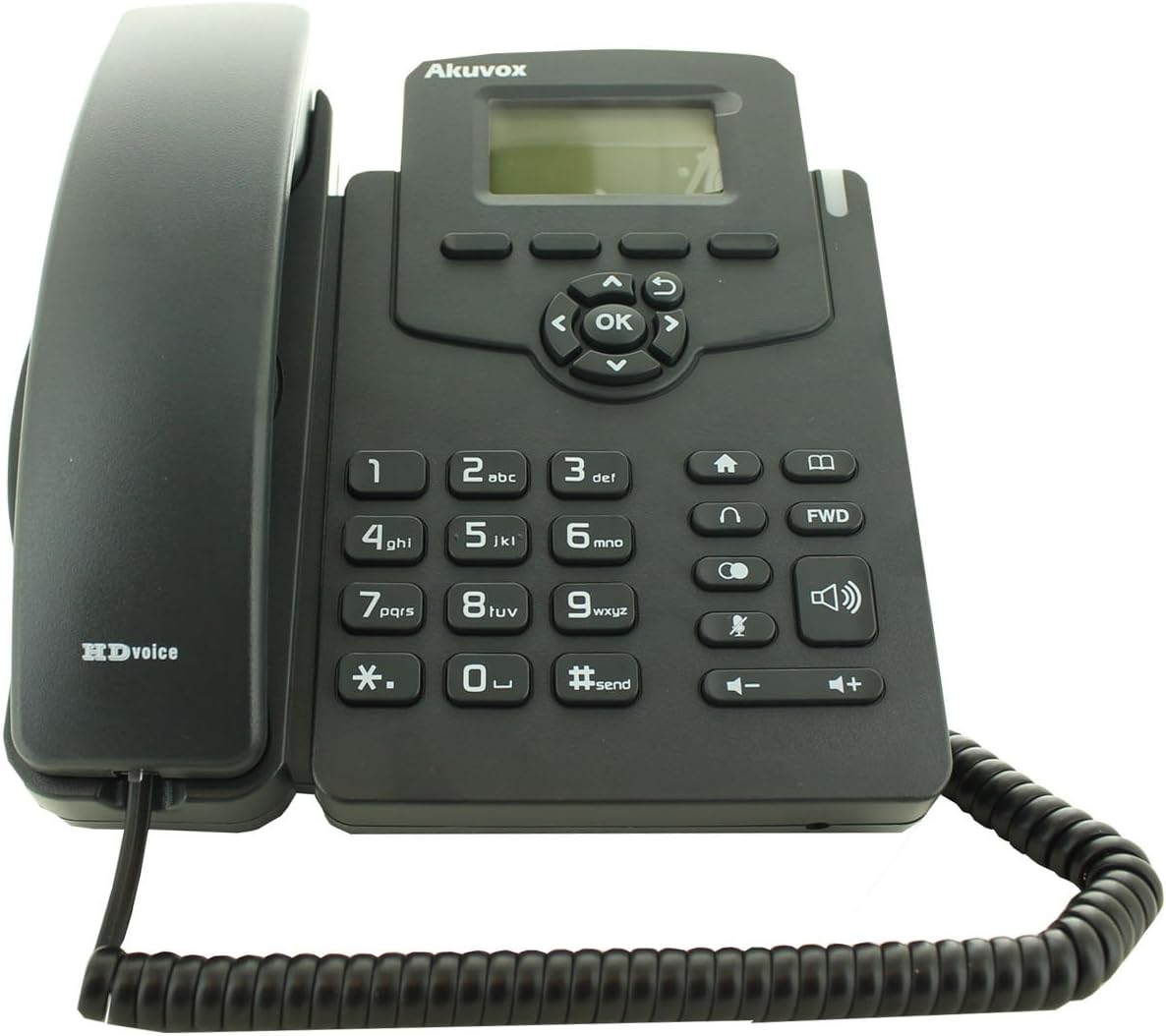
Figure 2.1: Akuvox SP-R50P IP Phone components. The image displays the main phone unit, the handset resting on its cradle, and the coiled handset cable. The phone features a display screen, navigation keys, a numeric keypad, and function buttons.
3. Configurare
Follow these steps to set up your Akuvox SP-R50P IP Phone for first-time use.
- Atașați suportul telefonului: Align the tabs on the phone stand with the slots on the back of the phone base unit. Slide the stand into place until it clicks securely.
- Conectați receptorul: Plug one end of the coiled handset cable into the handset jack on the side of the phone base unit and the other end into the handset.
- Connect to Network and Power:
- Utilizarea PoE (Alimentare prin Ethernet): If your network switch supports PoE, connect an Ethernet cable from the LAN port on the back of the phone to a PoE-enabled port on your network switch. The phone will power on automatically.
- Using a Power Adapter (Optional, not included): If PoE is not available, connect a compatible 5V DC power adapter (not included) to the power jack on the back of the phone, then plug the adapter into a power outlet. Connect an Ethernet cable from the LAN port on the back of the phone to your network router or switch.
- Pornire inițială: The phone will power on and begin its boot-up sequence. The LCD screen will display the Akuvox logo and then proceed to load the operating system. This may take a few moments.
- Configurarea Rețelei: Once booted, the phone will attempt to obtain an IP address via DHCP. If your network requires static IP configuration or specific SIP server settings, these can be configured via the phone's web interface or directly on the phone's menu (refer to Section 4.2 for menu navigation).
4. Instrucțiuni de utilizare
This section details the basic and advanced functions of your Akuvox SP-R50P IP Phone.
4.1 Funcții de apel de bază
- Efectuarea unui apel:
- Ridicați receptorul sau apăsați tasta Difuzor buton.
- Formați numărul de telefon dorit folosind tastatura.
- Apăsați tasta #send button or wait a few seconds for the call to connect automatically.
- Răspunsul la un apel: Când sună telefonul, ridicați receptorul sau apăsați butonul Difuzor buton.
- Încheierea unui apel: Închideți receptorul sau apăsați tasta Difuzor butonul din nou.
- Reapelare: Apăsați tasta reapelare button (often represented by a curved arrow or a dedicated key) to redial the last dialed number.
- Mut: În timpul unui apel, apăsați tasta Mut button (microphone icon) to mute your microphone. Press it again to unmute.
- Reglarea volumului: Utilizați Volum +/- buttons during a call to adjust the handset, headset, or speaker volume. When idle, use them to adjust the ringer volume.
4.2 Advanced Call Features
- Apel în așteptare: În timpul unui apel activ, apăsați tasta Ține button (often represented by a pause icon or two vertical lines). The call will be placed on hold. Press the Ține button again or the flashing line key to resume the call.
- Transfer de apel:
- Transfer orb: În timpul unui apel activ, apăsați tasta Transfer soft key or button. Dial the number to transfer to, then press the Transfer tasta soft din nou.
- Transferul la care a participat: În timpul unui apel activ, apăsați tasta Transfer soft key or button. Dial the number to transfer to and wait for the party to answer. Announce the call, then press the Transfer tasta soft din nou pentru a finaliza transferul.
- Conferință tripartită:
- În timpul unui apel activ, apăsați tasta Conf soft key or button. The first call will be placed on hold.
- Dial the number of the third party and wait for them to answer.
- Apăsați tasta Conf soft key again to join all three parties in a conference call.
- Nu deranja (DND): Apăsați tasta DND button (often represented by a crossed-out bell or similar icon) to activate or deactivate Do Not Disturb mode. When active, incoming calls will be redirected or sent to voicemail without ringing your phone.
- Call Forward: Access the phone's menu (usually via a Meniu or Setări soft key) to configure call forwarding options (Always, Busy, No Answer).
- Carte de telefoane: The phone supports a local phonebook of up to 500 groups. Access it via the Agenda telefonică soft key or menu option. You can add, edit, and delete contacts.
- Taste programabile: The 10 programmable keys can be configured for various functions such as speed dial, busy lamp field (BLF), or line keys. Refer to your system administrator or the phone's web interface for configuration details.
Afișaj LCD 4.3 și navigare
The 2.6" graphical LCD displays call information, menu options, and status indicators. Use the navigation cluster (Up, Down, Left, Right arrows, and OK button) to navigate through menus and select options. The soft keys below the display change their function based on the current context.
5. Întreținere
Proper care and maintenance will ensure the longevity of your Akuvox SP-R50P IP Phone.
- curatenie: Folosiți o cârpă moale și uscată pentru a curăța suprafața telefonului. Pentru petele persistente, ștergeți ușor.ampen the cloth with water. Do not use harsh chemicals, abrasive cleaners, or solvents, as these can damage the phone's finish and internal components.
- Mediu: Keep the phone away from direct sunlight, excessive heat sources, and moisture. Ensure it is placed on a stable, flat surface to prevent accidental falls.
- Cabluri: Periodically check all connected cables (handset, Ethernet) for any signs of wear or damage. Replace damaged cables immediately.
- Ventilare: Ensure the ventilation slots on the phone are not blocked to prevent overheating.
6. Depanare
If you encounter issues with your Akuvox SP-R50P IP Phone, refer to the following common problems and solutions.
| Problemă | Cauza posibila | Soluţie |
|---|---|---|
| Telefonul nu pornește. | No power supply; PoE not active or faulty; power adapter faulty. |
|
| Fără ton de apel. | Network connection issue; SIP registration failure; handset cable loose. |
|
| Nu pot efectua sau primi apeluri. | SIP registration failure; network firewall blocking VoIP traffic; DND active. |
|
| Calitate audio slabă (ecou, zgomot static). | Congestie la rețea; cablu defect; problemă cu microfonul/difuzorul. |
|
If the problem persists after trying these solutions, please contact your system administrator or Akuvox technical support.
7. Specificații
Detailed technical specifications for the Akuvox SP-R50P IP Phone.
| Caracteristică | Descriere/Valoare |
|---|---|
| Numărul de model | SP-R50P |
| Marca | Akuvox |
| Afişa | 2.6" 132x64 Graphical LCD with backlight |
| Chei | 31 Keys (4 Soft Keys, 10 Programmable keys) |
| Calitatea vocii | Voce HD |
| Conturi SIP | 1 Line (Support 1 SIP account) |
| Porturi Ethernet | 2 RJ45 10/100m Ethernet Jacks |
| Mufă pentru căști | 1 RJ9 Headset Jack |
| Mufă pentru receptor | 1 RJ9 Handset jack |
| PoE | IEEE 802.3af |
| Apel conferință | Local 3-Way Conference |
| Capacitate agenda telefonică | 500 de grupuri |
| Jurnalele de apeluri | 100 de intrări |
| Material | Plastic |
| Culoare | Negru |
| Dimensiuni pachet | 20.8 x 19.8 x 9 cm |
| Greutate | 859.99 g |
| Prima dată disponibilă | 26 iunie 2015 |
8. Garanție și asistență
For warranty information, please refer to the warranty card included with your product or contact your point of purchase. Akuvox provides technical support for its products. For further assistance, please visit the official Akuvox website-ul sau contactați departamentul de servicii pentru clienți.
Se recomandă păstrarea bonului fiscal ca dovadă a achiziției pentru reclamațiile în garanție.
Ask a question about this manual
Ask about setup, troubleshooting, compatibility, parts, safety, or missing instructions. Manuals+ will review the question and use this page’s manual context to help answer it.