
Introducere
Thank you for choosing the Hype Bluetooth Selfie Stick. This extendable wireless monopod is designed to help you capture self-portraits and group photos with ease. This manual provides essential information for the safe and efficient use of your device. Please read it thoroughly before operation and retain it for future reference.
Informații de siguranță
- Nu expuneți dispozitivul la temperaturi extreme, la lumina directă a soarelui sau la umiditate ridicată.
- Țineți aparatul departe de apă și alte lichide.
- Nu încercați să dezasamblați sau să modificați dispozitivul. Aceasta va anula garanția.
- Ensure your smartphone is securely mounted in the holder before extending the stick.
- Avoid using the selfie stick in crowded areas where it might cause injury to others.
- A nu se lăsa la îndemâna copiilor.
Conținutul pachetului
Vă rugăm să verificați conținutul pachetului la deschidere pentru a vă asigura că sunt prezente toate articolele:
- Hype Bluetooth Selfie Stick
- Manual de utilizare (acest document)
- Charging Cable (if applicable, usually Micro USB) - Nota: The product description does not explicitly mention a charging cable, but Bluetooth devices typically require one.
Produs terminatview
Familiarize yourself with the components of your Hype Bluetooth Selfie Stick:
- Suport pentru smartphone: Adjustable grip to secure your mobile device.
- Monopied extensibil: Telescopic arm for varying lengths.
- Mâner: Mâner ergonomic pentru o prindere confortabilă.
- Bluetooth Shutter Button: Integrated button on the handle to trigger your phone's camera.
- Port de încărcare: (If rechargeable) For connecting the charging cable.
- Power Button/LED Indicator: To turn the device on/off and show status.
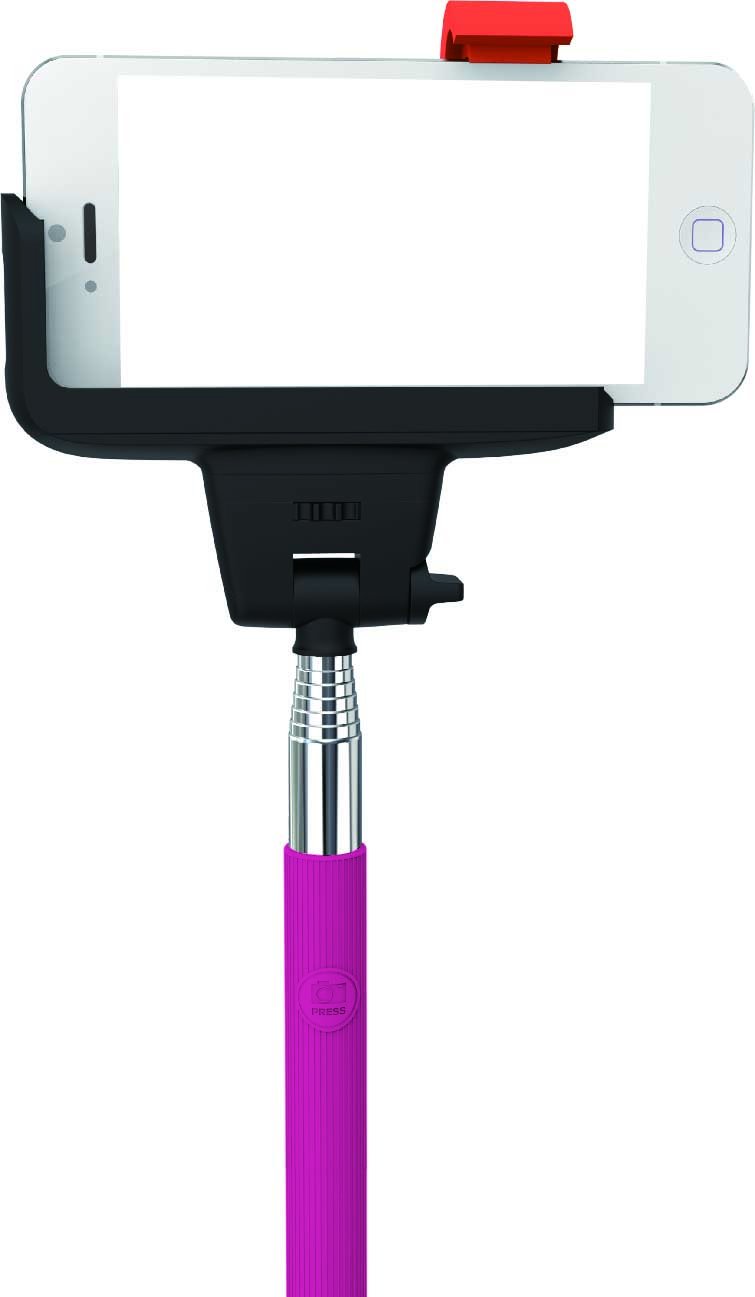
Image: Hype Bluetooth Selfie Stick with a smartphone mounted. The image displays the adjustable phone holder, the telescopic monopod arm, and the handle with the integrated Bluetooth shutter button. The phone is securely held in landscape orientation.
Instrucțiuni de configurare
1. Charging the Selfie Stick (if applicable)
If your selfie stick is rechargeable, connect the provided charging cable to the charging port on the device and to a USB power source (e.g., computer USB port, wall adapter). The LED indicator will typically show red during charging and turn off or change color when fully charged. A full charge usually takes 1-2 hours.
2. Conectarea smartphone-ului
- Gently pull apart the adjustable smartphone holder to expand its grip.
- Carefully insert your smartphone into the holder, ensuring it is centered and securely gripped. The holder is designed to fit devices with 4-5.5 inch screens.
- Verify that the phone is stable and will not slip out when the stick is extended or moved.
3. Asociere Bluetooth
- Pornire: Press and hold the power button on the selfie stick handle for a few seconds until the LED indicator light starts blinking, indicating it's in pairing mode.
- Activați Bluetooth: On your smartphone, go to Settings > Bluetooth and turn Bluetooth ON.
- Caută Dispozitive: Your phone will search for available Bluetooth devices. Look for "Hype Selfie Stick" or a similar name in the list.
- Pereche: Select the selfie stick from the list. The LED indicator on the selfie stick will typically stop blinking and remain solid, confirming a successful connection.
- Deschideți aplicația Cameră: Once paired, open your smartphone's camera application.
Nota: The selfie stick should automatically reconnect to your phone when powered on if it was previously paired and your phone's Bluetooth is active.
Instrucțiuni de operare
1. Extending and Retracting the Monopod
- To extend: Gently pull the telescopic sections of the monopod outwards to your desired length. The stick can extend up to 40 inches (approximately 101 cm).
- To retract: Push the telescopic sections back into the handle until fully collapsed for compact storage.
2. Reglarea unghiului
The smartphone holder features an adjustable head that allows for 180-degree rotation. Loosen the adjustment knob (if present) or gently pivot the holder to achieve the desired shooting angle, then tighten to secure it.
3. Realizarea fotografiilor
- Ensure your smartphone is securely mounted and the selfie stick is paired via Bluetooth.
- Deschideți aplicația pentru camera smartphone-ului.
- Position the selfie stick and your phone to frame your shot.
- Press the Bluetooth shutter button on the selfie stick handle to take a photo.
Sfat: Some phones may require you to set the volume button function to "shutter" in the camera settings for the Bluetooth button to work correctly.
Întreţinere
- curatenie: Wipe the selfie stick with a soft, dry cloth. Do not use abrasive cleaners or solvents.
- Depozitare: Store the selfie stick in a cool, dry place away from direct sunlight and extreme temperatures. Retract the monopod fully before storage.
- Îngrijirea bateriei: If the device has a rechargeable battery, charge it periodically (e.g., every 3 months) even if not in use, to maintain battery health.
Depanare
| Problemă | Soluţie |
|---|---|
| Selfie stick does not power on. | Ensure the device is charged (if rechargeable). Press and hold the power button for a longer duration. |
| Nu se poate conecta la smartphone. |
|
| Shutter button does not take photos. |
|
| Phone is not secure in the holder. | Ensure your phone's screen size is within the supported range (4-5.5 inches). Adjust the holder carefully to grip the phone firmly. Remove any bulky phone cases if they interfere with the grip. |
Specificații
| Numărul de model | HY-SLF-BT-PNK |
| Marca | Hype |
| Conectivitate | Bluetooth |
| Lungime maximă extensibilă | Up to 40 inches (approx. 101 cm) |
| Compatibilitate smartphone | Most Android and iOS smartphones with 4-5.5 inch screens |
| Dimensiuni produs (restrânse) | 30.48 x 11.43 x 2.54 cm (aprox. 12 x 4.5 x 1 inci) |
| Greutatea articolului | 141 g (aprox. 0.31 lbs) |
| Culoare | Roz |
Garanție și suport
For warranty information or technical support, please refer to the retailer where the product was purchased or visit the official Hype webPăstrați dovada achiziției pentru reclamații în garanție.
Disclaimer: Specifications are subject to change without notice. Hype is not responsible for any damage or data loss caused by improper use of this product.