
Introducere
Mulțumesc pentru achizițieasing the STOGA Ubox STV040 Dual Lens Car DVR Camera. This manual provides detailed instructions for the proper installation, operation, and maintenance of your device. Please read this manual thoroughly before using the product to ensure optimal performance and safety.
Conținutul pachetului
Vă rugăm să verificați conținutul pachetului la deschidere. Dacă lipsesc sau sunt deteriorate articolele, contactați distribuitorul.
- 1 x STOGA Ubox STV040 Car DVR Camera
- 1 x încărcător auto
- 1 x Suport auto
- 1 x External GPS Module
- 1 x Manual de utilizare
Produs terminatview
Familiarize yourself with the components and features of your STOGA Ubox STV040 Car DVR Camera.

Figura 1: Faţă view of the DVR camera with the display screen active.

Figura 2: Faţă view detailing the dual wide-angle lenses and surrounding controls.
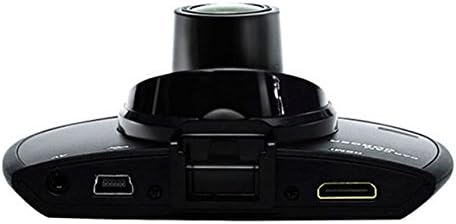
Figura 3: Top view illustrating the connectivity ports (HDMI, USB, AV).
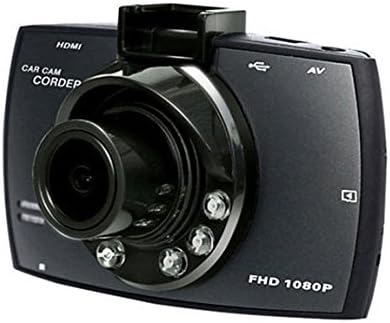
Figura 4: Angled perspective of the DVR camera, showing its compact design.
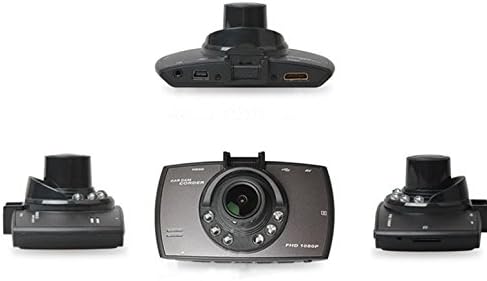
Figura 5: Cuprinzător view of the DVR camera from various angles.
Înființat
1. Instalarea cardului Micro SD
Insert a Micro SD card (Class 6 or higher, 4GB-32GB) into the designated slot on the DVR camera. Ensure the card is inserted correctly until it clicks into place. The device supports continuous loop recording and emergency event recording.
2. Montarea camerei
- Attach the car mount to the windshield in a position that does not obstruct your view.
- Securely attach the DVR camera to the car mount.
- Adjust the camera angle to ensure both lenses capture the desired view (front and interior/side). The dual lenses are 180-degree rotatable.
3. Conexiune la alimentare
Connect the car charger to the DVR camera's power input and plug the other end into your vehicle's 12V power outlet (cigarette lighter socket). The camera will typically power on automatically when the vehicle starts and power off when the vehicle is turned off.
4. GPS Module Connection (Optional)
Connect the external GPS module to the designated GPS port on the DVR camera. This enables GPS logging, recording location data along with video footage.
Instrucțiuni de operare
Pornire/Oprire
- Automat: The camera powers on and starts recording automatically when the car engine starts. It powers off automatically when the engine is turned off.
- Manual: Apăsați și mențineți apăsat butonul de pornire pentru a porni sau opri manual dispozitivul.
Moduri de înregistrare
- Înregistrare în buclă: The camera continuously records video in segments. When the memory card is full, it automatically overwrites the oldest unlocked footage.
- Înregistrare de urgență (senzor G): The built-in G-Sensor detects sudden impacts or collisions. In such an event, the current video segment is automatically locked and protected from being overwritten.
Navigare meniu
Use the control buttons located on the device to navigate through the menu options on the 2.0" TFT LCD screen. Adjust settings such as video resolution, date/time stamp, language (English, Chinese, Japanese, Russian), and G-Sensor sensitivity.
Redare
- Stop recording if currently active.
- Enter playback mode via the menu.
- Selectați videoclipul dorit file for playback on the device screen.
- Alternatively, remove the Micro SD card and insert it into a computer to view files.
Protecție prin parolă
The device supports password protection to prevent unauthorized access to recordings. Refer to the on-screen menu for setting up and managing this feature.
Întreţinere
- curatenie: Folosiți o cârpă moale și uscată pentru a curăța lentilele și ecranul camerei. Evitați substanțele de curățare abrazive sau solvenții.
- Card Micro SD: Format the Micro SD card regularly (e.g., once a month) to ensure optimal performance and prevent data corruption. Back up important files înainte de formatare.
- Temperatură: Evitați expunerea dispozitivului la temperaturi extreme, la lumina directă a soarelui pentru perioade lungi de timp sau la umiditate ridicată.
- Actualizări firmware: Verifică-l pe cel al producătorului webVerificați periodic site-ul pentru actualizări de firmware disponibile, pentru a îmbunătăți performanța și a adăuga funcții.
Depanare
| Problemă | Cauză/Soluție posibilă |
|---|---|
| Camera nu pornește. |
|
| Înregistrarea se oprește pe neașteptate. |
|
| Calitate video slabă. |
|
| GPS-ul nu funcționează. |
|
| Bateria nu menține încărcarea. |
|
Specificații
| Caracteristică | Detaliu |
|---|---|
| Numărul de model | Ubox STV040 |
| Afişa | 2.0" TFT LCD (960 x 240 pixels) |
| Lentile | Dual 140-degree A+ wide-angle, 180-degree rotatable |
| Senzor | CMOS |
| Rezoluție video | 1280 x 480 @ 30 fps, 640 x 480 @ 30 fps |
| Format video | AVI |
| Format imagine | M-JPG |
| Vedere de noapte | Funcția de vizionare prin noapte în infraroșu |
| Depozitare | Micro TF (SD HC) card, 4GB-32GB, Class 6 and above |
| GPS | Supports external GPS module |
| G-Senzor | Integrated, supports emergency event recording lock |
| Microfon/Difuzor | Integrat |
| Ieșire | CVBS (Video Output) |
| Baterie | 3.7V 700mA Lithium-Polymer battery |
| Compatibilitatea sistemelor de operare | Windows 2000/XP/Vista/Windows 7 |
| Limbi acceptate | English, Chinese, Japanese, Russian |
Garanție și suport
For warranty information and technical support, please refer to the documentation provided with your purchase or contact your retailer. Keep your purchase receipt as proof of purchase for warranty claims.
For further assistance, you may also visit the official STOGA website-ul lor (dacă este disponibil) sau contactați departamentul de asistență pentru clienți.