
1. Configurare
1.1 Despachetare și conținut
Scoateți cu grijă televizorul și toate accesoriile din ambalaj. Asigurați-vă că toate componentele sunt prezente:
- Sharp LC-40LE653U 40-Inch Smart LED TV
- Telecomanda
- 2 baterii AA
1.2 Instalarea standului
If placing the TV on a table, attach the included stand. Refer to the diagram below for proper assembly. Ensure all screws are securely fastened.
1.3 Conectarea dispozitivelor externe
Connect your external devices such as cable boxes, Blu-ray players, or gaming consoles to the TV's input ports. The TV features multiple connectivity options.


Available ports include:
- HDMI: 2 ports for high-definition audio and video. One HDMI port supports MHL (Mobile High-Definition Link).
- USB: 1 port for media playback or connecting a USB device.
- Ethernet: Pentru conexiune la rețea prin cablu.
- Component/Video: For older video devices.
- DTV/TV (Antenna): Pentru conectarea unei antene sau a unei alimentări TV prin cablu.
- Ieșire audio: Optical for digital audio, and RCA for analog audio.
1.4 Conexiune la alimentare
After connecting all necessary devices, plug the TV's power cord into a wall outlet.
1.5 Configurare inițială
Upon first power-on, the TV will guide you through an initial setup process. This includes language selection, time zone, and network configuration. For Wi-Fi setup, select your network and enter the password.
2. Instrucțiuni de utilizare
2.1 Funcții de control de la distanță
The remote control allows you to access all TV functions. Insert the two AA batteries into the remote control, ensuring correct polarity.

- Pornire (Buton Roșu): Pornește sau oprește televizorul.
- Intrare: Selectează sursa de intrare (HDMI, TV, USB etc.).
- VOL +/-: Reglează nivelul volumului.
- CH +/-: Schimbă canalele TV.
- Butoane de navigare (Sus/Jos/Stânga/Dreapta/Enter): Folosit pentru navigarea din meniuri și selectarea opțiunilor.
- INTELIGENT: Accesses the Smart Central Apps menu.
- MENIUL: Opens the main TV menu for settings adjustments.
- NETFLIX: Buton de acces direct pentru aplicația Netflix.
2.2 Smart TV Features (Smart Central Apps)
The Sharp LC-40LE653U features Smart Central Apps, providing access to various online services and a web browser. Ensure your TV is connected to the internet via Wi-Fi or Ethernet.

- Accesarea aplicațiilor: Press the 'SMART' button on your remote to open the Smart Central Apps menu.
- Servicii suportate: Includes Hulu Plus, Netflix, Pandora, Vudu, and YouTube.
- Web Browser: Utilizați sistemul încorporat web browser for general internet browsing. Navigation is done via the remote control.
2.3 Wallpaper Mode
When the TV is turned off, Wallpaper Mode can display virtually any image. To use this feature, connect a USB drive containing your desired images to the TV's USB port. Navigate to the Wallpaper Mode settings in the TV menu to select and configure your images.
3. Întreținere
3.1 Curățarea televizorului
Pentru a curăța ecranul, ștergeți-l ușor cu o lavetă moale, uscată și fără scame. Pentru petele persistente, ștergeți ușor.ampen the cloth with water or a specialized screen cleaner. Avoid using harsh chemicals, abrasive cleaners, or direct spraying of liquids onto the screen or cabinet.
Clean the TV cabinet with a soft, dry cloth. Ensure the TV is unplugged before cleaning.
3.2 Actualizări de software
Periodically check for software updates through the TV's settings menu to ensure optimal performance and access to the latest features. Updates can be performed via the internet connection.
4. Depanare
If you encounter issues with your Sharp LC-40LE653U TV, refer to the following common solutions:
- Fără putere: Ensure the power cord is securely plugged into both the TV and a working wall outlet. Check if the power indicator light on the TV is on.
- Fără imagine/sunet: Verify the correct input source is selected using the 'Input' button on the remote. Check all cable connections (HDMI, component, etc.) are secure.
- Calitate slabă a imaginii: Reglați setările de imagine (luminozitate, contrast, claritate) în meniul TV. Asigurați-vă că sursa de intrare furnizează un semnal de înaltă calitate.
- Fără conexiune internet: Check your Wi-Fi router or Ethernet cable connection. Re-enter your Wi-Fi password in the TV's network settings. Restarting your router may resolve connectivity issues.
- Telecomanda nu funcționează: Înlocuiți bateriile din telecomandă. Asigurați-vă că nu există obstacole între telecomandă și senzorul IR al televizorului.
For more detailed troubleshooting steps, consult the full online manual or contact customer support.
5. Specificații
Key technical specifications for the Sharp LC-40LE653U 40-Inch Smart LED TV:
| Caracteristică | Caietul de sarcini |
|---|---|
| Numărul de model | LC-40LE653U |
| Dimensiunea ecranului | 39.5 inci (clasa de 40 inci) |
| Tehnologia de afișare | LCD |
| Rezoluţie | 1080p (Full HD) |
| Rata de reîmprospătare | 60 Hz |
| Raportul de aspect | 16:9 |
| Tehnologia de conectivitate | Wifi |
| Interfață hardware | Ethernet, HDMI, USB |
| Total Number of HDMI Ports | 2 (one with MHL support) |
| Total porturi USB | 1 |
| Intrare audio | HDMI, Optic, USB |
| Putere maximă de ieșire difuzor | 20 wați |
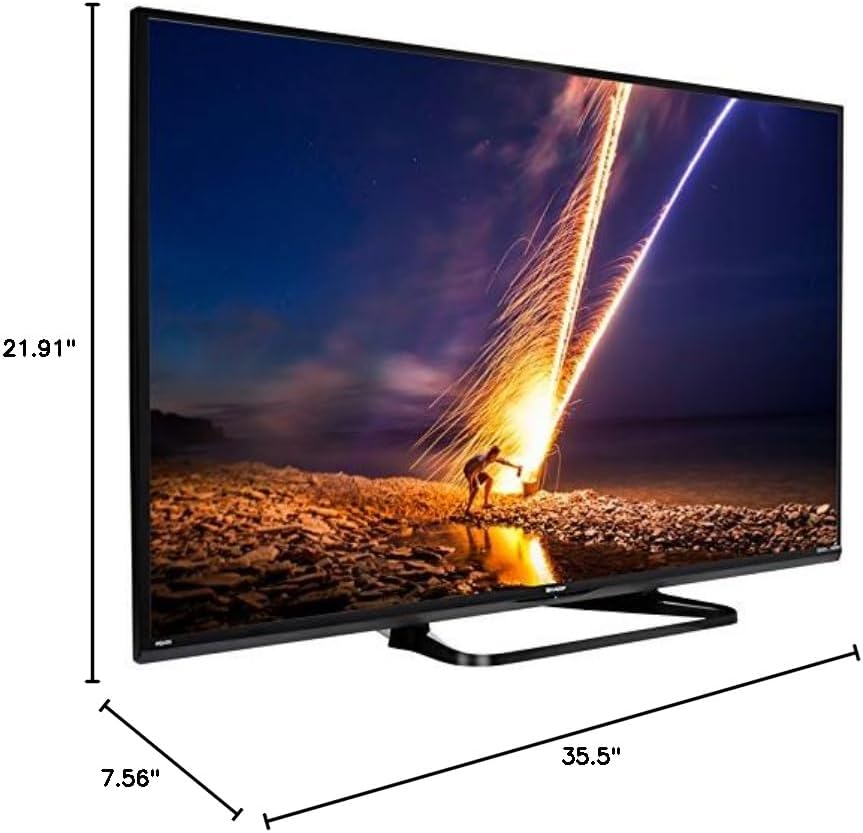
| Dimensiuni produs (D x L x H) | 7.56 cm x 35.5 cm x 21.91 cm |
| Greutatea articolului | 16.3 lire sterline |
| Tip de montare | Suport de masă |
| Servicii de Internet acceptate | Hulu Plus, Netflix, Pandora, Vudu, YouTube |
| Certificat Energy Star | Da |
6. Garanție și asistență
6.1 Garanția produsului
This Sharp LC-40LE653U TV comes with a Garanție limitată de 1 anVă rugăm să păstrați dovada achiziției pentru reclamațiile în garanție. Garanția acoperă defectele de fabricație în condiții normale de utilizare.
6.2 Asistență pentru clienți
For technical assistance, troubleshooting beyond this manual, or warranty service, please contact Sharp customer support. Refer to the official Sharp website-ul sau cardul de înregistrare al produsului pentru cele mai recente informații de contact.