
1. Introducere
This instruction manual provides essential information for the proper installation, operation, and maintenance of your Valcom VC-V-CTLA-2 2x2 Talkback Layin Ceiling Speakers. These speakers are designed for integration into standard 2x2 (24x24 inch) suspended ceiling grid systems, offering both audio output and talkback capabilities. Please read this manual thoroughly before installation and use to ensure optimal performance and safety.
Caracteristici cheie:
- Easy lay-in mounting for quick installation in standard 2x2 ceiling grids.
- Integrated volume settings for audio level control.
- Scuff-resistant perforated grille for durability and aesthetic integration.
- Durable white acrylic baked enamel finish to match common ceiling aesthetics.
- Integral backbox with a three-hour burn rating for enhanced safety and compliance.
- Provides excellent music and voice reproduction.
- Talkback functionality for two-way communication.
2. Informații de siguranță
Respectați întotdeauna următoarele instrucțiuni de siguranță pentru a preveni vătămările corporale sau deteriorarea echipamentului.
- Instalare profesională recomandată: Installation should be performed by qualified personnel familiar with local electrical codes and ceiling grid systems.
- Deconectare de la curent: Ensure all power to the installation area is disconnected before beginning any wiring or installation procedures.
- Cablajul adecvat: Use appropriate gauge wiring and ensure all connections are secure and insulated to prevent short circuits.
- Suport greutate: Verify that the ceiling grid system can adequately support the weight of the speakers.
- Conditii de mediu: Do not expose speakers to excessive moisture, extreme temperatures, or corrosive environments. These speakers are not waterproof.
- Integral Backbox: The integral backbox provides fire resistance; do not modify or remove it.
3. Conținutul pachetului
La deschiderea ambalajului, verificați dacă toate componentele sunt prezente și nedeteriorate.
- Valcom VC-V-CTLA-2 2x2 Talkback Layin Ceiling Speaker (x2)
- Manual de instrucțiuni (acest document)
4. Configurare și instalare
The Valcom VC-V-CTLA-2 speakers are designed for easy installation into standard 2x2 (24x24 inch) suspended ceiling grid systems.
4.1 Montarea difuzorului
- Prepare the Ceiling Grid: Identify the desired location for the speaker. Ensure the existing ceiling tile can be removed to accommodate the speaker.
- Remove Ceiling Tile: Carefully lift and remove the 2x2 ceiling tile from the grid where the speaker will be installed.
- Lay-in Speaker: Position the Valcom VC-V-CTLA-2 speaker into the open 2x2 grid space. The speaker is designed to rest directly on the grid rails, similar to a standard ceiling tile. Ensure it is seated securely and flush with adjacent tiles.
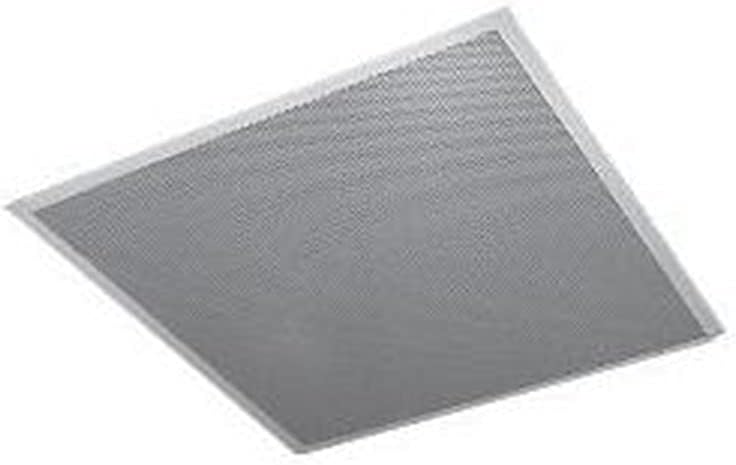
Imaginea 1: Valcom VC-V-CTLA-2 2x2 Talkback Layin Ceiling Speaker. This image shows the speaker's perforated grille and frame, designed to fit into a standard suspended ceiling grid.
4.2 Conexiuni de cablare
The speaker utilizes coaxial connectivity for both audio and talkback functions.
- Cablare de acces: Locate the wiring terminals on the back of the speaker's integral backbox.
- Conectați cablul coaxial: Connect the appropriate coaxial cable from your audio system/amplifier to the speaker's coaxial input. Ensure a secure and proper connection according to your system's wiring diagram.
- Conexiune de alimentare: The speaker requires a 5W power source, typically supplied via the coaxial connection from a compatible Valcom system or amplifier. Verify power requirements with your system's documentation.
- Testare conexiuni: Before fully securing the speaker, perform a preliminary test of the audio and talkback functions to ensure correct wiring.
5. Funcționare
Once installed and connected, the Valcom VC-V-CTLA-2 speakers are ready for operation.
5.1 Redare audio
- Source Activation: Activate the audio source connected to your speaker system.
- Reglarea volumului: The speaker features integrated volume settings. These can typically be adjusted via a control on the speaker itself (often a small rotary knob or switch accessible from the front or side) or through the connected amplifier/system. Adjust to the desired listening level.
5.2 Talkback Functionality
The talkback feature allows for two-way communication through the speaker.
- Initiating Talkback: Refer to your Valcom communication system's manual for specific instructions on how to initiate a talkback session with the speaker. This usually involves pressing a button or selecting the speaker zone on a master station.
- Speaking into the Speaker: When talkback is active, the speaker acts as a microphone. Speak clearly towards the speaker grille for effective communication.
- Ascultare: The speaker will also reproduce audio from the other end of the talkback conversation.
6. Întreținere
Regular maintenance ensures the longevity and optimal performance of your speakers.
- curatenie: Use a soft, dry cloth to gently wipe the speaker grille and frame. For stubborn dirt, a slightly damp cloth with mild soap can be used, ensuring no liquid enters the speaker components. Avoid abrasive cleaners.
- Inspecţie: Periodically inspect the speaker for any signs of damage, loose connections, or obstructions to the grille.
- Fără piese reparabile de utilizator: Do not attempt to open or service the speaker yourself. Refer all servicing to qualified personnel.
7. Depanare
If you encounter issues with your Valcom VC-V-CTLA-2 speakers, consult the following table before contacting support.
| Problemă | Cauza posibila | Soluţie |
|---|---|---|
| Niciun sunet de la difuzor |
|
|
| Sunet distorsionat sau neclar |
|
|
| Talkback function not working |
|
|
8. Specificații
| Model | V-CTLA-2 |
| Marca | Valcom |
| Tip difuzor | In-Ceiling, Talkback |
| Tip de montare | Lay-in Ceiling Mount (designed for 2x2 / 24x24 inch grid) |
| Dimensiunea difuzorului | 8 inchi |
| Putere maximă de ieșire difuzor | 5 wați |
| Tehnologia de conectivitate | Coaxial |
| Metoda de control | Voice (for talkback), Integrated Volume Control |
| Sursa de alimentare | Corded Electric (via coaxial connection) |
| Termina | Durable white acrylic baked enamel |
| Backbox | Integral, with three-hour burn rating |
| Greutatea articolului | Approximately 1 pound (0.45 kg) per speaker |
| Product Dimensions (Approximate) | Designed for 23.75 x 23.75 inch (60.3 x 60.3 cm) ceiling grid opening |
| UPC | 799111017280 |
Notă: Specificațiile pot fi modificate fără notificare prealabilă.
9. Garanție și asistență
Valcom products are manufactured to high-quality standards. For information regarding warranty coverage, technical support, or service, please refer to the warranty card included with your product or visit the official Valcom website-ul.
When contacting support, please have your model number (V-CTLA-2) and purchase information readily available.