
1. Introducere
This manual provides comprehensive instructions for the installation, operation, and maintenance of your 1byone OUSQH-0535 Easy Chime Wireless Doorbell Kit. This kit includes two plug-in receivers and one push button, designed to provide a reliable and convenient notification system for your home or office. Please read this manual thoroughly before use to ensure proper functionality and safety.
2. Conținutul pachetului
Verificați dacă toate articolele sunt prezente în colet:
- 2 x 1byone Plug-in Receivers
- 1 x 1byone Wireless Push Button
- 1 x AAA Battery (pre-installed in push button)
- Mounting Hardware (screws and adhesive tape)

Figure 2.1: Complete 1byone Wireless Doorbell Kit
3. Caracteristicile produsului
- Rază wireless extinsă: Operates up to 100 meters (300 feet) in open areas, ensuring reliable signal transmission throughout most homes.
- Multiple Chime Tones: Offers 36 selectable CD-quality melodies.
- Volum reglabil: Three volume levels ranging from 25dB to 85dB.
- Alertă vizuală: Integrated LED flash provides a visual notification, beneficial for the hearing impaired or noisy environments.
- Buton rezistent la intemperii: IP44 rated for outdoor use, protecting against dust and splashing water.
- Sistem extensibil: Supports adding additional 1byone chimes or push buttons.
- Instalare ușoară: Simple plug-and-play setup for receivers and flexible mounting options for the push button.

Figure 3.1: Wireless Range Illustration
4. Identificarea componentelor
4.1. Plug-in Receiver
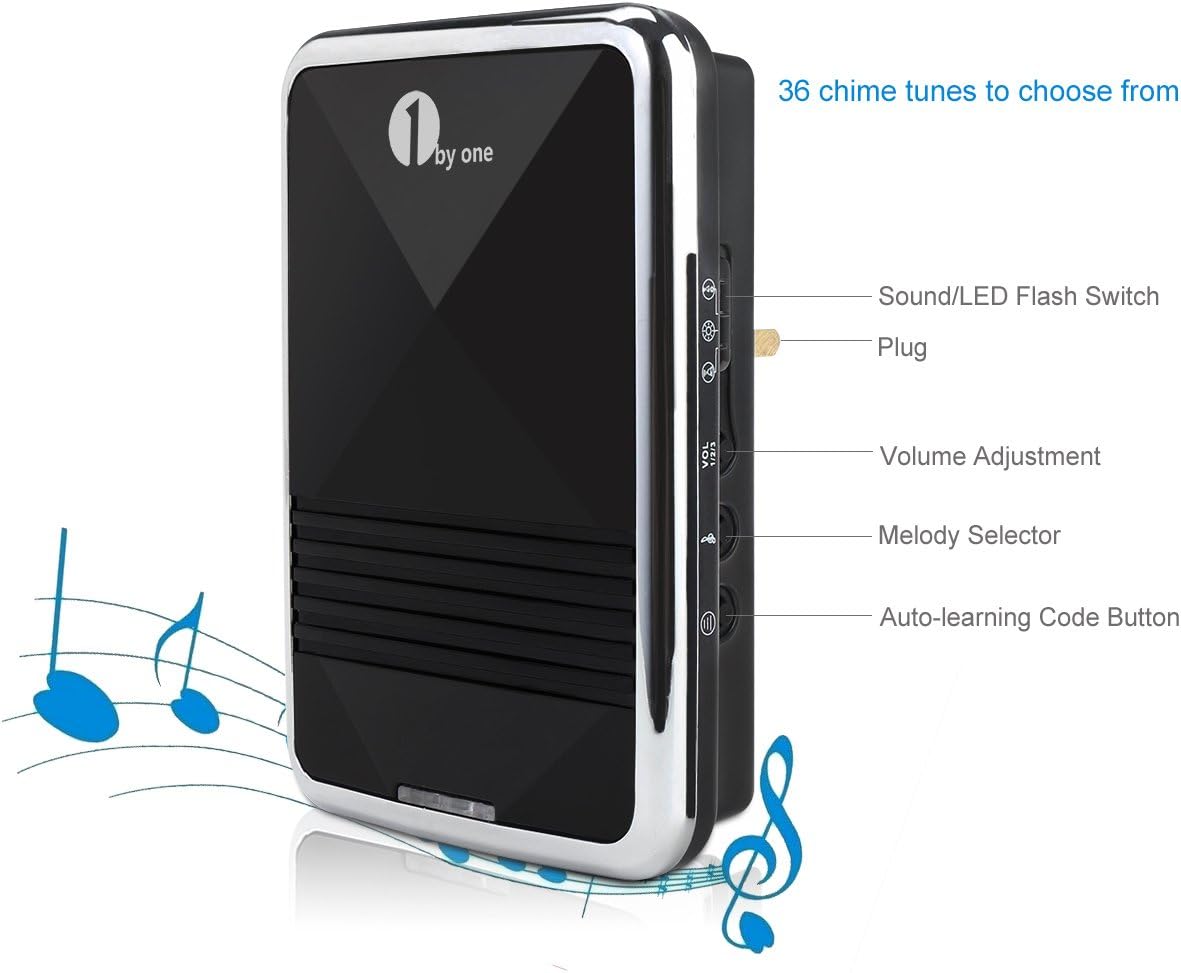
Figure 4.1: Receiver Controls and Features
- Sound/LED Flash Switch: Toggles between sound only, LED flash only, or sound and LED flash modes.
- priză: For connecting to a standard electrical outlet.
- Reglarea volumului: Cycles through three volume levels (low, medium, high).
- Melody Selector: Cycles through the 36 available chime melodies.
- Auto-learning Code Button: Used for pairing the receiver with a push button.
4.2. Wireless Push Button
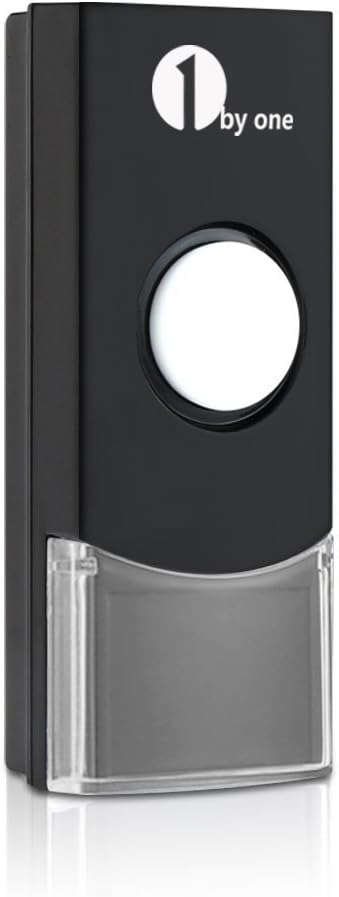
Figure 4.2: Wireless Push Button
- Apasa butonul: Activates the doorbell chime.
- Indicator LED: Illuminates when the button is pressed, confirming signal transmission.
- Compartiment baterie: Located on the back, houses the AAA battery.
5. Configurare
5.1. Installing the Push Button
- Instalare baterie: The push button comes with a pre-installed AAA battery. If replacement is needed, carefully open the back cover to access the battery compartment. Ensure correct polarity.
- Locație de montare: Choose a flat, vertical surface near your door. Ensure the location is easily accessible to visitors and within the wireless range of your receivers.
- Opțiuni de montare:
- Bandă adezivă: Peel off the protective film from the included double-sided adhesive tape and firmly press the push button onto the desired surface for at least 30 seconds.
- Șuruburi: Use the provided screws and wall anchors to securely fasten the push button to the wall. It is recommended to apply a small amount of silicone sealant around the screw holes on the back of the button to enhance weather resistance.
5.2. Installing the Receivers
- Select a standard electrical outlet in a central location within your home or in areas where you wish to hear the chime.
- Plug the receiver directly into the electrical outlet. The receiver will power on.
- Repeat for the second receiver in another desired location.
5.3. Pairing the Push Button with Receivers (Auto-Learning)
The push button and receivers are typically pre-paired at the factory. If they do not work out of the box, or if you wish to add additional push buttons/receivers, follow these steps:
- Plug the receiver into an electrical outlet.
- Țineți apăsat butonul Butonul de cod de învățare automată on the receiver for approximately 5 seconds until the receiver emits a 'ding' sound and its LED indicator flashes. This indicates it is in pairing mode.
- Immediately press the wireless push button. The receiver will chime, confirming successful pairing.
- Test the pairing by pressing the push button. The receiver should chime.
- Repeat this process for any additional receivers you wish to pair with the same push button.
6. Funcționare
6.1. Schimbarea melodiilor
Pentru a selecta o melodie diferită:
- Apăsați tasta Selector de melodie button on the side of the receiver. Each press will cycle to the next available melody.
- Stop pressing when you hear your desired melody. The selected melody will be saved.
6.2. Reglarea volumului
To change the volume level:
- Apăsați tasta Reglarea volumului button on the side of the receiver. Each press will cycle through the three available volume levels (low, medium, high).
- Selectați nivelul volumului care se potrivește cel mai bine mediului dumneavoastră.
6.3. Sound and LED Flash Modes
To switch between notification modes:
- Utilizați Sound/LED Flash Switch on the side of the receiver.
- Toggle the switch to select sound only, LED flash only, or both sound and LED flash.
7. Întreținere
7.1. Push Button Battery Replacement
When the push button's LED indicator no longer illuminates or the signal becomes unreliable, it's time to replace the battery.
- Carefully open the back cover of the push button. Note that the cover may be tight to ensure weather resistance.
- Scoateți bateria veche AAA.
- Insert a new AAA battery, ensuring correct positive (+) and negative (-) polarity.
- Închideți bine capacul din spate.
- Test the push button with the receivers to confirm functionality.
7.2. Curatenie
To clean the doorbell components, use a soft, dry cloth. Do not use abrasive cleaners, solvents, or immerse any part in water.
8. Depanare
| Problemă | Cauza posibila | Soluţie |
|---|---|---|
| Receptorul nu sună. | Receptorul nu este pornit. Push button battery low/dead. Nu sunt asociate. În afara razei de acțiune. | Asigurați-vă că receptorul este conectat la o priză activă. Replace push button battery. Re-pair the push button and receiver (Section 5.3). Move receiver closer to push button. |
| Soneria sună aleatoriu. | Interferențe de la alte dispozitive wireless. Factorii de mediu. | Re-pair the push button and receiver to reset the code (Section 5.3). Ensure no other strong radio frequency devices are directly adjacent to the doorbell components. |
| Receiver loses pairing after power cut. | Temporary power interruption. | Re-pair the push button and receiver (Section 5.3). |
| Push button difficult to open for battery replacement. | Tight seal for weather protection. | Use a small, flat tool to gently pry open the cover. Exercise caution to avoid damage. |
| Sound quality not as expected. | Subjective perception. Speaker limitations. | While the system offers 36 melodies, sound quality can vary. Ensure volume is set appropriately. |
9. Specificații
| Caracteristică | Detaliu |
|---|---|
| Numele modelului | OUSQH-0535 |
| Marca | 1byone |
| Culoare | Negru |
| Material | Metal (components may include plastic) |
| wireless Range | Până la 100 metri (300 picioare) |
| Melodii | 36 selectabile |
| Niveluri de volum | 3 (25dB până la 85dB) |
| Evaluarea butonului | IP44 (rezistent la intemperii) |
| Baterie cu buton | 1 x AAA (incluse) |
| Puterea receptorului | AC Plug-in (Voltage: 12V, Power Consumption: <5W) |
| Greutatea articolului | Aproximativ 7.8 uncii (0.49 livre) |
| Dimensiunile produsului | Receivers: 4.72 x 3.15 x 4.72 inches Push Button: 3.42 x 1.38 inches (approx.) |
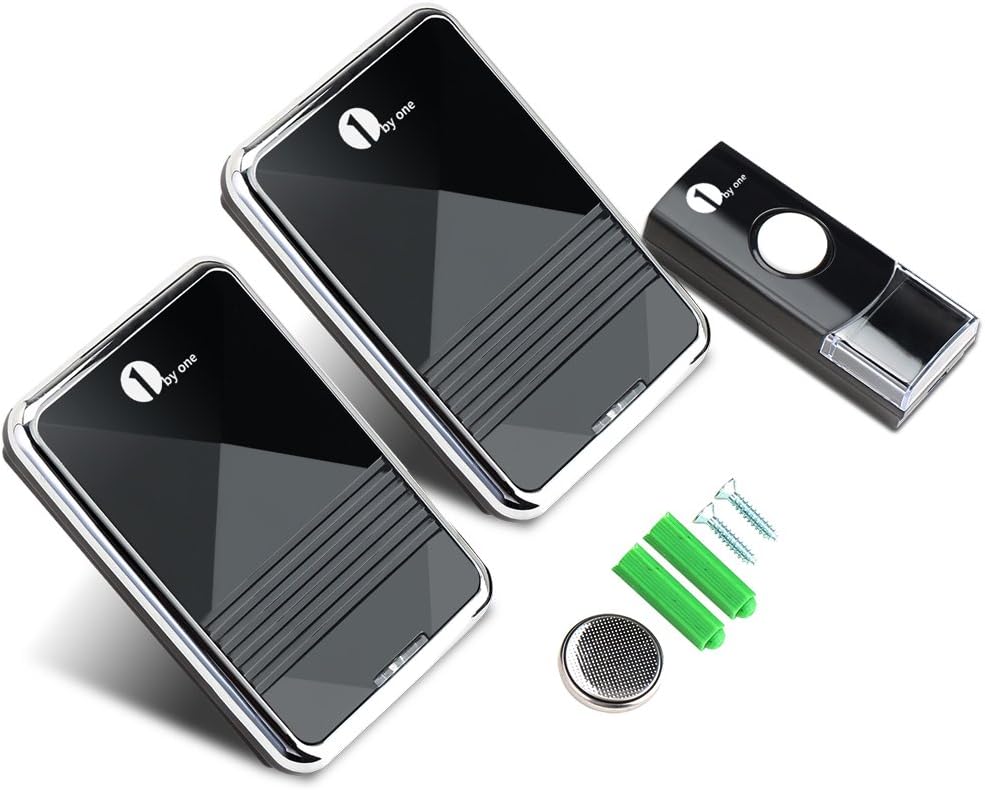
Figura 9.1: Dimensiunile produsului
10. Informații de siguranță
- Do not expose the push button to extreme temperatures or direct sunlight for prolonged periods.
- Ensure receivers are plugged into easily accessible outlets for quick disconnection if needed.
- Do not attempt to disassemble or repair the product yourself. Refer all servicing to qualified personnel.
- A nu se lăsa la îndemâna copiilor. Aruncați bateriile uzate conform reglementărilor locale.
- Avoid placing receivers near strong electromagnetic fields, which may interfere with operation.
11. Garanție și asistență
For warranty information or technical support, please contact 1byone customer service through their official website or the retailer where the product was purchased. Please have your model number (OUSQH-0535) and purchase details ready.