
Introducere
This manual provides instructions for the Goldmaster RCU 881 Universal Remote Control. This device is designed to control various television sets using infrared technology, offering a convenient replacement or alternative to multiple original remote controls.
Informații de siguranță
- Nu lăsați bateriile la îndemâna copiilor.
- Nu amestecați baterii vechi cu noi sau diferite tipuri de baterii.
- Nu expuneți telecomanda la temperaturi extreme, la lumina directă a soarelui sau la umiditate.
- Aruncați bateriile uzate conform reglementărilor locale de mediu.
- Avoid disassembling the remote control; this may void any warranty.
Conținutul pachetului
- 1 x Goldmaster RCU 881 Universal Remote Control
- Note: Batteries are not included and must be purchased separately (2x AAA batteries required).
Produs terminatview
The Goldmaster RCU 881 is a universal infrared remote control featuring a sleek silver design and a comprehensive button layout for intuitive control of compatible devices, primarily televisions.
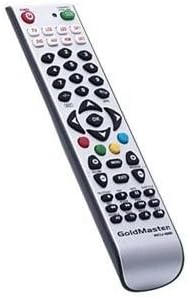
Imagine: față view of the Goldmaster RCU 881 Universal Remote Control, showing its silver finish and button layout.

Image: The official Goldmaster brand logo.
Înființat
1. Instalarea bateriei
- Localizați capacul compartimentului bateriei de pe spatele telecomenzii.
- Slide the cover off in the direction indicated by an arrow (if present).
- Insert two AAA batteries, ensuring correct polarity (+ and - symbols match the markings inside the compartment).
- Puneți la loc capacul compartimentului bateriei până când se fixează în siguranță cu un clic.
2. Programarea telecomenzii
The Goldmaster RCU 881 is a universal remote. Programming typically involves entering a code specific to your TV brand or using an automatic search function. Refer to the included code list (if available with your purchase) or follow these general steps:
- Porniți dispozitivul pe care doriți să îl controlați (de exemplu, televizorul).
- Țineți apăsat butonul SET button (or a similar button, if present) on the remote until the indicator light turns on and remains lit.
- Enter the 3 or 4-digit code for your TV brand using the number buttons. If the indicator light turns off, the code has been accepted.
- Testați telecomanda apăsând butonul PUTERE button or other function buttons. If the device responds, the programming is successful.
- If the code does not work, or if the indicator light flashes and turns off without controlling the device, repeat steps 2-4, trying other codes listed for your brand.
- If no code works, or if a code list is not provided, use the automatic search function:
- Țineți apăsat butonul SET butonul până când indicatorul luminos se aprinde.
- Apăsați tasta PUTERE button once. The indicator light will begin to flash slowly.
- Point the remote at your TV and repeatedly press the PUTERE butonul (sau CH+ button) slowly, allowing a few seconds between presses, until the TV turns off.
- Once the TV turns off, immediately press the SET Apăsați butonul pentru a salva codul. Indicatorul luminos se va stinge.
- Test the remote. If it controls your TV, programming is complete. If not, repeat the automatic search process.
Note: Specific programming steps and available codes may vary. Consult the original packaging or manufacturer's website for a comprehensive code list or detailed instructions for your specific device model.
Instrucțiuni de operare
Once programmed, the Goldmaster RCU 881 functions like your original remote control for the assigned device. Below are common button functions:
- Buton de alimentare: Pornește sau oprește dispozitivul.
- Butoane de canal (CH+/CH-): Schimbă canalele în sus sau în jos.
- Butoane de volum (VOL+/VOL-): Reglează volumul sunetului.
- Buton mut: Dezactivează sau activează sunetul.
- Butoane numerice (0-9): Folosit pentru intrare directă a canalului.
- Menu/Settings Buttons: Accesses device menus and settings.
- Butoane de navigare (Sus/Jos/Stânga/Dreapta/OK): Navighează prin meniuri și confirmă selecțiile.
- Buton Intrare/Sursă: Changes the input source (e.g., HDMI 1, AV, Component).
Button layout and specific functionality may vary based on the programmed device and the universal code used.
Întreţinere
- Clean the remote control with a soft, dry cloth. Do not use liquid cleaners, abrasive materials, or chemical solvents.
- If the remote control will not be used for an extended period (e.g., one month or more), remove the batteries to prevent potential leakage and damage.
- Avoid dropping the remote control or exposing it to strong impacts, which can damage internal components.
- Depozitați telecomanda într-un loc răcoros și uscat, ferit de lumina directă a soarelui.
Depanare
Telecomanda nu funcționează după programare:
- Ensure batteries are inserted correctly with the correct polarity and are not depleted. Replace if necessary.
- Re-attempt the programming process, trying different codes for your device brand.
- Asigurați-vă că nu există obstacole între telecomandă și receptorul infraroșu al dispozitivului.
- The remote control may not be compatible with all functions of your specific device model.
Unele butoane nu funcționează:
- This can occur if the programmed code does not fully support all functions of your device. Try a different code.
- Ensure the buttons are clean and free from debris.
Indicator light not turning on:
- Check battery installation and ensure batteries have sufficient charge. Replace batteries if needed.
Specificații
| Caracteristică | Detaliu |
|---|---|
| Marca | GoldMaster |
| Model | RCU-881 |
| Tehnologia de conectivitate | Infraroşu |
| Dispozitive compatibile | Televiziune |
| Culoare | Argint |
| Metoda de intrare | Buton |
| Baterii incluse | Nu |
| Anul modelului | 2014 |
| ASIN | B00PUIXRRA |
Garanție și suport
Specific warranty information for the Goldmaster RCU 881 Universal Remote Control is not provided in the product details. For warranty claims, technical support, or further assistance, please contact GoldMaster customer service directly or refer to the documentation included with your original purchase.
You can often find up-to-date support information and contact details on the official GoldMaster website-ul.