
1. Introducere
This manual provides detailed instructions for the installation, operation, and maintenance of your D-Link DCS-8350LH 2K QHD Indoor Wi-Fi Camera. Please read this manual thoroughly before using the product to ensure proper setup and functionality.
The D-Link DCS-8350LH is designed to provide precise and detailed surveillance for your home or small office. It features 2K QHD resolution, color night vision, AI-based detection, and two-way audio for comprehensive monitoring.
2. Informații de siguranță
- Asigurați-vă că camera este instalată într-un loc stabil pentru a preveni căderea acesteia.
- Folosiți doar adaptorul de alimentare furnizat împreună cu camera.
- Do not expose the camera to water or moisture. This product is for indoor use only.
- Evitați amplasarea camerei în apropierea surselor de căldură sau în lumina directă a soarelui.
- Do not attempt to open or repair the camera yourself. Refer all servicing to qualified personnel.
- Nu lăsați camera și accesoriile acesteia la îndemâna copiilor.
3. Produs terminatview
Familiarize yourself with the components of your D-Link DCS-8350LH camera.
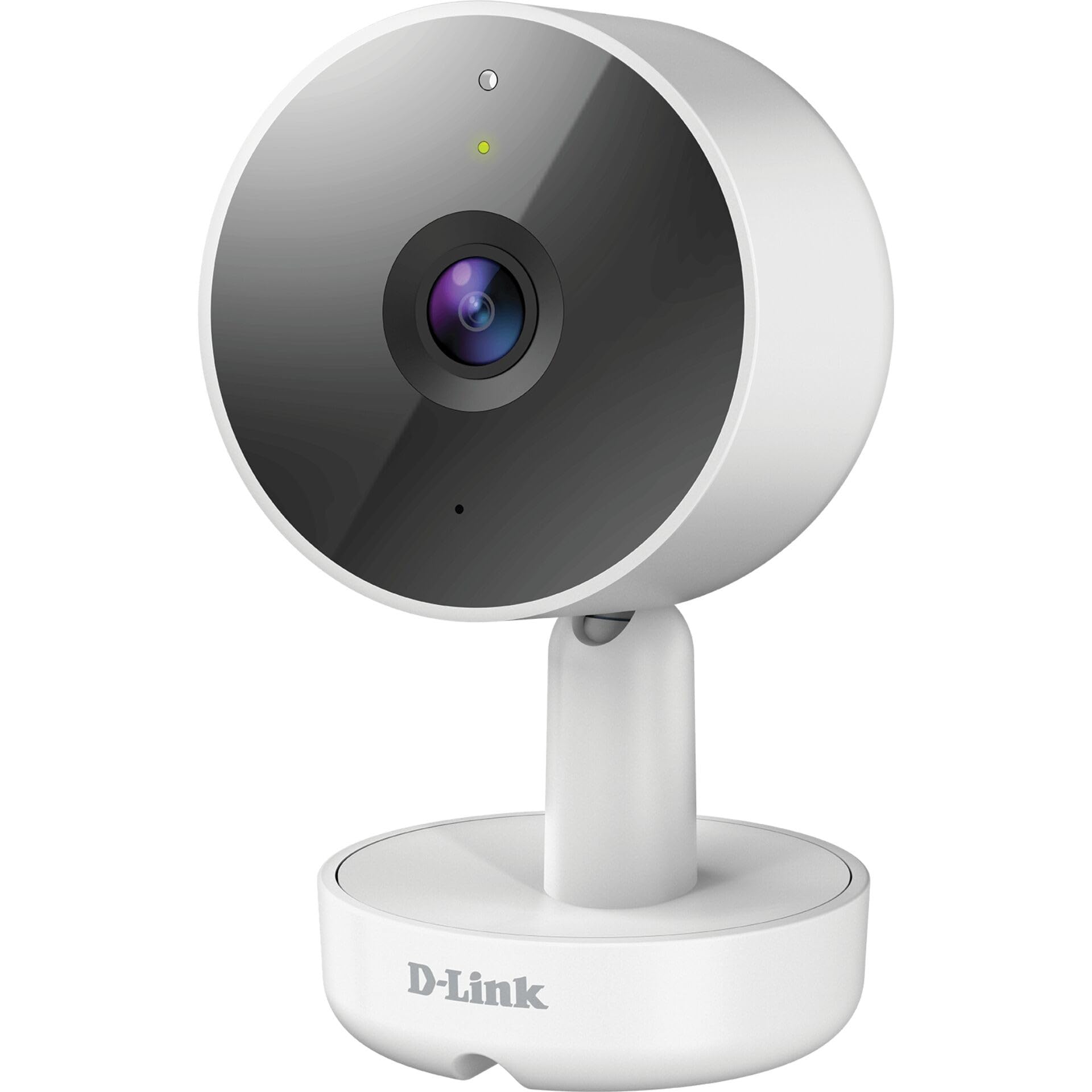
Figura 3.1: Faţă View a Camerei
- 1. Lentila: Captează video.
- 2. LED de stare: Indică starea camerei (de exemplu, alimentare, conexiune).
- 3. Microfon: Capturează sunet pentru comunicare bidirecțională.
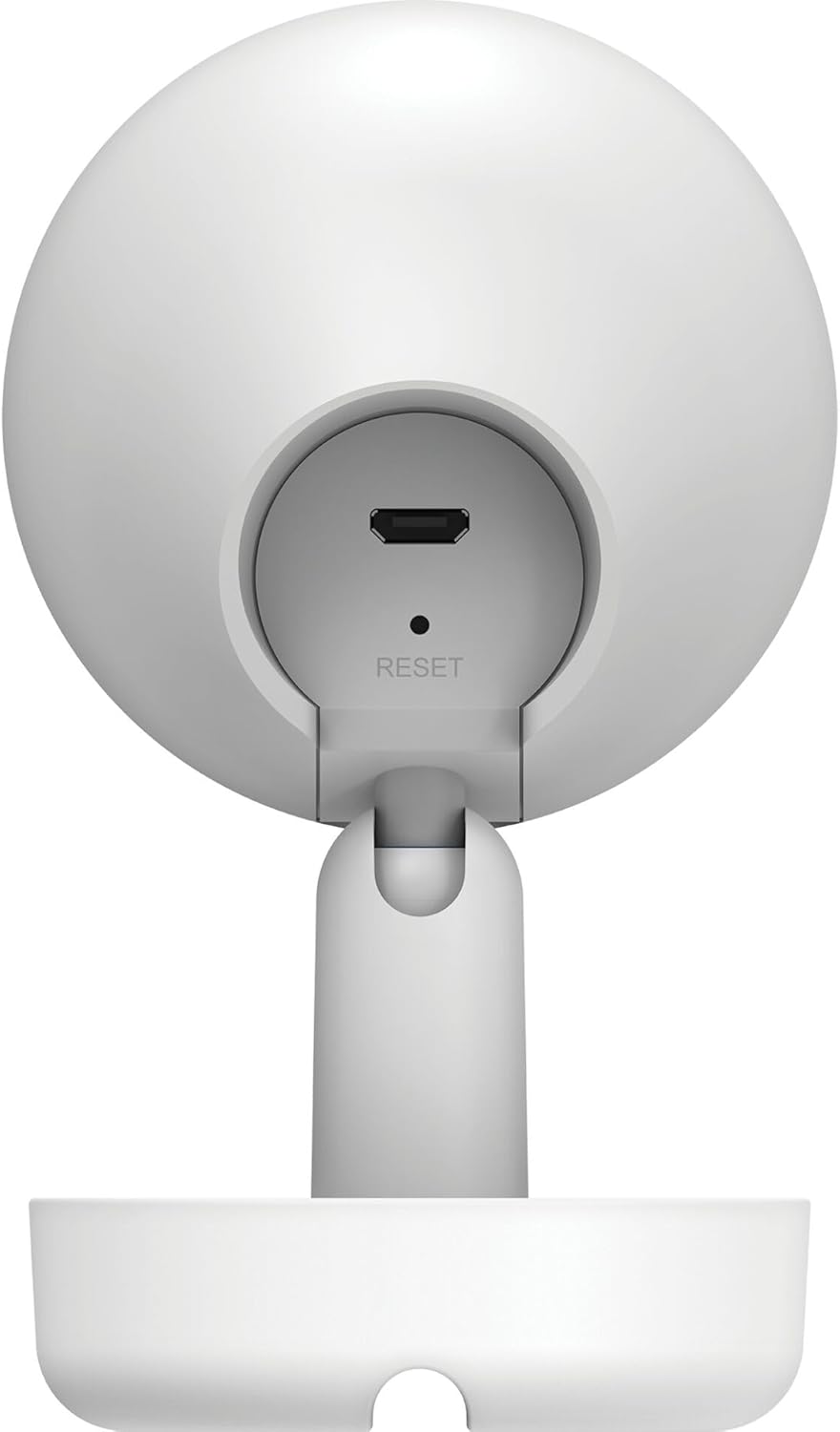
Figura 3.2: Spate View a Camerei
- 1. Micro USB Power Port: Se conectează la adaptorul de alimentare.
- 2. Buton Resetare: Folosit pentru a restaura setările implicite din fabrică.
- 3. Difuzor: Emite audio pentru comunicare bidirecțională.
- 4. Slot pentru card MicroSD: For local video storage (located on the side or bottom, not visible in this specific image, but mentioned in features).
4. Configurare
Follow these steps to set up your D-Link DCS-8350LH camera:
- Descărcați aplicația mydlink: Caută "mydlink" on the App Store (iOS) or Google Play (Android) and download the official mydlink app.
- Create a mydlink Account: Open the app and follow the on-screen instructions to create a new mydlink account or log in if you already have one.
- Porniți camera: Connect the provided power adapter to the camera's Micro USB port and plug it into a power outlet. The status LED will begin to blink.
- Adăugați dispozitiv: In the mydlink app, tap the menu icon (usually three lines) and select "Add a Device". Scan the QR code located on the camera or its packaging.
- Conectați-vă la Wi-Fi: Follow the app's instructions to connect your camera to your home Wi-Fi network. Ensure your mobile device is connected to the same Wi-Fi network during setup.
- Plasare: Position your camera in the desired indoor location.

Figura 4.1: Camera and mydlink App Integration
5. Instalare
The D-Link DCS-8350LH camera supports wall mounting for optimal placement.
- Alegeți o locație: Alegeți o locație interioară cu lumină naturală view din zona pe care doriți să o monitorizați și în raza de acțiune a rețelei Wi-Fi.
- Suprafata de montare: Asigurați-vă că peretele sau suprafața este suficient de rezistentă pentru a susține camera.
- Asigurați baza: Use appropriate screws and anchors (not included) to secure the camera's base to the chosen surface.
- Reglarea unghiului: Once mounted, adjust the camera's angle to cover the desired viewing area. The camera has a 108-degree viewunghiul de ing.
6. Instrucțiuni de utilizare
Once set up, you can access and control your camera using the mydlink app.
6.1. în direct View
Open the mydlink app and select your DCS-8350LH camera from the device list to view the live feed. The camera provides 2K QHD (1440p) resolution for clear images.
6.2. Viziune nocturnă color
The camera automatically switches to color night vision in low-light conditions, allowing you to see detailed color video even when it's dark.
6.3. AI-based Event Detection
The camera features intelligent detection capabilities:
- Detectarea persoanei: Identifies human presence, reducing false alarms from pets or moving objects.
- Detectarea sunetului: Alerts you to specific sounds, including carbon monoxide and smoke alarm sounds.
Configure detection zones and sensitivity settings within the mydlink app to customize alerts.
6.4. Sunet bidirecțional
Use the built-in microphone and speaker to communicate with people or pets near the camera. Tap the microphone icon in the live view within the mydlink app to speak.
6.5. Înregistrare și stocare video
The DCS-8350LH offers multiple recording options:
- Card MicroSD: Insert a microSD card (not included) into the camera's slot for local storage of recorded video clips.
- mydlink Cloud Recording: Utilize the mydlink Cloud service for secure off-site storage. Free and paid subscription plans are available.
- Smartphone Recording: Capture snapshots and video clips directly to your smartphone via the mydlink app.
7. Întreținere
7.1. Curatenie
To clean the camera, gently wipe the lens and exterior surfaces with a soft, dry cloth. Do not use liquid cleaners or abrasive materials.
7.2. Actualizări de firmware
Regularly check for firmware updates through the mydlink app. Keeping your camera's firmware up-to-date ensures optimal performance, security, and access to new features.
8. Depanare
If you encounter issues with your D-Link DCS-8350LH camera, refer to the following common solutions:
- Camera Offline / Wi-Fi Disconnection:
- Asigurați-vă că aparatul foto se află în raza de acțiune a routerului Wi-Fi.
- Check your Wi-Fi network status.
- Reporniți camera deconectând și reconectând adaptorul de alimentare.
- If the issue persists, try resetting the camera to factory defaults (see below) and re-adding it to the mydlink app.
- Calitate video slabă:
- Asigurați-vă că obiectivul camerei este curat.
- Check your internet connection speed. A stable and fast connection is required for 2K QHD streaming.
- Ajustați poziția camerei pentru a evita strălucirea sau obstrucțiile.
- Resetarea camerei:
To restore the camera to its factory default settings, use a paperclip or a thin object to press and hold the recessed Resetați button (refer to Figure 3.2) for approximately 10 seconds while the camera is powered on. The status LED will change, indicating a reset. You will then need to reconfigure the camera through the mydlink app.
9. Specificații
| Caracteristică | Detaliu |
|---|---|
| Numele modelului | DCS-8350LH |
| Rezoluție de înregistrare video | 1440p (2K QHD) |
| Viewunghiul ing | 108 de grade |
| Protocol de conectivitate | Wifi |
| Tehnologia comunicațiilor fără fir | Bluetooth (for initial setup) |
| Utilizare în interior/exterior | De interior |
| Sursa de alimentare | Cordon electric |
| Consumul de energie | 8 wați |
| Factor de formă | Dom |
| Tip de montare | Montare pe perete |
| Material | Plastic |
| Dimensiuni articol (L x l x H) | 6.67 x 6.57 x 11.14 cm |
| Greutate | 320 de grame |
| Componente incluse | Camera de interior |
| Tip controler | Amazon Alexa |
10. Garanție și asistență
For warranty information, technical support, and further assistance, please visit the official D-Link website or contact D-Link customer service. Keep your purchase receipt as proof of purchase.
You can find the latest support resources, FAQs, and contact details at www.dlink.com.