
1. User Guide & Product Overview
The Valcom VC-V-400 is an omni-directional dynamic desktop microphone designed for clear audio capture in various applications. It features a low impedance design and includes a push-to-talk switch with a locking bar for convenient operation. This manual provides essential information for setting up, operating, and maintaining your Valcom VC-V-400 microphone.
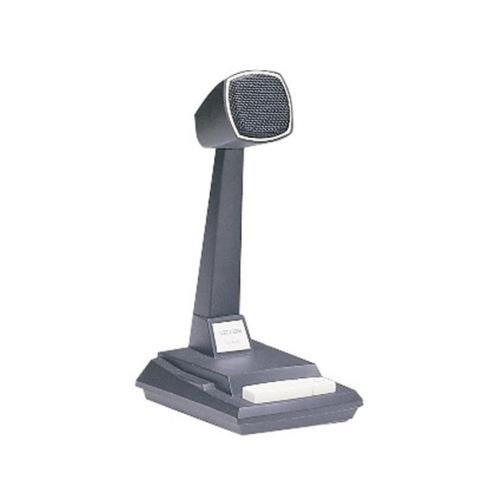
Figure 1: Valcom VC-V-400 Dynamic Desktop Microphone. An image showing the Valcom VC-V-400 Dynamic Desktop Microphone, featuring a dark grey base with a white push-to-talk bar, and a tall stand supporting the microphone head with a metallic grille.
2. Instrucțiuni de configurare
To ensure proper functionality, the Valcom VC-V-400 microphone requires the Valcom V-9939B Microphone Adapter (sold separately) for connection to your system.
2.1 Despachetarea
- Scoateți cu grijă microfonul din ambalaj.
- Verify that all components are present: Valcom VC-V-400 Microphone.
2.2 Conexiune
- Ensure your audio system or device is powered off before making connections.
- Connect the XLR connector of the Valcom VC-V-400 microphone to the appropriate input on the Valcom V-9939B Microphone Adapter.
- Connect the Valcom V-9939B Microphone Adapter to your audio system or PC as per the adapter's instructions.
- Once all connections are secure, you may power on your audio system.
3. Instrucțiuni de utilizare
The Valcom VC-V-400 microphone is designed for ease of use with its integrated push-to-talk functionality.
3.1 Funcționarea funcției Apasă-și-Vorbește (PTT)
- To activate the microphone for speaking, press and hold the white push-to-talk bar located on the base of the microphone.
- Release the bar to mute the microphone.
3.2 Locking Bar Feature
- For continuous microphone activation, push the white push-to-talk bar down and slide the locking bar (if present and functional on your model) to hold it in the depressed position.
- To disengage, slide the locking bar back and allow the push-to-talk bar to return to its original position.
3.3 Amplasarea microfonului
As an omni-directional microphone, the VC-V-400 picks up sound equally from all directions. Position the microphone centrally within the desired speaking area for optimal audio capture.
4. Întreținere
Proper care and maintenance will extend the life of your Valcom VC-V-400 microphone.
- curatenie: Use a soft, dry cloth to wipe the exterior of the microphone. Do not use liquid cleaners or abrasive materials.
- Depozitare: Când nu este utilizat, depozitați microfonul într-un mediu curat și uscat, ferit de temperaturi extreme și umiditate.
- Manipulare: Evitați să scăpați microfonul sau să îl supuneți la impacturi puternice, deoarece acest lucru poate deteriora componentele interne.
5. Depanare
If you encounter issues with your Valcom VC-V-400 microphone, refer to the following common problems and solutions:
| Problemă | Cauza posibila | Soluţie |
|---|---|---|
| Fără ieșire audio |
|
|
| Poor audio quality (e.g., static, low volume) |
|
|
6. Specificații
| Caracteristică | Detaliu |
|---|---|
| Marca | Valcom |
| Numele modelului | VC-V-400 |
| Factor de formă a microfonului | Table Array |
| Model polar | Omnidirecțional |
| Tehnologia de conectivitate | XLR |
| Tip conector | XLR |
| Caracteristica specială | Push-to-talk with locking bar, Lift-to-talk mode |
| Dispozitive compatibile | Personal Computer (requires V-9939B adapter) |
| Culoare | White (microphone base) |
| Componente incluse | Microfon |
| Greutatea articolului | 3.4 livre (aprox. 1.54 kg) |
| Sursa de alimentare | Corded Electric (via adapter) |
| Raportul semnal-zgomot | 60 dB |
| Numărul de canale | 1 |
| Raspuns in frecventa | 15 KHz |
| Producător | VALCOM |
| UPC | 809390045079, 807035655225 |
| Data primului disponibil | 11 iunie 2014 |
7. Informații despre garanție
Specific warranty details for the Valcom VC-V-400 Dynamic Desktop Microphone are not provided in this document. Please refer to the product packaging or contact Valcom directly for comprehensive warranty information.
8. Suport
For technical assistance, product inquiries, or further support regarding your Valcom VC-V-400 microphone, please contact Valcom customer service. Contact information can typically be found on the manufacturer's official webamplasamentul sau ambalajul produsului.