
1. Introducere
This manual provides comprehensive instructions for the Adesso AKB-132UY Luminous Large Print Multimedia Desktop USB Keyboard. This keyboard is designed with large, high-contrast keys to enhance readability, particularly for users with visual impairments. It also integrates multimedia controls for convenience.

Figure 1: Adesso AKB-132UY Luminous Large Print Multimedia Desktop USB Keyboard. This image displays the full keyboard with its black frame and bright yellow keys, featuring large black characters.
2. Conținutul pachetului
Verificați dacă toate articolele sunt prezente în colet:
- Adesso EasyTouch 132 - Florescent Yellow Multimedia Desktop Keyboard
- Ghid de pornire rapidă
3. Instrucțiuni de configurare
3.1 Conectarea tastaturii
- Găsiți un port USB disponibil pe computer.
- Plug the USB connector of the Adesso AKB-132UY keyboard into the USB port.
- Sistemul de operare va detecta și instala automat driverele necesare. De obicei, nu este necesară nicio instalare suplimentară de software.
The keyboard is powered via the USB connection.
4. Utilizarea tastaturii
4.1 Caracteristici cheie
- Fluorescent 4X Large Print Keys: The keyboard features black characters printed in a large 4X size on bright fluorescent yellow keys. This design provides high contrast for improved visibility and readability, particularly beneficial for users with visual impairments.

Figura 2: Prim-plan view of the keyboard's QWERTY section, highlighting the large black characters on fluorescent yellow keys.
- Comenzi multimedia: Dedicated hotkeys allow for one-touch control of media functions. These include:
- Media Player
- Reducerea volumului
- Creșterea volumului
- Mut
- Redare/Pauză
- Piesa anterioară
- Următoarea piesă
- Stop

Figura 3: Prim-plan view of the numeric keypad and dedicated multimedia control keys located on the upper right side of the keyboard.
- Windows One-Touch Controls: Access common Windows applications directly with dedicated hotkeys:
- Computerul meu
- Caută
- Calculator
- Acasă (Browser)
- Favorites (Browser)
- Quiet Membrane Key Switches: The keyboard utilizes membrane key switches designed to provide a responsive and quiet typing experience. These switches are rated for a lifespan of up to five million keystrokes.
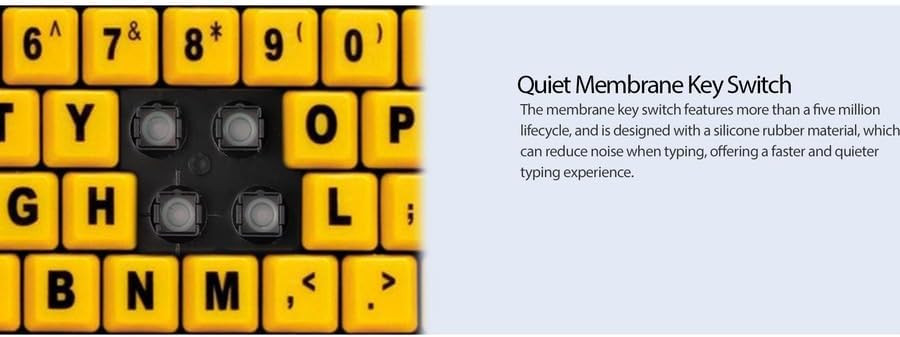
Figura 4: Detaliat view showing the internal membrane key switch mechanism beneath a keycap.
- 104-Key US Layout: The keyboard features a standard 104-key US layout, providing a familiar typing experience.
5. Întreținere
5.1 Curățarea tastaturii
Pentru a menține aspectul și funcționalitatea tastaturii:
- Deconectați tastatura de la computer înainte de curățare.
- Folosiți un moale, ușor damp cloth to wipe the surface of the keys and the keyboard body.
- For stubborn dirt or debris between keys, use compressed air or a soft brush.
- Avoid using harsh chemicals, abrasive cleaners, or excessive moisture, as these can damage the keyboard's finish or internal components.
6. Depanare
If you encounter issues with your Adesso AKB-132UY keyboard, refer to the following troubleshooting steps:
6.1 Tastatura nu răspunde
- Verificați conexiunea USB: Ensure the keyboard's USB cable is securely plugged into a functioning USB port on your computer. Try unplugging and re-plugging the cable.
- Încercați un alt port USB: Connect the keyboard to another USB port on your computer to rule out a faulty port.
- Reporniți computerul: Uneori, o simplă repornire a sistemului poate rezolva problemele de conectivitate.
- Testați pe un alt computer: If possible, test the keyboard on a different computer to determine if the issue is with the keyboard or your computer's setup.
6.2 Keys Sticking or Not Registering
- Clean Under Keys: Dust, crumbs, or debris can get lodged under keys. Use compressed air to clear any obstructions.
- Evitați scurgerile: Liquid spills can cause keys to stick or malfunction. If a spill occurs, disconnect the keyboard immediately and allow it to dry completely before reconnecting.
7. Specificații
| Caracteristică | Descriere |
|---|---|
| Marca | Adesso |
| Numărul de model | AKB-132UY |
| Numele modelului | EasyTouch 132 |
| Tehnologia de conectivitate | USB |
| Descrierea tastaturii | Membrană |
| Caracteristica specială | Large Print Keys |
| Culoare | Negru Galben |
| Material | Plastic |
| Numărul de chei | 104 |
| Aspectul tastaturii | QWERTY (layout SUA) |
| Sursa de alimentare | Alimentare USB |
| Greutatea articolului | 1.5 lire sterline |
| Dispozitive compatibile | PC |
8. Informații despre garanție
The Adesso AKB-132UY keyboard comes with a Garanție limitată de 1 an from the date of purchase. This warranty covers defects in materials and workmanship under normal use. For specific terms and conditions, please refer to the warranty card included in your package or visit the official Adesso website-ul.
9. Suport
For technical support, product registration, or additional information, please visit the official Adesso website la www.adesso.com. You may also find FAQs and driver downloads on their support pages.