
Introducere
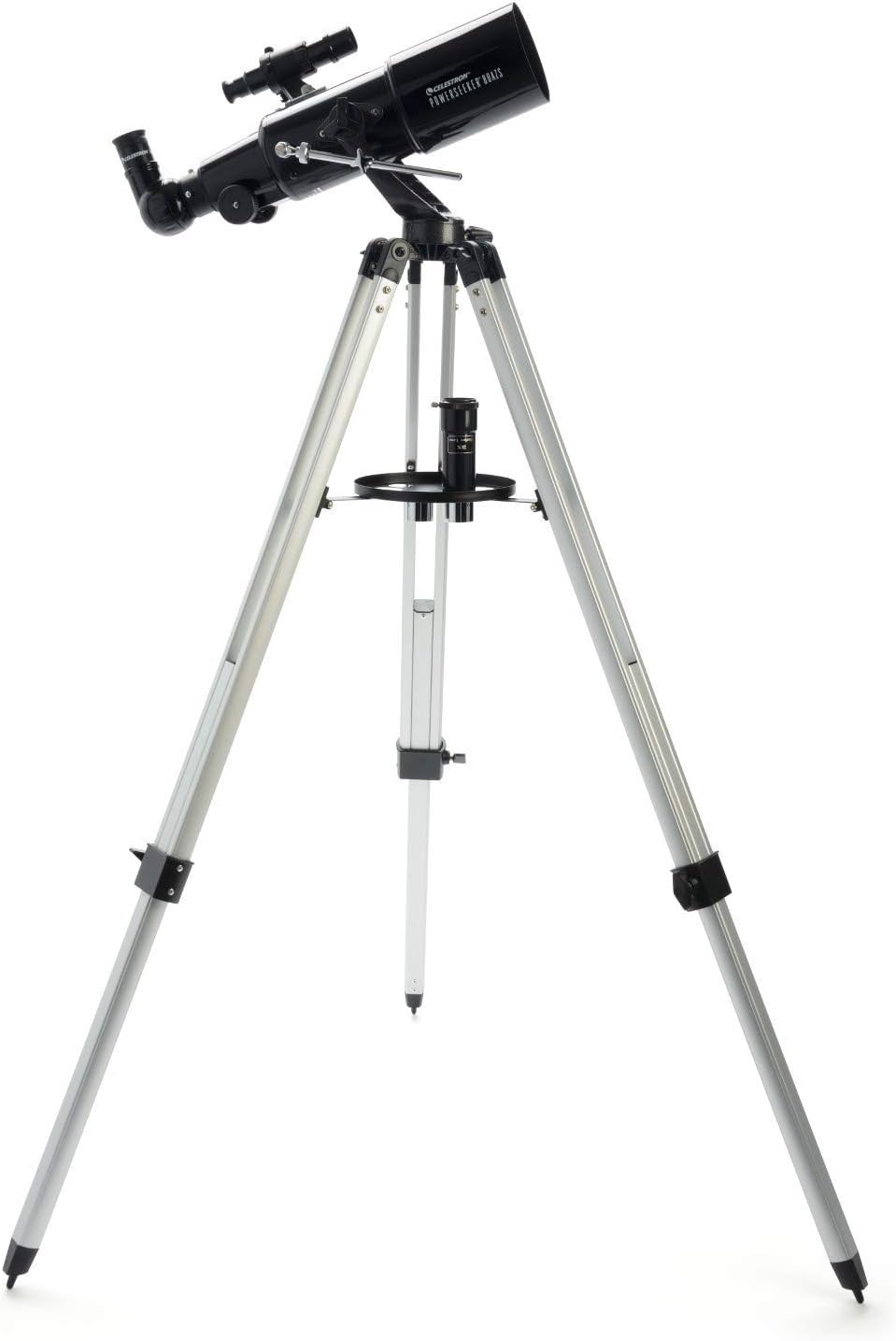
The Celestron PowerSeeker 80AZS is a powerful and user-friendly refractor telescope designed for amateur astronomers and beginners. This manual provides essential information for assembling, operating, and maintaining your telescope to ensure optimal viewing experiences of celestial objects like the Moon, planets, and distant galaxies, as well as terrestrial observations.
The PowerSeeker series combines quality, value, and user-friendly features, making it an excellent choice for exploring the night sky.
Ce este în cutie
- Celestron PowerSeeker 80AZS Telescope Optical Tube
- Full-Height Aluminum Tripod with Accessory Tray
- Ocular de 20 mm
- Ocular de 4 mm
- 3x lentilă Barlow
- Diagonală a imaginii erecte
- Scopul Finder
- BONUS Starry Night Basic Edition Astronomy Software (downloadable)
Înființat
Assembling your Celestron PowerSeeker 80AZS telescope is straightforward. Follow these steps to get started:
- Asamblați trepiedul: Extend the tripod legs to your desired height and secure them. Attach the accessory tray to the center brace of the tripod.
- Atașați tubul optic: Place the telescope optical tube onto the alt-azimuth mount on the tripod. Secure it using the provided screws.
- Instalați luneta căutătoare: Attach the finder scope to the optical tube using the small screws on the side. This low-powered scope helps in locating objects before viewtrecându-le prin telescopul principal.
- Introduceți diagonala imaginii în poziție verticală: Insert the erect image diagonal into the focuser of the telescope. This accessory ensures that images appear correctly oriented, which is useful for terrestrial viewing.
- Introduceți un ocular: Choose either the 20mm or 4mm eyepiece and insert it into the diagonal. The 20mm eyepiece provides a wider field of view, while the 4mm eyepiece offers higher magnification. For even greater magnification, you can insert the 3x Barlow lens between the diagonal and the eyepiece.


Ghid video de configurare
Video 1: Official Celestron guide to setting up PowerSeeker AZ Telescopes, demonstrating assembly and key features.
Operarea telescopului
Once assembled, your PowerSeeker 80AZS is ready for observation. Here’s how to operate it:
- Align the Finder Scope: Before observing, align the finder scope with the main telescope. Point the main telescope at a distant, easily identifiable object (e.g., a tree during the day). Look through the finder scope and adjust its screws until the object is centered in its crosshairs.
- Localizați un obiect: Use the finder scope to locate the celestial or terrestrial object you wish to observe. Center the object in the finder scope's crosshairs.
- Observe through the Eyepiece: Look through the main telescope's eyepiece. Use the focuser knobs to bring the image into sharp focus.
- Reglați mărirea: Experiment with different eyepieces (20mm for wide views, 4mm for high magnification) and the 3x Barlow lens to achieve your desired level of detail.
- Urmărirea obiectelor: The manual alt-azimuth mount allows for smooth movement up/down and left/right. Use the slow-motion altitude rod to make fine adjustments and track objects as they move across the sky.

Operating Video Guide
Video 2: A complete guide to the Celestron PowerSeeker AZS, including setup and operational tips for optimal viewing.
Întreţinere
Întreținerea corectă va prelungi durata de viață și performanța telescopului dumneavoastră:
- Curățarea opticii: Use a soft, lint-free cloth or a specialized optical cleaning solution to clean lenses. Avoid touching optical surfaces with bare hands.
- Protecție împotriva prafului: Always keep dust caps on the telescope when not in use.
- Depozitare: Store the telescope in a dry, dust-free environment. If disassembling for storage, ensure all components are clean and protected.
- Piese mecanice: Verificați periodic strângerea tuturor șuruburilor și butoanelor. Nu strângeți excesiv.
Depanare
If you encounter issues with your telescope, consider these common solutions:
- Imagini neclare: Ensure the focuser is properly adjusted. Check if the eyepiece is securely seated. Atmospheric conditions can also affect image clarity.
- Dificultate în localizarea obiectelor: Verify that the finder scope is correctly aligned with the main telescope. Start with the lowest magnification eyepiece (20mm) for a wider field of view.
- Instabil View: Ensure the tripod legs are fully extended and locked, and the accessory tray is securely in place to provide stability. Avoid observing on windy days.
- Nicio imagine: Check that all lens caps (front of the telescope, eyepiece, diagonal) are removed.
Specificații
| Caracteristică | Detaliu |
|---|---|
| Marca | Celestron |
| Numele modelului | Telescopul PowerSeeker 80AZS |
| Lungimea tubului optic | 41 inchi |
| Diametrul obiectivului | 80 milimetri |
| Descrierea monturii telescopului | Muntele Altazimut |
| Dimensiunile produsului | 40" D x 19" L x 55" H |
| Tip de focalizare | Focalizare manuală |
| Finderscope | Reflex |
| Acoperire | Complet acoperit |
| Descrierea distanței focale | 15.748 inci |
| Greutatea articolului | 10 lire sterline |
Garanție și suport
Your Celestron PowerSeeker 80AZS Telescope comes with a 2-Year US Warranty, ensuring peace of mind for your purchase. Celestron, a leading telescope brand since 1960, also provides unlimited access to technical support from their team of US-based experts.
For any questions or assistance, please refer to the contact information provided in your product documentation or visit the official Celestron website-ul.


