
1. Introducere
The Tivoli Audio Albergo is a compact and versatile Bluetooth clock radio designed to provide high-fidelity audio, AM/FM radio reception, and convenient alarm clock functionalities. This manual provides detailed instructions for setting up, operating, and maintaining your Albergo unit.
2. Instrucțiuni de siguranță
- Citiți toate instrucțiunile înainte de a utiliza unitatea.
- Păstrați aceste instrucțiuni pentru referințe viitoare.
- Respectați toate avertismentele de pe produs și din manual.
- Nu utilizați acest aparat lângă apă sau umezeală.
- Curățați numai cu o cârpă uscată.
- Nu blocați niciun orificiu de ventilație. Instalați conform instrucțiunilor producătorului.
- Nu instalați lângă nicio sursă de căldură, cum ar fi calorifere, registre de căldură, sobe sau alte aparate (inclusiv ampliificatori) care produc căldură.
- Protejați cablul de alimentare împotriva călcării sau ciupitului.
- Utilizați numai atașamente/accesorii specificate de producător.
- Deconectați acest aparat din priză în timpul furtunilor cu fulgere sau când nu este utilizat pentru perioade lungi de timp.
- Pentru toate lucrările de întreținere, adresați personalului de service calificat.
3. Conținutul pachetului
Verificați dacă pachetul dvs. conține următoarele articole:
- Tivoli Audio Albergo Bluetooth Clock Radio Unit
- Adaptor de alimentare
- Telecomanda
- Antena FM
4. Produs terminatview
Comenzi și afișaj de pe panoul frontal
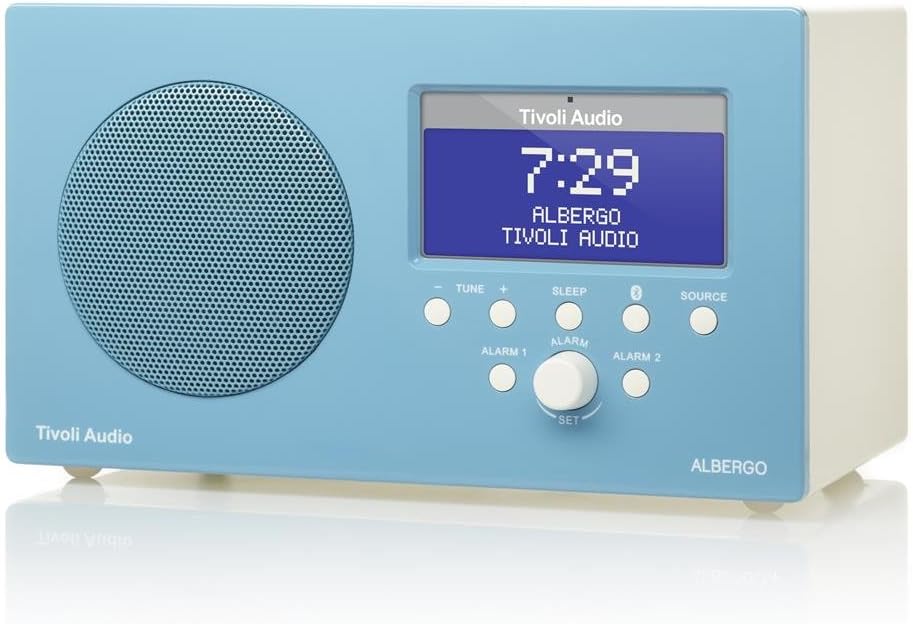
Figura 4.1: Faţă view of the Albergo unit. The front panel features a speaker grille, a digital display, and control buttons for tuning, sleep, Bluetooth, source selection, and alarm settings.
- Afişa: Shows time, station, source, and menu information.
- Tune - / Tune +: Adjusts radio frequency or navigates menu options.
- Dormi: Activează temporizatorul de somn.
- Buton Bluetooth: Inițiază modul de asociere Bluetooth.
- Sursă: Cycles through available audio sources (FM, AM, Bluetooth, Auxiliary).
- Alarma 1 / Alarma 2: Activates or sets Alarm 1 or Alarm 2.
- Set Knob: Rotates to adjust values and presses to confirm selections.
Latura View and Rear Connections

Figura 4.2: Înclinat view of the Albergo unit. The rear panel typically includes connections for power, external antenna, and auxiliary input.
The rear panel of the Albergo unit contains the following connections:
- Intrare DC: Pentru conectarea adaptorului de alimentare inclus.
- Intrare antenă FM: For connecting the external FM antenna.
- Intrare auxiliara: For connecting external audio devices via a 3.5mm cable (not included).
- Ieșire căști: Pentru ascultare privată.
5. Configurare
5.1 Conexiune la alimentare
- Insert the small end of the power adapter into the DC Input jack on the rear of the Albergo unit.
- Conectați celălalt capăt al adaptorului de alimentare la o priză de perete.
- Unitatea se va porni sau va intra în modul standby.
5.2 Conectarea antenei
- For FM reception, connect the included external FM antenna to the FM Antenna Input on the rear of the unit.
- Extindeți antena complet pentru o recepție optimă.
- For AM reception, the Albergo has a built-in internal AM antenna. If reception is poor, try repositioning the unit.
6. Instrucțiuni de utilizare
6.1 Pornire/Oprire
- Apăsați tasta Putere button (usually integrated with the Set knob or a dedicated button on the remote) to turn the unit on or off.
- When powered off, the clock display will remain active.
6.2 Operarea radioului (AM/FM)
- Apăsați tasta Sursă button until "FM" or "AM" appears on the display.
- Utilizați Tune - or Acordați + butoane pentru a regla manual frecvența.
- Pentru a scana automat următorul post disponibil, apăsați și mențineți apăsat Tune - or Acordați +.
- The Albergo supports FM RDS (Radio Data System) where available, displaying station information.
6.3 Funcționare Bluetooth
- Apăsați tasta Sursă button until "Bluetooth" appears on the display.
- The unit will enter pairing mode, indicated by a flashing Bluetooth icon on the display.
- Pe dispozitivul compatibil Bluetooth (de exemplu, smartphone, tabletă), activați Bluetooth și căutați dispozitivele disponibile.
- Select "Tivoli Albergo" from the list of devices.
- Once paired, the Bluetooth icon on the Albergo display will stop flashing and remain solid. You can now stream audio wirelessly.
6.4 Clock and Alarm Settings
Many clock and alarm settings are best accessed and adjusted using the included remote control.
- Setarea orei:
- În modul de așteptare, țineți apăsată tasta Set butonul sau Meniu butonul de pe telecomandă.
- Navigate to "Time Set" using the Acord +/- buttons or remote arrows.
- Presa Set or Intră de pe telecomandă pentru confirmare.
- Reglați orele și minutele folosind Acord +/- or remote arrows, confirming each with Set or Intră.
- Setting Alarms (Alarm 1 / Alarm 2):
- Apăsați tasta Alarma 1 or Alarma 2 butonul de pe panoul frontal sau de pe telecomandă.
- Follow the on-screen prompts to set the alarm time, source (buzzer, FM, AM), and volume.
- Confirm each setting using the Set knob or remote's Intră buton.
- Funcție de amânare: Când sună o alarmă, apăsați butonul Amână buton (adesea Dormi button or a dedicated button on the remote) to temporarily silence the alarm for a set period.
- Temporizator de somn: Apăsați tasta Dormi button repeatedly to cycle through available sleep timer durations (e.g., 15, 30, 45, 60 minutes, Off). The unit will automatically turn off after the selected time.
6.5 Utilizarea telecomenzii
The included full-function remote control provides access to all features and settings, including those not directly available on the front panel. Ensure the remote has working batteries and is pointed towards the front of the Albergo unit during use.
7. Întreținere
- curatenie: Folosiți o cârpă moale și uscată pentru a curăța unitatea. Nu utilizați produse de curățare abrazive, ceară sau solvenți.
- Plasare: Evitați amplasarea unității în lumina directă a soarelui, în apropierea surselor de căldură sau în zone cu umiditate ridicată sau praf.
- Antenă: Handle the FM antenna carefully to prevent damage.
8. Depanare
| Problemă | Cauza posibila | Soluţie |
|---|---|---|
| Fără putere | Adaptorul de alimentare nu este conectat sau priza este defectă. | Asigurați-vă că adaptorul de alimentare este conectat corect la unitate și la o priză de perete funcțională. |
| Recepție radio slabă | Antenna not properly connected or positioned; weak signal. | Extend the FM antenna fully. Reposition the unit for better AM reception. Try a different location. |
| Dispozitivul Bluetooth nu se conectează | Albergo not in pairing mode; device too far; previously paired device connected. | Ensure Albergo is in Bluetooth source mode and flashing. Move device closer. Disconnect from other Bluetooth devices. |
| Clock displays incorrect time | Ora nu este setată corect; întrerupere de curent. | Refer to Section 6.4 to reset the time. Unplug and replug the unit to reset if necessary. |
| Alarma nu sună | Alarm not activated; volume too low; incorrect alarm source. | Verify Alarm 1 or Alarm 2 is enabled. Check alarm volume. Ensure correct alarm source (buzzer/radio) is selected. |
| Telecomanda nu funcționează | Dead batteries; obstruction; not pointed correctly. | Replace remote control batteries. Ensure no obstructions between remote and unit. Point remote directly at the unit. |
9. Specificații
- Marca: Tivoli Audio
- Număr de model: ALBERGO
- Tehnologie de conectivitate: Bluetooth
- Tehnologia tunerului: AM, FM (with RDS where available)
- Caracteristici speciale: Digital Clock, Dual Alarms, Sleep Timer, Snooze
- Sursa de alimentare: Adaptor de curent alternativ
- Tip de afișare: LCD digital
- Componente incluse: Telecomanda
- Greutatea articolului: Aproximativ 2.3 de livre (1.04 kg)
- UPC: 815097015581
10. Garanție și asistență
For warranty information and technical support, please refer to the documentation provided with your purchase or visit the official Tivoli Audio webPăstrați dovada achiziției pentru reclamații în garanție.