
1. Introducere
This manual provides essential information for the safe and efficient operation of your InFocus IN2126a WXGA Network Projector. Please read this manual thoroughly before using the projector and retain it for future reference. The InFocus IN2126a is designed for versatile use in various environments, offering high brightness and network capabilities.
2. Informații de siguranță
Respectați următoarele măsuri de siguranță pentru a preveni deteriorarea proiectorului și a asigura siguranța utilizatorului:
- Nu blocați orificiile de ventilație. Asigurați o circulație adecvată a aerului în jurul proiectorului.
- Nu priviți direct în lentila proiectorului atunci cândamp este pornit. Lumina puternică poate provoca leziuni oculare.
- Avoid placing the projector in direct sunlight, near heat sources, or in environments with high humidity or excessive dust.
- Folosiți doar cablul de alimentare furnizat împreună cu proiectorul.
- Apelați pentru toate lucrările de service la personal de service calificat. Nu încercați să deschideți sau să reparați singur proiectorul.
3. Produs terminatview
Familiarize yourself with the components and features of your InFocus IN2126a projector.
3.1 Componentele proiectorului
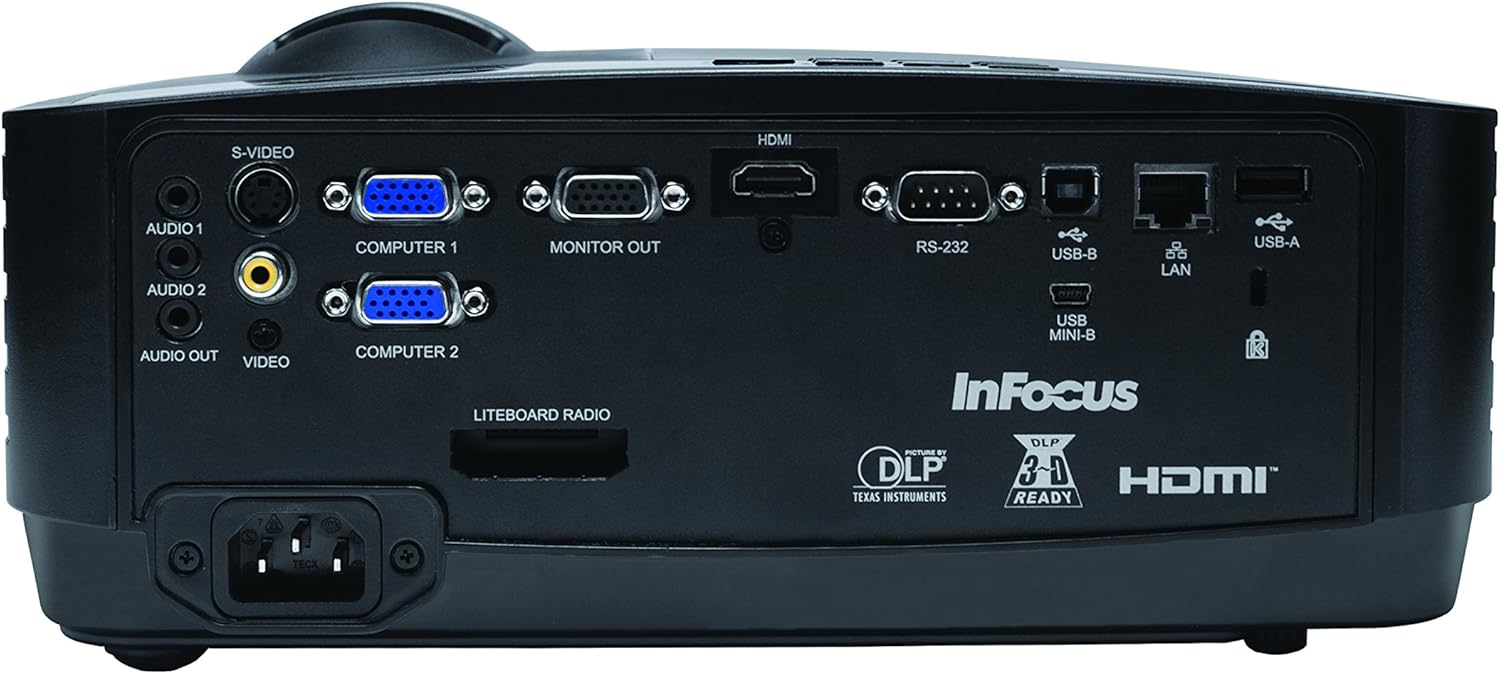
Figura 1: Partea frontală view of the InFocus IN2126a projector, showing the lens and ventilation.

Figura 2: lateral view of the InFocus IN2126a projector, highlighting the ventilation grilles.
3.2 Conexiuni la panoul din spate
The rear panel provides various input and output ports for connecting external devices.
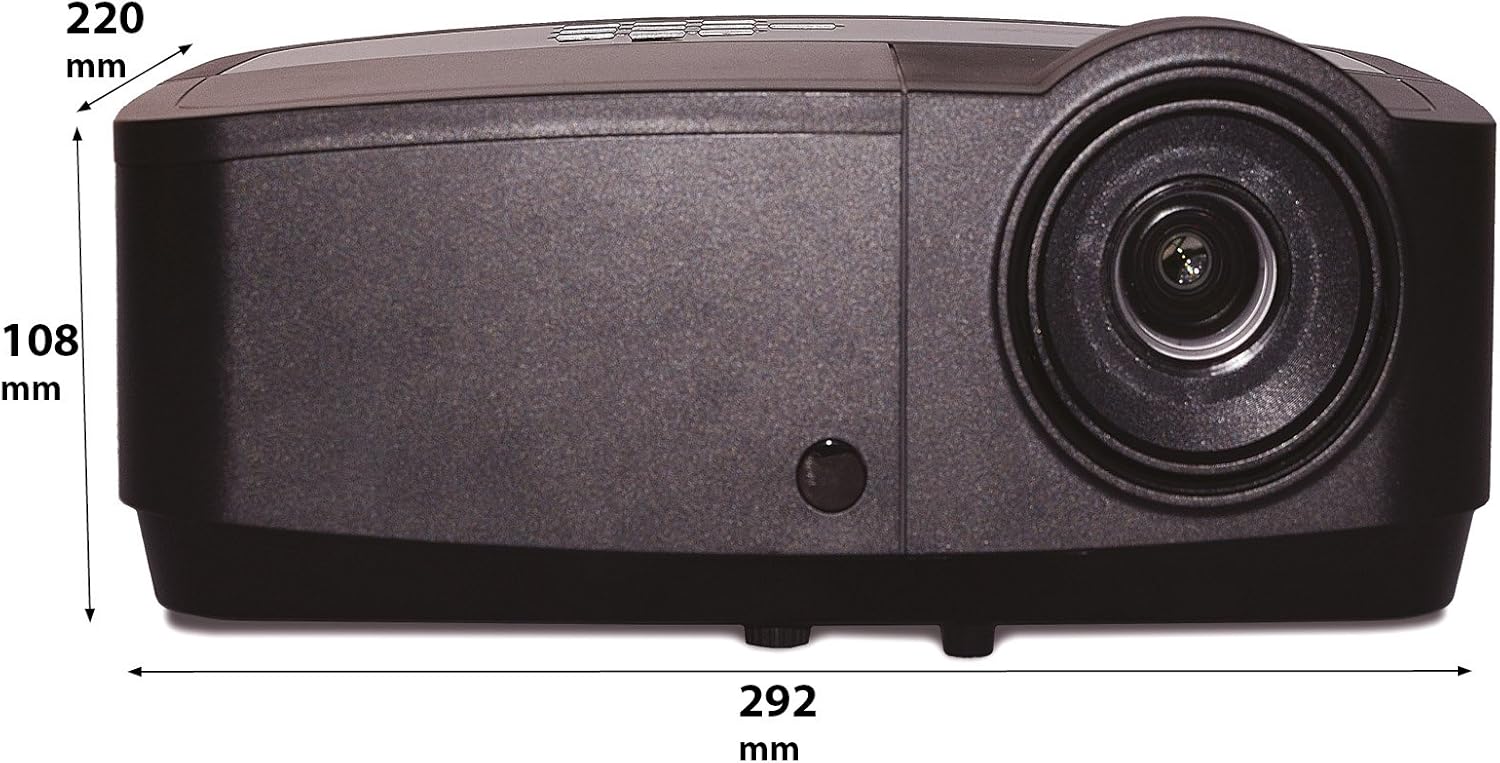
Figure 3: Rear panel of the InFocus IN2126a projector, displaying various connectivity ports including HDMI, VGA, USB, and LAN.
- HDMI: Pentru intrare video și audio digitală.
- COMPUTER 1 / COMPUTER 2 (VGA): Pentru intrare video analogică de la computere.
- MONITOR OUT (VGA): Pentru conectarea unui monitor extern.
- USB-B / USB Mini-B: For service or specific USB functions.
- USB-A: For connecting USB devices, such as a wireless adapter.
- LAN (RJ45): Pentru conectivitate la rețea.
- RS-232: Pentru control serial.
- AUDIO 1 / AUDIO 2 (RCA): Pentru intrare audio.
- IEȘIRE AUDIO: Pentru conectarea sistemelor audio externe.
- VIDEO (RCA): Pentru intrare video compozită.
- S-VIDEO: For S-Video input.
- Intrare de alimentare: Pentru conectarea cablului de alimentare.
3.3 Comenzile panoului superior
The top panel features controls for basic projector functions and image adjustments.

Figure 4: Top panel of the InFocus IN2126a projector, showing the control buttons and focus/zoom rings.
- Buton de alimentare: Pornește sau oprește proiectorul.
- Menu/Exit Button: Accesses or exits the on-screen display (OSD) menu.
- Butoane de navigare (Sus, Jos, Stânga, Dreapta): Navighează prin opțiunile din meniu.
- Buton Enter: Confirmă selecțiile din meniu.
- Buton sursă: Selectează sursele de intrare.
- Blank Button: Temporarily blanks the screen.
- Buton automat: Reglează automat setările de imagine.
- Inel de focalizare: Ajustează claritatea imaginii.
- Inel de zoom: Ajustează dimensiunea imaginii.
3.4 Dimensiuni
Understanding the physical dimensions is important for installation and placement.

Figure 5: Diagram illustrating the dimensions of the InFocus IN2126a projector (292mm length, 220mm width, 108mm height).
4. Configurare
4.1 Amplasarea proiectorului
Place the projector on a stable, flat surface or mount it securely. Ensure the projector is positioned at an appropriate distance from the screen to achieve the desired image size. Maintain sufficient space around the projector for proper ventilation.
4.2 Conectarea dispozitivelor
- Conexiune de alimentare: Connect the power cord to the projector's power inlet and then to a grounded electrical outlet.
- Sursa video:
- For digital sources (e.g., Blu-ray player, laptop), use an HDMI cable to connect to the HDMI port.
- For analog computer sources, use a VGA cable to connect to the COMPUTER 1 or COMPUTER 2 port.
- For other video sources, use the appropriate S-VIDEO or VIDEO (RCA) connections.
- Sursa audio: If your video source does not transmit audio via HDMI, connect audio cables to the AUDIO 1 or AUDIO 2 ports.
- Conexiune retea: For wired network access, connect an Ethernet cable to the LAN port.
- Conectivitate wireless: If using a compatible wireless adapter (sold separately), insert it into the USB-A port.
4.3 Pornire/Oprire
- Pentru a porni: Press the Power button on the projector's top panel or the remote control. The power indicator light will illuminate.
- Pentru a opri: Press the Power button again. The projector will enter a cooling cycle before shutting down completely. Do not unplug the projector during the cooling cycle.
5. Operarea proiectorului
5.1 Selectarea sursei
After powering on, the projector may automatically detect an active input source. If not, or to switch sources:
- Apăsați tasta Sursă butonul de pe proiector sau telecomandă.
- Use the navigation buttons to highlight the desired input source (e.g., HDMI, Computer 1, Video).
- Presa Intră pentru a selecta sursa.
5.2 Ajustarea imaginii
- Focus: Rotiți Concentrează-te ring on the projector lens until the image appears sharp and clear.
- Zoom: Rotiți Zoom ring on the projector lens to adjust the image size to fit your screen.
- Corecție trapezoială: If the image appears trapezoidal, use the keystone correction feature in the OSD menu to square the image.
5.3 Meniul de afișare pe ecran (OSD).
The OSD menu allows you to configure various projector settings.
- Apăsați tasta Meniu buton pentru a deschide meniul OSD.
- Utilizați Sus/Jos navigation buttons to select a menu category.
- Utilizați Stânga/Dreapta navigation buttons to adjust settings or enter sub-menus.
- Presa Intră pentru a confirma modificările.
- Presa Ieșire to close the OSD menu.
5.4 Conectivitate fără fir
The IN2126a is wireless-ready. To enable wireless display, a compatible InFocus wireless adapter (sold separately) must be connected to the USB-A port. Refer to the wireless adapter's specific instructions for setup and connection procedures.
5.5 Funcționalitate 3D
The projector supports 3D content. To view 3D content, you will need a compatible 3D source, 3D glasses, and appropriate 3D content. Refer to the projector's OSD menu for 3D settings and ensure your source device is configured for 3D output.
6. Întreținere
Întreținerea regulată asigură performanțe optime și prelungește durata de viață a proiectorului.
6.1 Lamp Înlocuire
Proiectorul lamp has a limited lifespan (approximately 4000 hours). When the lamp indicatorul se aprinde sau luminozitatea imaginii scade semnificativ, indicatorul lamp needs replacement. Always use an authorized InFocus replacement lampConsultați manualul de service complet pentru informații detaliate.amp replacement instructions or contact customer support.
6.2 Curăţarea filtrului
Dust accumulation on the air filter can impede airflow and cause overheating. Regularly clean the air filter to maintain proper ventilation. Turn off and unplug the projector before cleaning. Use a soft brush or vacuum cleaner to remove dust from the filter cover.
6.3 Curățare generală
- Proiector Casing: Utilizați o cârpă moale, fără scame dampened with a mild, non-abrasive cleaner. Do not use harsh chemicals.
- Obiectiv: Use a lens cleaning cloth and specialized lens cleaning solution. Avoid touching the lens surface with your fingers.
7. Depanare
Dacă întâmpinați probleme cu proiectorul, consultați următoarele probleme și soluții frecvente:
| Problemă | Cauza posibila | Soluţie |
|---|---|---|
| Nicio imagine pe ecran | Sursă de intrare selectată incorect; Conexiune slăbită a cablului; Proiector în modul standby. | Verify input source; Check all cable connections; Press power button to wake from standby. |
| Imaginea este neclară | Focalizarea nu este ajustată; Proiectorul este prea aproape/departe de ecran. | Adjust the focus ring; Reposition the projector and adjust zoom. |
| Imaginea este trapezoidală | Proiectorul nu este perpendicular pe ecran. | Folosiți corecția trapezoidală în meniul OSD. |
| Fără sunet | Audio cables not connected; Volume too low; Muted. | Check audio cable connections; Adjust volume; Unmute projector. |
| Proiectorul se supraîncălzește și se oprește | Ventilație blocată; Filtru de aer murdar. | Ensure clear airflow around projector; Clean the air filter. |
For more detailed troubleshooting, consult the complete user manual or contact InFocus customer support.
8. Specificații
Key technical specifications for the InFocus IN2126a WXGA Network Projector:
- Nume model: IN2126a
- Tip de afișare: DLP
- Rezoluție nativă: 1280 x 800 (WXGA)
- Luminozitate: 3500 lumeni
- Raport de contrast: 15000:1
- Reproducerea culorilor: 1.07 Billion Colors (30-bit)
- Durata de funcționare a sursei de lumină: 4000 de ore
- Tehnologie de conectivitate: Wireless-ready, HDMI 1.4, VGA (x2), USB (Type-A, Mini-B, Type-B), LAN (RJ45), RS-232, Audio In (x2), Audio Out, Video (RCA), S-Video
- Caracteristici speciale: 3D-Ready, Network Projector
- Factor de formă: Portabil
- Tip de montare: Suport de masă
- Greutatea articolului: 7.1 lire sterline
9. Garanție și asistență
For information regarding your product's warranty, please refer to the warranty card included with your purchase or visit the official InFocus website. For technical support, service, or to purchase accessories, please contact InFocus customer service through their official channels.