
Introducere
This manual provides essential information for the safe and efficient operation of your InFocus IN124a XGA Wireless-Ready Projector. Please read this manual thoroughly before using the projector and retain it for future reference. This projector is designed for displaying content with XGA (1024 x 768) native resolution, offering 3500 lumens of brightness and a 15000:1 contrast ratio.
Informații de siguranță
- Siguranta electrica: Always connect the projector to a grounded power outlet. Do not use damaged power cords. Disconnect power before cleaning or servicing.
- Caldura si ventilatie: Ensure adequate ventilation around the projector. Do not block ventilation openings. Avoid placing the projector near heat sources.
- Lamp Siguranţă: Proiectorul lamp operates at high temperatures and pressures. Allow the projector to cool down before moving or replacing the lamp. Do not look directly into the lens when the lamp este pornit.
- Manipulare: Manevrați proiectorul cu grijă. Evitați să-l scăpați sau să-l supuneți la impacturi puternice.
- Umiditate: Do not expose the projector to rain, moisture, or excessive humidity.
Conținutul pachetului
Verificați dacă toate articolele sunt prezente în colet:
- InFocus IN124a Projector
- Cablu HDMI
- Cablu VGA
- Cablu de alimentare
- Remote Control (not explicitly listed but standard)
- Optional USB adapter for wireless connectivity (if purchased separately)
Produs terminatview
Familiarize yourself with the physical components and connections of your InFocus IN124a projector.

This image displays the rear panel of the InFocus IN124a projector, highlighting various connectivity options including HDMI, VGA (Computer 1 and 2), Monitor Out, S-Video, Video, Audio In (1 and 2), Audio Out, RS-232, USB-B, USB Mini-B, and USB-A ports. The power input is located on the lower left.

The top panel of the InFocus IN124a projector is shown, featuring the control buttons for power, menu navigation (up, down, left, right, enter), source selection, blank screen function, and indicators for temperature and lamp status. The focus and zoom adjustment rings are also visible.

Un front view of the InFocus IN124a projector, showing the main projection lens and the power indicator light. The focus and zoom rings are visible near the lens.

Această imagine prezintă o latură view of the InFocus IN124a projector, emphasizing the ventilation grilles designed for heat dissipation, crucial for maintaining optimal operating temperature.
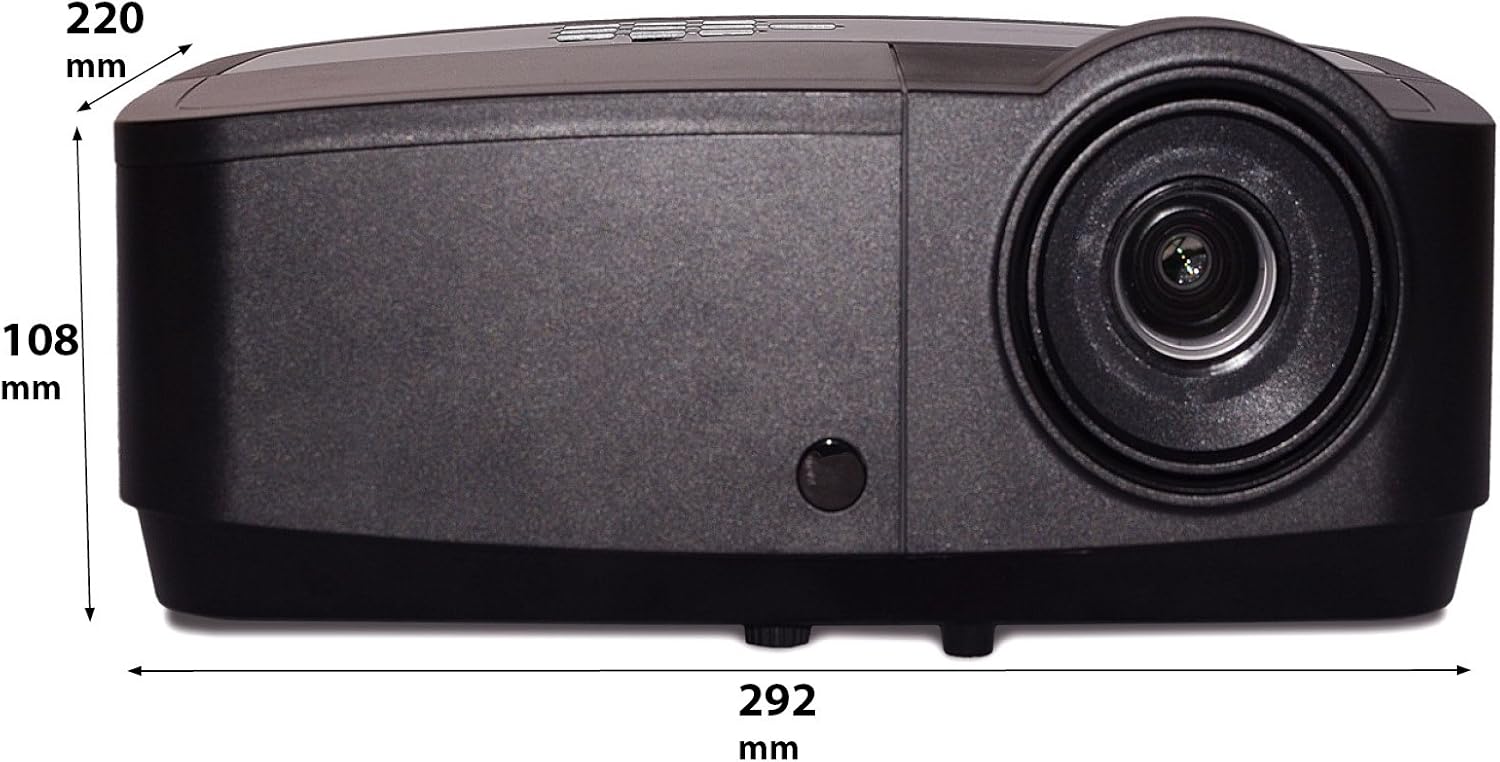
Această imagine prezintă un avantaj lateralfile of the InFocus IN124a projector, illustrating its physical dimensions: approximately 292 mm in length, 108 mm in height, and 220 mm in width.
Înființat
1. Plasare
Position the projector on a stable, flat surface or mount it securely. Ensure the projector is at an appropriate distance from the screen to achieve the desired image size. Avoid direct sunlight or strong ambient light on the screen for optimal viewing.
2. Conectarea puterii
- Conectați cablul de alimentare la intrarea de alimentare a proiectorului.
- Conectați celălalt capăt al cablului de alimentare la o priză cu împământare.
3. Conectarea surselor video
The IN124a offers multiple connectivity options:
- HDMI: Conectați un cablu HDMI de la dispozitivul sursă (de exemplu, laptop, player Blu-ray) la portul HDMI al proiectorului.
- VGA (Calculator 1/2): Use a VGA cable to connect your computer to either the 'COMPUTER 1' or 'COMPUTER 2' port.
- S-Video/Video: For older devices, connect S-Video or composite video cables to the respective ports.
- USB: The USB-A port can be used for displaying content directly from a USB drive. The USB-B port supports USB display functionality.
- Audio: Connect external audio sources to 'AUDIO 1' or 'AUDIO 2' inputs, and use 'AUDIO OUT' for external speakers if needed.
4. Wireless Setup (Optional)
For wireless connectivity, an optional USB adapter is required. Insert the wireless USB adapter into the designated USB port on the projector. Refer to the adapter's specific instructions for software installation and connection procedures on your source device.
Funcționează
1. Pornire/Oprire
- Pornire: Press the 'Power' button on the projector's control panel or remote control. The power indicator light will turn steady blue.
- Oprire: Press the 'Power' button again. A confirmation message may appear. Press 'Power' a second time to confirm shutdown. The fan will continue to run briefly to cool the lamp before shutting down completely.
2. Ajustarea imaginii
- Focus: Rotiți inelul de focalizare în jurul obiectivului până când imaginea apare clară și ascuțită.
- Zoom: Rotate the zoom ring around the lens to adjust the image size without moving the projector.
- Corecție trapezoială: Dacă imaginea apare trapezoidală, utilizați funcția de corecție a diafragmei din meniul proiectorului pentru a o îndrepta spre dreptunghi.
3. Selectarea sursei
Press the 'Source' button on the control panel or remote control repeatedly to cycle through available input sources (HDMI, Computer 1, Computer 2, S-Video, Video, USB). The projector will automatically detect an active signal.
4. Navigare prin meniu
Press the 'Menu' button to access the On-Screen Display (OSD) menu. Use the arrow buttons to navigate through options and 'Enter' to select. Press 'Menu' or 'Exit' to close the OSD.
5. Modul 3D
The InFocus IN124a is 3D-Ready. To utilize 3D functionality, you will need compatible 3D content, a 3D-capable source device, and active 3D glasses. Refer to your 3D source device's manual for specific setup instructions. The projector will automatically detect a 3D signal when available.
Întreţinere
1. Lamp Înlocuire
Proiectorul lamp are o durată de viață de până la 7,000 de ore. Când lamp viața se apropie de sfârșit, poate apărea un mesaj de avertizare sau poate apăreaamp indicator light will illuminate. Only replace the lamp with an authorized InFocus replacement lamp. Always allow the projector to cool completely before attempting lamp înlocuire.
2. Curatenie
- Proiector Casing: Utilizați o cârpă moale, fără scame dampened with a mild, non-abrasive cleaner. Do not use harsh chemicals.
- Obiectiv: Gently wipe the lens with a lens cleaning cloth or lens tissue. Avoid touching the lens surface with your fingers.
- Orificii de aerisire: Periodically check and clean the air vents to prevent dust buildup, which can lead to overheating. Use a soft brush or compressed air to clear obstructions.
Depanare
Dacă întâmpinați probleme cu proiectorul, consultați următoarele probleme și soluții frecvente:
| Problemă | Cauza posibila | Soluţie |
|---|---|---|
| Nu este afișată nicio imagine | Power not connected; Incorrect input source; Source device not active. | Check power connection; Select correct input source; Ensure source device is on and outputting signal. |
| Imaginea este neclară sau nefocalizată | Lens focus not adjusted; Projector too close/far from screen. | Adjust the focus ring on the lens; Adjust projector distance or use zoom ring. |
| Telecomanda nu funcționează | Batteries depleted; Obstruction between remote and projector; Remote sensor blocked. | Replace batteries; Remove obstructions; Ensure remote sensor on projector is clear. |
| Proiectorul se supraîncălzește și se oprește | Blocked ventilation; Dusty air filter. | Ensure vents are clear; Clean air filter (if applicable) and vents. |
Specificații
| Caracteristică | Caietul de sarcini |
|---|---|
| Rezoluție nativă | XGA (1024 x 768) |
| Luminozitate | 3500 lumeni |
| Raport de contrast | 15000:1 |
| Lamp Viaţă | Până la 7,000 de ore (Mod Eco) |
| Tehnologia de conectivitate | Wireless (with optional adapter), HDMI, USB video |
| Caracteristica specială | Gata 3D |
| Dimensiunile produsului | 14.25 x 12 x 7.75 inchi (36.2 x 30.5 x 19.7 cm) |
| Greutatea articolului | 5.4 lire (2.45 kg) |
| Utilizări recomandate | Interior/Exterior |
Garanție și suport
For warranty information and technical support, please refer to the warranty card included with your product or visit the official InFocus webPăstrați bonul fiscal ca dovadă a achiziției pentru reclamații în garanție.