
1. Produs terminatview
The Irradio Mini Blast is a compact, amplified Bluetooth speaker designed for portable audio playback. It offers high-efficiency sound output and versatile connectivity options.
Caracteristici cheie:
- Bluetooth 3.0 EDR for wireless audio streaming.
- Integrated USB 2.0 connection.
- Auxiliary (AUX) input for connecting external audio devices.
- Integrated lithium battery for portable use.
- 3 Watts maximum speaker output power.
- Alimentare DC 5V.
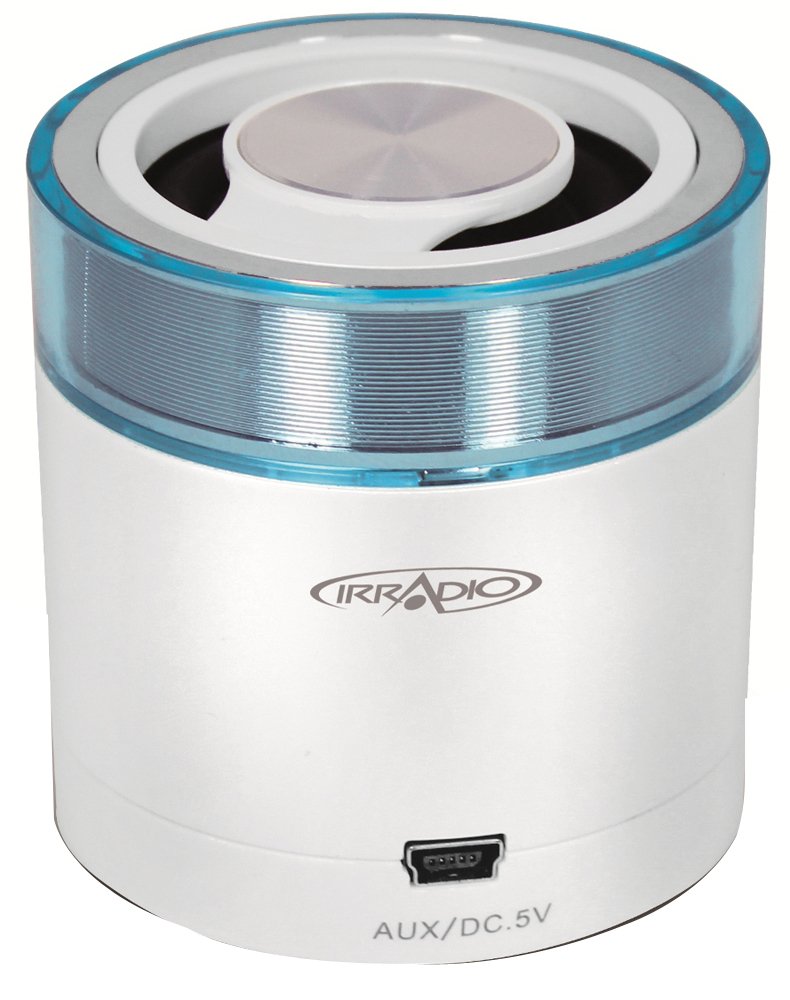
Imaginea 1.1: Față view of the Irradio Mini Blast Amplified Bluetooth Speaker in white and blue. This image displays the compact design and primary color scheme of the device.
2. Conținutul pachetului
Vă rugăm să bifați căsuța pentru următoarele elemente:
- Irradio Mini Blast Speaker Unit
- Cablu USB
- Ghid de pornire rapidă
- Manual de utilizare
3. Informații de siguranță
Read all safety instructions before using this product. Failure to follow these instructions may result in electric shock, fire, or other hazards.
- Nu expuneți dispozitivul la temperaturi extreme, la lumina directă a soarelui sau la umiditate ridicată.
- Do not disassemble, repair, or modify the device. This may void the warranty and pose a safety risk.
- Țineți aparatul departe de apă și alte lichide.
- Folosiți doar cablul de încărcare furnizat sau aprobat.
- Aruncați dispozitivul și bateria acestuia în mod responsabil, în conformitate cu reglementările locale.
4. Configurare
4.1 Încărcare inițială
- Connect the provided USB cable to the speaker's USB port.
- Connect the other end of the USB cable to a compatible USB power adapter (DC 5V, not included) or a computer's USB port.
- The charging indicator light will illuminate (color may vary) to show that the device is charging.
- Allow the speaker to charge fully before first use. The indicator light will change or turn off when charging is complete.
4.2 Pornire/Oprire
- Pentru a porni: Press and hold the Power button (usually marked with Ⓘ) for approximately 3 seconds. An audible tone or indicator light will confirm the device is on.
- Pentru a opri: Press and hold the Power button for approximately 3 seconds. An audible tone or indicator light will confirm the device is off.
5. Instrucțiuni de utilizare
5.1 Asociere Bluetooth
- Ensure the speaker is powered on and within close proximity (within 10 meters) of your Bluetooth-enabled device.
- The speaker will automatically enter Bluetooth pairing mode, indicated by a flashing LED light (e.g., blue).
- Pe dispozitivul audio (smartphone, tabletă etc.), activați Bluetooth și căutați dispozitivele disponibile.
- Select "Irradio Mini Blast" from the list of found devices.
- Once paired, the LED indicator will typically stop flashing and remain solid, and an audible confirmation may be heard.
- Acum poți reda sunet de pe dispozitiv prin difuzor.
5.2 Conexiune AUX
For devices without Bluetooth, use the AUX input:
- Connect one end of a 3.5mm audio cable (not included) to the AUX port on the Irradio Mini Blast speaker.
- Conectați celălalt capăt al cablului audio de 3.5 mm la mufa pentru căști sau la portul de ieșire audio al dispozitivului audio extern.
- The speaker should automatically switch to AUX mode, or you may need to press a mode button if available.
- Adjust the volume on both your external device and the speaker.
5.3 Redare USB
The integrated USB 2.0 connection can be used for charging the speaker or potentially for playing audio from a USB storage device, depending on the model's specific features. Refer to the quick start guide for detailed USB playback instructions if applicable.
6. Întreținere
6.1 Curățare
- Opriți întotdeauna dispozitivul înainte de curățare.
- Use a soft, dry, lint-free cloth to wipe the exterior of the speaker.
- Nu folosiți produse de curățare abrazive, solvenți sau substanțe chimice puternice, deoarece acestea pot deteriora suprafața.
- Evitați pătrunderea umezelii în orice deschidere.
6.2 Depozitare
- Depozitați difuzorul într-un loc răcoros și uscat, ferit de lumina directă a soarelui și de temperaturi extreme.
- Dacă depozitați bateria pentru o perioadă lungă de timp, încărcați-o periodic (de exemplu, la fiecare 3-6 luni) pentru a o menține sănătoasă.
7. Depanare
| Problemă | Cauza posibila | Soluţie |
|---|---|---|
| Difuzorul nu pornește. | Bateria este epuizată. | Încărcați difuzorul utilizând cablul USB furnizat. |
| Nu se poate conecta prin Bluetooth. | Bluetooth is not enabled on the device; speaker is out of range; speaker is already paired to another device. | Ensure Bluetooth is on; move device closer to speaker; disconnect from other devices and try pairing again. |
| Niciun sunet sau volum redus. | Volume is too low on speaker or connected device; incorrect input mode selected. | Increase volume on both speaker and connected device; ensure correct input mode (Bluetooth/AUX) is selected. |
| Distorsiunea sunetului. | Volume is too high; audio source quality is poor. | Reduce volume on speaker and connected device; try a different audio source. |
8. Specificații
| Caracteristică | Detaliu |
|---|---|
| Numele modelului | Mini |
| Numărul de model | 166000109 |
| Marca | IRRADIO |
| Tehnologia de conectivitate | Bluetooth (3.0 EDR), Auxiliary, USB |
| Putere maximă de ieșire difuzor | 3 wați |
| Sursa de alimentare | Battery Powered (Integrated Lithium Battery) |
| Alimentare electrică | DC 5V |
| Tip de montare | Suport de masă |
| Dimensiunile produsului | 18.2 x 11 x 7.2 cm |
| Greutatea articolului | 100 de grame |
| Culoare | White/Light Blue |
9. Garanție și asistență
9.1 Informații despre garanție
This product is covered by a limited warranty. Please refer to the warranty card included in your package or contact your retailer for specific terms and conditions. The warranty typically covers manufacturing defects under normal use.
9.2 Asistență pentru clienți
For technical assistance, troubleshooting, or warranty claims, please contact your point of purchase or visit the official Irradio website for support contact details. Have your model number (166000109) and purchase information ready when contacting support.