
Introducere
This manual provides comprehensive instructions for the installation, operation, and maintenance of your Azza XT1 Full Tower Gaming Case (Model: CSAZ-XT1 W). Please read this manual thoroughly before beginning installation to ensure proper setup and to maximize the performance and longevity of your product.
Informații de siguranță
Observe the following safety precautions to prevent damage to the case or injury to yourself:
- Always disconnect the power supply from the wall outlet before performing any installation or maintenance.
- Handle internal components with care to avoid electrostatic discharge (ESD) damage. Consider using an anti-static wrist strap.
- Ensure all cables are routed properly to prevent interference with fans or other moving parts.
- Do not block ventilation openings. Maintain adequate airflow around the case.
- Keep the case away from sources of heat, direct sunlight, and moisture.
Caracteristicile produsului
The Azza XT1 Full Tower Gaming Case is designed with several features to enhance your computing experience:
- Suport pentru placă VGA: Accommodates VGA cards up to 340 mm in length.
- Easy Swap Slot: Features a bottom-mounted easy swap slot for tool-less hard drive installation.
- Performanță de răcire: Equipped with four pre-installed fans for optimal airflow and supports up to two 120mm water cooling radiators.
- Customizable Grilles: Front and top decorative grilles are removable and exchangeable for aesthetic customization.
- Tool-less Installation: Designed for easy installation of 5.25" devices and HDDs with a tool-less mechanism and a 90-degree rotating HDD holder.
- Organizare de cabluri: Includes a dedicated compartment for efficient cable routing, improving internal airflow and aesthetics.
Configurare și instalare
Follow these steps to set up your Azza XT1 case and install components:
1. Pregătiți cazul
Place the case on a stable, flat surface. Remove the side panels by unscrewing the thumb screws at the rear and sliding the panels backward.
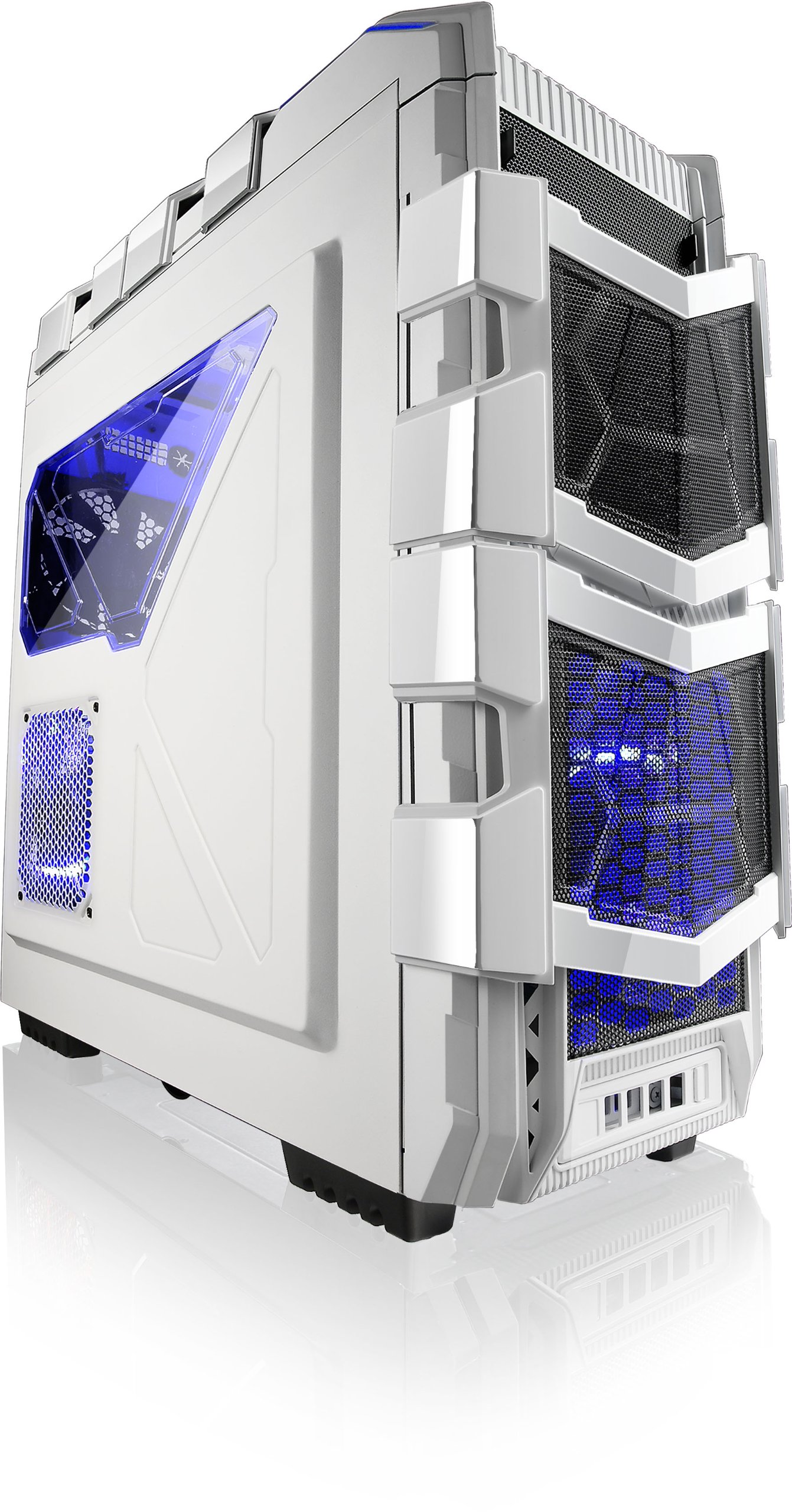
Figura 1: Înclinat view of the Azza XT1 case, showing its overall design and front mesh panels.
2. Instalarea plăcii de bază
Install the I/O shield into the rear opening of the case. Align your ATX motherboard with the standoffs inside the case. Secure the motherboard using the provided screws.

Figure 2: Internal layout of the Azza XT1 case, highlighting the motherboard tray and drive bay areas.
3. Instalarea sursei de alimentare
Mount your power supply unit (PSU) into the designated area at the bottom rear of the case. Secure it with screws from the outside.
4. Drive Installation (HDD/SSD)
Utilize the tool-less HDD holders. For the easy swap slot, simply slide the hard drive into the bottom slot until it clicks into place. For other bays, secure drives using the provided trays or mounting mechanisms. The HDD holder can rotate 90 degrees for easier access.

Figura 3: Partea internă din spate view of the Azza XT1 case, illustrating the drive bays and the space behind the motherboard for cable management.
5. Expansion Card Installation (VGA, etc.)
Remove the necessary expansion slot covers at the rear of the case. Insert your VGA card or other expansion cards into the motherboard's PCIe slots and secure them with screws or the tool-less retention clips.
6. Gestionarea cablurilor
Route all power and data cables through the designated cutouts and tie-down points behind the motherboard tray. This improves airflow and maintains a clean internal appearance.
7. Închideți Carcasa
Once all components are installed and cables are managed, reattach the side panels and secure them with the thumb screws.
Operarea carcasei
The Azza XT1 case provides the housing and cooling for your PC components. Operation primarily involves using the front panel controls:
- Buton de alimentare: Located on the top panel, press to power on or off your system.
- Buton de resetare: Located on the top panel, press to restart your system.
- Porturi USB: Connect USB devices to the front panel USB 2.0 and USB 3.0 ports.
- Mufe audio: Connect headphones and microphones to the front panel audio jacks.

Figura 4: Sus view of the Azza XT1 case, detailing the power button, USB ports, and audio jacks.
Întreţinere
Regular maintenance helps ensure optimal performance and longevity of your Azza XT1 case and its components.
- Curățare de praf: Curățați periodic filtrele de praf și componentele interne folosind aer comprimat. Asigurați-vă că sistemul este oprit și deconectat de la priză înainte de curățare.
- Inspecție ventilator: Check fans for dust buildup and ensure they are spinning freely. Clean as necessary.
- Verificare cablu: Verify that all internal cables remain securely connected and are not obstructing airflow.
- Curatenie exterioara: Ștergeți suprafețele exterioare cu un material moale, damp pânză. Evitați curățarea abrazivă.
Depanare
This section addresses common issues you might encounter with your PC case.
| Problemă | Cauza posibila | Soluţie |
|---|---|---|
| Sistemul nu pornește. | Power button not connected correctly; PSU issue; motherboard issue. | Verify front panel power button cable is securely connected to the motherboard. Check PSU connections. |
| Ventilatoarele nu se învârt. | Fan cables disconnected; fan failure; insufficient power. | Ensure all fan power cables are properly connected to the motherboard or fan controller. |
| Front panel USB ports not working. | USB header cable disconnected or incorrectly connected. | Check that the USB 2.0 and USB 3.0 header cables from the front panel are correctly plugged into the motherboard. |
| Flux de aer slab sau supraîncălzire. | Dust buildup; blocked vents; improper fan configuration. | Clean dust filters and internal components. Ensure case fans are oriented correctly for optimal airflow. |
Specificații
Detailed specifications for the Azza XT1 Full Tower Gaming Case (CSAZ-XT1 W):
| Caracteristică | Detaliu |
|---|---|
| Marca | Azza |
| Numărul de model | CSAZ-XT1 W |
| Tipul cazului | Turn complet |
| Culoare | Alb |
| Material | SECC Steel |
| Compatibilitate cu placa de baza | ATX |
| Dimensiunile produsului (Lxlxh) | 51.56 x 20.57 x 56.64 cm |
| Greutatea articolului | 9.98 kg |
| Porturi USB 2.0 | 2 |
| Porturi USB 3.0 | 1 |
| VGA Card Length Support | Până la 340 mm |
| Suport pentru răcire cu apă | Up to 2x120mm radiators |
Garanție și suport
For warranty information and technical support, please refer to the official Azza website-ul lor web sau contactați departamentul lor de asistență pentru clienți. Păstrați bonul fiscal ca dovadă a achiziției pentru reclamațiile în garanție.
Producător: AZZA (USA) Technology Inc