
1. Introducere
The D-Link DIR-808L Wireless AC600 Dual-Band Cloud Router provides high-speed Wi-Fi connectivity with dual-band technology and Fast Ethernet ports. This device is designed to deliver a reliable networking experience for home use, supporting activities such as HD media streaming, online gaming, and web browsing. It includes security features and mydlink Cloud Services for remote network management.
The DIR-808L is backward compatible with existing Wi-Fi devices (802.11a/b/g/n) for seamless integration into your current network setup.
2. Conținutul pachetului
Verificați dacă pachetul dvs. conține următoarele articole:
- Wireless AC600 Dual Band Cloud Router (DIR-808L)
- Adaptor de alimentare
- Cablu Ethernet
- Ghid de instalare rapidă
If any of the above items are missing or damaged, please contact your local D-Link reseller.
3. Cerințe minime de sistem
To set up and use the D-Link DIR-808L router, ensure your computer meets the following minimum requirements:
- Sistem de operare: Windows® 8, Windows® 7, Windows Vista®, Windows® XP SP3, or Mac OS® X (v10.4 or higher)
- Web Browser: Internet Explorer® v6, Mozilla® Firefox®, Google Chrome, or Safari 4 or higher
- Hardware: Placă de interfață de rețea (NIC)
For Internet access, you will also need:
- Modem prin cablu sau DSL
- Abonament la un furnizor de servicii de internet (ISP)
4. Hardware terminatview
Familiarize yourself with the physical components and ports of your DIR-808L router.

Figura 4.1: Faţă view of the DIR-808L router with power and internet status indicators.

Figura 4.2: Rear panel of the DIR-808L router, detailing port layout.
Descriere panou din spate:
- Porturi LAN (1-4): Four Fast Ethernet ports for connecting wired devices such as computers, gaming consoles, or network storage.
- Port de internet: Se conectează la modem pentru acces la internet.
- Buton de resetare: Press and hold for 10 seconds to restore the router to factory default settings.
- Putere de intrare: Conectați aici adaptorul de alimentare inclus.
- Butonul WPS: Use for easy, secure wireless connection to WPS-compatible devices.
5. Configurare și instalare
Follow these steps to set up your D-Link DIR-808L router.
5.1 Conexiunea fizică
- Oprire: Deconectați alimentarea de la modem și router (dacă este cazul).
- Conectați modemul: Connect an Ethernet cable from your modem's Ethernet port to the Internet port on the back of your DIR-808L router.
- Conectarea computerului (opțional): For initial setup, connect an Ethernet cable from your computer's Ethernet port to any of the LAN ports (1-4) on the back of your DIR-808L router. You can also connect wirelessly using the default Wi-Fi name and password found on the device label.
- Pornirea modemului: Connect the power adapter to your modem and power it on. Wait for the modem's indicator lights to stabilize, indicating an active internet connection.
- Pornirea routerului: Conectați adaptorul de alimentare inclus la Intrare de putere on the back of your DIR-808L router and plug it into a power outlet. The power LED on the front of the router should illuminate.
5.2 Configurație inițială (Web Browser)
After physical connections are made, configure your router using a web browser.
- Deschide a web browser (e.g., Chrome, Firefox, Edge) on a computer connected to the router.
- În bara de adrese, tastați
http://dlinkrouter.localor192.168.0.1și apăsați Enter. - The D-Link Setup Wizard should appear. Follow the on-screen instructions to configure your Internet connection, wireless network name (SSID), and password.
- Create a unique password for your router's administration interface for security.
5.3 Quick Router Setup Mobile App
Alternatively, you can use the D-Link Quick Router Setup mobile app for convenient setup from your smartphone or tablet.
- Download the "D-Link QRS Mobile" app from the Apple App Store or Google Play Store.
- Conectați dispozitivul mobil la rețeaua Wi-Fi implicită a routerului (SSID-ul și parola se găsesc pe eticheta routerului).
- Launch the QRS Mobile app and follow the instructions to complete the setup.
6. Funcționare
This section covers the basic operation of your DIR-808L router.
6.1 Dual-Band Wireless Performance
The DIR-808L operates on two frequency bands: 2.4 GHz and 5 GHz.
- Banda de 2.4 GHz: Oferă o acoperire mai largă și o penetrare mai bună prin pereți, potrivită pentru utilizarea generală a internetului și pentru dispozitive mai vechi.
- Banda de 5 GHz: Offers faster speeds and less interference, ideal for high-bandwidth activities like HD video streaming and online gaming, but with a shorter range.
You can configure separate SSIDs (network names) for each band or use a single SSID for both, allowing the router to intelligently assign devices to the optimal band.
6.2 Conectivitate prin cablu
The four Fast Ethernet LAN ports allow you to connect up to four wired devices directly to the router for stable and fast connections.
6.3 mydlink Cloud Management
mydlink Cloud Services enable you to monitor and manage your network remotely from anywhere using the mydlink Lite app or the mydlink web portal.
- Acces de la distanță: View connected devices, block unwanted users, and receive notifications.
- Control parental: Manage internet access schedules and block specific website-uri.
To use mydlink services, you will need to register your router with a mydlink account during or after the initial setup process.
6.4 Securitate wireless
The DIR-808L supports WPA/WPA2 encryption to secure your wireless network. It is recommended to use WPA2-PSK (AES) for the strongest security.
- WPS (Configurare protejată prin Wi-Fi): Provides a simple way to connect WPS-compatible devices to your wireless network by pressing the WPS button on the router and the device.
7. Întreținere
Întreținerea corectă asigură performanța optimă și longevitatea routerului dumneavoastră.
- Actualizări firmware: Verificați periodic suportul D-Link website for firmware updates. Updating firmware can improve performance, add new features, and fix security vulnerabilities. Instructions for updating firmware are typically provided with the update package.
- curatenie: Keep the router in a clean, dust-free environment. Use a soft, dry cloth to clean the exterior. Do not use liquid cleaners or aerosols.
- Plasare: Place the router in a central location, away from obstructions and devices that may cause interference (e.g., cordless phones, microwaves).
8. Depanare
This section addresses common issues you might encounter with your DIR-808L router.
8.1 Fără conexiune la internet
- Verificați cablurile: Asigurați-vă că toate cablurile Ethernet sunt conectate în siguranță la porturile corecte de pe router și modem.
- Ciclu de alimentare: Power off your modem, then your router. Wait 30 seconds, then power on your modem first. Once the modem is fully online (indicator lights stable), power on your router.
- Stare modem: Verify that your modem has an active internet connection. Check its indicator lights or consult your modem's manual.
- Setări ISP: Confirm your Internet Service Provider (ISP) settings are correctly entered in the router's web interfata.
8.2 Slow Wireless Speed or Poor Range
- Plasarea routerului: Position the router in a central location, elevated, and away from large metal objects, concrete walls, and other electronic devices that may cause interference.
- Interferență: Other wireless devices (cordless phones, microwaves, Bluetooth devices) can interfere with Wi-Fi signals. Try changing the wireless channel in the router's settings.
- Dual-Band Usage: Connect devices that require high bandwidth (e.g., streaming devices) to the 5 GHz band, and other devices to the 2.4 GHz band.
- Firmware: Asigurați-vă că firmware-ul routerului este actualizat.
8.3 Nu se pot accesa routerele Web Interfață
- Adresa IP: Asigurați-vă că computerul este configurat să obțină automat o adresă IP (DHCP).
- Adresă corectă: Double-check that you are typing the correct address:
http://dlinkrouter.localor192.168.0.1. - Temporary Disable Firewall/Antivirus: Dezactivați temporar orice firewall sau software antivirus de pe computerul dvs. care ar putea bloca accesul.
- Resetare router: If all else fails, perform a factory reset by pressing and holding the Reset button on the back of the router for 10 seconds. Nota: Aceasta va șterge toate setările personalizate.
9. Specificatii tehnice
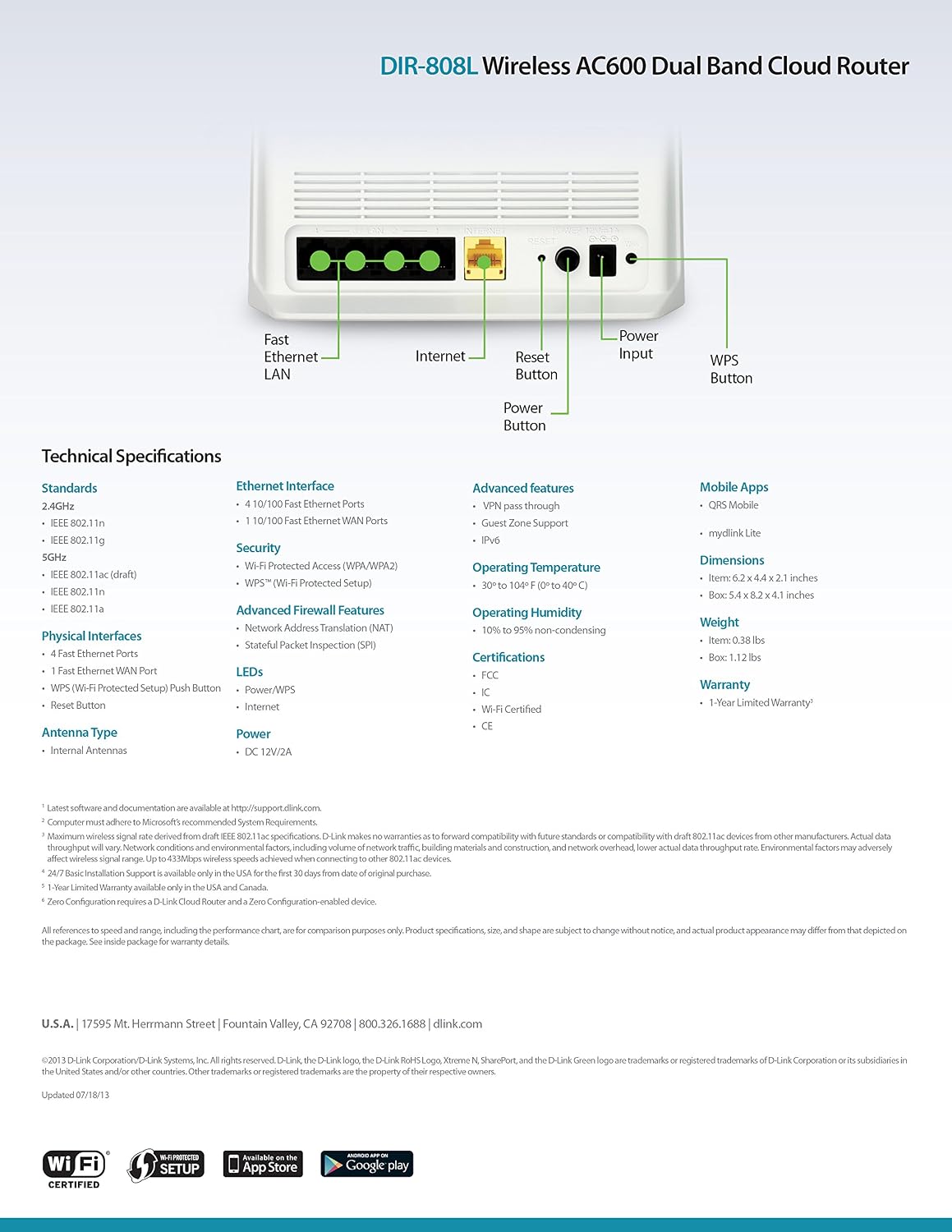
Figura 9.1: Technical specifications and rear panel diagram of the DIR-808L router.
| Caracteristică | Descriere |
|---|---|
| Numele modelului | DIR-808L |
| Tip fără fir | 802.11ac (AC600), 802.11a/b/g/n |
| Clasa de bandă de frecvență | Bandă duală (2.4 GHz și 5 GHz) |
| Conectivitate prin cablu | 4 x Fast Ethernet LAN Ports, 1 x Fast Ethernet WAN Port |
| Securitate | WPA/WPA2, WPS (Wi-Fi Protected Setup) |
| Compatibilitatea sistemelor de operare | Windows, Mac, Android |
| Dimensiuni (Lxlxh) | 2.1 x 6.1 x 4.4 inci |
| Greutatea articolului | 7.2 uncii (0.45 lire) |
| Intrare de putere | 12V DC, 1A |
| Temperatura de operare | 0 până la 40°C (32 până la 104°F) |
| Umiditatea de funcționare | 10% până la 95% fără condensare |
| Certificari | FCC, Wi-Fi Certified, CE |
10. Informații despre garanție
The D-Link DIR-808L Wireless AC600 Dual-Band Cloud Router comes with a Garanție limitată de 1 ani de la data achiziției. Această garanție acoperă defectele de materiale și de fabricație în condiții normale de utilizare.
For full warranty terms and conditions, please refer to the warranty card included with your product or visit the official D-Link website-ul.
Legal Disclaimer: D-Link is not responsible for honoring warranty claims from unauthorized resellers. Please contact the manufacturer directly for official warranty service.
11. Suport tehnic
If you encounter problems that are not addressed in this manual, or require further assistance, please contact D-Link Technical Support.
- Asistență D-Link Website: Vizita support.dlink.com for FAQs, documentation, and firmware downloads.
- Phone Support (U.S.): You may contact D-Link customer support at 1-877-453-5465. Please have your product model number (DIR-808L) and serial number ready when calling.