
Supersonic SC-25
SuperSonic SC-25 2.0 Channel DVD Player with USB Input User Manual
Model: SC-25
Introducere
Mulțumesc pentru achizițieasing the SuperSonic SC-25 2.0 Channel DVD Player with USB Input. This manual provides essential information for the safe and efficient operation of your new device. Please read it thoroughly before use and retain it for future reference.
Măsuri de siguranță
- Nu expuneți unitatea la ploaie sau umezeală pentru a preveni incendiul sau electrocutarea.
- Nu deschideți c.asing. Apelați la personal calificat pentru toate lucrările de service.
- Asigurați o ventilație adecvată în jurul unității.
- Evitați amplasarea unității pe suprafețe instabile.
- Deconectați cablul de alimentare în timpul furtunilor cu fulgere sau când nu este utilizat pentru perioade lungi de timp.
Conținutul pachetului
Before setup, please verify that all items are present:
- 1 SuperSonic SC-25 DVD Player Unit
- 1 Telecomandă
- 1 Manual de utilizare (acest document)
- Cablu de alimentare
- Audio/Video (AV) Cable
Instrucțiuni de configurare
1. Conectarea la un televizor
- Asigurați-vă că atât playerul DVD, cât și televizorul sunt oprite.
- Connect one end of the AV cable (red, white, yellow connectors) to the corresponding output jacks on the back of the DVD player.
- Connect the other end of the AV cable to the corresponding input jacks on your television.
- For optimal video quality, ensure the television input is set to the correct AV channel (e.g., Video 1, AV1). The player supports NTSC video format.
2. Conexiune la alimentare
- Plug the power cable into the AC IN port on the back of the DVD player.
- Conectați celălalt capăt al cablului de alimentare la o priză electrică standard.
3. Pornirea inițială
- Press the Power button on the front panel of the DVD player or on the remote control.
- Turn on your television and select the correct input source (e.g., AV1, Video 1) to see the DVD player's display.
Instrucțiuni de operare
1. Redarea discului
- Apăsați butonul OPEN/CLOSE de pe panoul frontal sau de pe telecomandă pentru a deschide sertarul discului.
- Place a compatible disc (DVD, CD, VCD, SVCD, MP3, Picture CD, CD-R, CD-RW) onto the disc tray with the label side facing up.
- Press the OPEN/CLOSE button again to close the disc tray. The player will automatically begin reading the disc.
- Folosiți butoanele PLAY, PAUSE, STOP, FAST FORWARD și REWIND de pe telecomandă pentru a gestiona redarea.
- The player supports multi-level fast forward and backward scan functionalities.
2. Redare USB
- Insert a USB flash drive into the USB input port on the front of the DVD player.
- The player should automatically detect the USB device and display its contents. If not, use the SOURCE or USB button on the remote to switch to USB mode.
- Navigați prin files using the arrow keys and SELECT/ENTER button on the remote.
- Playerul acceptă MP3 file format for audio playback.
3. Language and Subtitle Settings
- During DVD playback, press the AUDIO button on the remote to cycle through available audio languages (up to 8 languages supported).
- Press the SUBTITLE button on the remote to cycle through available subtitle languages (up to 32 subtitles supported).
Întreţinere
1. Curățarea unității
- Wipe the exterior of the DVD player with a soft, dry cloth.
- Nu folosiți agenți de curățare lichizi sau spray-uri cu aerosoli, deoarece acestea pot deteriora finisajul sau componentele interne.
2. Cleaning Discs
- Manevrați discurile de margini pentru a evita amprentele.
- Dacă un disc este murdar, ștergeți-l ușor din centru spre exterior cu o lavetă moale, fără scame.
- Do not use abrasive cleaners or solvents on discs.
3. Depozitare
- Store the DVD player in a cool, dry place away from direct sunlight and extreme temperatures.
- When not in use, store discs in their cases to protect them from dust and scratches.
Depanare
| Problemă | Cauza posibila | Soluţie |
|---|---|---|
| Fără putere | Cablul de alimentare nu este conectat; Priza de alimentare nu este activă. | Asigurați-vă că este conectat corect cablul de alimentare. Testați priza cu un alt dispozitiv. |
| Fără imagine sau sunet | AV cables incorrectly connected; Incorrect TV input selected. | Check AV cable connections. Select the correct input source on your TV. |
| Discul nu se redă | Disc is dirty or scratched; Disc is incompatible; Disc inserted incorrectly. | Clean the disc. Ensure the disc type is supported. Insert disc with label side up. |
| Dispozitivul USB nu este recunoscut | USB device not properly inserted; Unsupported file format on USB. | Re-insert the USB device. Ensure filesunt în format MP3. |
Specificații
- Marca: Supersonic
- Număr de model: SC-25
- Tip media: CD, DVD (Compatible with DVD/CD/VCD/SVCD/MP3/Picture/CD-R/CD-RW)
- Tehnologie de conectivitate: Powerline (Implies standard AC power connection)
- Culoare: Negru
- Greutatea articolului: 1.9 lire sterline
- Dispozitive compatibile: Televiziune
- Input Video Compatibility: NTSC
- Număr de canale: 2
- Format video analogic: NTSC
- Tipul controlerului: Telecomanda
- File Format (USB): MP3
- UPC: 639131000254
- Producător: SUPERSONIC INC.
- Dimensiuni pachet: 7.874 H x 24.13 L x 24.13 W (centimetri)
- Greutate pachet: 2.160 lire sterline
- Țara de origine: China
Garanție și suport
This SuperSonic SC-25 DVD Player is covered by a Garantia producatorului. For specific details regarding warranty terms and conditions, please refer to the documentation included with your purchase or contact SuperSonic customer support.
For technical assistance or customer service inquiries, please visit the official SuperSonic website or contact their support channels. Keep your purchase receipt for warranty claims.
Produs terminatview
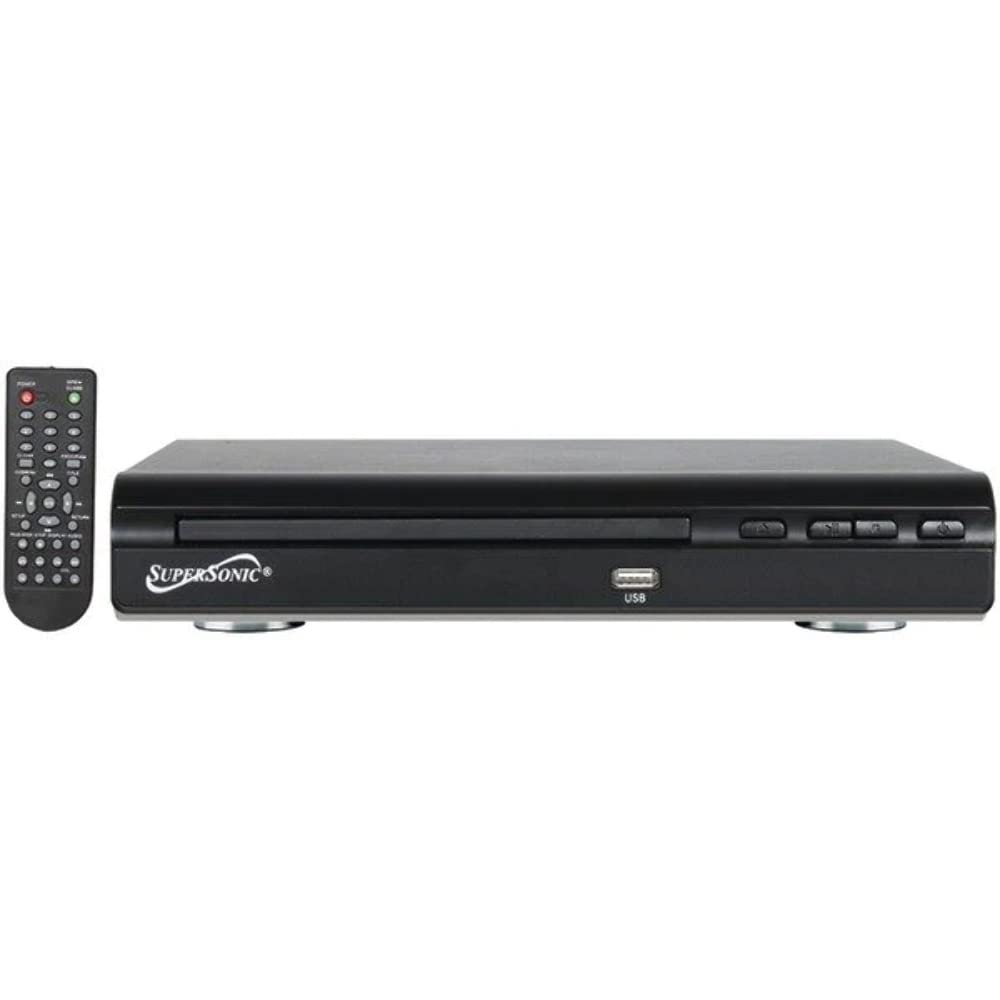
Faţă view of the SuperSonic SC-25 DVD player, showing the disc tray, USB port, and control buttons.
Documente aferenteSC-25


Ask a question about this manual
Ask about setup, troubleshooting, compatibility, parts, safety, or missing instructions. Manuals+ will review the question and use this page’s manual context to help answer it.