
1. Introducere și Pesteview
This manual provides comprehensive instructions for the setup, operation, maintenance, and troubleshooting of your InFocus IN3124 Projector. Designed for clarity and ease of use, this guide will help you maximize your projector's performance and longevity.
The InFocus IN3124 is a high-performance projector featuring XGA (1024 x 868) native resolution, 4800 lumens of brightness, and a 3000:1 contrast ratio, making it suitable for various presentation environments. Its portable design allows for flexible placement and usage.
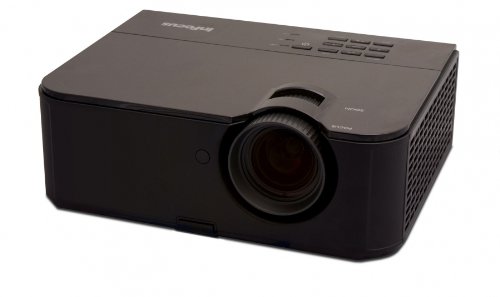
Figura 1: Partea frontală view of the InFocus IN3124 Projector, highlighting the main lens and the top-mounted control panel.
2. Configurare
2.1 Despachetarea
Carefully remove the projector and all accessories from the packaging. Verify that all components listed in the packing list are present. Retain the original packaging for future transport or storage.
2.2 Plasarea
Position the projector on a stable, level surface. Ensure adequate ventilation around the unit to prevent overheating. Maintain a clear path between the projector lens and the projection screen or surface. The optimal projection distance will vary based on the desired screen size.
2.3 Conectarea puterii
- Conectați cablul de alimentare la intrarea de alimentare a proiectorului.
- Conectați celălalt capăt al cablului de alimentare la o priză cu împământare.
2.4 Conectarea surselor de intrare
The IN3124 projector supports various input sources. Connect your video source (e.g., computer, DVD player) to the appropriate input port on the projector. Common ports include VGA and HDMI (if available on your specific model).
- VGA: Use a VGA cable to connect to a computer's video output.
- HDMI: Use an HDMI cable for digital video and audio (check projector for HDMI port availability).
3. Instrucțiuni de utilizare
3.1 Pornire/Oprire
- Pentru a porni: Apăsați butonul de alimentare de pe panoul de control al proiectorului sau de pe telecomandă. Indicatorul luminos de alimentare se va aprinde.
- Pentru a opri: Press the power button twice. The projector will enter a cooling cycle before shutting down completely. Do not unplug the projector during the cooling cycle.
3.2 Adjusting Focus and Zoom
Rotate the focus ring on the projector lens until the image appears sharp and clear. Use the zoom ring (if present) to adjust the image size to fit your screen.
3.3 Selecting Input Sources
Press the "Source" or "Input" button on the projector's control panel or remote control to cycle through available input sources (e.g., VGA, HDMI). Select the input corresponding to your connected device.
3.4 Menu Navigation and Keystone Correction
Use the menu buttons on the projector or remote to access the On-Screen Display (OSD). Navigate through the menu options to adjust settings such as brightness, contrast, color, and keystone correction. Keystone correction helps to square the image if the projector is not perfectly perpendicular to the screen.
4. Întreținere
4.1 Curățarea lentilei
Ștergeți ușor lentila proiectorului cu o lavetă moale, fără scame, special concepută pentru suprafețe optice. Nu utilizați produse de curățare abrazive sau forță excesivă, deoarece acest lucru poate zgâria lentila.
4.2 Curățarea filtrelor de aer
Regularly check and clean the projector's air filters to ensure proper airflow and prevent overheating. Refer to the projector's specific filter access instructions. Use a soft brush or vacuum cleaner to remove dust accumulation.
4.3 Lamp Înlocuire
Proiectorul lamp are o durată de viață finită. Când lamp life indicator appears or the image becomes dim, the lamp may need replacement. Consult the full service manual or manufacturer's website for detailed lamp proceduri de înlocuire și compatibilitateamp models. Always allow the projector to cool down completely before attempting lamp înlocuire.
4.4 Depozitare
Când nu utilizați proiectorul pentru perioade lungi de timp, depozitați-l într-un loc răcoros și uscat, ferit de lumina directă a soarelui și de temperaturi extreme. Folosiți ambalajul original sau o carcasă de protecție pentru a preveni praful și deteriorarea.
5. Depanare
This section addresses common issues you might encounter with your InFocus IN3124 Projector. For more complex problems, contact customer support.
- Nicio imagine afișată:
- Asigurați-vă că proiectorul este pornit și că indicatorul de alimentare este aprins continuu.
- Verify that the input source cable (VGA, HDMI) is securely connected to both the projector and the source device.
- Selectați sursa de intrare corectă folosind butonul „Sursă”.
- Check if the source device is outputting a signal.
- Dim or Faded Image:
- Adjust brightness and contrast settings in the OSD menu.
- Asigurați-vă că lamp is not nearing the end of its lifespan.
- Clean the projector lens and air filters.
- Check the projection mode (e.g., Eco mode might reduce brightness).
- Imaginea este neclară:
- Reglați inelul de focalizare de pe lentila proiectorului.
- Asigurați-vă că suprafața de proiecție este plană și că proiectorul este stabil.
- Check the resolution settings of your source device to match the projector's native resolution.
- Telecomanda nu funcționează:
- Înlocuiți bateriile din telecomandă.
- Asigurați-vă că nu există obstrucții între telecomandă și receptorul IR al proiectorului.
- Îndreptați telecomanda direct spre proiector.
6. Specificații
The following table outlines the key technical specifications for the InFocus IN3124 Projector:
| Caracteristică | Caietul de sarcini |
|---|---|
| Numărul de model | IN3124 |
| Rezoluție afișare (nativă) | XGA (1024 x 868) |
| Luminozitate | 4800 lumeni |
| Raport de contrast | 3000:1 |
| Tip de afișare | LCD, LCoS |
| Greutatea articolului | 8.16 lire (3.7 kg) |
| Dimensiuni produs (L x l x H) | 12.83 x 10.43 x 4.8 inchi (32.59 x 26.49 x 12.19 cm) |
| Caracteristica specială | Portabil |
7. Garanție și asistență
For detailed warranty information, please refer to the warranty card included with your product packaging or visit the official InFocus website. Garanția acoperă de obicei defectele de fabricație pentru o perioadă specificată de la data achiziției.
If you encounter issues that cannot be resolved using the troubleshooting guide, or require technical assistance, please contact InFocus customer support. Contact details can usually be found on the manufacturer's webpe site sau în documentația produsului dumneavoastră.