
Introducere
Welcome to your new Cherub WST-620 Flip Tuner. This manual provides instructions for the proper setup, operation, and maintenance of your device. Please read it thoroughly before use. The WST-620 is a versatile clip-on tuner designed for various musical instruments, featuring an ultra-large LCD with orientation-sensing technology for optimal viewing.
Caracteristici cheie
- Supports Guitar, Bass, Violin, Ukulele, and Chromatic Tuning.
- Display changes color to indicate when you are in tune.
- Ultra-large LCD with innovative orientation-sensing technology that automatically flips the display.
- Allows clipping on the front or back of the headstock for both left and right-handed instruments.
Conținutul pachetului
- Cherub WST-620 Flip Tuner
- Baterie CR2032 (preinstalată sau inclusă)
- Manual de utilizare (acest document)
Identificarea pieselor
Familiarize yourself with the components of your WST-620 tuner.
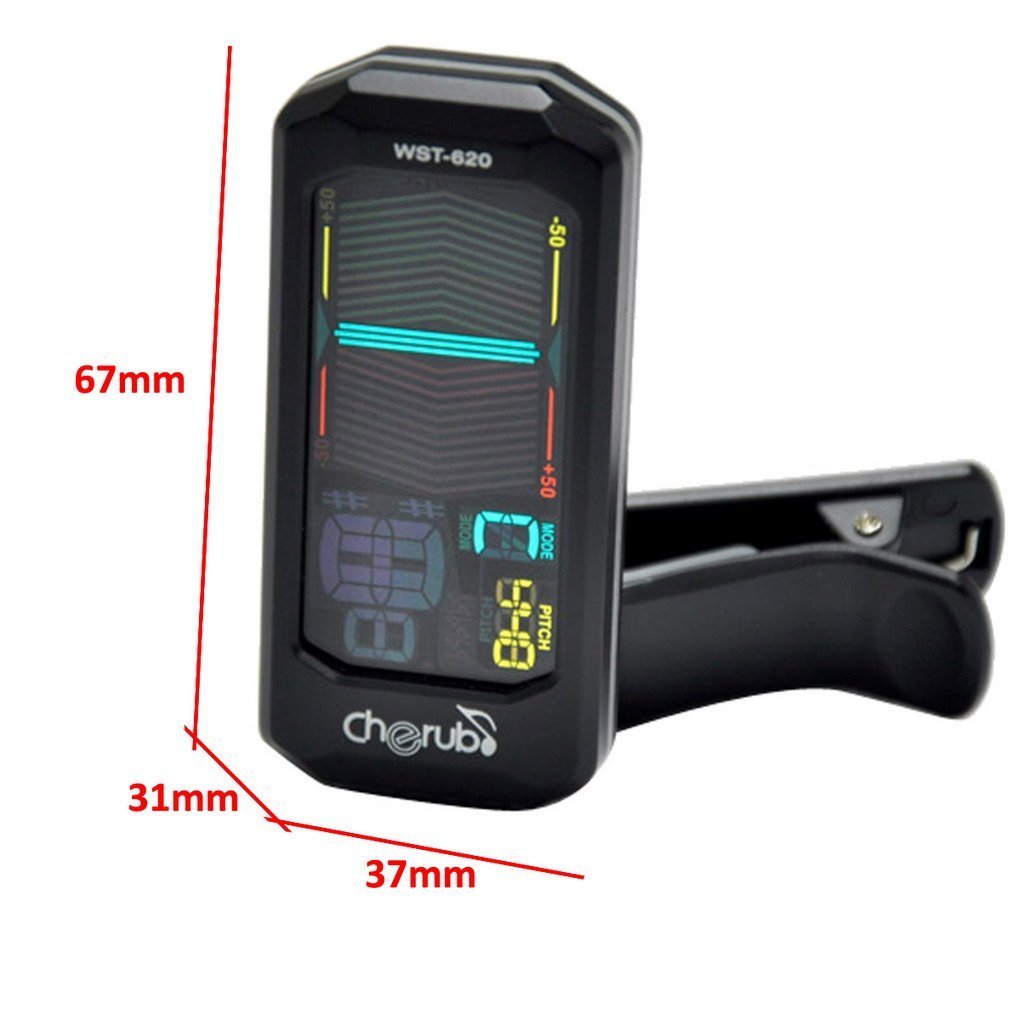
Imagine: față view of the Cherub WST-620 Flip Tuner with dimensions (67mm height, 37mm width, 31mm depth).

Imagine: față view of the Cherub WST-620 Flip Tuner, showing the LCD display with tuning indicators and pitch setting.

Imagine: Spate view of the Cherub WST-620 Flip Tuner, highlighting the power/mode button, pitch button, flat button, and battery compartment.

Imagine: Laterală view of the Cherub WST-620 Flip Tuner, showing the adjustable clip mechanism.

Image: The Cherub WST-620 Flip Tuner attached to an instrument, demonstrating its flexible viewunghiul de ing.
Înființat
1. Instalarea bateriei
The WST-620 uses one CR2032 battery. If the display does not light up or is dim, replace the battery.
- Localizați compartimentul bateriilor pe spatele tunerului.
- Use a coin or small screwdriver to twist the battery cover counter-clockwise to open.
- Introduceți o nouă baterie CR2032 cu partea pozitivă (+) în sus.
- Puneți la loc capacul bateriei și rotiți-l în sensul acelor de ceasornic pentru a-l fixa.
2. Atașarea tunerului
The WST-620 features a flexible clip and an orientation-sensing display.
- Open the clip and attach it firmly to the headstock of your instrument.
- Adjust the angle of the tuner for optimal viewing. The display will automatically orient itself.
Instrucțiuni de operare
1. Pornire/Oprire
Țineți apăsat butonul PUTERE / MOD button (located on the back) for 2 seconds to turn the tuner on or off.
2. Selectarea modului de acordare
While the tuner is on, short press the PUTERE / MOD button to cycle through the available tuning modes:
- C (Chromatic): Tunes all notes.
- G (Guitar): Tunes standard guitar notes (E, A, D, G, B, E).
- B (Bass): Tunes standard bass notes (E, A, D, G).
- V (Violin): Tunes standard violin notes (G, D, A, E).
- U (Ukulele): Tunes standard ukulele notes (G, C, E, A).
3. Setting Pitch (A4 Calibration)
The default A4 pitch is 440Hz. To adjust:
- Apăsați scurt pe PAS button to enter pitch calibration mode.
- Apăsați tasta PAS button repeatedly to adjust the A4 frequency from 430Hz to 450Hz.
- Setarea va fi salvată automat după câteva secunde de inactivitate.
4. Flat Tuning (Guitar/Bass Mode)
In Guitar or Bass mode, you can set flat tuning:
- Apăsați scurt pe PLAT button to cycle through ♭, ♭♭, ♭♭♭, ♭♭♭♭, or no flat.
- This allows for tuning down by semitones.
5. Acordarea instrumentului
Once the tuner is on and the correct mode is selected:
- Pluck a single string on your instrument.
- The display will show the note name and a meter indicating pitch accuracy.
- plat: If the needle is to the left and the display is red, the note is flat. Tighten the string.
- Sharp: If the needle is to the right and the display is red, the note is sharp. Loosen the string.
- În ton: When the note is in tune, the needle will be in the center, and the display will turn green.
Întreţinere
1. Înlocuirea bateriei
Refer to the "Battery Installation" section under Setup for instructions on replacing the CR2032 battery.
2. Curatenie
Wipe the tuner with a soft, dry cloth. Do not use liquid cleaners or solvents, as they may damage the finish or internal components.
3. Depozitare
If the tuner will not be used for an extended period, remove the battery to prevent leakage and store the device in a cool, dry place.
Depanare
| Problemă | Cauza posibila | Soluţie |
|---|---|---|
| Tunerul nu pornește. | Baterie descărcată sau instalată incorect. | Replace the CR2032 battery, ensuring correct polarity (+ side up). |
| Afișajul este întunecat sau pâlpâie. | Putere scăzută a bateriei. | Înlocuiți bateria CR2032. |
| Acordorul nu detectează notele cu precizie. | Incorrect tuning mode selected; weak vibration from instrument; noisy environment. | Ensure the correct tuning mode (C, G, B, V, U) is selected. Pluck strings firmly. Tune in a quiet environment. Ensure tuner is securely clipped. |
| Display does not flip automatically. | Rare sensor malfunction. | Try turning the tuner off and on again. If the issue persists, contact support. |
Specificații
- Model: WST-620
- Moduri de reglare: Cromatic, Chitară, Bas, Vioară, Ukulele
- Frecvența A4: 430-450Hz (adjustable)
- Metoda de detectare: Vibration (Clip)
- Gama de reglare: A0 (27.5Hz) - C8 (4186Hz)
- Putere: 3V (CR2032 Lithium Battery)
- Dimensiuni: 12.7 x 7.62 x 5.08 cm (approx. 67 x 37 x 31 mm for the tuner unit)
- Greutate: 45.4 g
Garanție și suport
Cherub products are designed for reliability and performance. For warranty information or technical support, please refer to the official Cherub website-ul web sau contactați distribuitorul local. Păstrați bonul fiscal ca dovadă a achiziției.
Pentru asistență suplimentară, vă rugăm să vizitați: www.cherubtechnology.com