
1. Introducere
The Aerocool Touch2100 is a multi-functional fan and temperature controller designed for PC enthusiasts. It allows users to monitor and adjust up to five fan speeds and corresponding temperatures via an intuitive touch-sensitive LCD display. Additionally, it provides convenient front panel access to two USB 3.0 ports and audio/microphone jacks, enhancing your system's connectivity and control.
2. Caracteristicile produsului
- Controls and monitors five independent fan speeds and temperature zones.
- Interactive touch control LCD display for easy adjustments.
- Integrated 2 x USB 3.0 ports for high-speed data transfer.
- Front panel audio (headphone) and microphone ports for convenient access.
- Adjustable display backlight color.
- Temperature alarm function for critical thermal conditions.
3. Conținutul pachetului
Vă rugăm să verificați dacă toate articolele sunt prezente în coletul dumneavoastră:
- Aerocool Touch2100 Fan and Temperature Controller Unit
- Fan Cables (3-pin)
- Senzori de temperatură
- Șuruburi de montare
- Cablu USB 3.0
- Audio/Microphone Cables
- 4-pin Molex Power Cable
4. Configurare și instalare
Follow these steps to properly install your Aerocool Touch2100 unit into your computer system.
- Pregătiți-vă sistemul: Power off your computer and disconnect it from the power source. Open your computer case.
- Instalați unitatea: Locate two available 5.25-inch drive bays. Slide the Touch2100 unit into the bays from the front of the case until it is flush with the front panel. Secure the unit using the provided mounting screws on both sides.
- Conectare alimentare: Connect the 4-pin Molex power cable from your power supply unit (PSU) to the corresponding connector on the back of the Touch2100 controller.
- Conectați ventilatoarele: Connect up to five 3-pin fan cables from your system fans to the fan headers on the Touch2100 unit. Ensure each fan is connected to its designated header (Fan 1 to Fan 5).
- Attach Temperature Sensors: Carefully attach the temperature sensors to the components you wish to monitor (e.g., CPU heatsink, GPU, hard drive, case areas). Use adhesive tape (not included, or use provided strips if available) to secure them. Connect each sensor to its corresponding temperature sensor port on the controller.
- Connect USB 3.0: Connect the blue USB 3.0 cable from the Touch2100 to an available USB 3.0 header on your motherboard. If your motherboard does not have a USB 3.0 header, some cables may include a USB 2.0 adapter for basic functionality.
- Connect Audio/Mic: Connect the audio and microphone cables from the Touch2100 to the corresponding audio headers on your motherboard. These are typically labeled 'HD Audio' or 'AC'97'.

5. Instrucțiuni de utilizare
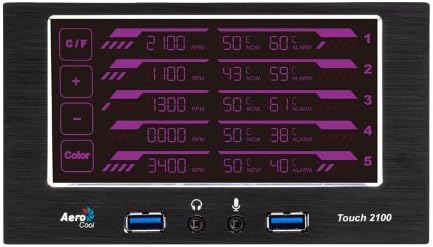
The Touch2100 features a touch-sensitive LCD display for easy control and monitoring.
5.1 Afișare pesteview

The display shows five channels, each indicating:
- Viteza ventilatorului: Revolutions Per Minute (RPM) for the connected fan.
- Temperatură: Current temperature reading from the connected sensor.
- Stare alarmă: Indicates if a temperature alarm is active for that channel.
5.2 Controale de bază
- Butonul C/F: Touch this button to switch the temperature display between Celsius (°C) and Fahrenheit (°F).
- Butoane +/-: Use these buttons to adjust the selected fan speed or temperature alarm threshold.
- Buton de culoare: Touch this button to cycle through various backlight colors for the LCD display.

5.3 Reglarea vitezei ventilatorului
- Touch the desired fan channel (1-5) on the display to select it. The selected channel will typically highlight or blink.
- Utilizați + şi - buttons to increase or decrease the fan speed. Speeds are typically adjusted in increments (e.g., 100 RPM).
- The display will show the new RPM value. The controller will automatically adjust the fan to the set speed.
5.4 Setarea alarmelor de temperatură
- Touch the temperature reading of the desired channel (1-5) to select it for alarm setting.
- Utilizați + şi - buttons to set the desired temperature threshold.
- If the monitored temperature exceeds this threshold, an alarm will activate (visual and/or audible, depending on model).
5.5 USB 3.0 and Audio Ports
The front panel USB 3.0 ports provide high-speed connectivity for peripherals. The audio and microphone jacks allow for convenient connection of headphones and microphones.
6. Întreținere
- curatenie: Use a soft, dry cloth to clean the LCD display and front panel. Avoid abrasive cleaners or solvents.
- Plasarea senzorului: Periodically check that temperature sensors remain securely attached to their monitoring points for accurate readings.
- Organizare de cabluri: Ensure all internal cables connected to the Touch2100 are neatly routed and do not obstruct airflow within the PC case.
7. Depanare
- Problem: Fans are not spinning or not responding to speed adjustments.
- Soluţie:
- Ensure the 4-pin Molex power connector is securely attached to the Touch2100 and your PSU.
- Verify that fan cables are correctly plugged into the appropriate fan headers on the controller.
- Check if the fan itself is functional by connecting it directly to a motherboard fan header.
- Some fans may have a minimum RPM threshold below which they will not operate or report correctly.
- Problem: Incorrect or erratic temperature readings.
- Soluţie:
- Ensure temperature sensors are firmly attached to the surface being monitored and are not loose.
- Verify that the sensor cables are properly connected to the controller's temperature ports.
- Avoid placing sensors directly on heat sources that might cause extreme fluctuations or damage.
- Replace faulty sensors if necessary (extra sensors may be included in the package).
- Problem: USB 3.0 or Audio ports are not functioning.
- Soluţie:
- Confirm that the USB 3.0 cable is securely connected to a functional USB 3.0 header on your motherboard.
- Ensure the audio and microphone cables are correctly plugged into the corresponding audio headers on your motherboard.
- Check your motherboard's BIOS/UEFI settings to ensure front panel USB and audio are enabled.
- Install or update relevant motherboard drivers.
8. Specificații
| Caracteristică | Caietul de sarcini |
|---|---|
| Numărul de model | Atinge2100 |
| Marca | AeroCool |
| Fan Channels | 5 |
| Senzori de temperatură | 5 |
| Porturi USB | 2 x USB 3.0 |
| Porturi audio | 1 x Headphone, 1 x Microphone |
| Conector de alimentare | Molex cu 4 pini |
| Golful de instalare | Dual de 5.25 inchi |
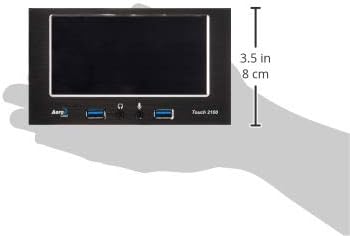
| Dimensiuni (Lxlxh) | 8.4 x 6.7 x 3.5 inchi (21.3 x 17 x 8.9 cm) |
| Greutate | 9.9 uncii (280 g) |
9. Garanție și asistență
For warranty information and technical support, please refer to the official AeroCool website-ul web sau contactați distribuitorul local. Păstrați dovada achiziției pentru a putea solicita garanție.


