
1. Introducere
This manual provides essential information for the safe and effective use of your ProForm Power 995c Treadmill. Please read all instructions carefully before assembly and operation. Retain this manual for future reference.

Image 1.1: The ProForm Power 995c Treadmill, ready for use.
2. Informații de siguranță
To reduce the risk of serious injury, read all important precautions and instructions in this manual before using the treadmill. ProForm assumes no responsibility for personal injury or property damage sustained by or through the use of this product.
- Consultați întotdeauna medicul înainte de a începe orice program de exerciții fizice.
- Țineți copiii și animalele de companie departe de banda de alergare.
- Așezați banda de alergare pe o suprafață plană, cu cel puțin 6 metri de spațiu liber în spatele acesteia și 2 metri pe fiecare parte.
- Purtați îmbrăcăminte sportivă și pantofi sport adecvate.
- Nu folosiți banda de alergare dacă este deteriorată sau funcționează defectuos.
- Always use the safety key. Attach the clip to your clothing before starting the treadmill.
- Nu depășiți greutatea maximă a utilizatorului de 159 kg (350 lbs).

Image 2.1: User preparing to use the treadmill.
3. Instructiuni de asamblare
The ProForm Power 995c Treadmill requires assembly. Due to its weight and size, it is recommended that two or more people assist with the assembly process. Ensure all parts are present before beginning. Refer to the included assembly guide for detailed, step-by-step instructions and diagrams.
3.1 Space Saver Design
This treadmill features a Space Saver design, allowing the walking platform to be folded vertically for storage. To fold, lift the walking platform until the latch pin locks it in the upright position. To unfold, push the latch pin and slowly lower the platform to the floor.

Image 3.1: Folding the treadmill for compact storage.
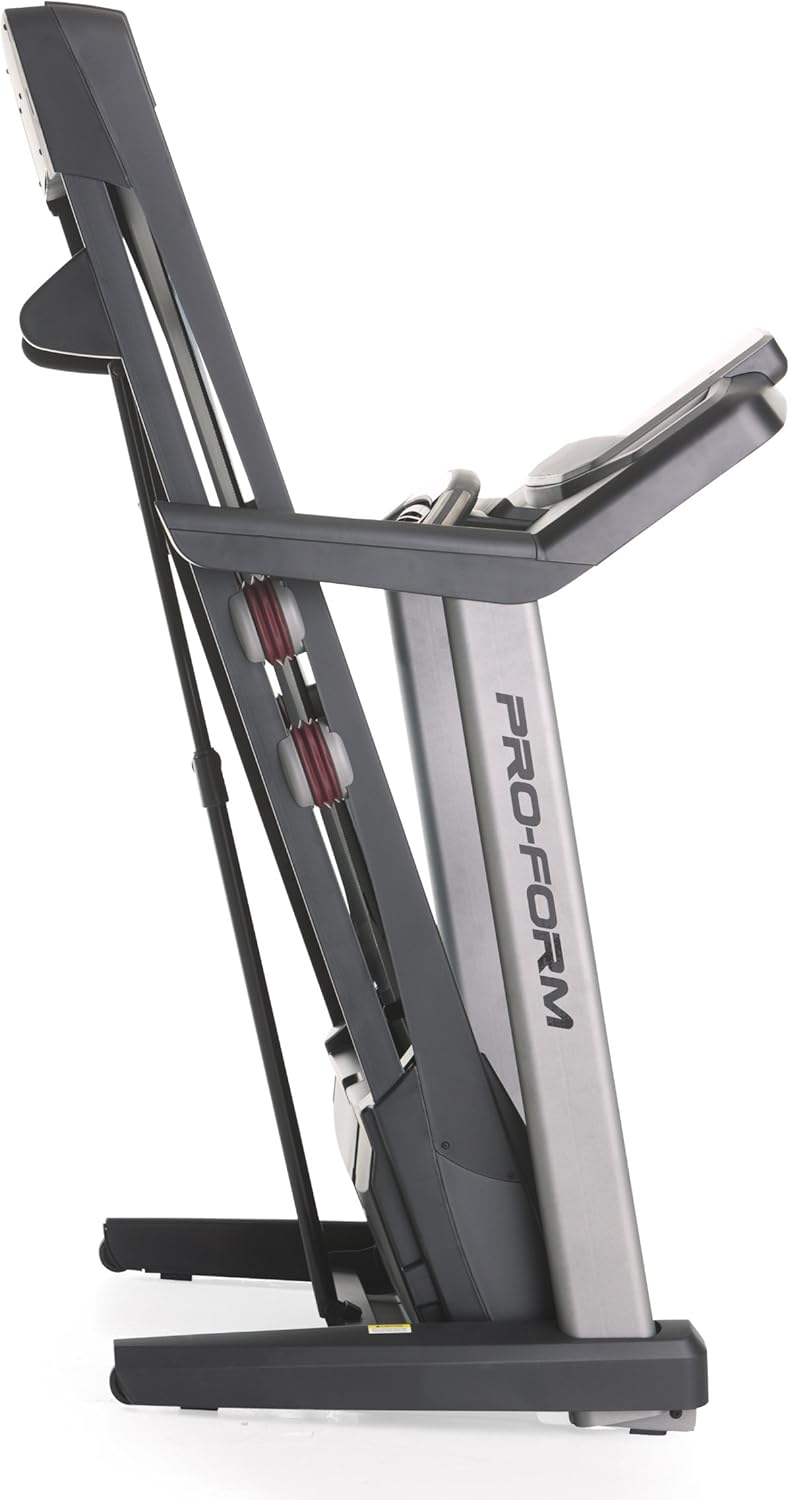
Image 3.2: The treadmill in its folded position.
4. Instrucțiuni de utilizare
Familiarize yourself with the console and its functions before starting your workout.
4.1 Consola Pesteview
The treadmill features a 7-inch oversized backlit display that shows your workout metrics. The console includes QuickSpeed and Quick Incline controls for easy adjustments during your exercise.

Image 4.1: Treadmill console with display and control buttons.
4.2 Starting a Manual Workout
- Pășește pe banda de alergare.
- Atașați clema cheii de siguranță la îmbrăcăminte.
- Apăsați tasta ÎNCEPUT butonul. Banda va începe să se miște cu viteză mică.
- Reglați viteza folosind QuickSpeed butoane sau + şi - butoane.
- Reglați înclinația folosind Quick Incline butoane sau ^ şi v butoane.
- Pentru a opri, apăsați tasta STOP butonul sau trageți de cheia de siguranță.

Image 4.2: Interacting with the console controls.
4.3 Built-in Workout Apps
The treadmill includes 30 pre-programmed workout apps. Select a workout by pressing the corresponding number button on the console. The treadmill will automatically adjust speed and incline according to the program.
4.4 iFit Compatibility
The ProForm Power 995c Treadmill is iFit Compatible. With an iFit wireless module (sold separately), you can access a library of interactive workouts, track your progress, and simulate real-world routes using Google Maps. The console also features a media tray for your personal devices.

Image 4.3: iFit Compatible feature on the console.

Image 4.4: Media tray for personal devices.
4.5 Monitorizarea ritmului cardiac
The treadmill is equipped with a heart rate monitor. Grip the metal sensors on the handlebars to display your heart rate on the console. This feature helps you stay within your target heart rate zone.
5. Întreținere
Întreținerea regulată asigură longevitatea și performanța optimă a benzii de alergare.
- curatenie: Ștergeți suprafețele benzii de alergare cu reclameamp lavetă după fiecare utilizare. Evitați substanțele de curățare abrazive.
- Lubrifierea curelei: Periodically check and lubricate the walking belt as instructed in the detailed assembly guide. Proper lubrication prevents friction and wear.
- Alinierea și tensiunea curelei: Ensure the walking belt remains centered and properly tensioned. Adjustments may be necessary over time. Refer to the assembly guide for specific instructions.
- Capac motor: Keep the motor cover clean and free of dust to ensure proper ventilation.
6. Depanare
If you encounter issues with your treadmill, refer to the following common solutions. For problems not listed here, contact customer support.
| Problemă | Cauza posibila | Soluţie |
|---|---|---|
| Banda de alergare nu pornește. | Cablul de alimentare nu este conectat la priză; întrerupătorul s-a declanșat; cheia de siguranță nu este introdusă. | Ensure power cord is securely plugged into a grounded outlet. Check household circuit breaker. Insert safety key fully into the console. |
| Walking belt slows down or stops during use. | Belt too loose; motor overheating; user weight exceeds capacity. | Adjust belt tension as per manual. Allow treadmill to cool down. Ensure user weight is within specifications. |
| Console display is erratic or not working. | Conexiune slăbită a cablului; defecțiune a consolei. | Verificați toate conexiunile prin cablu la consolă. Dacă problema persistă, contactați serviciul de asistență pentru clienți. |
| Unusual noise from the treadmill. | Piese slăbite; frecare a curelei; problemă cu motorul. | Inspect for loose bolts or screws and tighten. Lubricate walking belt if needed. If noise persists, contact customer support. |
7. Specificații
Detailed technical specifications for the ProForm Power 995c Treadmill.
- Număr de model: PFTL99912
- Motor: 3.0 CHP Mach Z Commercial Plus Motor
- Viteza maxima: 12 mile pe oră (19.3 km/h)
- Înclinație maximă: 15% Quick Incline Control
- Tread Belt: 20 inches x 60 inches (50.8 cm x 152.4 cm) Non-Stretch, Commercial Tread belt
- Amortizare: Amortizare ProShox
- Greutatea maximă a utilizatorului: 350 de lire sterline (159 kg)
- Dimensiuni produs (Lxlxh): 81" x 37" x 60" (205.7 cm x 94 cm x 152.4 cm)
- Dimensiuni pliate (aprox.): 33"W x 14"H (Depth varies)
- Tip de afișare: 7-inch Oversized Backlit LCD
- Aplicații de antrenament: 30 Built-in Workout Apps
- Conectivitate: Compatibil iFit
- Indicatori măsurați: Distance, Heart Rate, Incline, Time, Calories Burned, Speed
- Material cadru: Metal, plastic

Image 7.1: ProShox Cushioning system.

Image 7.2: ProForm branding on the treadmill deck.
8. Garanție și asistență
Your ProForm Power 995c Treadmill is covered by the following warranty:
- Cadru și motor: Garanție pe viață
- Piese: 3 ani garanție
- Muncă: 1 ani garanție
For warranty claims, technical assistance, or to order replacement parts, please contact ProForm Customer Service. Have your model number (PFTL99912) and serial number ready when contacting support.