
1. Introducere
The D-Link GO-SW-5G is a 5-Port Unmanaged Gigabit Desktop Switch designed for home and small office environments. This device provides a simple and cost-effective solution to expand your network connectivity, offering high-speed Gigabit Ethernet ports for reliable data transfer. It incorporates D-Link's Green Technology for energy efficiency, reduced heat generation, and extended product lifespan.
This switch is a plug-and-play device, requiring no complex configuration or software installation, making it easy to integrate into an existing network.
2. Conținutul pachetului
Vă rugăm să verificați dacă toate articolele enumerate mai jos sunt incluse în pachetul dumneavoastră:
- D-Link GO-SW-5G 5-Port Gigabit Desktop Switch
- Adaptor de alimentare
- Ghid de instalare rapidă
If any items are missing or damaged, please contact your retailer for assistance.
3. Instrucțiuni de configurare
The D-Link GO-SW-5G switch is designed for easy plug-and-play installation. Follow these steps to set up your device:
3.1. Conectați adaptorul de alimentare
- Locate the power input port on the side of the D-Link GO-SW-5G switch.
- Conectați adaptorul de alimentare furnizat la acest port.
- Conectați celălalt capăt al adaptorului de alimentare la o priză electrică standard.
- The power LED on the front of the switch will illuminate, indicating that the device is receiving power.

Figura 1: Latura view of the D-Link GO-SW-5G switch with the power input port.
3.2. Conectați-vă la rețeaua dvs
- Using a standard Ethernet cable (RJ45), connect one end to an available LAN port on your router (not your modem).
- Connect the other end of this Ethernet cable to any of the five available ports on the back of the D-Link GO-SW-5G switch.
- The corresponding LED on the front of the switch will light up, indicating an active connection.
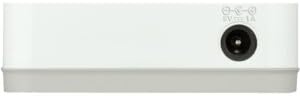
Figura 2: Spate view of the D-Link GO-SW-5G switch with five Ethernet ports.
3.3. Connect Network Devices
- Connect your network devices (e.g., computers, gaming consoles, network printers, smart TVs) to the remaining available Ethernet ports on the D-Link GO-SW-5G switch using Ethernet cables.
- Each connected device will have its corresponding LED on the front of the switch illuminate, confirming a successful connection.

Figura 3: Faţă view of the D-Link GO-SW-5G switch showing active port LEDs.
4. Instrucțiuni de utilizare
The D-Link GO-SW-5G is an unmanaged switch, meaning it operates automatically without requiring user configuration. Once connected as described in the Setup section, it will begin forwarding network traffic between connected devices.
- Negociere automată: The switch automatically detects the network speed (10/100/1000 Mbps) and duplex mode (half/full) of connected devices and adjusts accordingly.
- MDI/MDIX automat: All ports support automatic MDI/MDIX crossover, eliminating the need for crossover cables when connecting to other switches or hubs.
- Indicatoare LED: Each port has an LED indicator on the front panel. A lit LED indicates an active link, and blinking indicates network activity.
5. Întreținere
To ensure optimal performance and longevity of your D-Link GO-SW-5G switch, consider the following maintenance guidelines:
- Plasare: Așezați comutatorul într-un loc răcoros și uscat, ferit de lumina directă a soarelui, surse de căldură și umiditate excesivă. Asigurați o ventilație adecvată în jurul dispozitivului.
- curatenie: Use a soft, dry cloth to clean the exterior of the switch. Avoid using liquid or aerosol cleaners, as they may damage the device.
- Organizare de cabluri: Keep Ethernet cables neatly organized to prevent tangles and accidental disconnections.
- Ciclu de alimentare: If you experience network issues, a simple power cycle (unplugging the power adapter for 10 seconds and then plugging it back in) can often resolve minor problems.
6. Depanare
If you encounter issues with your D-Link GO-SW-5G switch, refer to the following common troubleshooting steps:
- Fără LED de alimentare:
- Asigurați-vă că adaptorul de alimentare este conectat corect atât la întrerupător, cât și la o priză electrică funcțională.
- Verificați dacă priza electrică funcționează conectând un alt dispozitiv.
- No Link/Activity LED for a Connected Device:
- Verificați dacă cablul Ethernet este conectat corect atât în portul switch-ului, cât și în dispozitivul de rețea.
- Încercați un alt cablu Ethernet pentru a exclude un cablu defect.
- Asigurați-vă că dispozitivul conectat este pornit și că adaptorul său de rețea funcționează corect.
- Încercați să conectați dispozitivul la un alt port de pe comutator.
- Viteză redusă a rețelei:
- Verify that all connected devices and cables support Gigabit Ethernet (1000 Mbps) for optimal performance. The switch will operate at the lowest common speed.
- Ensure your router and internet service provider (ISP) plan support the desired speeds.
- Perform a power cycle on the switch and your router.
- Conectivitate intermitentă:
- Verificați dacă există conexiuni de cablu slăbite.
- Ensure the switch is not overheating; provide adequate ventilation.
- Test with different Ethernet cables.
7. Specificații
| Marca | D-Link |
| Numărul de model | GO-SW-5G/B |
| Numărul de porturi | 5 |
| Tip comutator | Negestionat |
| Rata de transfer de date | 1 Gigabits Per Second (10/100/1000 Mbps) |
| Interfață | RJ45 |
| Culoare | Alb |
| Greutatea articolului | 0.22 lire sterline |
| Voltage | 100-240 volți |
| Dispozitive compatibile | PC, Mac, and other Ethernet-enabled devices |
| Schimbarea țesăturii | 10 Gbps |
| UPC | 790069365669 |
8. Garanție și asistență
Garantie limitata: The D-Link GO-SW-5G switch comes with a 3-year limited warranty. For detailed terms and conditions, please refer to the warranty information included in your package or visit the official D-Link website-ul.
Suport tehnic: For technical assistance, product registration, or to download the latest firmware and documentation, please visit the Asistență D-Link Website-ul or contact D-Link customer service.