
Xantrex C12
Controler de încărcare solară Xantrex C12 12 Amps Manual de instrucțiuni
Model: C12
1. Introducere
This manual provides essential information for the safe and efficient operation of your Xantrex C12 Solar Charge Controller. The C12 is a sophisticated 12-amp controller designed for charge, lighting, or load management in solar power systems. It features three-stage charging, user-definable voltage parameters, and automatic equalization to optimize battery performance and longevity. Please read this manual thoroughly before installation and use.
2. Informații de siguranță
Always observe the following safety precautions to prevent personal injury and damage to the controller or other equipment.
- Asigurați-vă că toate cablurile sunt dimensionate corect și izolate corespunzător.
- Always disconnect power from the solar array and battery before installing or servicing the controller.
- Install the controller in a dry, well-ventilated area, away from flammable materials.
- Do not attempt to open or repair the controller. Refer all servicing to qualified personnel.
- Wear appropriate personal protective equipment, including eye protection, when working with batteries.
3. Conținutul pachetului
Verificați dacă toate articolele sunt prezente în colet:
- Xantrex C12 Solar Charge Controller (1 unit)
- Manual de instrucțiuni (acest document)
4. Configurare și instalare
The Xantrex C12 controller is designed for quick and easy setup. Follow these general steps for installation:
- Montare: Choose a suitable location for mounting the controller. It should be close to the battery, in a cool, dry, and well-ventilated area, protected from direct sunlight and moisture.
- Conexiune baterie: Connect the battery to the controller's battery terminals first. Ensure correct polarity (positive to positive, negative to negative). This step is crucial for the controller to sense battery voltage.
- Conexiune panou solar: Connect the solar panel array to the controller's solar input terminals. Again, observe correct polarity.
- Conexiune de sarcină (opțional): If using the controller for load management, connect your DC loads to the designated load terminals. Ensure the total current draw of the loads does not exceed the controller's rated ampepoca.
- Verificare: Double-check all connections for tightness and correct polarity before applying power.
Important: Always connect the battery first and disconnect it last. Failure to do so may damage the controller.
5. Instrucțiuni de utilizare
The Xantrex C12 controller automatically manages the charging process and load distribution.
- Trei-Stage Încărcare: Controlerul folosește o funcție de trei secundetage charging algorithm (bulk, absorption, float) to efficiently charge your battery and prolong its lifespan.
- User-Definable Voltage Parametri: The C12 allows for customization of voltage setpoints to match specific battery types and requirements. Refer to the display indicators section for details on HVD (High Voltage Disconnect) and UVD (Low Voltage Disconnect) settings.
- Automatic Equalization: The controller can perform automatic equalization cycles, which are crucial for maintaining the health of flooded lead-acid batteries. The "EQUALIZE ACTIVATED" indicator will illuminate during this process.
- Controlul sarcinii: When configured for load control, the controller will disconnect the load if the battery voltage scade sub volumul scăzuttage Disconnect (LVD) threshold to protect the battery from deep discharge.
6. Indicatori de afișare
The front panel of the Xantrex C12 features an intuitive LED display to indicate battery status and operational modes.
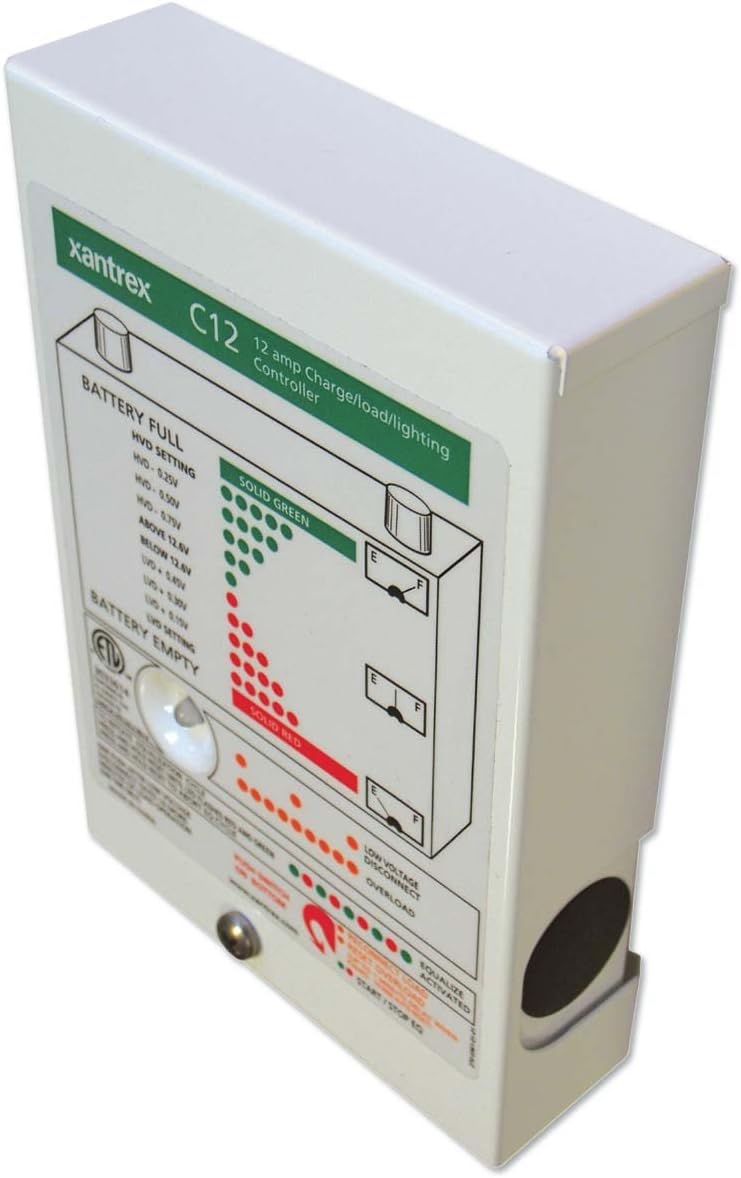
Figura 1: Față view of the Xantrex C12 Solar Charge Controller, showing the LED indicator panel.
The LED panel provides visual feedback on the system's status:
- BATTERY FULL (Solid Green LEDs): Indicates the battery is fully charged or near full. The specific voltage thresholds for High Voltage Disconnect (HVD) are displayed on the panel (e.g., HVD - 0.25V, HVD - 0.50V, HVD - 0.75V, ABOVE 12.8V).
- BATTERY EMPTY (Solid Red LEDs): Indicates the battery is discharged or near empty. The specific voltage thresholds for Low Voltage Disconnect (UVD) are displayed (e.g., BELOW 12.8V, UVD - 0.50V, UVD - 0.75V, UVD - 1.0V).
- VOL scăzutTAGE DISCONNECT (Orange/Red LEDs): Se aprinde când volumul baterieitage drops below a critical level, and the load has been disconnected to protect the battery.
- OVERLOAD (Orange/Red LEDs): Indicates that the connected load is drawing excessive current, potentially causing the controller to shut down the load output.
- EQUALIZE ACTIVATED (Green LED): Lights up when the automatic battery equalization cycle is active.
- START/STOP EQ (Button): A push-button located at the bottom of the panel to manually initiate or stop an equalization cycle.
7. Întreținere
The Xantrex C12 Solar Charge Controller requires minimal maintenance.
- Inspecție regulată: Verificați periodic toate conexiunile cablurilor pentru strângere și coroziune.
- curatenie: Keep the controller's exterior clean and free of dust. Use a dry cloth; do not use liquid cleaners.
- Ventilare: Asigurați-vă că orificiile de ventilație nu sunt obstrucționate pentru a preveni supraîncălzirea.
8. Depanare
If you encounter issues with your Xantrex C12 controller, refer to the following common problems and solutions:
| Problemă | Cauza posibila | Soluţie |
|---|---|---|
| Fără afișaj/Fără alimentare | Loose battery connection, reversed polarity, blown fuse (external) | Check battery connections and polarity. Inspect external fuses. |
| Bateria nu se încarcă | No solar input, reversed solar polarity, faulty solar panel, battery already full | Check solar panel connections and polarity. Verify solar panel output. Monitor battery status. |
| Load disconnected (Low Voltage Disconnect LED on) | Volumul baterieitage prea jos | Allow battery to charge. Reduce load. |
| Overload LED on | Excessive current draw from load | Reduce the connected load. Check for short circuits in the load wiring. |
Dacă problema persistă după încercarea acestor soluții, contactați serviciul de asistență pentru clienți Xantrex.
9. Specificații
| Caracteristică | Detaliu |
|---|---|
| Marca | Xantrex |
| Model | C12 |
| Ampepoca | 12 Amps |
| Voltage | 12 volți |
| Tip de afișare | LCD (LED indicators on front panel) |
| Greutatea articolului | 1.35 lire (0.61 kg) |
| Dimensiuni pachet | 6.7 x 4.8 x 1.8 inchi (17 x 12.2 x 4.6 cm) |
| Material | Metal, plastic |
| UPC | 687873000520 |
10. Garanție și asistență
For detailed warranty information, please refer to the warranty card included with your product or visit the official Xantrex website-ul.
If you require technical assistance or have questions not covered in this manual, please contact Xantrex customer support through their official website-ul sau canalele de asistență desemnate.
Ask a question about this manual
Ask about setup, troubleshooting, compatibility, parts, safety, or missing instructions. Manuals+ will review the question and use this page’s manual context to help answer it.