
Produs terminatview
The Focusrite ISA Two is a classic dual mono transformer-based microphone preamplifier designed for professional audio recording. It incorporates the renowned Lundahl LL1538 mic input transformer, originally selected by Rupert Neve for the ISA 110, ensuring exceptional audio quality.
Caracteristicile cheie includ:
- Lundahl LL1538 Transformer: Utilizes the high-quality Lundahl LL1538 mic input transformer for superior sound.
- High Gain and Low Noise: Offers up to 80 dB of clean gain on the microphone input with minimal noise.
- Impedanta variabila de intrare: Four selectable input impedance settings, including the original ISA 110 value, allow for optimal matching with various microphones.
- User-Calibrated Metering: Each channel features an eight-LED array for clear level display, with a rear panel calibration knob to match DAW converters.
- Intrări versatile: Two 1/4-inch front panel DI inputs for instruments and rear panel TRS line inputs.
- Filtru de trecere înaltă: An 18dB/octave high-pass filter, based on the ISA 110 module, is built-in for precise low-frequency control.
- Balanced Inserts: Each channel includes balanced insert points (1/4-inch TRS send and receive) for integrating external hardware processors.
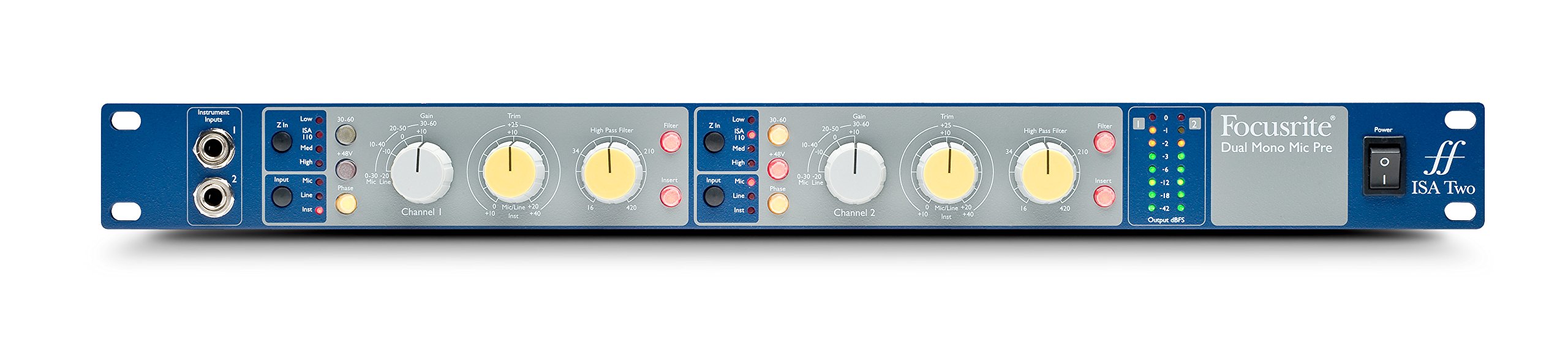
Figura 1: Față view of the Focusrite ISA Two preamplifier, showcasing its controls and metering.
Conținutul pachetului
Verificați dacă toate articolele sunt prezente în colet:
- Focusrite ISA Two Unit
- Cablu de alimentare IEC
Ghid de instalare
Follow these steps to set up your ISA Two preampmai în viață:
- Instalare pe rack: The ISA Two is designed for standard 19-inch rack mounting. Secure the unit using appropriate rack screws.
- Conexiune de alimentare: Connect the supplied IEC power cable to the rear panel power inlet and then to a suitable AC power source. Ensure the power switch is in the OFF position before connecting.
- Conectarea microfoanelor: Use balanced XLR cables to connect your microphones to the 'MIC INPUT' XLR connectors on the rear panel for each channel.
- Conectarea surselor de linie: For line-level signals, use balanced TRS cables to connect to the 'LINE INPUT' TRS connectors on the rear panel.
- Instrumente de conectare: For instruments such as guitars or basses, use 1/4-inch jack cables to connect to the 'Instrument Inputs' on the front panel.
- Conexiuni de ieșire: Connect the 'OUTPUT' XLR connectors on the rear panel to your audio interface, mixer, or other recording equipment using balanced XLR cables.
- Insert Connections: If using external hardware processors, connect them to the 'SEND' and 'RETURN' 1/4-inch TRS jacks on the rear panel for each channel.

Figure 2: Rear panel of the Focusrite ISA Two, showing microphone, line, output, and insert connections.
Instrucțiuni de operare
This section details the operation of the ISA Two preamplifier's controls:
- Pornire: After all connections are made, switch the power button on the front panel to the ON position.
- Selectare intrare: Use the 'Input' buttons (Mic, Line, Inst) to select the appropriate input source for each channel. Ensure only one input type is active per channel.
- Gain control: The large 'Gain' knob adjusts the primary gain level (e.g., 0-30 dB, 30-60 dB). The smaller 'Trim' knob provides fine-tuning (+/-10 dB) for precise level setting.
- Variable Input Impedance (Z In): For microphone inputs, select one of the four impedance settings (Low, ISA 110, Med, High) to optimize the interaction with your microphone. Experiment to find the best sonic match.
- Alimentare fantomă (+48V): Activate the +48V button for condenser microphones that require phantom power. Ensure the microphone is connected before engaging phantom power.
- Filtru de trecere înaltă (HPF): Engage the 'Filter' button and use the 'High Pass Filter' knob to remove unwanted low-frequency rumble or proximity effect. The filter offers an 18dB/octave slope.
- Insert Function: Press the 'Insert' button to engage any external hardware processors connected to the rear panel insert points.
- Măsurare: Monitor your signal levels using the eight-LED array. Adjust gain and trim to achieve optimal levels without clipping (red LEDs). The VU meter provides an average level indication.
For a visual demonstration of the ISA Two in action, watch the official product video:
Video 1: Focusrite ISA Two Classic Dual Mono Transformer-Based Microphone Preamplifier in use during a recording session. This video demonstrates the preamplifier's features and sound quality in a practical studio environment.
Întreţinere
To ensure the longevity and optimal performance of your Focusrite ISA Two, follow these maintenance guidelines:
- curatenie: Folosiți o cârpă moale și uscată pentru a curăța exteriorul unității. Evitați substanțele de curățare abrazive, solvenții sau cerurile.
- Ventilare: Ensure adequate airflow around the unit, especially if rackmounted, to prevent overheating.
- Depozitare: When not in use for extended periods, store the unit in a cool, dry environment away from direct sunlight and extreme temperatures.
- Organizare de cabluri: Păstrați cablurile organizate și fără îndoituri sau tensiune excesivă pentru a preveni deteriorarea conectorilor și a unității.
Depanare
If you encounter issues with your ISA Two, consider the following common troubleshooting steps:
- Fără putere: Check the power cable connection to both the unit and the wall outlet. Ensure the power switch is ON.
- Fără ieșire audio: Verify all input and output cables are securely connected. Check the input selection (Mic, Line, Inst) and ensure phantom power is engaged if using a condenser microphone. Confirm gain levels are appropriately set.
- Audio distorsionat: Reduce the input gain and trim levels. Check for proper impedance matching with your microphone. Ensure no cables are damaged.
- Semnal intermitent: Inspect all cable connections for looseness or damage. Try swapping cables to isolate a faulty one.
- Zgomot/Bumzet: Ensure all equipment is properly grounded. Check for nearby sources of electromagnetic interference.
If problems persist after these steps, contact Focusrite support for further assistance.
Specificatii tehnice
| Caietul de sarcini | Valoare |
|---|---|
| Marca | Focusrite |
| Numele modelului | ISA Doi |
| Tehnologia de conectivitate | Analogic |
| Tip conector | 2 intrare / 2 ieșire |
| Culoare | Albastru / Gri |
| Greutatea articolului | 7 lire sterline |
| Dimensiuni articol (L x l x H) | 5.55 x 15.16 x 26.06 inci |
| Material | Oţel inoxidabil |
| Platformă hardware | Mic Preamp |
| Numărul de canale | 2 |
| Raspuns in frecventa | 20 KHz |
| Material carcasă | Oţel inoxidabil |
| Numărul de model | AMS-ISA-2 |
| Număr de identificare comercială globală (GTIN) | 815301005148 |
| UPC | 815301005148 |
| Numărul piesei producător | ISA Doi |
Garanție și suport
The Focusrite ISA Two comes with a 2 an garanție de la data achiziției, acoperind defectele de fabricație și defecțiunile în condiții normale de utilizare.
For technical support, product registration, or to view the full warranty terms and conditions, please visit the official Focusrite website. De asemenea, puteți găsi acolo întrebări frecvente și resurse suplimentare.
Suport online: www.focusrite.com/support