
Introducere
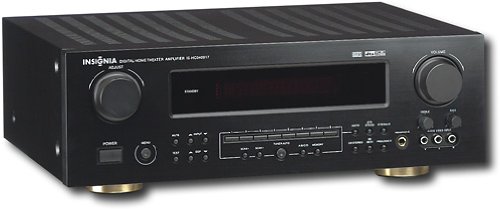
This manual provides essential instructions for the setup, operation, maintenance, and troubleshooting of your Insignia 6.1-Channel 600W Digital Home Theater Receiver, model IS-HC040917. Please read this manual thoroughly before using the receiver to ensure proper and safe operation.
Instrucțiuni importante de siguranță
- Nu blocați niciun orificiu de ventilație. Instalați conform instrucțiunilor producătorului.
- Nu instalați lângă nicio sursă de căldură, cum ar fi calorifere, registre de căldură, sobe sau alte aparate (inclusiv ampliificatori) care produc căldură.
- Protejați cablul de alimentare să nu fie călcat sau ciupit, în special la prize, prize convenabile și la punctul de ieșire din aparat.
- Utilizați numai atașamente/accesorii specificate de producător.
- Deconectați acest aparat din priză în timpul furtunilor cu fulgere sau când nu este utilizat pentru perioade lungi de timp.
- Consultați toate lucrările de service către personalul de service calificat. Întreținerea este necesară atunci când aparatul a fost deteriorat în vreun fel.
Ghid de instalare
1. Despachetarea
Carefully remove the receiver and all accessories from the packaging. Ensure all components are present:
- Insignia IS-HC040917 Receiver
- Telecomanda
- Antenă buclă AM
- Antenă cu fir FM
- Manual de utilizare (acest document)
2. Conectarea difuzoarelor
The IS-HC040917 receiver supports a 6.1-channel speaker configuration. Connect your speakers to the corresponding terminals on the rear panel. Ensure correct polarity (+ to + and - to -) for each speaker.
- Față Stânga/Dreapta: Pentru sunet stereo principal.
- Centru: Pentru dialog.
- Surround Left/Right: For ambient sound effects.
- Surround spate: For additional rear channel effects in 6.1 setups.
- Subwoofer (Pre-out): Connect to a powered subwoofer's LFE input.
Note: The receiver is designed for speakers with an impedance of 8 ohms.
3. Conectarea surselor audio/video
Connect your external devices (e.g., DVD player, Blu-ray player, game console, cable box) to the appropriate input jacks on the receiver.
- HDMI: Use HDMI cables for high-definition audio and video signals. The receiver has 3 HDMI input ports.
- Audio digital (optic/coaxial): For digital audio from devices like CD players or set-top boxes.
- Sunet analogic (RCA): For standard stereo audio connections from devices like VCRs or older CD players.
- S-Video: For video signals from compatible devices.
4. Conexiune antenă
Connect the supplied AM loop antenna and FM wire antenna to their respective terminals on the rear panel for radio reception.
5. Conexiune la alimentare
Once all audio/video and speaker connections are made, plug the receiver's power cord into a standard AC wall outlet.
Imagine: Rear panel of the Insignia IS-HC040917 receiver, showing various input and output connections for speakers, audio/video sources (HDMI, RCA, S-Video, Digital), and antenna terminals. This diagram is crucial for correctly wiring the home theater system.
Instrucțiuni de operare
1. Pornire/Oprire
Apăsați tasta PUTERE butonul de pe panoul frontal sau de pe telecomandă pentru a porni sau opri receptorul.
2. Selectare intrare
Utilizați INTRARE SELECTOR knob/buttons on the front panel or the remote control to choose the desired audio/video source (e.g., HDMI 1, DVD, CD, Tuner).
3. Controlul volumului
Reglați volumul principal folosind butonul mare VOLUM butonul de pe panoul frontal sau de pe VOLUM +/- butoanele de pe telecomandă.
4. Moduri audio
The receiver supports various audio modes, including 6.1-channel surround sound. Use the MOD or DSP buttons on the remote to cycle through available sound modes (e.g., Stereo, Dolby Digital, DTS, Pro Logic).
5. Tuner Operation (AM/FM Radio)
Select the "Tuner" input. Use the BANDĂ button to switch between AM and FM. Use the TUNE +/- buttons to manually tune to stations or PRESETARE +/- to select stored stations. Refer to the remote control for specific tuner functions.
Întreţinere
1. Curatenie
Wipe the exterior of the receiver with a soft, dry cloth. Do not use liquid cleaners or aerosol sprays, as they may damage the finish or internal components. Ensure the unit is unplugged before cleaning.
2. Ventilare
Ensure that the ventilation openings on the top and sides of the receiver are not blocked. Proper airflow is essential to prevent overheating and ensure long-term performance.
3. Gestionarea cablurilor
Periodically check all cable connections to ensure they are secure. Loose connections can lead to poor audio or video quality.
Depanare
| Problemă | Cauza posibila | Soluţie |
|---|---|---|
| Fără putere | Cablul de alimentare este deconectat; priza nu este activă. | Verificați conexiunea cablului de alimentare; încercați o altă priză. |
| Nici un sunet | Intrare incorectă selectată; fire difuzor slăbite; volum prea scăzut; sunet activat. | Selectați intrarea corectă; verificați conexiunile difuzoarelor; măriți volumul; dezactivați sunetul. |
| Niciun videoclip | Incorrect input selected; video cables loose or incorrect. | Select correct input; check video cable connections (HDMI, S-Video, RCA). |
| Telecomanda nu funcționează | Baterii descărcate; obstrucție între telecomandă și receptor; mod incorect al telecomenzii. | Replace batteries; remove obstructions; ensure remote is in the correct operating mode. |
Specificații
- Model: IS-HC040917
- Marca: INSIGNIA
- Putere de iesire: 600 wați
- Număr de canale: 6.1 canal
- Mod de ieșire audio: Surround
- Total porturi HDMI: 3
- Tipuri de conector: 3.5mm Jack, HDMI, RCA, USB
- Dispozitive compatibile: Difuzor
- Metoda de control: Telecomanda
- Culoare: Negru
- UPC: 799530659962
- ASIN: B0075C3DN2
Garanție și suport
For warranty information and customer support, please refer to the warranty card included with your product or visit the official Insignia website-ul. Păstrați chitanța de achiziție pentru cererile de garanție.
For further assistance, you may contact Insignia customer service. Contact details are typically available on the manufacturer's website-ul sau în ambalajul produsului.