
1. Introducere
Mulțumesc pentru achizițieasing the Gemini PS3-USB 3 Channel 10-Inch Mixer. This manual provides essential information for the proper setup, operation, and maintenance of your mixer. Please read this manual thoroughly before use to ensure optimal performance and to prevent damage.
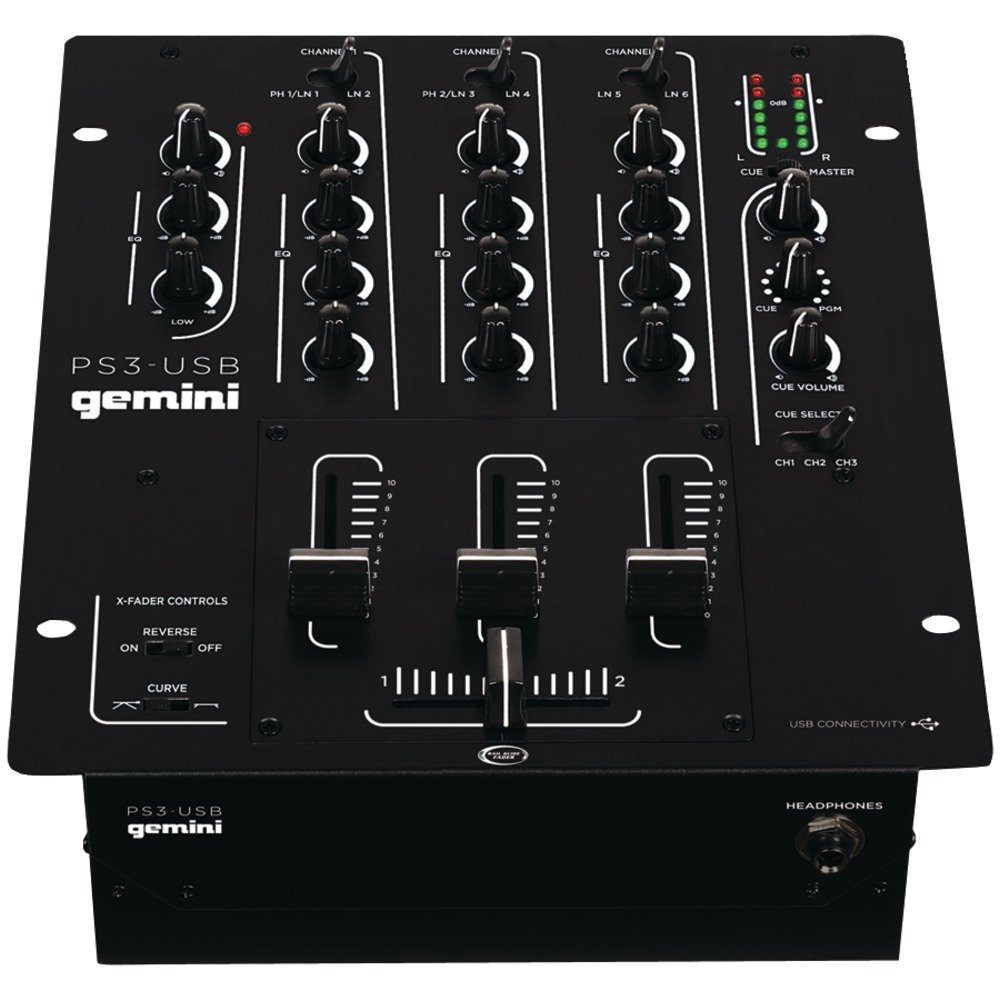
Figura 1: Față view of the Gemini PS3-USB Mixer, showing controls and inputs.
2. Instrucțiuni de siguranță
- Sursa de alimentare: Conectați unitatea numai la sursa de alimentare specificată.
- Ventilare: Asigurați o ventilație corespunzătoare. Nu blocați orificiile de ventilație.
- Apă și umiditate: Nu expuneți unitatea la ploaie sau umezeală. Nu așezați obiecte umplute cu lichide pe unitate.
- Căldură: Țineți unitatea departe de surse de căldură, cum ar fi calorifere, registre de căldură, sobe sau alte aparate (inclusiv ampliificatori) care produc căldură.
- curatenie: Curățați numai cu o cârpă uscată.
- Service: Apelați la personal de service calificat pentru toate lucrările de service. Nu încercați să reparați singur acest produs.
3. Configurare
3.1 Despachetarea
Carefully unpack the mixer and check for any signs of damage. Retain the packaging materials for future transport or storage.
3.2 Conectarea puterii
Conectați adaptorul de alimentare furnizat la intrarea de alimentare a mixerului și apoi la o priză electrică adecvată.
3.3 Conexiuni audio
The PS3-USB features 5-line, 3-channel inputs with 2 convertible Phono/Line RCA inputs.
- Intrări Phono/Linie: Connect turntables or line-level devices (CD players, media players) to the RCA inputs. Use the Phono/Line switch to select the appropriate input type for each channel.
- Ieșire principală: Connect the Master RCA outputs to your ampamplificator sau difuzoare amplificate.
- Ieșire înregistrare: Connect the Record RCA outputs to a recording device if you wish to record your mix.
- Căști: Plug your 1/4" (6.3mm) headphones into the front panel headphone connector.
3.4 Conexiune USB
Connect the mixer to your Mac or PC using a standard USB cable. This allows for simultaneous playback and recording through your computer's media player software.
4. Instrucțiuni de utilizare
4.1 Comenzi și funcții de mai susview
Familiarize yourself with the mixer's layout:
- Channel Gain Control: Ajustează nivelul de intrare pentru fiecare canal.
- 3-Band Rotary EQ: Provides control over High, Mid, and Low frequencies for each channel.
- Faders de canal: Control the volume of each individual channel.
- Crossfader: A user-replaceable Rail Glide crossfader with curve and reverse controls for blending between channels.
- Volumul principal: Controlează nivelul general de ieșire al mixerului.
- Contoare VU: Visual indicators for master or cue levels.
- Secțiunea de tac: Includes rotary cue volume, CUE/PGM controls, and a split cue switch for headphone monitoring.
- Secțiunea microfon: Features a rotary microphone volume control and a 2-band EQ for microphone input.
4.2 Mixaj de bază
- Connect your audio sources to the appropriate Phono/Line inputs.
- Set the Phono/Line switch for each channel to match your source.
- Adjust the Gain control for each active channel to achieve a healthy input level without clipping (distortion).
- Use the channel faders to bring up the volume of your desired audio sources.
- Utilize the 3-band EQ to shape the sound of each channel.
- Use the crossfader to smoothly transition between channels.
- Monitor your mix using headphones via the Cue section and adjust the Master Volume for the main output.
4.3 Redare și înregistrare USB
Once connected via USB, your computer should recognize the PS3-USB as an audio device.
- Redare: Select the PS3-USB as the output device in your computer's sound settings or media player software to route audio through the mixer.
- Înregistrare: Select the PS3-USB as the input device in your recording software. The mixer's master output will be sent to your computer for recording.
5. Întreținere
- curatenie: Folosiți o lavetă moale și uscată pentru a curăța exteriorul mixerului. Nu folosiți agenți de curățare lichizi sau solvenți.
- Crossfader Replacement: The Rail Glide crossfader is user-replaceable. Refer to the Gemini website or authorized service centers for replacement parts and instructions if needed.
- Depozitare: When not in use for extended periods, store the mixer in a cool, dry place, preferably in its original packaging.
6. Depanare
| Problemă | Cauza posibila | Soluţie |
|---|---|---|
| No sound output from master. | Master volume too low; incorrect input selection; amplifier/speaker issues. | Increase Master Volume. Check Phono/Line switches. Verify ampconexiuni amplificator/difuzor și alimentare. |
| Niciun sunet de la un anumit canal. | Channel fader down; Gain too low; incorrect Phono/Line selection; source device off/muted. | Raise channel fader. Adjust Gain. Correct Phono/Line switch. Check source device. |
| Audio distorsionat. | Input Gain too high; Master Volume too high; faulty cable. | Reduce channel Gain. Reduce Master Volume. Replace cables. |
| USB recording/playback not working. | Incorrect USB connection; computer audio settings incorrect; driver issues. | Ensure USB cable is securely connected. Select PS3-USB as audio device in computer settings. Restart computer. |
7. Specificații
- Model: PS3USB
- Canale: 3
- Intrări: 5-Line, 2 Convertible Phono/Line RCA, USB
- Ieșiri: Master RCA, Record RCA, 1/4" (6.3mm) Headphone
- EQ: 3-Band Rotary EQ per channel, 2-Band EQ for Microphone
- Crossfader: User-replaceable Rail Glide with Curve and Reverse controls
- Conectivitate: USB for Mac/PC Playback & Recording
- Dimensions (Approximate Shipping): 12.00in x 10.00in x 3.25in
- Weight (Approximate Shipping): 6.2 lbs (2.8 kg)
- UPC: 747705208149
8. Garanție și asistență
This Gemini product is covered by a 90 de zile garanție from the date of purchase. This warranty covers manufacturing defects and workmanship under normal use. It does not cover damage caused by misuse, accident, modification, or unauthorized repair.
For technical support, service inquiries, or warranty claims, please contact your authorized Gemini dealer or visit the official Gemini website pentru informații de contact.
Vă rugăm să păstrați dovada achiziției pentru validarea garanției.