
Introducere
This manual provides essential information for the safe and effective operation of your Laserliner SoundTest-Master 082.070A Noise Level Meter. Please read these instructions carefully before using the device and keep them for future reference. The SoundTest-Master 082.070A is designed for precise measurement of noise levels, featuring integrated long-term memory and PC connectivity for comprehensive documentation.
Instrucțiuni de siguranță
- Always operate the device within its specified environmental conditions.
- Nu expuneți dispozitivul la temperaturi extreme, umiditate sau lumina directă a soarelui.
- Evitați să scăpați dispozitivul sau să îl supuneți la impacturi puternice.
- Nu încercați să deschideți sau să modificați dispozitivul. Reparațiile trebuie efectuate numai de către personal autorizat.
- Țineți dispozitivul departe de câmpuri magnetice puternice.
- Ensure the microphone is clean and free from obstructions for accurate measurements.
Produs terminatview
The Laserliner SoundTest-Master 082.070A is a handheld noise level meter equipped with a sensitive electret condenser microphone and a clear, illuminated display. It features various controls for measurement settings and data management.

Figura 1: Faţă view of the SoundTest-Master 082.070A, showing the display, microphone with windshield, and control buttons.
Componente cheie:
- Microfon cu condensator electret: For capturing sound. Includes a removable windshield.
- Afișaj iluminat: Shows measurement values, settings, and status.
- Butoane de control: Power, Setup, Max, Record, A/C weighting, Fast/Slow time weighting, Level adjustment, Data send.
- Ieșiri analogice: DC and AC outputs for external connections.
- Interfata RS232: Optoisolated port for PC connection and data transfer.
Înființat
1. Instalarea bateriei
The device requires batteries for operation. Ensure correct polarity when inserting batteries into the compartment, typically located on the rear of the unit.
2. Pornirea inițială
Apăsați tasta Putere button to turn on the device. The display will illuminate and show initial readings.
3. Windshield Attachment
Attach the removable windshield to the microphone to minimize wind noise interference during outdoor measurements.
Instrucțiuni de operare
1. Măsurare de bază
- Porniți dispozitivul folosind Putere buton.
- Point the microphone towards the sound source.
- The current noise level will be displayed in decibels (dB).
2. Frequency Weighting (dB(A), dB(C))
Utilizați A/C button to switch between frequency weighting curves:
- dB (A): Simulates the human ear's response to sound, commonly used for environmental noise measurements.
- dB(C): Provides a flatter response, suitable for measuring peak sound pressure levels or low-frequency noise.
3. Time Weighting (Fast/Slow)
Apăsați tasta REPEDE INCET button to select the desired time weighting:
- RAPID (125 ms): Pentru măsurarea nivelurilor de zgomot care se schimbă rapid.
- LENT (1 secundă): For measuring average noise levels over a longer period, suitable for stable noise sources.
4. Data Logging and PC Connection
The device features a long-term recording function with 16,000 memory points and real-time logging capabilities when connected to a PC.
- Internal Data Logging: Apăsați tasta ÎNREGISTRA button to start/stop internal data recording. The device can store up to 16,000 measurement points.
- Conexiune PC: Connect the device to a computer using the provided RS232 cable.
- Software: Install the provided software on your PC. This software allows for real-time data display, analysis, and download of recorded data.
- Trimiterea datelor: Utilizați TRIMITE DATE button to initiate data transfer to the connected PC.
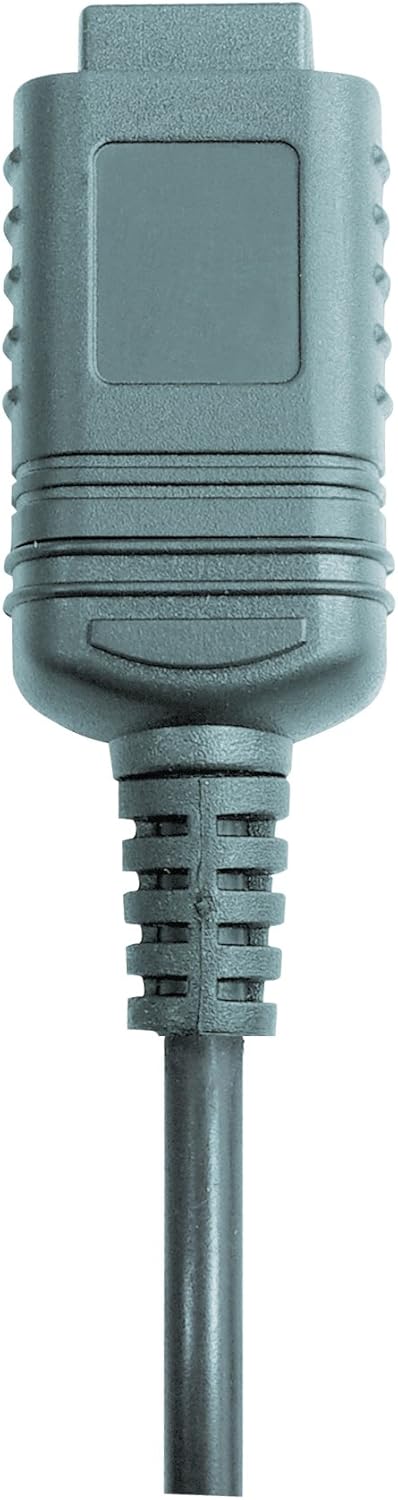

Figura 2: RS232 cable connectors used for connecting the SoundTest-Master to a PC.
5. Calibrare
The device can be calibrated and adjusted using a standard noise level calibrator (94 dB / 1 kHz). Refer to the calibrator's instructions for the specific calibration procedure.
Întreţinere
1. Curatenie
- Ștergeți dispozitivul casinștergeți cu o cârpă moale și uscată.
- Nu utilizați agenți de curățare abrazivi sau solvenți.
- Ensure the microphone is kept clean and free of dust or debris.
2. Depozitare
When not in use, store the SoundTest-Master in its protective case in a cool, dry place, away from direct sunlight and extreme temperatures. Remove batteries if storing for extended periods.
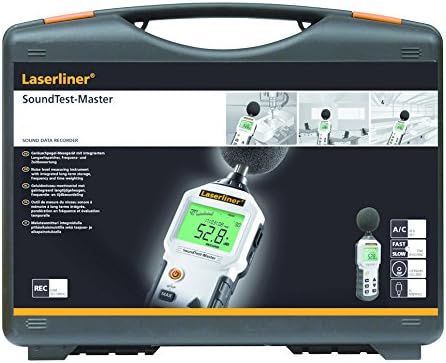
Figura 3: The SoundTest-Master 082.070A stored in its protective carrying case.
Depanare
| Problemă | Cauza posibila | Soluţie |
|---|---|---|
| Dispozitivul nu pornește. | Baterii descărcate sau instalate incorect. | Înlocuiți bateriile, asigurându-vă de polaritatea corectă. |
| Citiri inexacte. | Microphone obstructed or dirty; device needs calibration. | Clean microphone; perform calibration with a standard calibrator. |
| No data transfer to PC. | Incorrect cable connection; software not installed or configured. | Check RS232 cable connection; ensure PC software is correctly installed and running. |
| Afișajul este slab iluminat sau ilizibil. | Low battery power; display backlight off. | Replace batteries; check device settings for backlight control. |
Specificații
| Caracteristică | Detaliu |
|---|---|
| Numele modelului | SoundTest-Master |
| Numărul piesei | 082.070A |
| Producător | Umarex |
| Marca | Laserliner |
| Ponderarea în frecvență | dB(A), dB(C) |
| Ponderarea timpului | FAST (125 ms), SLOW (1 second) |
| Memorie de date | 16,000 de puncte de măsurare |
| Interfață | Optoisolated RS232 |
| Ieșiri analogice | DC și AC |
| Calibrare | Adjustable with 94 dB / 1 kHz standard calibrator |
| Microfon | Sensitive electret condenser with removable windshield |
| Afişa | Illuminated, clear display |
| Greutatea articolului | 1.18 kilograme (2.6 de lire sterline) |
| Dimensiunile produsului | 10.33 x 5.51 x 13.78 inci |
| Material | Metal (Frame, Barrel) |
| Culoare | Negru și Gri |
| Bateriile necesare | Yes (not included, type not specified in data) |
Garanție și suport
For warranty information and technical support, please refer to the documentation included with your purchase or visit the official Laserliner website-ul.