
1. Introducere
This manual provides detailed instructions for the installation, configuration, and operation of the D-Link Xstack DGS-3120-48PC Managed L3 Switch. The DGS-3120-48PC is a high-performance Layer 3 managed switch designed for enterprise and campus networks, offering advanced features for network management, security, and quality of service.
2. Caracteristici cheie
- 44 x 10/100/1000BASE-T PoE Ports: Provides power and data over a single Ethernet cable to connected devices.
- 4 x Combo SFP Ports: Offers flexible uplink options using fiber or copper transceivers.
- Layer 3 Management: Supports static routing for efficient network segmentation and traffic management.
- QoS avansat: Prioritizes network traffic to ensure optimal performance for critical applications.
- Caracteristici de securitate robuste: Includes access control lists (ACLs), port security, and authentication mechanisms.
- Standard and Enhanced Software Images: Offers different feature sets (SI for basic L2/L3, EI for advanced L3 features like ERPS, Double VLAN, IPv6).
3. Conținutul pachetului
Verify the following items are included in your DGS-3120-48PC package:
- D-Link DGS-3120-48PC Switch
- Cablu de alimentare
- Rack Mount Kit (brackets and screws)
- Cablu de consolă (RJ-45 la DB-9)
- Picioare din cauciuc (pentru instalarea pe desktop)
- Ghid de instalare rapidă
If any item is missing or damaged, please contact your local D-Link reseller for assistance.
4. Descriere fizică
4.1. Panoul frontal
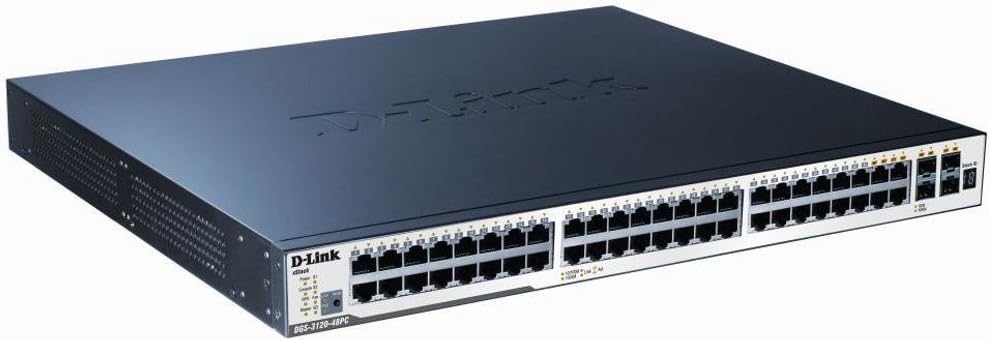
Figure 1: D-Link DGS-3120-48PC Front Panel
The front panel of the DGS-3120-48PC switch features 44 Gigabit Ethernet ports with Power over Ethernet (PoE) capabilities, and 4 additional combo SFP ports for flexible uplink connections. LED indicators provide status information for power, system, and individual port activity.
Indicatoare LED:
- LED de alimentare: Indicates power status (On/Off).
- LED de sistem: Indică starea de funcționare a sistemului.
- Link/Act/Speed LEDs (per port): Indicates link status, activity, and connection speed (10/100/1000 Mbps).
- PoE Status LEDs (per PoE port): Indică starea de livrare a energiei PoE.
Porturi:
- RJ-45 Ports (1-44): 10/100/1000BASE-T Gigabit Ethernet ports with PoE.
- Combo SFP Ports (45-48): Can be used with SFP transceivers for fiber connections or with corresponding RJ-45 ports for copper connections.
- Port de consolă: RJ-45 port for command-line interface (CLI) management.
4.2. Panoul din spate
The rear panel typically includes the AC power inlet, grounding screw, and possibly ventilation openings. Specific details may vary slightly.
- Priză de alimentare CA: Se conectează la cablul de alimentare.
- Șurub de împământare: For connecting an earth ground cable.
5. Configurare și instalare
5.1. Măsuri de siguranță
- Asigurați-vă că sursa de alimentare voltage corespunde cerințelor comutatorului.
- Nu blocați orificiile de ventilație.
- Avoid placing the switch in direct sunlight, near heat sources, or in areas with high humidity.
- Asigurați o împământare adecvată pentru a preveni pericolele electrice.
5.2. Montarea comutatorului
Instalare desktop:
- Attach the included rubber feet to the bottom of the switch.
- Place the switch on a flat, stable surface with adequate ventilation.
Instalare rack:
- Attach the two rack-mounting brackets to the sides of the switch using the provided screws.
- Secure the switch in a standard 19-inch equipment rack using appropriate rack screws.
5.3. Conectarea puterii
- Connect one end of the AC power cord to the power inlet on the rear panel of the switch.
- Conectați celălalt capăt al cablului de alimentare la o priză electrică cu împământare.
- Asigurați-vă că LED-ul de alimentare de pe panoul frontal se aprinde, indicând că comutatorul primește alimentare.
5.4. Conectarea dispozitivelor de rețea
- Connect Ethernet cables from your network devices (e.g., computers, servers, access points) to the RJ-45 ports (1-44) on the switch.
- For fiber uplinks, insert compatible SFP transceivers into the SFP ports (45-48) and connect fiber optic cables.
- Observe the Link/Act/Speed LEDs for each connected port to confirm proper connection and activity.
6. Operarea comutatorului
6.1. Configurare inițială
The DGS-3120-48PC can be configured via a web-based graphical user interface (GUI) or a command-line interface (CLI) through the console port.
WebGUI bazat pe:
- Connect a computer to any of the switch's Ethernet ports.
- Configurați adresa IP a computerului astfel încât să fie în aceeași subrețea ca și adresa IP implicită a switch-ului (consultați Ghidul de instalare rapidă pentru adresa IP implicită).
- Deschide a web browser și introduceți adresa IP implicită a switch-ului.
- Log in using the default username and password (refer to documentation).
Interfață linie de comandă (CLI):
- Connect the console cable from your computer's serial port to the switch's console port.
- Use a terminal emulation program (e.g., PuTTY, Tera Term) with appropriate serial port settings (e.g., 115200 baud, 8 data bits, no parity, 1 stop bit, no flow control).
- Conectați-vă folosind numele de utilizator și parola implicite.
6.2. Basic Network Configuration
After initial access, it is recommended to:
- Change the default administrator password.
- Configure the switch's IP address, subnet mask, and default gateway.
- Set up system time and NTP synchronization.
6.3. Caracteristici avansate
The DGS-3120-48PC supports a wide range of advanced features:
- VLAN-uri (Rețele Locale Virtuale): Segmentați-vă rețeaua pentru o securitate și o performanță îmbunătățite.
- Spanning Tree Protocol (STP/RSTP/MSTP): Prevents network loops.
- Agregarea legăturilor (LACP): Increases bandwidth and provides link redundancy.
- Calitatea serviciului (QoS): Prioritizes traffic based on various criteria.
- Liste de control al accesului (ACL): Filters network traffic based on defined rules.
- PoE Management: Control power delivery to connected PoE devices.
- Rutare statică: Configure routes for inter-VLAN or inter-network communication.
Refer to the D-Link DGS-3120 Series User Manual for detailed configuration instructions on these advanced features.
7. Întreținere
7.1. Actualizări de firmware
Verificați periodic asistența D-Link website for the latest firmware versions. Firmware updates can provide new features, performance improvements, and security patches. Follow the instructions provided with the firmware download carefully.
7.2. Curatenie
To maintain optimal performance and extend the lifespan of your switch:
- Ensure the switch is powered off and unplugged before cleaning.
- Folosiți o lavetă moale și uscată pentru a șterge exteriorul comutatorului.
- Folosiți aer comprimat pentru a îndepărta praful din orificiile de ventilație.
- Nu utilizați detergenți lichidi sau aerosoli.
8. Depanare
This section provides solutions to common issues you may encounter with the DGS-3120-48PC switch.
| Problemă | Cauza posibila | Soluţie |
|---|---|---|
| Fără indicație LED de alimentare | Power cord not connected; Power outlet faulty; Switch power supply issue. | Ensure power cord is securely connected. Test power outlet with another device. Contact D-Link support if issue persists. |
| No Link/Act LED on connected port | Incorrect cable type; Faulty cable; Connected device is off or faulty; Port configuration issue. | Use appropriate Ethernet cable (Cat5e/6). Replace cable. Ensure connected device is powered on and functioning. Check port status in switch management interface. |
| Nu se poate accesa web GUI | Incorrect IP address configuration on PC; Switch IP address changed; Network connectivity issue. | Verify PC's IP address is in the same subnet as the switch. Try accessing via console CLI. Check network cable connection. |
| PoE device not receiving power | PoE budget exceeded; Device not PoE compatible; Cable issue; PoE port disabled. | Check PoE budget in switch management. Ensure device is 802.3af/at compliant. Verify cable integrity. Enable PoE on the port if disabled. |
9. Specificații
| Caracteristică | Descriere |
|---|---|
| Model | DGS-3120-48PC |
| Marca | D-Link |
| Porturi | 44 x 10/100/1000BASE-T PoE, 4 x Combo SFP |
| Tip de interfață | PoE, SFP |
| Rata de transfer de date | 1 Gigabit pe secundă (per port) |
| Suport pentru straturi | Stratul 3 Gestionat |
| Dimensiunile produsului | 14.96 x 17.32 x 1.73 inchi (38 x 44 x 4.4 cm) |
| Greutatea articolului | 19.98 lire sterline (9.08 kilograme) |
| UPC | 790069344510 |
| Prima disponibilă | 8 august 2012 |
10. Garanție și suport tehnic
For information regarding the warranty policy, please refer to the warranty card included with your product or visit the official D-Link website. Technical support resources, including FAQs, documentation, and software downloads, are available on the D-Link support portal. Please have your product model and serial number ready when contacting support.
D-Link Website: www.dlink.com