
1. Introducere
This manual provides essential instructions for the safe and efficient operation of your Sharp CD-DH950P 240W Mini-Component System. This system features a 5-disc CD changer, a cassette deck, an iPod/iPhone docking station, a USB host for digital audio playback, and an AM/FM tuner. Please read this manual thoroughly before using the system and retain it for future reference.
2. Informații de siguranță
- Sursa de alimentare: Conectați unitatea numai la o priză de curent alternativ cu volumul specificat.tage.
- Ventilare: Asigurați o ventilație adecvată. Nu blocați orificiile de ventilație.
- Apă și umiditate: Nu expuneți unitatea la ploaie, umezeală sau lichide care picură/stropi.
- Căldură: Țineți unitatea departe de surse de căldură, cum ar fi calorifere, registre de căldură, sobe sau alte aparate care produc căldură.
- curatenie: Deconectați unitatea de la priza de perete înainte de curățare. Folosiți o cârpă moale și uscată.
- Service: Nu încercați să reparați singur acest produs. Consultați toate lucrările de service către personalul calificat de service.
3. Conținutul pachetului
Verificați dacă pachetul dvs. conține următoarele articole:
- Main Unit (CD-DH950P)
- Difuzor stânga
- Difuzorul dreapta
- Telecomanda cu baterii
- Antenă buclă AM
- Antenă cu fir FM
- Cablu de alimentare
4. Configurare
4.1 Conectarea difuzoarelor
Connect the speaker wires from the main unit to the corresponding terminals on the back of each speaker. Ensure correct polarity (red to red, black to black) for optimal sound quality. The left speaker connects to the left speaker output, and the right speaker to the right speaker output.
4.2 Connecting the Antennas
- Antena FM: Connect the supplied FM wire antenna to the FM antenna terminal on the rear of the main unit. Extend the wire for better reception.
- Antena AM: Connect the supplied AM loop antenna to the AM antenna terminals on the rear of the main unit. Position the antenna for best reception.
4.3 Conexiune la alimentare
Plug the power cord into the AC IN jack on the rear of the main unit, then plug the other end into a standard AC wall outlet.
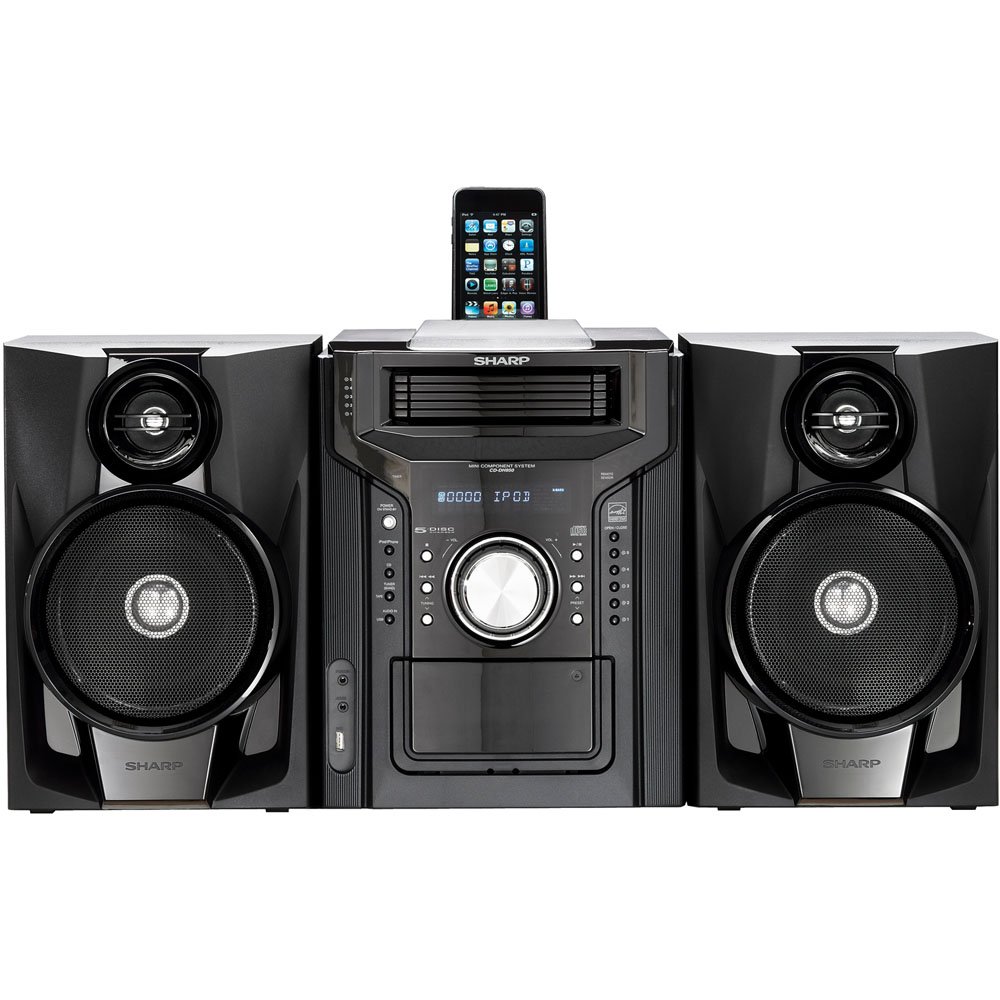
Figura 4.3.1: Per total view of the Sharp CD-DH950P Mini-Component System, showing the main unit flanked by two speakers, with an iPhone docked on top of the main unit.
5. Instrucțiuni de utilizare
5.1 Pornire/Oprire și control volum
- Apăsați tasta PUTERE butonul de pe panoul frontal sau de pe telecomandă pentru a porni sau opri unitatea.
- Rotiți VOLUM butonul de pe panoul frontal sau utilizați VOL +/- butoanele de pe telecomandă pentru a regla nivelul sunetului.
5.2 Redare CD
This system features a 5-disc CD changer.
- Apăsați tasta DESCHIS/ÎNCHIS butonul pentru a deschide tava CD.
- Place up to five CDs on the disc trays, label side up.
- Presa DESCHIS/ÎNCHIS din nou pentru a închide tava.
- Apăsați tasta CD pentru a selecta funcția CD.
- Apăsați tasta REDARE/PAUZĂ pentru a porni redarea.
- Utilizați SARE buttons to navigate between tracks or discs.
5.3 Funcționarea casetei audio
- Apăsați tasta TAPE OPEN/CLOSE button to open the cassette deck.
- Introduceți o casetă.
- Apăsați tasta BANDĂ pentru a selecta funcția casetă.
- Presa JUCA pentru a începe redarea.
- To record, ensure the source is selected (e.g., CD, Tuner) and press the ÎNREGISTRA button on the cassette deck.
5.4 iPod/iPhone Docking
The system includes a top-mounted docking slot for compatible iPod and iPhone devices (30-pin connector).
- Carefully place your iPod or iPhone into the docking slot.
- The system will automatically switch to iPod/iPhone mode or you may need to press the iPod / iPhone buton.
- Use the system's controls or your device's controls to play music. The device will also charge while docked.
5.5 USB Host Playback
Connect a USB storage device containing MP3 or WMA audio files to the USB port on the front panel.
- Introduceți dispozitivul USB în portul USB.
- Apăsați tasta USB butonul pentru a selecta funcția USB.
- Folosește comenzile de redare pentru a naviga și a reda files.
Tuner AM/FM 5.6
- Apăsați tasta TUNER pentru a selecta radioul AM sau FM.
- Utilizați TUNING +/- butoane pentru a acorda manual un post.
- To auto-scan, press and hold the TUNING +/- butoane.
- To store a preset, tune to the desired station, then press MEMORIE followed by a preset number.
5.7 Intrare audio
Connect an external audio device (e.g., MP3 player, smartphone) to the AUDIO IN jack on the front panel using a 3.5mm stereo cable.
- Connect your device to the AUDIO IN jack.
- Apăsați tasta INTRARE AUDIO button to select this source.
- Controlează redarea de pe dispozitivul conectat.
6. Întreținere
6.1 Curăţarea unităţii
Wipe the exterior of the unit with a soft, dry cloth. Do not use abrasive cleaners, waxes, or solvents. Ensure the unit is unplugged before cleaning.
6.2 CD and Cassette Care
- Handle CDs by their edges to avoid fingerprints and scratches. Clean discs with a soft, lint-free cloth from the center outwards.
- Store cassette tapes away from strong magnetic fields and direct sunlight.
7. Depanare
| Problemă | Cauza posibila | Soluţie |
|---|---|---|
| Fără putere | Cablul de alimentare nu este conectat; Priză defectă | Asigurați-vă că cablul de alimentare este conectat corect; Încercați o altă priză |
| Nici un sunet | Volum prea mic; Difuzoare neconectate; Sursă selectată incorectă | Măriți volumul; Verificați conexiunile difuzoarelor; Selectați sursa de intrare corectă |
| CD-ul nu se redă | Disc inserted incorrectly; Disc is dirty or scratched | Insert disc correctly (label side up); Clean or replace disc |
| Recepție radio slabă | Antena nu este poziționată corect; Semnal slab | Adjust position of AM/FM antennas; Try auto-tuning or manual fine-tuning |
| iPod/iPhone not charging/playing | Device not properly docked; Device not compatible (e.g., newer connector) | Re-dock the device; Note that this system uses a 30-pin connector, newer devices may require an adapter (not included) |
8. Specificații
- Marca: Ascuțit
- Model: CD-DH950P
- Putere totală de ieșire: 240 Watts RMS (85W/ch FTC)
- Configurație difuzor: 2.1 canale
- Formate audio acceptate: CD, MP3, WMA
- Raport semnal-zgomot: 100 dB
- Dispozitive compatibile: MP3 Player, Smartphone (via 30-pin dock or USB/Audio In)
- Dimensiuni (L x l x H): 27.6 x 13.6 x 13.5 inci
- Greutatea articolului: 24.4 lire sterline
- UPC: 074000369863, 074000369290
9. Informații despre garanție
This product is covered by a 1-year limited warranty from the date of purchase. Please refer to the warranty card included with your product for full terms and conditions, or contact Sharp customer service for details.
10. Suport
For further assistance, technical support, or service inquiries, please contact Sharp customer service. Contact information can typically be found on the Sharp official website-ul sau în documentația furnizată împreună cu produsul.