
1. Introducere
The InFocus IN1112 Ultra Mobile Widescreen DLP Projector is designed for professionals requiring a portable and high-performance display solution. Its combination of high brightness, lightweight design, and compact size makes it suitable for various environments, from brightly lit rooms to limited spaces. This manual provides essential information for setting up, operating, maintaining, and troubleshooting your projector.
Caracteristici cheie:
- Compact and lightweight (approximately 2.7 lbs / 1.2 kg) for easy portability.
- 2200 lumens of brightness for clear projection in various lighting conditions.
- HDMI input for versatile connectivity with modern devices including laptops, smartphones, and gaming consoles.
- Durable design built for frequent travel.
- Widescreen (WXGA) resolution to match contemporary laptop displays.
2. Informații de siguranță
Vă rugăm să citiți toate instrucțiunile de siguranță înainte de a utiliza proiectorul pentru a preveni vătămările corporale sau deteriorarea unității.
- Do not look directly into the projector lens când lamp este pornit. Lumina intensă poate provoca leziuni oculare.
- Ensure proper ventilation. Do not block ventilation openings, as this can lead to overheating and damage.
- Așezați proiectorul pe o suprafață stabilă și plană pentru a-l împiedica să cadă.
- Folosiți doar cablul de alimentare furnizat împreună cu proiectorul.
- Do not expose the projector to rain, moisture, or excessive humidity.
- Apelați pentru toate lucrările de service la personal de service calificat. Nu încercați să deschideți sau să reparați singur proiectorul.
- Țineți proiectorul departe de surse de căldură și de lumina directă a soarelui.
3. Conținutul pachetului
Verificați dacă toate articolele sunt prezente în colet:
- InFocus IN1112 Projector
- Cablu de alimentare
- Telecomanda (cu baterii)
- Cablu VGA
- Cablu HDMI
- Manual de utilizare (acest document)
- Husă de transport (poate varia în funcție de regiune)
4. Produs terminatview
Familiarize yourself with the main components of your InFocus IN1112 projector.
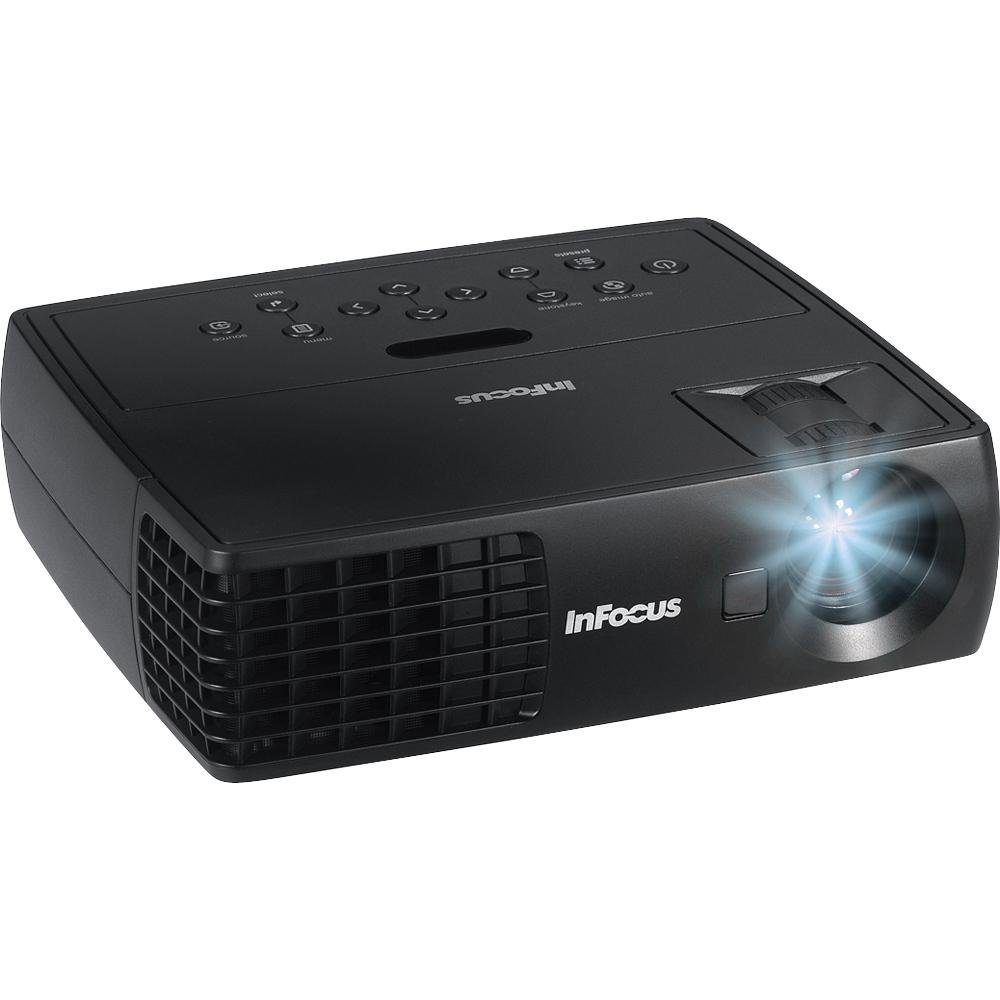
Figura 4.1: Față view of the InFocus IN1112 Projector. This image displays the projector's lens, ventilation, and part of the control panel.

Figura 4.2: lateral view of an InFocus projector, illustrating typical connectivity ports such as HDMI and VGA.
4.1. Panoul frontal
- Lentila de proiectie: Emite imaginea pe ecran.
- Inel de focalizare: Adjusts the sharpness of the projected image.
- Maneta de zoom: Adjusts the size of the projected image.
4.2. Top Panel (Control Panel)
- Buton de alimentare: Pornește sau oprește proiectorul.
- Buton de meniu: Accesează meniul Afișare pe ecran (OSD).
- Butoane de navigare (Sus/Jos/Stânga/Dreapta): Navighează prin opțiunile din meniu.
- Buton Enter: Confirmă selecțiile din meniu.
- Buton sursă: Selects the input source (HDMI, VGA, USB).
4.3. Rear Panel (Connectivity)
- Port HDMI: Connects to devices with HDMI output (laptops, media players).
- Port VGA: Se conectează la computere cu ieșire VGA.
- Port USB: For service or connecting compatible USB devices.
- Putere de intrare: Conectează cablul de alimentare.
5. Configurare
5.1. Plasare
- Așezați proiectorul pe o suprafață plană și stabilă.
- Ensure there is adequate space around the projector for ventilation (at least 30 cm / 12 inches).
- Position the projector at an appropriate distance from the screen to achieve the desired image size.
5.2. Conexiune la alimentare
- Conectați cablul de alimentare la portul de intrare al proiectorului.
- Conectați celălalt capăt al cablului de alimentare la o priză electrică cu împământare.
5.3. Connecting a Source Device
Choose the appropriate cable for your source device:
- HDMI: Connect one end of the HDMI cable to the projector's HDMI port and the other end to your laptop, media player, or other HDMI-enabled device.
- VGA: Connect one end of the VGA cable to the projector's VGA port and the other end to your computer's VGA output. Secure the screws on the VGA connector if available.
6. Operare
6.1. Pornire/Oprire
- Pentru a porni: Press the Power button on the projector's control panel or the remote control. The power indicator light will turn steady blue.
- Pentru a opri: Press the Power button again. A confirmation message may appear. Press Power again to confirm shutdown. The projector will enter a cooling cycle, and the power indicator will flash before turning off.
6.2. Selecting an Input Source
Apăsați tasta Sursă button on the projector or remote control repeatedly to cycle through available input sources (e.g., HDMI, VGA). The projector will automatically detect an active signal if connected.
6.3. Ajustarea imaginii
- Focus: Rotiți inelul de focalizare de pe obiectiv până când imaginea apare clară și ascuțită.
- Zoom: Use the zoom lever on the lens to adjust the size of the projected image.
- Corecție trapezoială: If the image appears trapezoidal, use the Keystone Correction function in the OSD menu to square the image.
6.4. Using the On-Screen Display (OSD) Menu
- Apăsați tasta Meniu button on the projector or remote control to open the OSD menu.
- Utilizați Navigare buttons (Up/Down/Left/Right) to move through menu options.
- Apăsați tasta Intră pentru a selecta o opțiune sau a confirma o setare.
- Utilizați Navigare butoane pentru a ajusta valorile sau a selecta subopțiuni.
- Apăsați tasta Meniu button again to exit the OSD menu.
Common OSD settings include Brightness, Contrast, Color Temperature, Aspect Ratio, and Advanced Settings.
7. Întreținere
7.1. Curățarea proiectorului
- Casing: Folosiți o cârpă moale, fără scame dampened with water or a mild cleaner. Do not use abrasive cleaners or solvents.
- Obiectiv: Use a professional lens cleaning cloth and lens cleaning solution. Gently wipe the lens in a circular motion. Avoid touching the lens with your fingers.
- Deschideri de ventilație: Periodically clean the ventilation openings with a soft brush or compressed air to prevent dust buildup.
7.2. Lamp Îngrijire
Proiectorul lamp has an operating life of approximately 5000 hours. When the lamp reaches the end of its life, the image brightness may decrease, or the lamp indicator may illuminate. Refer to the full service manual for lamp replacement procedures, which should be performed by qualified personnel.
8. Depanare
Această secțiune abordează problemele frecvente pe care le puteți întâmpina cu proiectorul dumneavoastră.
| Problemă | Cauza posibila | Soluţie |
|---|---|---|
| Nicio imagine proiectată | Power cable loose; Source not selected; Input device off; Lamp emisiune. | Check power connection; Select correct input source; Ensure input device is on; Contact support if lamp indicator is active. |
| Imaginea este neclară | Lentila nefocalizată; Proiectorul este prea aproape/departe de ecran. | Adjust the focus ring on the lens; Adjust projector distance or zoom. |
| Imaginea este trapezoidală | Proiectorul nu este perpendicular pe ecran. | Use Keystone Correction in the OSD menu; Reposition the projector. |
| Telecomanda nu funcționează | Batteries dead; Obstruction between remote and projector; Remote sensor blocked. | Replace batteries; Remove obstructions; Ensure remote is pointed at the projector's sensor. |
| Proiectorul se supraîncălzește și se oprește | Ventilație blocată; Temperatură ambientală ridicată. | Ensure ventilation openings are clear; Operate in a well-ventilated area. |
9. Specificații
Detailed technical specifications for the InFocus IN1112 Projector.
| Caracteristică | Caietul de sarcini |
|---|---|
| Marca | InFocus |
| Numele modelului | IN1112 Ultra |
| Tip de afișare | DLP |
| Luminozitate | 2200 lumeni (2100 lumeni ANSI) |
| Rezoluție nativă | 1920 x 1080 (Full HD, though WXGA is mentioned in title, 1920x1080 is in specs) |
| Rezoluția afișajului maximă | 1920 x 1080 |
| Raport de contrast | 2600:1 |
| Tehnologia de conectivitate | HDMI, VGA, USB |
| Durata de funcționare a sursei de lumină | 5000 de ore |
| Greutatea articolului | 1.2 kg (2.65 lbs) |
| Wattage | 185 watts (Lamp Wattage: 165 wați) |
| Culoare | Black (Note: Product images may show white units for illustration) |
| Utilizări recomandate | Business, Traveling |
| Tip de montare | Suport de masă |
| Metoda de control | Remote, Button Control |
10. Garanție și asistență
10.1. Informații despre garanție
The InFocus IN1112 Projector typically comes with a manufacturer's limited warranty. Please refer to the warranty card included with your product or visit the official InFocus webConsultați site-ul pentru termenii și condițiile specifice ale garanției, inclusiv detalii despre durată și acoperire. Păstrați dovada achiziției pentru solicitările de garanție.
10.2. Asistență pentru clienți
For technical assistance, troubleshooting beyond this manual, or service inquiries, please contact InFocus customer support. You can find contact information, FAQs, and additional resources on the official InFocus website: www.infocus.com