
Introducere
Thank you for choosing the Casio G-Shock GW-M5600A-7ER. This watch combines robust G-Shock durability with advanced radio-controlled timekeeping and solar power technology. This manual provides essential information for proper setup, operation, and maintenance of your watch. Please read it carefully to ensure optimal performance and longevity.
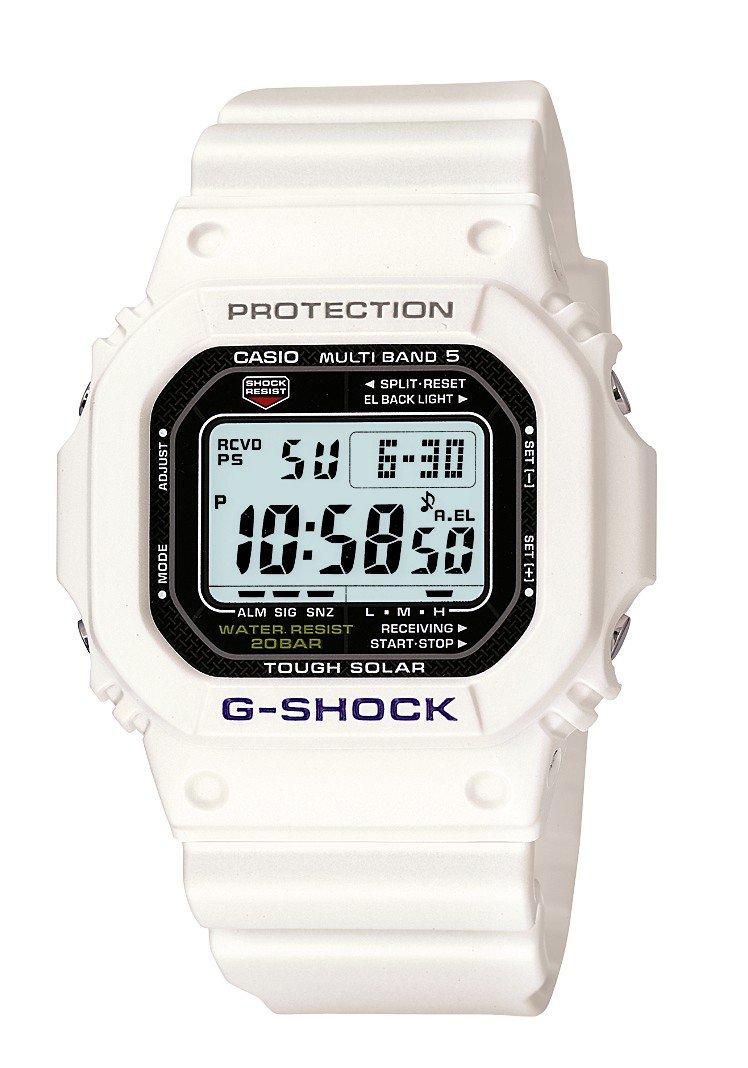
Imagine: față view of the Casio G-Shock GW-M5600A-7ER watch, showcasing its digital display and resin strap.
Caracteristici cheie
- Radio-Controlled Timekeeping: Automatically receives time calibration signals for accurate timekeeping.
- Alimentat cu energie solară: Equipped with a solar panel that converts light into electrical power, eliminating the need for battery replacement.
- Rezistență la apă de 200 de metri: Suitable for swimming, snorkeling, and diving (excluding saturation diving).
- Rezistență la șocuri: Conceput să reziste la impacturi și vibrații.
- Ecran digital: Clear and easy-to-read digital time and function display.
- Funcția cronometru: Măsoară timpul scurs, timpul intermediar și timpii de pe locurile 1-2.
- Funcția de alarmă: Multiple daily alarms and an hourly semnal orar.
- Ora mondială: Afișează ora curentă în orașele mari și în anumite zone din întreaga lume.
- Sticlă minerală: Protective, scratch-resistant hard mineral lens.
- Construcție durabilă din rășină: High-performance and durable resin case and strap.
Înființat
1. Încărcarea inițială
Your watch is powered by a solar cell. Before initial use, expose the watch face to bright light for several hours to ensure it is sufficiently charged. The watch may arrive with a low charge, indicated by a flashing 'CHG' or 'LOW' indicator on the display. Avoid prolonged storage in dark places.
2. Setting Your Home City
The Home City setting is crucial for correct time calibration and World Time functionality. Refer to the detailed instructions in the full manual for specific button operations to set your Home City. This setting determines which time calibration signal the watch attempts to receive.
3. Time Calibration Signal Reception
The watch automatically attempts to receive a time calibration signal up to six times a day (or five times a day for the Chinese calibration signal). For optimal reception, place the watch near a window at night, away from metal objects and electronic devices. Manual reception can also be initiated:
- In Timekeeping Mode, hold down the 'A' button (top left) for several seconds until the current time calibration status appears.
- Press the 'D' button (bottom right) to initiate manual reception.
- The watch will display 'RCVD' upon successful reception.
Instrucțiuni de operare
Mod de navigare
Press the 'C' button (bottom left) to cycle through the different modes:
- Modul de indicare a orei: Afișează ora și data curente.
- Modul Ora mondială: Displays current time in various time zones.
- Mod de alarmă: Setați și activați alarme zilnice.
- Mod cronometru: Măsurați timpul scurs.
- Modul cronometru cu numărătoare inversă: Set a countdown from a specified time.
Folosind cronometrul
- Navigate to Stopwatch Mode using the 'C' button.
- Press the 'D' button (bottom right) to start/stop the stopwatch.
- Press the 'B' button (top right) to record split times or reset the stopwatch when stopped.
Setarea alarmelor
- Navigate to Alarm Mode using the 'C' button.
- Hold down the 'A' button (top left) until the alarm time starts flashing.
- Use the 'B' and 'D' buttons to adjust the hour and minute settings.
- Press 'A' to confirm and exit the setting screen.
- Press 'D' to toggle the alarm ON/OFF.
Iluminare
Press the 'B' button (top right) to illuminate the display for easy viewing in low light conditions. The duration of illumination can be adjusted in the watch settings.
Întreţinere
Încărcarea ceasului
To maintain optimal performance, ensure your watch is regularly exposed to light. The power indicator on the display shows the current charge level. If the charge level is low, expose the watch to direct sunlight or strong artificial light. Avoid covering the watch face when charging.
Curatenie
Ștergeți ceasul cu o cârpă moale și uscată pentru a îndepărta murdăria și umezeala. Pentru murdăria persistentă, folosiți o cârpă moale.ampClătiți cu apă și un detergent neutru blând, apoi ștergeți pentru uscare. Evitați utilizarea agenților volatili precum diluantul sau benzina, deoarece aceștia pot deteriora componentele din rășină.
Precauții privind rezistența la apă
While your watch is water-resistant to 200 meters, it is important to observe the following:
- Nu acționați butoanele în timp ce ceasul este ud sau scufundat.
- Avoid exposing the watch to hot water or steam (e.g., in showers, saunas) as this can compromise seals.
- After exposure to saltwater, rinse the watch thoroughly with fresh water and wipe dry.
Depanare
Time Not Syncing
- Check Home City Setting: Ensure your Home City is correctly set to a region that receives time calibration signals.
- Reception Environment: Move the watch to a location with better signal reception, ideally near a window, away from electronic interference.
- Recepție manuală: Attempt a manual time calibration signal reception (refer to Setup section).
- Nivel de încărcare: Ensure the watch has sufficient charge. Low power can affect signal reception.
Afișajul este gol sau întunecat
- Nivel de încărcare: The watch may be in power-saving mode or have a very low charge. Expose it to bright light for an extended period.
- Economisire de energie: The watch enters power-saving mode when left in the dark for a certain period. Press any button or expose it to light to reactivate the display.
Butoanele nu răspund
- Resetați: In rare cases, a full reset might be necessary. Consult the full Casio manual for your specific module number (usually found on the watch's case back) for detailed reset procedures.
- Apă: Ensure the watch is completely dry if it has been exposed to water.
Specificații
| Numărul de model | GW-M5600A-7ER |
| Producător | G-SHOCK |
| Tip de afișare | Digital |
| Circulaţie | Cuarţ |
| Sursa de alimentare | Alimentat cu energie solară |
| Adâncimea de rezistență la apă | 200 metri |
| Tipul de material al carcasei | Răşină |
| Tipul materialului benzii | Răşină |
| Tipul de material al ferestrei cadranului | Mineral |
| Diametrul carcasei | 49 mm |
| Grosimea carcasei | 17 mm |
| Lățimea benzii | 25 mm |
| Tip de închidere | Cataramă Tang |
| Forma articolului | Pătrat |
| Culoarea benzii | Alb |
| Culoare cadran | Gri |
Garanție și suport
Your Casio G-Shock GW-M5600A-7ER watch comes with a Garanție de 2 an de la producătorAceastă garanție acoperă defectele de materiale și de fabricație în condiții normale de utilizare. Vă rugăm să păstrați dovada achiziției pentru reclamațiile în garanție.
For detailed warranty terms, service, or technical support, please refer to the official Casio website or contact your local authorized Casio service center. Contact information can typically be found in the full product manual or on the manufacturer's website-ul.