
1. Introducere
The D-Link DES-1008E is an 8-Port Fast Ethernet Desktop Switch designed to expand your network connectivity. This unmanaged switch provides eight 10/100 Mbps Ethernet ports, allowing you to connect multiple devices such as computers, printers, and network-attached storage (NAS) to your network. It supports full-duplex mode, delivering up to 200 Mbps throughput per port for efficient data transfer. The plug-and-play design ensures easy installation without the need for software configuration.
2. Conținutul pachetului
Vă rugăm să verificați dacă pachetul dumneavoastră conține următoarele articole:
- D-Link DES-1008E 8-Port Fast Ethernet Desktop Switch
- Adaptor de alimentare
- Ghid de instalare rapidă
If any items are missing or damaged, please contact your local D-Link reseller for assistance.
3. Configurare
Follow these steps to set up your D-Link DES-1008E switch:
- Poziționați comutatorul: Place the switch on a flat, stable surface or mount it to a wall using appropriate hardware (not included). Ensure adequate ventilation around the device.
- Conectați adaptorul de alimentare: Plug the provided power adapter into the power port on the back of the DES-1008E switch. Connect the other end of the power adapter to a standard electrical outlet. The power LED on the front of the switch should illuminate.
- Conectarea dispozitivelor de rețea: Connect your network devices (e.g., computers, routers, game consoles) to any of the eight Ethernet ports on the switch using standard Ethernet cables. The corresponding port LED on the front of the switch will illuminate when a connection is established.
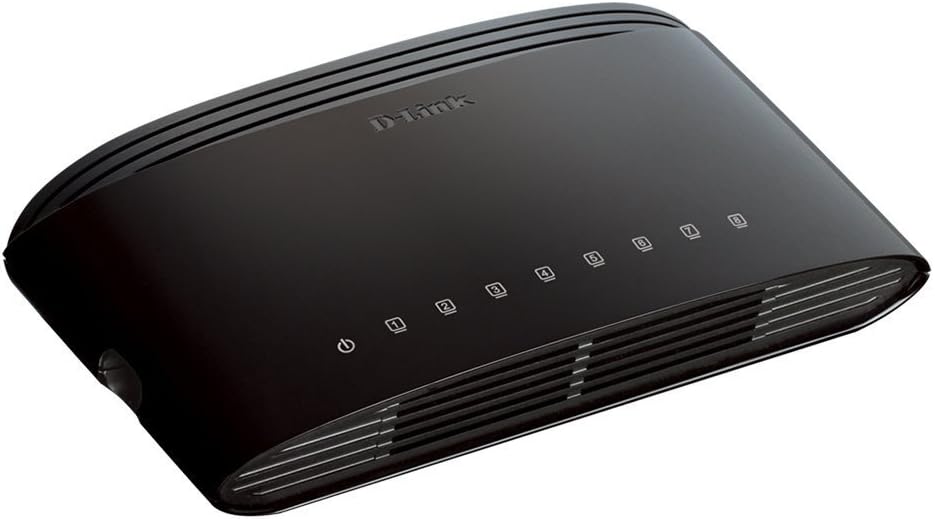
Figura 1: Față view of the D-Link DES-1008E switch, showing the power indicator and eight port status LEDs.

Figura 2: Spate view of the D-Link DES-1008E switch, illustrating the eight Ethernet ports for device connections.
The D-Link DES-1008E is a plug-and-play device, requiring no software installation or configuration. Once connected, your devices should automatically detect the network connection.
4. Operarea comutatorului
The DES-1008E operates automatically once powered on and connected. It functions as an unmanaged switch, meaning it requires no user intervention for basic network traffic management.
Indicatoare LED:
- LED de alimentare: Illuminates green when the switch is receiving power.
- LED-uri port (1-8): Each port has an associated LED. This LED illuminates green when a device is connected to the port and flashes to indicate network activity (data transmission).
5. Întreținere
To ensure optimal performance and longevity of your D-Link DES-1008E switch, consider the following maintenance guidelines:
- curatenie: Gently wipe the exterior of the switch with a soft, dry cloth. Avoid using liquid or aerosol cleaners directly on the device.
- Ventilare: Ensure that the ventilation slots on the switch are not blocked. Proper airflow prevents overheating.
- Mediu: Folosiți comutatorul în intervalele de temperatură și umiditate specificate. Evitați expunerea acestuia la lumina directă a soarelui, căldură excesivă sau umiditate.
- Ciclu de alimentare: If the switch experiences issues, a simple power cycle (unplugging and replugging the power adapter) can often resolve minor problems.
6. Depanare
If you encounter issues with your D-Link DES-1008E switch, refer to the following troubleshooting tips:
- Fără putere:
- Asigurați-vă că adaptorul de alimentare este conectat corect atât la întrerupător, cât și la o priză electrică funcțională.
- Verificați dacă priza electrică funcționează conectând un alt dispozitiv.
- Verificați adaptorul de alimentare pentru a depista eventuale deteriorări vizibile.
- Nicio legătură/activitate pe un port:
- Verificați dacă cablul Ethernet este conectat corect atât în portul switch-ului, cât și în dispozitivul conectat.
- Încercați un alt cablu Ethernet pentru a exclude un cablu defect.
- Connect a different device to the same port to check if the port is functional.
- Asigurați-vă că dispozitivul conectat este pornit și că adaptorul său de rețea este activat.
- Performanță lentă a rețelei:
- Verificați dacă toate dispozitivele conectate funcționează la vitezele așteptate.
- Check for excessive network traffic or bandwidth-intensive applications running on connected devices.
- Ensure your internet service provider (ISP) is delivering the expected speeds to your router.
- High-Pitched Sound from Power Adapter:
- Some users have reported a high-pitched sound from the included power adapter. If this occurs, consider using an alternative 5V power supply with compatible specifications. Ensure the replacement power supply meets the voltage and current requirements of the switch to avoid damage.
7. Specificații
| Numărul de model | DES-1008E |
| Numărul de porturi | 8 |
| Standard Ethernet | 10/100 Mbps Fast Ethernet |
| Rata de transfer de date | Up to 200 Mbps (full-duplex) |
| Capacitatea de comutare | 1.6 Gbps |
| Dimensiunea tabelului de adrese MAC | 1K intrări |
| Intrare de putere | 5V DC |
| Greutatea articolului | 9.44 uncii |
| Culoare | Negru |
8. Garanție și asistență
The D-Link DES-1008E 8-Port Fast Ethernet Desktop Switch comes with a Garanție limitată pe viață. For detailed warranty terms and conditions, please refer to the warranty information provided with your product or visit the official D-Link website-ul.
For technical support, product registration, or to download the latest firmware and documentation, please visit the D-Link support website or contact D-Link customer service in your region. Support contact information can typically be found on the D-Link official website-ul.