
1. Introducere
This manual provides detailed instructions for the setup, operation, maintenance, and troubleshooting of your Inland Pro Bluetooth Optical Mouse (Model 07347). Please read this manual thoroughly before using the device to ensure proper functionality and to prevent damage.
The Inland Pro Bluetooth Optical Mouse offers wireless convenience and precise optical tracking for various computing tasks. Its ergonomic design aims to provide comfortable use.
2. Conținutul pachetului
Verificați dacă toate articolele enumerate mai jos sunt prezente în ambalajul produsului:
- Inland Pro Bluetooth Optical Mouse (Model 07347)
- Manual de utilizare (acest document)
- Notă: Sunt necesare 2 baterii AAA pentru funcționare și nu sunt incluse.
3. Produs terminatview
The Inland Pro Bluetooth Optical Mouse is designed for ease of use and reliable performance. Key features include:
- Bluetooth Wireless Interface: Provides a cable-free connection to your compatible device.
- Tehnologie optică: Delivers accurate and responsive cursor control.
- Design ergonomic: Shaped for comfortable handling during extended use.
- Two Buttons and Scroll Wheel: Standard navigation controls for efficient interaction.
- Senzor 1000 DPI: Offers a fixed sensitivity for general computing tasks.
Componentele mouse-ului
Refer to the image below for an illustration of the mouse components.
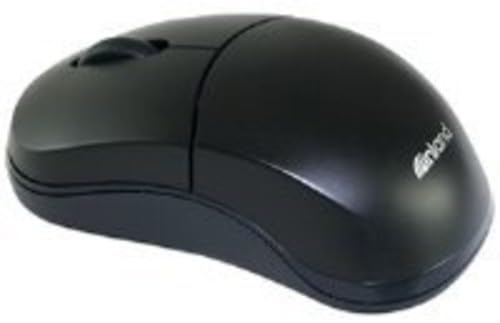
Figure 1: Inland Pro Bluetooth Optical Mouse (Model 07347). This image displays the top and side profile of the black optical mouse, highlighting its ergonomic shape and standard button layout.
- Faceți clic stânga pe butonul
- Faceți clic dreapta pe butonul
- Rotiță de derulare
- Senzor optic (situat pe partea inferioară)
- Compartimentul bateriei (situat pe partea inferioară)
- Bluetooth Connection/Pairing Button (located on the underside)
- Power On/Off Switch (located on the underside)
4. Configurare
4.1. Instalarea bateriilor
- Turn the mouse over to access the underside.
- Locate the battery compartment cover. Slide or lift the cover to open it.
- Introduceți două (2) baterii AAA, asigurându-vă că bornele pozitive (+) și negative (-) se aliniază corect cu marcajele din interiorul compartimentului.
- Puneți bine capacul compartimentului bateriei.
- Slide the Power On/Off switch to the 'On' position.
4.2. Asociere Bluetooth
Follow these steps to connect your mouse to a compatible device:
- Ensure the mouse has fresh batteries and is powered on.
- On your computer or device, enable Bluetooth and open the Bluetooth settings or device manager.
- Țineți apăsat butonul Bluetooth Connection/Pairing Button on the underside of the mouse for approximately 3-5 seconds. An indicator light on the mouse (if present) may flash to indicate pairing mode.
- On your device, search for new Bluetooth devices. The mouse should appear as "Inland Pro Mouse" or a similar identifier.
- Select the mouse from the list of available devices to initiate the connection.
- If prompted for a passkey, enter "0000" or consult your device's Bluetooth instructions. Some devices may not require a passkey.
- Once connected, the mouse indicator light may stop flashing or turn solid, and your device should confirm the successful pairing.
Notă de compatibilitate: This mouse is compatible with Windows 2000, Windows XP, Windows Vista, and Mac OS. Compatibility with other operating systems or specific Bluetooth adapters may vary.
5. Instrucțiuni de utilizare
After successful pairing, the mouse is ready for use.
- Moving the Cursor: Move the mouse across a flat, non-reflective surface to control the cursor on your screen.
- Click stânga: Apăsați butonul stâng pentru a selecta elemente, a deschide linkuri sau a activa funcții.
- Click dreapta: Apăsați butonul din dreapta pentru a deschide meniurile contextuale sau pentru a accesa opțiuni suplimentare.
- Rotiță de defilare: Rotiți rotița de derulare în sus sau în jos pentru a naviga prin documente și web pages. The scroll wheel can also be pressed as a middle click button for some functions.
6. Întreținere
6.1. Curățarea mouse-ului
Pentru a menține performanța și aspectul optime:
- Asigurați-vă că mouse-ul este oprit înainte de curățare.
- Folosiți o cârpă moale, fără scame dampcu apă sau cu o soluție de curățare blândă.
- Wipe the exterior surfaces of the mouse gently.
- Evitați utilizarea substanțelor chimice dure, a produselor de curățare abrazive sau a umidității excesive, deoarece acestea pot deteriora mouse-ul.
- Do not spray cleaners directly onto the mouse.
6.2. Înlocuirea bateriei
When the mouse's performance degrades or it stops responding, it may be time to replace the batteries. Follow the steps in Section 4.1 to replace the two (2) AAA batteries.
Note: Dispose of used batteries responsibly according to local regulations.
7. Depanare
Dacă întâmpinați probleme cu mouse-ul optic Bluetooth Inland Pro, consultați următoarele probleme și soluții comune:
- Mouse does not respond or cursor does not move:
- Ensure the mouse is powered on. Check the On/Off switch on the underside.
- Înlocuiți bateriile cu baterii AAA noi.
- Ensure the mouse is within the effective range of your Bluetooth device (typically up to 10 meters).
- Verify that the mouse is properly paired with your device. If not, re-pair it following the steps in Section 4.2.
- Try connecting the mouse to a different Bluetooth-enabled device to rule out an issue with your primary device's Bluetooth adapter.
- Connection fails or mouse frequently disconnects:
- Ensure there are no other strong wireless signals or devices interfering with the Bluetooth connection.
- Turn the mouse off and then on again using the power switch on the underside. This can often re-establish the connection.
- Remove the mouse from your device's Bluetooth paired devices list and then re-pair it.
- Actualizați driverele Bluetooth ale computerului.
- If your device requests a code during pairing and none was provided, try common codes like "0000" or "1234". If issues persist, consult your device's operating system documentation.
- Mișcarea cursorului este neregulată sau imprecisă:
- Curățați senzorul optic de pe partea inferioară a mouse-ului cu o lavetă moale și uscată.
- Use the mouse on a clean, uniform, non-reflective surface. Avoid highly reflective or transparent surfaces.
8. Specificații
| Marca | În interior |
| Numărul de model | 07347 |
| Tehnologia de conectivitate | Bluetooth, Wireless (2.4 GHz Radio Frequency, 802.11abg) |
| Tehnologia de detectare a mișcării | Optic |
| DPI (puncte pe inch) | 1000 dpi |
| Numărul de butoane | 2 (plus scroll wheel click) |
| Culoare | Negru |
| Compatibilitatea sistemelor de operare | Windows 2000, Windows XP, Windows Vista, Mac OS |
| Bateriile necesare | 2 x AAA (nu sunt incluse) |
| Greutatea articolului | 109 g |
| Dimensiuni produs (L x l x H) | 20.32 x 6.35 x 18.29 cm (dimensiuni aproximative ale ambalajului) |
9. Garanție și asistență
For warranty information, please refer to the documentation provided at the time of purchase or contact your retailer. Inland typically offers a limited warranty against defects in materials and workmanship.
For technical support or further assistance, please visit the official Inland website or contact their customer service department. Contact details are usually available on the product packaging or the manufacturer's website-ul.