
VTech 80-109744
VTech Schulstart Laptop E Instruction Manual
Model: 80-109744
1. Introducere
This manual provides essential information for the safe and effective use of your VTech Schulstart Laptop E. This learning computer is designed for children aged 6 and up, offering 160 educational games in both German and English. It covers subjects such as letters, words, mathematics, nature, science, and creativity.
Vă rugăm să citiți cu atenție acest manual înainte de a utiliza dispozitivul și să îl păstrați pentru referințe ulterioare.
2. Informații de siguranță
AVERTIZARE: Choking hazard due to small parts that can be swallowed. Not suitable for children under 36 months.
AVERTIZARE: Strangulation hazard. Keep packaging materials away from children.
- Supravegheați întotdeauna copiii în timpul utilizării.
- Nu expuneți dispozitivul la temperaturi extreme sau la lumina directă a soarelui.
- Păstrați dispozitivul uscat. Nu-l scufundați în apă sau alte lichide.
- Curățați dispozitivul cu o lavetă moale și uscată. Nu utilizați substanțe de curățare abrazive.
- Asigurați-vă că bateriile sunt introduse corect, respectând marcajele de polaritate.
- Scoateți rapid bateriile uzate.
- Nu amestecați baterii vechi cu noi sau diferite tipuri de baterii.
- Bateriile nereîncărcabile nu trebuie reîncărcate.
- Bateriile reîncărcabile trebuie încărcate numai sub supravegherea unui adult.
- Scoateți bateriile reîncărcabile din jucărie înainte de încărcare.
- Bornele de alimentare nu trebuie scurtcircuitate.
3. Conținutul pachetului
The VTech Schulstart Laptop E package includes:
- 1 x VTech Schulstart Laptop E
- 1 x Cursor Mouse
- 3 x AA Demonstration Batteries (for test purposes only)
Note: A VTech power adapter and VTech laptop bag are sold separately and are not included.
4. Configurare
4.1 Instalarea bateriei
The device requires 3 AA batteries. The included demonstration batteries are for testing purposes only and should be replaced with new batteries for regular use.
- Localizați compartimentul bateriei pe partea inferioară a laptopului.
- Folosind o șurubelniță, deschideți capacul compartimentului bateriei.
- Remove the old demonstration batteries (if present).
- Introduceți 3 baterii AA noi, asigurându-vă că polaritatea este corectă (+/-), așa cum este indicată în interiorul compartimentului.
- Puneți la loc capacul compartimentului bateriei și fixați-l cu șurubul.

Figure 4.1: Battery installation guide. Replace demonstration batteries with new ones for extended play.
4.2 Connecting the Cursor Mouse
The VTech Schulstart Laptop E comes with a wired cursor mouse for interactive play.
- Locate the mouse port on the side of the laptop.
- Carefully insert the mouse connector into the port.
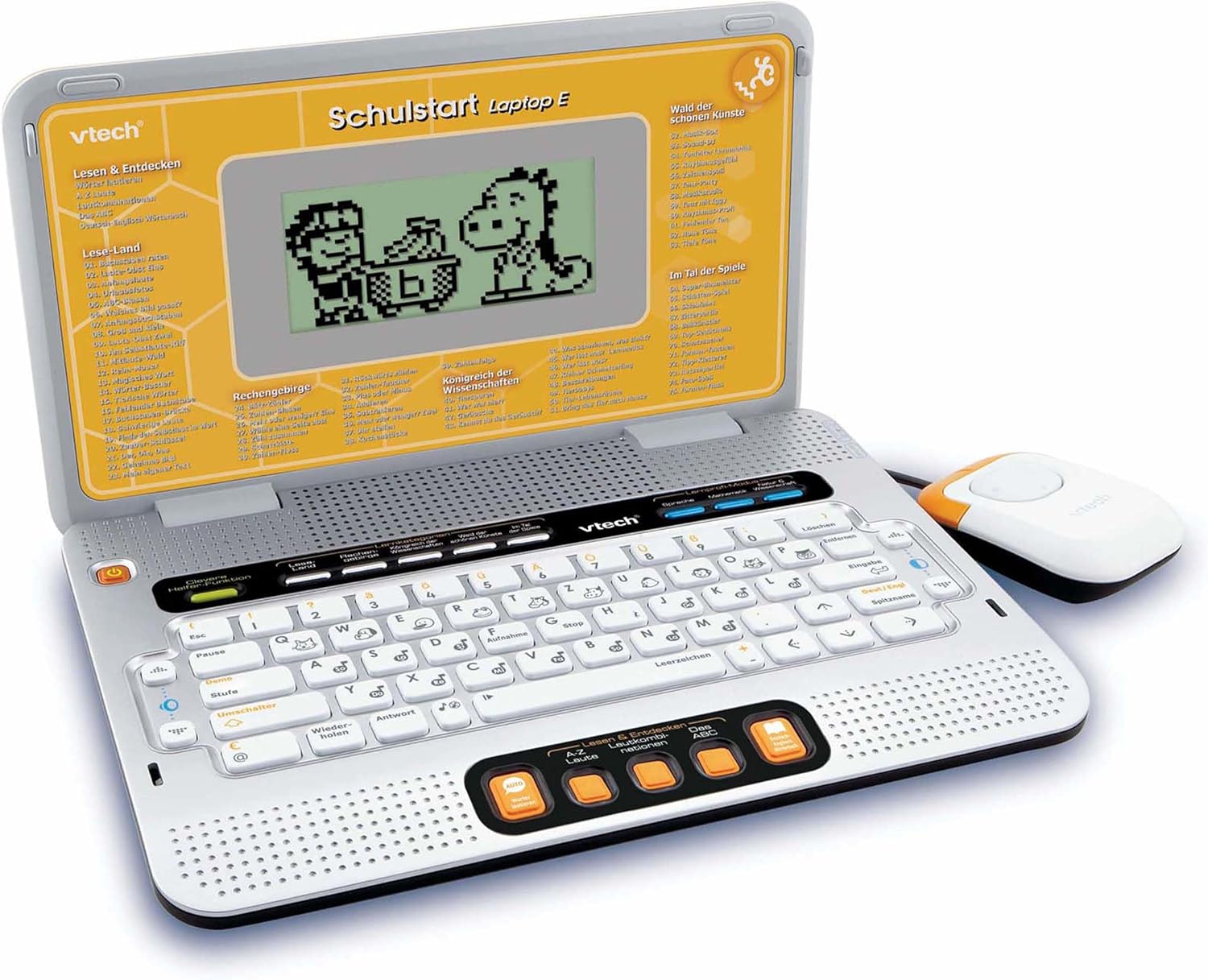
Figure 4.2: VTech Schulstart Laptop E with connected cursor mouse.
5. Instrucțiuni de utilizare
5.1 Pornire/Oprire
Pentru a porni laptopul, apăsați butonul Putere button, usually located on the top left of the keyboard area. To turn off, press the Putere button again or the laptop will automatically shut down after a period of inactivity to conserve battery life.
5.2 Selectarea limbii
The VTech Schulstart Laptop E supports both German and English. You can switch between languages using the dedicated language selection button or through the settings menu, if available. Refer to the on-screen prompts for initial setup.
5.3 Game Categories and Selection
The laptop features 160 educational games categorized as follows:
- Language Tools: 5 programe
- Letters & Words: 23 programe
- Matematică: 16 programe
- Nature & Science: 12 programe
- Creativitate: 12 programe
- Logic & Games: 12 programe
Use the arrow keys and the Enter button on the keyboard, or the cursor mouse, to navigate through the menu and select a game.

Figure 5.1: Navigating game categories on the VTech Schulstart Laptop E.
5.4 Tutor Function and Learning Modes
The laptop includes a Tutor function and a Learning Pro mode to enhance the learning experience:
- Tutor Function: Features 5 direct-dial keys for language tools (sounds, phonics, sound combinations, ABC with example words, German-English dictionary). These programs assist with letter pronunciation and reading.
- Learning Pro Mode: Offers progressive learning through increasing difficulty levels, adapting to the child's progress.
- Smart Helper Function: Provides additional hints and tips in many educational games upon request.

Figure 5.2: Child using the VTech Schulstart Laptop E's interactive learning features.
6. Întreținere
6.1 Curățare
To clean the VTech Schulstart Laptop E, use a soft, slightly damp lavetă. Nu utilizați substanțe chimice dure sau produse de curățare abrazive. Asigurați-vă că dispozitivul este oprit și deconectat de la orice sursă de alimentare înainte de curățare.
6.2 Depozitare
Store the laptop in a cool, dry place away from direct sunlight and extreme temperatures. If the device will not be used for an extended period, remove the batteries to prevent leakage.

Figure 6.1: Optional VTech laptop bag for storage and transport (sold separately).
7. Depanare
| Problemă | Cauza posibila | Soluţie |
|---|---|---|
| Dispozitivul nu pornește. |
|
|
| Ecranul este gol sau pâlpâie. |
|
|
| Keys or mouse not responding. |
|
|
| Sunetul este distorsionat sau lipsește. |
|
|
8. Specificații
- Număr de model: 80-109744
- Dimensiuni (L x l x H): 4 x 28 x 20 cm (1.57 x 11.02 x 7.87 țoli)
- Greutate: 1.29 kg (2.84 lbs)
- Varsta recomandata: 6 ani în sus
- Baterii: 3 x AA (not included for regular use)
- Limbi: germană, engleză
- Număr de jocuri: 160
- Data de lansare: 31 iulie 2010
9. Garanție și asistență
Pentru informații despre garanție și asistență pentru clienți, vă rugăm să consultați site-ul oficial VTech. website or contact your local VTech distributor. Keep your purchase receipt as proof of purchase.
VTech Oficial Website: www.vtech.com
Ask a question about this manual
Ask about setup, troubleshooting, compatibility, parts, safety, or missing instructions. Manuals+ will review the question and use this page’s manual context to help answer it.