
1. Produs terminatview
The Mad Catz Officially Licensed Controller for Xbox 360 is designed to enhance your gaming experience. This controller features analog triggers and joysticks, along with vibration feedback technology, to immerse you in your favorite games. Its soft touch elastomere finish ensures comfort during extended gaming sessions.
Caracteristici cheie:
- Officially Licensed Product for Xbox 360
- Integrated vibration feedback technology
- Responsive analog triggers and joysticks
- PC USB compatible for versatile use
- Durable construction with a comfortable soft touch elastomere finish
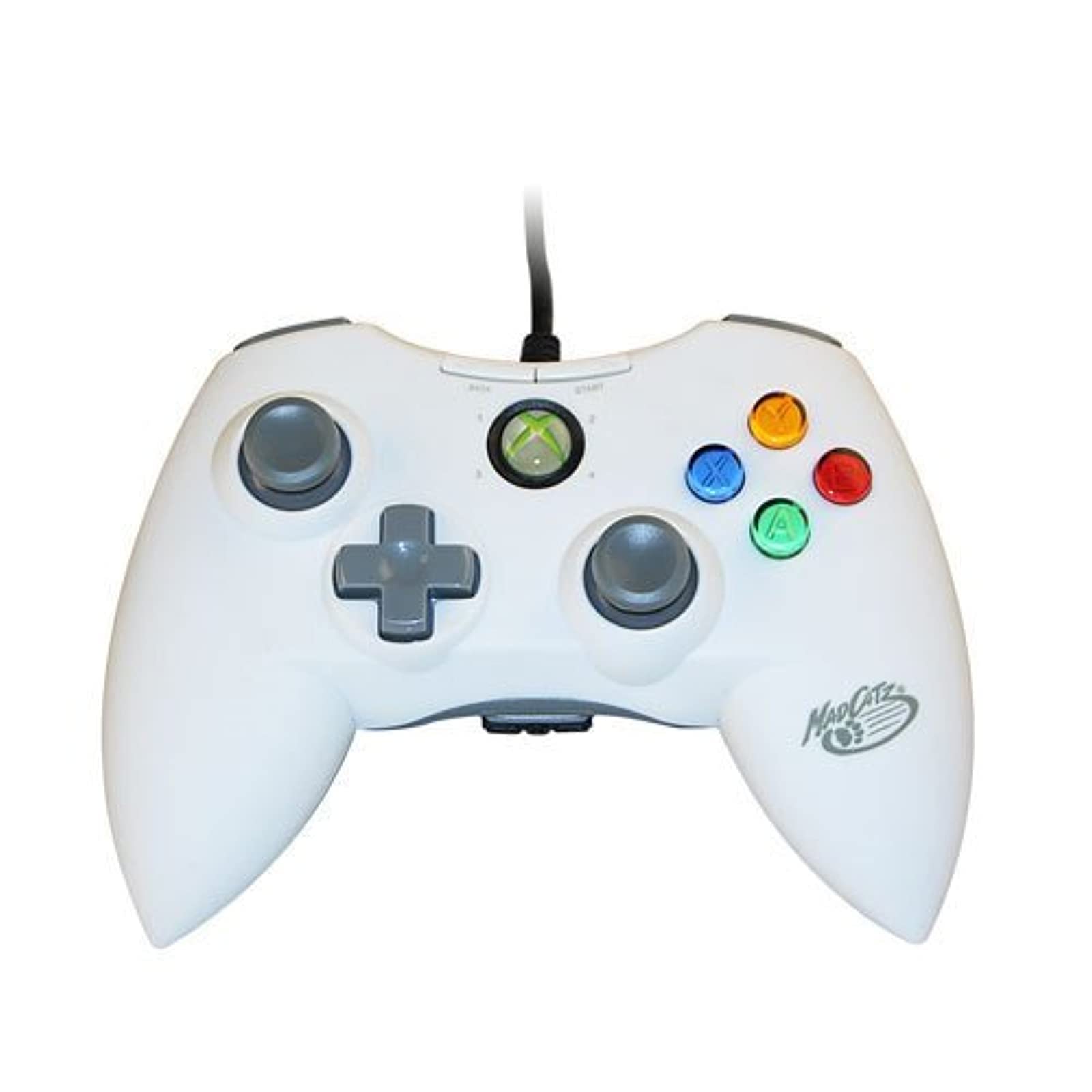
Imaginea 1.1: Față view of the Mad Catz Officially Licensed Controller for Xbox 360 in White.
2. Instrucțiuni de configurare
2.1 Connecting to Xbox 360
- Găsiți un port USB disponibil pe consola Xbox 360.
- Plug the USB connector of the Mad Catz controller firmly into the USB port.
- The controller will automatically be recognized by the console. The guide button LED will illuminate to indicate a successful connection and assigned player number.
2.2 Conectarea la PC
- Locate an available USB port on your personal computer.
- Plug the USB connector of the Mad Catz controller firmly into the USB port.
- For most Windows operating systems, the necessary drivers will install automatically. Follow any on-screen prompts.
- Once drivers are installed, the controller should be ready for use with compatible PC games. You may need to configure controller settings within individual game menus.
3. Operarea controlerului
The Mad Catz controller features a standard layout for Xbox 360, ensuring familiarity and ease of use.
- Stick-uri analogice stânga și dreapta: Folosit pentru mișcarea personajelor, controlul camerei sau navigarea prin meniu.
- D-Pad (D-Pad direcțional): Provides precise directional input, often used for menu navigation or specific in-game actions.
- Butoanele A, B, X, Y: Primary action buttons, typically color-coded and labeled.
- Butoanele Start și Înapoi: Used for pausing games, accessing in-game menus, or confirming selections.
- Bare de protecție stânga și dreapta (LB, RB): Located on the top edge of the controller, used for various in-game functions.
- Declanșatoare stânga și dreapta (LT, RT): Analog triggers located on the underside of the controller's top edge, providing pressure-sensitive input for actions like acceleration or firing weapons.
- Buton de ghidare: The central button with the Xbox logo, used to access the Xbox Guide or dashboard.
Feedback de vibrație: The controller incorporates vibration motors that provide tactile feedback during gameplay, enhancing immersion by simulating in-game events like impacts or explosions.
4. Întreținere
Proper care will extend the life of your Mad Catz controller.
- curatenie: Use a soft, dry cloth to wipe down the controller. Avoid using liquid cleaners, solvents, or abrasive materials, as these can damage the finish or internal components.
- Depozitare: Depozitați controlerul într-un loc răcoros și uscat, ferit de lumina directă a soarelui și de temperaturi extreme. Evitați așezarea obiectelor grele pe controler.
- Îngrijirea cablului: Do not sharply bend or pull the USB cable. Always grasp the plug when disconnecting the controller.
5. Depanare
If you encounter issues with your controller, refer to the following common solutions:
- Controllerul nu răspunde:
- Asigurați-vă că cablul USB este conectat corect atât la controler, cât și la consolă/PC.
- Încercați să conectați controlerul la un alt port USB.
- Reporniți consola Xbox 360 sau PC-ul.
- Vibration Feedback Not Working:
- Check the in-game settings of the game you are playing to ensure vibration feedback is enabled.
- Verify that the controller is properly connected and recognized by the system.
- Buttons or Analog Sticks Malfunctioning:
- Inspect for any visible debris or obstructions around the buttons or analog sticks.
- If issues persist, the controller may require service.
- PC Compatibility Issues:
- Ensure your PC's operating system is up to date.
- For some PC games, manual configuration of controller settings within the game's options menu may be necessary.
6. Specificații
| Marca | Catz nebun |
| Numărul de model | MCP471600M01/04/1 |
| Platformă hardware | Xbox 360 |
| Modele de console compatibile | Microsoft Xbox 360, Microsoft Xbox 360 E |
| Culoare | Alb |
| Greutatea articolului | 233 grame |
| Dimensiuni articol (L x l x H) | 8 x 5.5 x 3.5 inci |
| UPC | 071030164833, 080050412176, 072090440974, 151903469828, 728658009656 |
7. Garanție și asistență
Specific warranty details and direct support contact information are not provided in this manual. Please refer to the product packaging or the official Mad Catz website for the most current warranty information and customer support options.