
Introducere
Mulțumesc pentru achizițieasing the Snakebyte Wireless Bluetooth Premium PS3 Controller. This manual provides detailed instructions for setting up, operating, maintaining, and troubleshooting your new controller. Please read this manual thoroughly before use to ensure optimal performance and longevity of your device.
Conținutul pachetului
Vă rugăm să verificați dacă toate articolele sunt prezente în colet:
- Snakebyte Wireless Bluetooth Premium PS3 Controller
- USB Charging Cable (approximately 3 meters)
- Manual de instrucțiuni (acest document)

Image: The Snakebyte Wireless Bluetooth Premium PS3 Controller shown in its retail blister packaging, indicating the product and included cable.
Înființat
1. Încărcarea controlerului
Before initial use, fully charge the controller. Connect the supplied USB charging cable to the controller's charging port and the other end to a USB port on your PlayStation 3 console or a compatible USB power adapter. The indicator lights on the controller will show charging status and turn off or change color when fully charged.
2. Connecting to PlayStation 3
To connect the controller wirelessly to your PlayStation 3 console:
- Asigurați-vă că consola PlayStation 3 este pornită.
- Connect the controller to the PS3 console using the supplied USB charging cable. This will register the controller with the console.
- Apăsați tasta Butonul PS (located in the center of the controller) once. The controller will power on and attempt to establish a connection.
- Once the controller is registered and connected, the indicator lights will illuminate, typically assigning a player number.
- You can now disconnect the USB cable for wireless gameplay. If the connection is lost, reconnect the USB cable and press the PS button again.

Imagine: față view of the Snakebyte Wireless Bluetooth Premium PS3 Controller, showing the button layout including the central PS button.
Instrucțiuni de operare
Aspectul și funcțiile controlerului
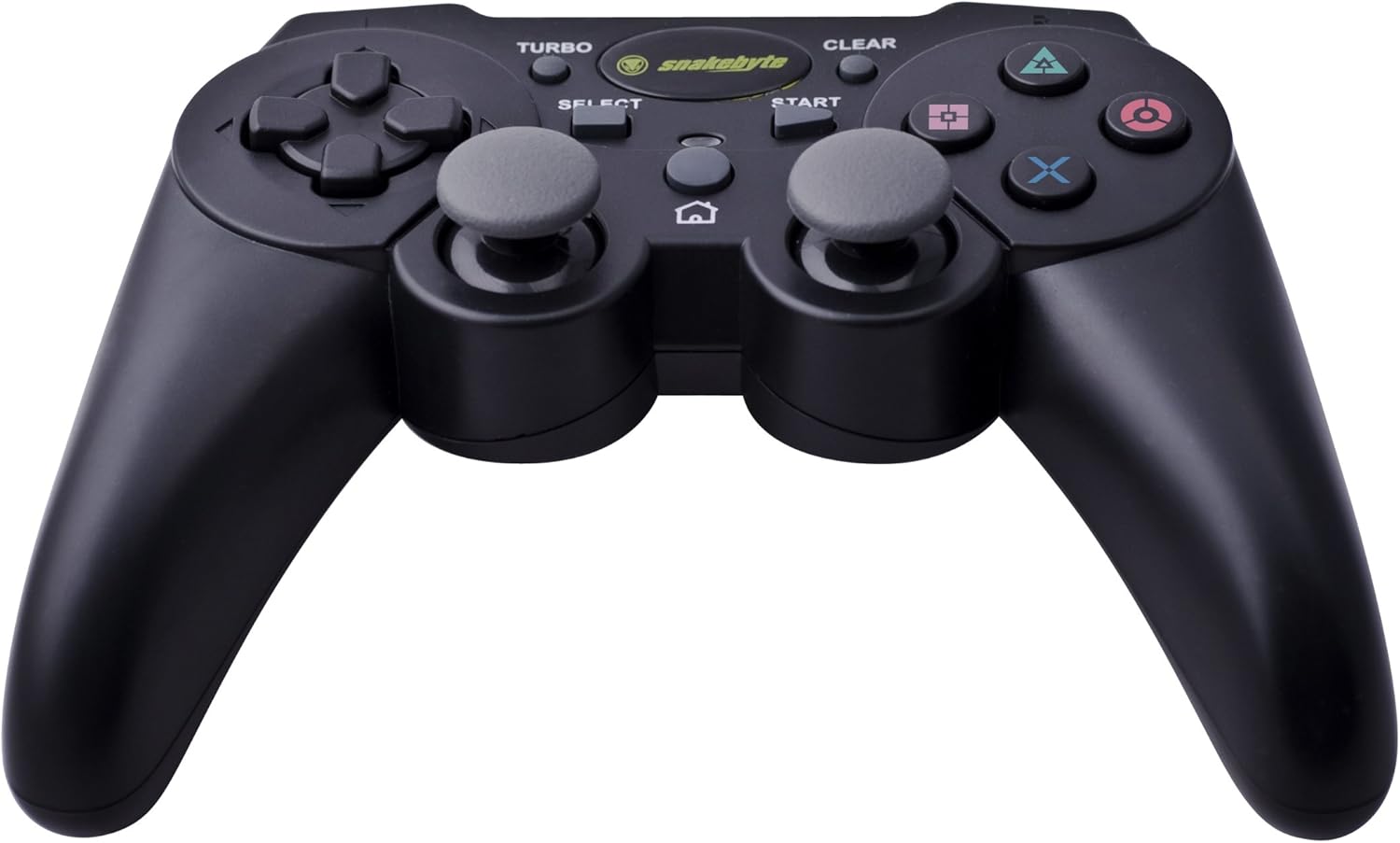
Image: The Snakebyte Wireless Bluetooth Premium PS3 Controller, highlighting the dual analog sticks and various buttons.
- Pad direcțional (D-Pad): For precise directional input in games.
- Stick analogic stâng: Controlul mișcării primare.
- Stick analogic drept: Camera control or secondary movement.
- Butoane de acțiune (Triunghi, Cerc, Cruce, Pătrat): Acțiuni specifice jocului.
- Butoane L1/R1: Shoulder buttons for various in-game functions.
- Declanșatoare L2/R2: Analog triggers for pressure-sensitive input, often used for acceleration/braking or aiming/firing.
- Butonul de start: Pauses games or opens menus.
- Buton SELECT: Opens in-game maps, inventories, or other menus.
- Buton PS: Powers on the controller, accesses the PS3 XMB (Cross Media Bar) menu, or turns off the controller/console.
- Butonul TURBO: Activates the turbo function for other buttons.
- Buton CLEAR: Deactivates the turbo function.
Funcția Turbo
The controller features a TURBO function, allowing a selected button to register multiple presses rapidly with a single hold. This can be useful for certain game mechanics.
- To activate TURBO: Press and hold the Buton TURBO, then press the desired action button (e.g., Cross, Square, Circle, Triangle, L1, R1, L2, R2). Release both buttons. The selected button will now have the TURBO function enabled.
- To deactivate TURBO for a specific button: Press and hold the Butonul CLEAR, then press the button for which TURBO is currently active. Release both buttons.
- To deactivate all TURBO functions: Press the Butonul CLEAR once without holding it down.
Motion Sensing and Vibration Feedback
This controller supports motion sensing capabilities, allowing for intuitive control in compatible games. It also provides vibration feedback to enhance immersion during gameplay, reacting to in-game events such as impacts or explosions.
Pornirea și oprirea
- Pentru a porni: Apăsați butonul Butonul PS.
- To power off: The controller will automatically enter sleep mode after a period of inactivity to conserve battery. Alternatively, you can hold the Butonul PS for several seconds to bring up the PS3 menu, where you can choose to turn off the controller.
Întreţinere
- curatenie: Folosiți o lavetă moale și uscată pentru a curăța controlerul. Nu utilizați substanțe de curățare abrazive sau solvenți.
- Depozitare: Depozitați controlerul într-un loc răcoros și uscat, ferit de lumina directă a soarelui și de temperaturi extreme.
- Îngrijirea bateriei: Pentru a prelungi durata de viață a bateriei, evitați descărcarea completă frecventă a controlerului. Încărcați-l regulat, chiar dacă nu îl utilizați constant.
- Evitați deteriorarea: Do not drop the controller or expose it to excessive force or moisture.
Depanare
| Problemă | Soluție posibilă |
|---|---|
| Controller does not connect wirelessly. |
|
| Buttons or analog sticks are unresponsive. |
|
| Controller does not charge. |
|
Resetarea controlerului
If the controller behaves erratically or becomes unresponsive, you can perform a reset. Locate the small reset button on the back of the controller (often in a small hole). Use a thin, pointed object (like a straightened paperclip) to press and hold the reset button for a few seconds. This will restart the controller's internal electronics.
Specificații
- Marca: Snakebyte
- Număr de model: SB904714
- Platformă compatibilă: Sony PlayStation 3
- Conectivitate: Wireless (Bluetooth)
- Număr de butoane: 16
- Dimensiuni (L x l x H): Aproximativ 23.01 x 16.31 x 8.51 cm (9.06 x 6.42 x 3.35 inchi)
- Greutate: Aproximativ 419.99 g (0.93 lbs)
- Culoare: Negru
Garanție și suport
For warranty information and technical support, please refer to the documentation provided with your purchase or contact your retailer. You may also visit the official Snakebyte website-ul pentru asistență suplimentară și informații despre produse.