
1. Introducere
Mulțumesc pentru achizițieasing the Karcher KA 350 Compact Stereo System. This versatile audio system combines modern design with a wide range of playback options, including a 3-disc CD changer, dual cassette deck, turntable, USB port, SD card reader, and an integrated radio. This manual provides essential information for safe operation, setup, and maintenance of your device. Please read it thoroughly before use and retain it for future reference.
2. Instrucțiuni importante de siguranță
- Sursa de alimentare: Asigurați-vă că sursa de alimentare voltage corespunde cu eticheta de identificare de pe unitate.
- Ventilare: Nu blocați niciun orificiu de ventilație. Lăsați suficient spațiu în jurul unității pentru o circulație corectă a aerului.
- Apă și umiditate: Do not expose the unit to rain, moisture, dripping, or splashing. Do not place objects filled with liquids, such as vases, on the apparatus.
- Căldură: Țineți unitatea departe de surse de căldură, cum ar fi calorifere, registre de căldură, sobe sau alte aparate (inclusiv ampliificatori) care produc căldură.
- curatenie: Deconectați unitatea de la priza de perete înainte de curățare. Folosiți doar o cârpă moale și uscată.
- Service: Nu încercați să reparați singur acest produs. Consultați toate lucrările de service către personalul calificat de service.
- Copii: A nu se lăsa la îndemâna copiilor.
- Siguranța laserului: This product uses a laser. Use of controls or adjustments or performance of procedures other than those specified herein may result in hazardous radiation exposure.
3. Conținutul pachetului
Vă rugăm să verificați dacă toate articolele sunt prezente și în stare bună:
- Karcher KA 350 Compact Stereo System (Main Unit)
- Telecomanda
- Manual de instructiuni
- Difuzoare stereo (2 unități)
- Cablu de alimentare
- FM Antenna (wire type)
4. Produs terminatview
4.1 Controale panoului frontal
The front panel provides access to all primary functions and controls for the KA 350 system.

Figura 4.1: Comenzile panoului frontal
- Buton ON/STANDBY: Pornește sau oprește unitatea.
- Buton FUNCȚIE: Selects between CD, Tuner (Radio), Phono (Turntable), Tape (Cassette), and USB/SD modes.
- Butonul VOLUM: Reglează nivelul volumului principal.
- CD Controls: Play/Pause, Stop, Skip/Search (Forward/Backward), Open/Close CD tray.
- Comenzi casetă magnetică: Play, Record, Fast Forward, Rewind, Stop/Eject for Deck 1 and Deck 2.
- USB/SD Controls: Play/Pause, Stop, Skip/Search (Forward/Backward).
- Comenzi tuner: Band selection (AM/FM), Tuning Up/Down, Memory presets.
- Afişa: Shows current mode, track information, radio frequency, and time.
4.2 Conexiuni la panoul din spate
The rear panel houses all necessary input and output connections for the system.
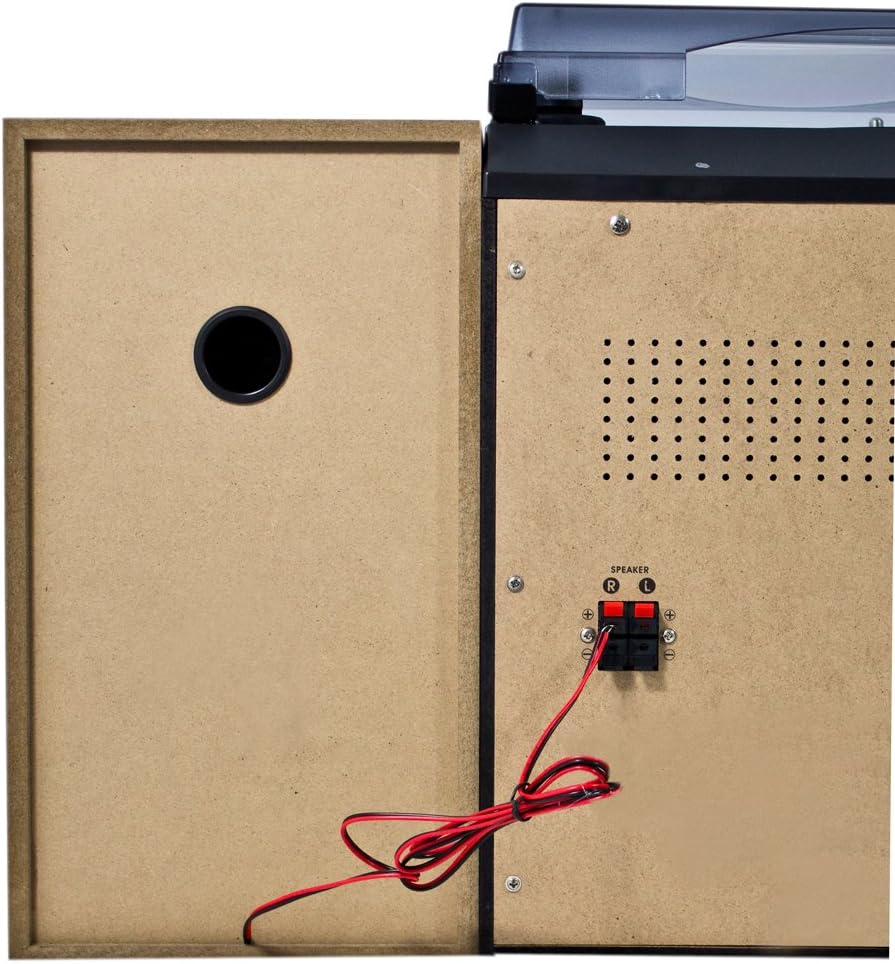
Figura 4.2: Conexiuni panou spate
- Speaker Terminals (R/L): Connect the included stereo speakers. Ensure correct polarity (+ to + and - to -).
- Intrare alimentare CA: Conectați cablul de alimentare aici.
- Terminal antenă FM: Connect the supplied FM wire antenna for radio reception.
4.3 Componentele principale

Figure 4.3: Karcher KA 350 Main Components
- Placă turnantă: Located on top, for playing vinyl records.
- 3-Disc CD Changer: Front-loading tray for multiple CDs.
- Dual Cassette Deck: Two cassette compartments for playback and recording.
- Port USB: Pentru conectarea unităților flash USB.
- Slot pentru card SD: Pentru introducerea cardurilor de memorie SD.
- Difuzoare stereo: Two external speakers for audio output.
5. Configurare
5.1 Despachetarea și plasarea
- Scoateți cu grijă toate componentele din ambalaj.
- Așezați unitatea principală pe o suprafață stabilă și plană.
- Poziționați difuzoarele pe fiecare parte a unității principale, asigurându-vă că sunt la o distanță egală pentru un sunet stereo optim.
- Asigurați-vă că există o ventilație adecvată în jurul unității.
5.2 Conectarea difuzoarelor
Connect the supplied speakers to the speaker terminals on the rear of the main unit.

Figure 5.1: Speaker Unit
- Identify the speaker wires. Each wire typically has two strands, one marked for positive (+) and one for negative (-).
- Connect the positive (+) terminal of the left speaker to the 'L+' terminal on the main unit's rear panel.
- Connect the negative (-) terminal of the left speaker to the 'L-' terminal on the main unit's rear panel.
- Repeat the process for the right speaker, connecting it to the 'R+' and 'R-' terminals.
- Ensure all connections are secure to prevent sound distortion or damage.
5.3 Conectarea antenei FM
For optimal radio reception, connect the supplied FM wire antenna.
- Insert the FM antenna plug into the FM antenna jack on the rear panel.
- Extend the wire antenna fully and position it for the best possible reception. You may need to experiment with its placement.
5.4 Conexiune la alimentare
- Plug the AC power cable into the AC power input on the rear of the main unit.
- Conectați celălalt capăt al cablului de alimentare la o priză standard de perete.
6. Instrucțiuni de utilizare
6.1 Pornire/Oprire
Apăsați tasta PORNIT / STANDBY butonul de pe panoul frontal sau de pe telecomandă pentru a porni sau opri unitatea.
6.2 Selectarea modului
Apăsați tasta FUNCŢIE button repeatedly to cycle through the available modes: CD, Tuner (Radio), Phono (Turntable), Tape (Cassette), and USB/SD.
6.3 Funcționarea CD Player-ului

Figure 6.1: CD Changer Tray
- Apăsați tasta FUNCŢIE pentru a selecta modul CD.
- Apăsați tasta DESCHIS/ÎNCHIS butonul pentru a deschide tava CD.
- Așezați până la trei CD-uri în sertarele pentru discuri, cu eticheta în sus.
- Apăsați tasta DESCHIS/ÎNCHIS din nou pentru a închide tava.
- Apăsați tasta REDARE/PAUZĂ pentru a porni redarea.
- Utilizați SALTA / CĂUTĂ buttons to navigate between tracks or fast forward/rewind.
6.4 Funcționarea casetofonului/recordofonului
- Apăsați tasta FUNCŢIE pentru a selecta modul TAPE.
- Apăsați tasta STOP/EJECT button on either Deck 1 or Deck 2 to open the cassette compartment.
- Introduceți o casetă și închideți compartimentul.
- Apăsați tasta JUCA pentru a porni redarea.
- To record, insert a blank tape into Deck 2 (for recording from Deck 1 or other sources) or Deck 1 (for recording from external sources if applicable). Press the ÎNREGISTRA buton.
6.5 Funcționarea platanului rotativ
- Apăsați tasta FUNCŢIE pentru a selecta modul PHONO.
- Deschideți capacul de praf.
- Pune un disc de vinil pe platou.
- Selectați viteza corespunzătoare (33, 45 sau 78 RPM) folosind comutatorul de selectare a vitezei.
- Carefully lift the tone arm and place the stylus onto the desired groove of the record.
- At the end of the record, manually return the tone arm to its rest.
6.6 Redare USB/SD
- Apăsați tasta FUNCŢIE button to select USB/SD mode.
- Introduceți o unitate flash USB în portul USB sau un card SD în slotul pentru card SD.
- Unitatea va detecta automat și va începe să redea sunete compatibile files (MP3, WMA, AAC).
- Utilizați REDARE/PAUZĂ şi SALTA / CĂUTĂ butoane pentru a controla redarea.
6.7 Operare radio
- Apăsați tasta FUNCŢIE button to select TUNER mode.
- Apăsați tasta BANDĂ button to select between FM and AM bands.
- Utilizați TUNING pentru a regla manual un post sau apăsați și țineți apăsate butoanele pentru scanarea automată.
- Pentru a salva un post, apăsați butonul MEMORIE , apoi utilizați butonul SALTA / CĂUTĂ pentru a selecta un număr presetat și apăsați butoanele MEMORIE din nou pentru a confirma.
6.8 Telecomandă
The included remote control allows convenient operation of all functions from a distance. Ensure batteries are correctly inserted.
7. Întreținere
7.1 Curăţarea unităţii
- Deconectați întotdeauna unitatea de la priză înainte de curățare.
- Folosiți o lavetă moale și uscată pentru a șterge suprafețele exterioare.
- Nu utilizați agenți de curățare abrazivi, ceară sau solvenți, deoarece aceștia pot deteriora finisajul.
7.2 Îngrijirea stiloului pick-up-ului
- Handle the stylus with extreme care. Only touch the tone arm, not the stylus itself.
- Curățați periodic stylusul cu o perie moale, periind din spate în față.
- Replace the stylus when it shows signs of wear (e.g., distorted sound, skipping).
7.3 Cassette Deck Care
- Regularly clean the tape heads, capstan, and pinch roller with a cotton swab lightly dampterminat cu alcool izopropilic.
- Demagnetize the tape heads periodically to maintain sound quality.
8. Depanare
| Problemă | Cauza posibila | Soluţie |
|---|---|---|
| Fără putere | Cablul de alimentare nu este conectat; Priza de alimentare nu este activă | Verificați conexiunea cablului de alimentare; Încercați o altă priză |
| Nici un sunet | Volume too low; Speakers not connected correctly; Incorrect function mode selected | Increase volume; Check speaker connections and polarity; Select correct function mode |
| CD-ul sare sau nu se redă | CD is dirty or scratched; CD inserted incorrectly | Clean or replace CD; Insert CD label side up |
| Recepție radio slabă | Antenna not connected or poorly positioned; Weak signal | Connect and adjust FM antenna; Try repositioning the unit |
| Viteza platanului este incorectă | Viteză greșită selectată | Adjust the speed selector switch (33/45/78 RPM) |
| Probleme de redare pe USB/SD | Incompatibil file formatare; card USB/SD nu a fost introdus corect; corupt files | Asigura files are MP3, WMA, or AAC; Reinsert USB/SD card; Try a different USB/SD card |
9. Specificații
| Caracteristică | Caietul de sarcini |
|---|---|
| Marca | Karcher |
| Numărul de model | KA 350 |
| Tehnologia de conectivitate | FM/MW Tuner, USB, SD |
| Culoare | Negru |
| Tip difuzor | Stereo (2 speakers included) |
| Dimensiuni articol (L x l x H) | 70.5 x 41 x 37.3 cm |
| Sursa de alimentare | Electric cu fir |
| Dispozitive compatibile | Smartphone, Tablet, MP3 Player, Personal Computer |
| Greutatea articolului | 10.8 kilograme |
| Putere de ieșire (RMS) | 2 x 5 W (Total 50 W) |
| Supported Media Standards | MP3, CD, Cassette, USB, SD |
| Formate audio acceptate | CD-DA, MP3, WMA, AAC |
| Suport Bluetooth | Nu |
| Număr de vorbitori | 2 |
| Mod ieșire audio | Stereo |
| Configurare sunet surround | 2.0 |
| Componente incluse | Compact system, Remote control, Instruction manual |
10. Garanție și asistență
For warranty information and technical support, please refer to the warranty card included with your product or visit the official Karcher webPăstrați dovada achiziției pentru orice reclamații în garanție.
Producător: Karcher