
Introducere
This manual provides instructions for the proper use and maintenance of your Presto 04213 Digital Timer. This electronic timer is designed for various timing needs, featuring both countdown and stopwatch functions. It includes an easy-to-read LCD display, an audible alarm, and a memory function for convenience.
Conținutul pachetului
- Presto 04213 Digital Timer
- 1 baterie AAA (inclusa)
Înființat
Instalarea bateriei
- Locate the battery compartment on the back of the timer. This is typically covered by the clip/easel stand.
- Gently open the clip/easel stand to access the battery compartment.
- Introduceți o baterie AAA, asigurându-vă că bornele pozitive (+) și negative (-) se aliniază corect cu marcajele din interiorul compartimentului.
- Close the battery compartment securely. The timer display should now be active.

Imagine: Spate view of the timer with the easel stand deployed, revealing the battery compartment and a separate AAA battery.
Opțiuni de plasare
The Presto 04213 Digital Timer offers versatile placement options:
- Atașament magnetic: A magnet on the back allows the timer to be attached to metallic surfaces like refrigerators or ovens.
- Easel Stand: The integrated clip can be extended to form an easel stand for tabletop use.
- Clip: The clip can also be used to attach the timer to clothing or other objects.
Instrucțiuni de operare
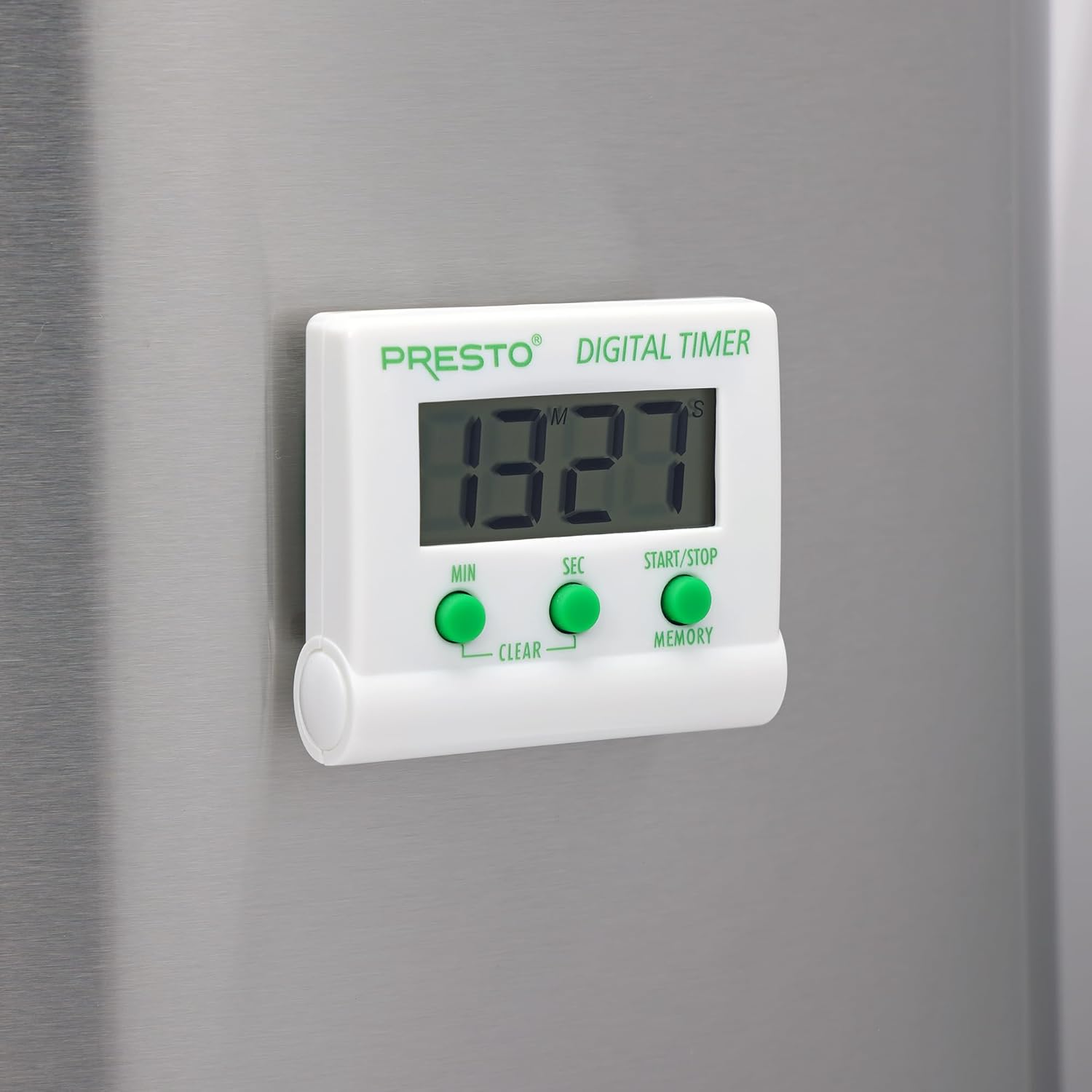
Imagine: față view of the Presto Digital Timer, displaying the time and showing the MIN, SEC, and START/STOP/MEMORY buttons.
Setarea cronometrului de numărătoare inversă
- Apăsați tasta MIN button to set the desired minutes (up to 99).
- Apăsați tasta SEC button to set the desired seconds (up to 59).
- To clear the current time setting, press both MIN şi SEC butoane simultan.
- Apăsați tasta START/STOP buton pentru a începe numărătoarea inversă.
- When the time reaches zero, an alarm will sound. Press START/STOP pentru a reduce alarma.
Using the Stopwatch Function (Count-Up)
- Ensure the timer display is set to "00:00". If not, press both MIN şi SEC buttons to clear it.
- Apăsați tasta START/STOP buton pentru a începe numărătoarea crescătoare.
- Presa START/STOP din nou pentru a întrerupe cronometrul.
- Pentru a relua, apăsați START/STOP. To reset to "00:00", press both MIN şi SEC buttons while the stopwatch is paused.
Funcția de memorie
The timer automatically stores the last countdown setting. After the alarm sounds and is silenced, or if the timer is stopped before reaching zero, pressing the MEMORIE button will recall the last set countdown time for quick reuse.
Caracteristici
- Counts down from any time up to 99 minutes and 59 seconds.
- Functions as a stopwatch (counts up).
- Easy-to-read digital display shows minutes and seconds.
- Audible alarm signals when countdown is complete.
- Memory feature stores the last countdown setting.
- Versatile design with a convenient clip, easel stand, and magnet for various mounting options.
- Operates on one AAA battery.
Întreţinere
Curatenie
To clean the timer, carefully wipe it with a slightly damp cloth. Do not immerse the timer in water or use abrasive cleaners, as this can damage the electronic components.
Înlocuirea bateriei
When the display becomes dim or the timer stops functioning, replace the AAA battery following the installation steps in the "Setup" section.
Depanare
- Cronometrul nu pornește: Ensure the AAA battery is correctly installed with proper polarity and is not depleted. Replace the battery if necessary.
- Afișajul este slab iluminat sau gol: This indicates a low battery. Replace the AAA battery.
- Alarma nu sună: Check if the timer reached zero. Ensure there are no obstructions to the speaker.
- Butoanele nu răspund: Ensure the timer is clean and free from debris around the buttons. If the issue persists after battery replacement, contact customer support.
Specificații
| Numărul de model | 04213 |
| Marca | Presto |
| Material | Plastic |
| Dimensiuni (D x W x H) | 0.5 cm x 2.25 cm x 2.5 cm |
| Greutatea articolului | 2.88 uncii |
| Sursa de alimentare | 1 AAA baterie |
| Max Countdown | 99 minute, 59 de secunde |
| Culoare | Alb |

Image: The Presto Digital Timer with its dimensions (2.5" H, 2.25" W, 0.5" D) clearly indicated.
Garanție și suport
Informații despre garanție
This Presto 04213 Digital Timer comes with a Garanție limitată de 1 an de la data achiziției. Această garanție acoperă defectele de materiale și de fabricație în condiții normale de utilizare. Nu acoperă daunele rezultate din utilizarea necorespunzătoare, accidente, modificări sau reparații neautorizate.
Asistență pentru clienți
For warranty claims, technical assistance, or any questions regarding your Presto Digital Timer, please contact Presto customer service. Refer to the official Presto website-ul sau ambalajul produsului pentru cele mai recente informații de contact.
De asemenea, puteți vizita Presto Store on Amazon pentru informații suplimentare despre produs și resurse de asistență.