
1. Introducere
The IOGEAR GHDMIFDVIMW6 adapter facilitates the connection between an HDMI-enabled source device and a DVI-enabled display device. This adapter features a gold-plated HDMI female connector on one end and a DVI-D Dual Link male connector on the other, ensuring a reliable digital video signal transmission.
2. Produs terminatview
The IOGEAR GHDMIFDVIMW6 is designed for high-quality video signal conversion. Its gold-plated connectors resist corrosion and enhance signal integrity.
- Conector 1: HDMI Female (19-pin Type A)
- Conector 2: DVI-D Dual Link Male (24-pin)
- Scop: Connects HDMI output to DVI input.
- Caracteristici: Gold-plated connectors for optimal signal transfer.
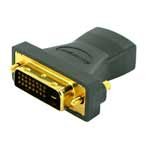
Figura 2.1: IOGEAR GHDMIFDVIMW6 Adapter. This image shows the compact adapter with an HDMI female port on one side and a DVI-D Dual Link male connector on the other.
3. Conținutul pachetului
- 1 x IOGEAR GHDMIFDVIMW6 HDMI Female to DVI-D Dual Link Male Adapter
4. Instrucțiuni de configurare
Follow these steps to connect your HDMI source device to a DVI display:
- Identificați porturile: Locate the HDMI output port on your source device (e.g., computer, game console, media player) and the DVI-D input port on your display (e.g., monitor, projector).
- Connect Adapter to Display: Plug the DVI-D Dual Link male connector of the IOGEAR GHDMIFDVIMW6 adapter directly into the DVI-D input port on your display device. Ensure a secure connection.
- Conectați cablul HDMI: Take a standard HDMI cable (not included) and plug one end into the HDMI output of your source device.
- Connect HDMI Cable to Adapter: Plug the other end of the HDMI cable into the HDMI female port on the IOGEAR GHDMIFDVIMW6 adapter.
- Pornirea dispozitivelor: Ensure both your source device and display device are powered on.
The connection is now complete.
5. Instrucțiuni de utilizare
Once the physical connection is established as described in the Setup section:
- Selectați intrare: On your DVI display, use its menu or input selection button to choose the correct DVI input source.
- Adjust Resolution: If the image does not appear correctly or is distorted, adjust the display resolution settings on your source device to match the native resolution of your DVI display. Refer to your source device's operating manual for instructions on changing display settings.
- Audio: Note that DVI connections transmit video signals only. For audio, a separate audio cable connection from your source device to an audio system or speakers will be required.
6. Întreținere
The IOGEAR GHDMIFDVIMW6 adapter requires minimal maintenance.
- curatenie: Use a soft, dry cloth to gently wipe the adapter if it becomes dusty. Do not use liquid cleaners or solvents.
- Depozitare: Depozitați adaptorul într-un loc răcoros și uscat, ferit de lumina directă a soarelui și de temperaturi extreme atunci când nu îl utilizați.
- Manipulare: Avoid bending or twisting the adapter excessively, as this can damage the internal wiring or connectors.
7. Depanare
Dacă întâmpinați probleme, consultați următorii pași de depanare:
- Fără semnal video:
- Ensure all connections (HDMI cable, adapter, DVI cable if applicable) are secure and fully seated.
- Verify that both the source device and the display are powered on.
- Confirm that the correct DVI input is selected on your display.
- Test with a different HDMI cable or DVI display if possible to rule out faulty components.
- Distorted or Incorrect Resolution:
- Adjust the display resolution settings on your source device. DVI displays often have a native resolution that provides the best picture quality.
- Ensure your source device's graphics driver is up to date.
- Fără audio:
- This adapter transmits video only. For audio, a separate audio connection is required from your source device to an audio system.
8. Specificații
| Caracteristică | Detaliu |
|---|---|
| Numărul de model | GHDMIFDVIMW6 |
| Connector Type (Left) | 19 pin HDMI Type A Female |
| Connector Type (Right) | 24 pin DVI-Digital (Dual-Link) Male |
| Dimensiuni produs (L x l x H) | 0.63 x 0.63 x 1.73 inci |
| Greutatea articolului | 0.96 uncii (aproximativ 0.06 lbs) |
| Tip de finisare | Gold-plated HDMI |
| Producător | IOGEAR |
9. Informații de siguranță
- Nu expuneți adaptorul la apă, umiditate sau temperaturi extreme.
- Nu încercați să dezasamblați sau să modificați adaptorul.
- A nu se lăsa la îndemâna copiilor.
- Use only as intended for connecting HDMI to DVI-D video signals.
10. Garanție și asistență
IOGEAR products are backed by a manufacturer's warranty. For specific warranty details, technical support, or customer service, please visit the official IOGEAR website-ul lor sau contactați direct serviciul de asistență pentru clienți.
IOGEAR Official Website: www.iogear.com