
1. Introducere
The Sigma SD14 is a 14-megapixel Digital Single-Lens Reflex (DSLR) camera designed for advanced photographers. It features the Foveon X3 direct-image sensor, which captures full RGB color information at each pixel layer, aiming for high-definition images with rich gradation. This manual provides essential information for setting up, operating, and maintaining your SD14 camera.
Key features include a 2.5-inch LCD monitor, a durable shutter mechanism rated for over 100,000 cycles, a 5-point autofocus system, and continuous shooting capabilities. The camera supports both RAW and JPEG image recording formats and includes Sigma Photo Pro 3.0 software for RAW image processing.

Figura 1.1: Față view of the Sigma SD14 Digital SLR Camera, showing the lens mount and body design.
2. Ce se află în cutie
Verify that all the following items are included in your Sigma SD14 package:
- Sigma SD14 Digital SLR Camera Body
- Lithium-ion Power Battery BP-21
- Battery Charger BC-21
- Cablu USB
- cablu video
- Cureaua pentru gât
- Eye Cap
- Capacul corpului
- Capac ocular
- SIGMA Photo Pro 3.0 CD-ROM
- SD14 Instruction Manual (this document)
3. Configurare
3.1. Încărcarea și instalarea bateriei
- Insert the Lithium-ion Battery BP-21 into the Battery Charger BC-21.
- Conectați încărcătorul la o priză. Indicatorul de încărcare se va aprinde.
- Charging typically takes approximately 120 minutes for a full charge.
- Odată încărcată complet, scoateți bateria din încărcător.
- Open the battery compartment cover on the camera body.
- Introduceți bateria încărcată în compartiment, asigurându-vă orientarea corectă.
- Închideți bine capacul compartimentului bateriei.
A fully charged BP-21 battery can capture approximately 500 images.
3.2. Introducerea unui card de memorie
The SD14 uses CompactFlash (CF) Type I/II cards. Ensure the card is formatted in the camera before first use.
- Open the CF card slot cover on the side of the camera.
- Insert the CF card with the correct orientation until it clicks into place.
- Close the CF card slot cover securely.
3.3. Atașarea unui obiectiv
The Sigma SD14 uses the Sigma SA Bayonet mount. Only Sigma SA mount lenses are directly compatible.
- Scoateți capacul corpului camerei și capacul posterior al obiectivului.
- Align the red index mark on the lens with the red index mark on the camera body's lens mount.
- Atașați obiectivul rotind-o în sensul acelor de ceasornic până când se blochează în poziție cu un clic.
- Pentru a scoate obiectivul, apăsați butonul de eliberare a obiectivului de pe corpul camerei și rotiți obiectivul în sens invers acelor de ceasornic.
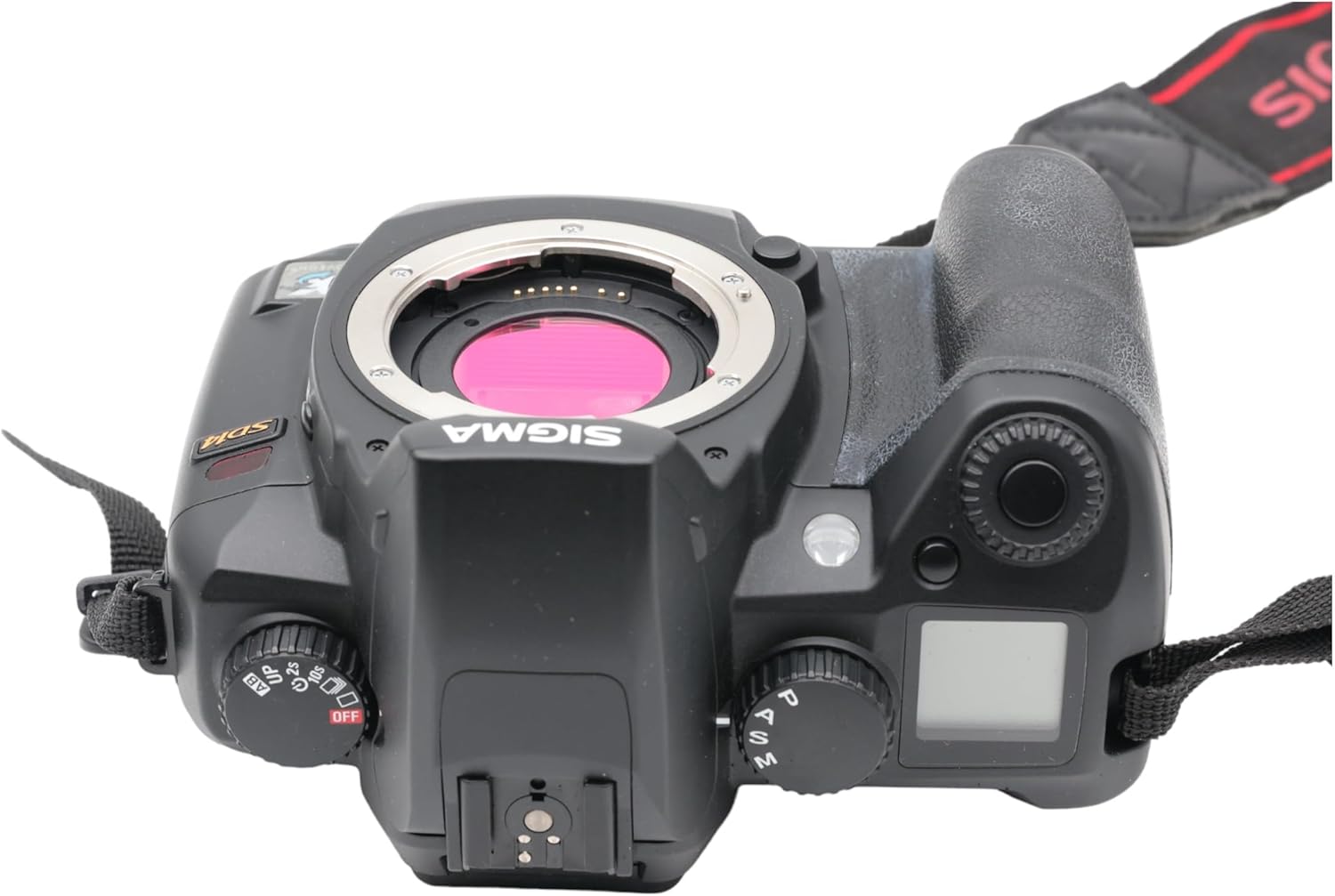
Figura 3.1: Sus view of the Sigma SD14, illustrating the lens mount and mode dials.
4. Funcționare
4.1. Pornire/Oprire
Rotate the power switch to the ON position to turn on the camera. Rotate it to OFF to power down.
4.2. Comenzi de bază și afișaj
The SD14 features a 2.5-inch LCD monitor for reviewing images and navigating menus, and a pentaprism viewfinder for composing shots. The top LCD panel displays key settings such as resolution, metering mode, battery status, and remaining shots.

Figura 4.1: Spate view of the Sigma SD14, showing the LCD monitor, viewvizor și butoane de control.
Key buttons include MENU, ISO, WB (White Balance), and a 4-way controller with an OK button for navigation. The INFO button displays shutter speed, aperture, and other settings on the LCD.
4.3. Concentrarea
The camera utilizes a 5-point autofocus (AF) system (center, left, right, up, and down). The center AF point features a cross-type sensor for enhanced precision. AF point selection can be automatic or manual.
4.4. Metering Modes
The SD14 offers three metering modes:
- 8-segment Evaluative Metering: Analyzes the entire scene for balanced exposure.
- Center Area Metering: Prioritizes the central area of the frame.
- Center Weighted Average Metering: Measures the entire frame but gives more weight to the central area.
Exposure compensation and auto bracketing functions are available for fine-tuning exposure.
4.5. Înregistrarea imaginilor
The camera supports both RAW (X3F) and JPEG formats. JPEG recording offers four sizes (Super High, High, Medium, Low) and three quality settings (Fine, Normal, Basic).
- Super High (4608 x 3072 pixels): Suitable for A3 or larger prints.
- High (2640 x 1760 pixels): Suitable for A4 prints.
- Medium (1776 x 1184 pixels): Suitable for regular size prints.
- Low (1296 x 864 pixels): Potrivit pentru web pages and email.
4.6. Fotografiere continuă
The SD14 can shoot continuously at 3 frames per second. The number of frames captured in a burst depends on the resolution setting:
- Ridicat: 6 rame
- Mediu: 12 rame
- Scăzut: 24 rame
These figures apply to both RAW and JPEG modes.
4.7. Bliț încorporat
The built-in flash has a guide number of 11 (ISO 100) and covers a 17mm lens angle (28mm equivalent on 35mm format). It supports S-TTL automatic flash metering and can synchronize with shutter speeds up to 1/180 second.
4.8. Mirror Lock-up
Activate the mirror lock-up mechanism to prevent camera shake caused by mirror movement during exposure. This is particularly useful for macro photography, long telephoto shots, or scientific applications. For best results, use with a remote controller or cable release (sold separately).
4.9. Sigma Photo Pro 3.0 Software
The included Sigma Photo Pro 3.0 software is a RAW image developer. It allows for quick conversion of RAW data and offers three adjustment modes: X3F Mode (original settings), Auto Adjustment Mode, and Custom Mode for manual adjustments (exposure, contrast, shadow, highlight, saturation, sharpness, fill-light). The software supports 8-bit TIFF, 16-bit TIFF, and JPEG file formats, and sRGB, Apple RGB, Adobe RGB, and ColorMatch RGB color spaces.
5. Întreținere
5.1. Image Sensor Dust Protector
The SD14 features a dust protector positioned in front of the image sensor. This design prevents dust from adhering directly to the sensor, minimizing its impact on image quality. If dust accumulates on the protector, it will be out of focus and generally not visible in images.
5.2. Curățarea corpului camerei și a obiectivului
- Folosiți o lavetă moale, fără scame, pentru a șterge corpul camerei. Pentru murdăria persistentă, ștergeți ușoramproți cârpa cu apă sau cu o soluție de curățare blândă.
- For lenses, use a lens brush to remove loose dust, then a lens cleaning solution and a microfiber cloth. Avoid touching the lens surface with your fingers.
- Never use organic solvents like paint thinner or benzene to clean the camera or lens.
5.3. Îngrijirea bateriei
- Depozitați bateriile într-un loc răcoros și uscat atunci când nu sunt utilizate.
- Evitați descărcarea completă frecventă a bateriei pentru a-i prelungi durata de viață.
- Dacă nu veți utiliza camera pentru o perioadă lungă de timp, scoateți bateria.
6. Depanare
| Problemă | Cauza posibila | Soluţie |
|---|---|---|
| Camera nu pornește. | Bateria este descărcată sau introdusă incorect. | Încărcați complet bateria și asigurați-vă că este introdusă corect. |
| Imaginile sunt neclare. | Focalizare incorectă, tremur al camerei sau obiectiv murdar. | Asigurați o focalizare corectă. Folosiți o viteză de expunere mai mare sau un trepied. Curățați obiectivul. |
| Images are too dark or too bright. | Incorrect exposure settings or metering mode. | Adjust exposure compensation. Select an appropriate metering mode for the scene. |
| Color blotching in underexposed areas. | Characteristic of the Foveon sensor when severely underexposed. | Aim to slightly overexpose images (e.g., +.7 EV) to retain shadow detail and avoid this effect. |
| Nu se pot înregistra imagini. | Cardul de memorie este plin, blocat sau nu este introdus corect. | Insert an empty card, unlock the card, or reinsert it correctly. Format the card if necessary (this will erase all data). |
| Camera se blochează sau nu răspunde. | Eroare temporară de software. | Scoateți și introduceți la loc bateria pentru a reseta camera. |
For more detailed troubleshooting or error codes, please refer to the comprehensive instruction manual included with your camera or visit the Sigma support website-ul.
7. Specificații
| Caracteristică | Detaliu |
|---|---|
| Numele modelului | SD14 |
| Rezoluția senzorului foto | 14 MP (Foveon X3 direct-image sensor) |
| Dimensiune senzor foto | APS-C |
| Suporturi compatibile | Sigma SA Bayonet |
| Sprijinit File Formate | JPEG, RAW (X3F), TIFF |
| Dimensiunea ecranului | 2.5 Inches (150,000 pixels) |
| Viewgăsitor | Optical Pentaprism (98% coverage, 0.9x magnification) |
| Puncte de focalizare automată | 5-point (Phase Detection) |
| Viteza de fotografiere continuă | 3 de cadre pe secundă |
| Viteza maximă a obturatorului | 1/4000 secunde |
| Viteza minimă a obturatorului | 30 secunde |
| Interval ISO extins | 100 - 1600 |
| Moduri de măsurare | 8-segment Evaluative, Center Area, Center Weighted Average |
| Built-in Flash Guide Number | 11 (ISO 100) |
| Medii de stocare | Compact Flash (CF) Type I/II |
| Sursa de alimentare | Lithium-ion Battery BP-21 |
| Conectivitate | USB, Ieșire video |
| Greutatea articolului | 1.65 lire sterline (aproximativ 748 g) |
| Numărul de model | C23900 |
| UPC | 085126924416 |
7.1. Accesorii opționale (se vând separat)
- Sigma Lenses (over 40 compatible models)
- Flashguns: EF-500 DG SUPER, EF-500 DG ST, EM-140 DG
- Power Grip PG-21
- Cable Release CR-21
- Remote Controller RS-31
- AC Adapter SAC-21
8. Garanție și asistență
8.1. Informații despre garanție
For detailed warranty terms and conditions, please refer to the warranty card included with your product or visit the official Sigma website. Garanția include de obicei defectele de materiale și de fabricație pentru o perioadă specificată de la data achiziției.
8.2. Asistență pentru clienți
If you encounter any issues or have questions not covered in this manual, please contact Sigma customer support. Contact information can usually be found on the official Sigma webla fața locului sau în documentația de garanție.
Resurse online: Visit the official Sigma website for product registration, firmware updates, FAQs, and additional support resources.