
1. Introducere
This manual provides comprehensive instructions for the safe and efficient use of your Logisys PS480D 480W ATX Power Supply. Please read this manual thoroughly before installation and operation to ensure proper functionality and to prevent damage to the unit or other components.

Figure 1: Logisys PS480D 480W ATX Power Supply, front view with cables bundled.
2. Informații de siguranță
AVERTIZARE: Power supplies contain high voltagcomponentele e. Nu deschideți sursa de alimentare casing. În interior nu există piese care să poată fi reparate de utilizator.
- Asigurați-vă că sursa de alimentare este deconectată de la priza de curent alternativ înainte de instalare sau întreținere.
- Always ground yourself to prevent electrostatic discharge (ESD) when handling internal computer components.
- Nu utilizați sursa de alimentare în locuri umede sau uscate.amp conditii.
- Asigurați o ventilație adecvată în jurul sursei de alimentare pentru a preveni supraîncălzirea.
- Use only the provided power cables and connectors.
3. Caracteristicile produsului
The Logisys PS480D is a 480W ATX power supply designed for personal computers. Key features include:
- Eficiență ridicată
- Low Noise & Ripple
- Peste Voltage Protecție
- Protecție la scurtcircuit
- Built-in EMI Filter
- Insulation Resistance 100MΩ min.
- Complies with FCC part 15J class B 115VAC operation and CISPR 22 230 VAC operation.
- Meets UL 1950, CSA 22.2 LEVEL 3 Requirement.
- 100% Burn-in test / Vibration test / Hi-pot test / Leakage current test.
- MTBF above 100,000 hours at 25 °C.

Figure 2: Rear panel of the power supply with fan, AC inlet, and power switch.
4. Configurare și instalare
Follow these steps to install the Logisys PS480D power supply into your computer system.
- Preparare: Ensure your computer is completely powered off and unplugged from the wall outlet. Open your computer case according to its manufacturer's instructions.
- Scoateți sursa de alimentare veche (dacă este cazul): Disconnect all cables from the old power supply to the motherboard, drives, and other components. Unscrew and remove the old power supply from the case.
- Instalați o nouă sursă de alimentare: Carefully place the Logisys PS480D into the power supply bay of your computer case. Secure it with screws.
- Conectați alimentarea principală: Connect the 20+4 pin ATX mainboard connector to your motherboard. If your motherboard uses a 20-pin connector, detach the 4-pin section. If it uses a 24-pin connector, connect both sections.
- Conectați alimentarea procesorului: Connect the 4-pin +12V power connector to the corresponding port on your motherboard.
- Connect Peripheral Power:
- Use the 4-pin standard drive connectors for HDDs and CD/DVD-ROM drives.
- Use the 4-pin 3.5" FDD or ZIP connectors for floppy disk drives or similar devices.
- Use the Serial ATA (SATA) connectors for SATA hard drives and SSDs.
- Organizare de cabluri: Route cables neatly to ensure proper airflow within the case.
- Închideți cazul: După ce toate conexiunile sunt securizate, închideți carcasa computerului.
- Conectați curent alternativ: Plug the AC power cord into the power supply's AC inlet and then into a wall outlet.
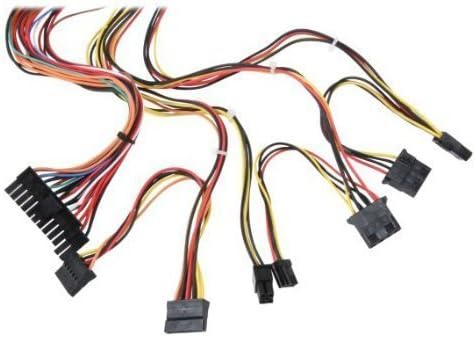
Figura 3: Pesteview of power supply connectors.

Figure 4: Power supply dimensions and included AC power cord.
5. Instrucțiuni de utilizare
After successful installation, you can power on your computer.
- Ensure the power switch on the rear of the power supply (Figure 2) is in the "ON" (I) position.
- Apăsați butonul de pornire/oprire de pe carcasa computerului.
- The power supply will provide stable power to your system components.
- To power off, shut down your operating system normally. For complete power disconnection, switch the power supply to the "OFF" (O) position and unplug the AC cord.
6. Întreținere
Întreținerea regulată ajută la asigurarea longevității și a performanței optime a sursei de alimentare.
- curatenie: Curățați periodic praful de pe ventilatorul și orificiile de ventilație ale sursei de alimentare folosind aer comprimat. Asigurați-vă că sursa de alimentare este deconectată înainte de curățare.
- Flux de aer: Ensure that the computer case has adequate airflow and that the power supply's fan is not obstructed.
- Integritatea cablului: Periodically check all power cables for secure connections and signs of wear or damage.
7. Depanare
Dacă întâmpinați probleme cu sursa de alimentare, consultați următorii pași comuni de depanare:
- Fără putere:
- Verificați dacă cablul de alimentare CA este conectat corect atât la sursa de alimentare, cât și la priza de perete.
- Ensure the power switch on the rear of the power supply is in the "ON" (I) position.
- Verificați dacă priza de perete funcționează conectând un alt dispozitiv.
- Check all internal power connections (20/24-pin ATX, 4-pin +12V, peripheral connectors) are firmly seated.
- Instabilitate a sistemului/Opriri aleatorii:
- This could indicate an overloaded or failing power supply. Ensure your system's power requirements do not exceed the PS480D's 480W capacity.
- Check for proper ventilation and ensure the power supply fan is spinning. Overheating can cause instability.
- Zgomot neobișnuit:
- A loud fan noise might indicate dust buildup or a failing fan bearing. Clean the fan as described in the Maintenance section.
If problems persist after attempting these steps, contact Logisys customer support or a qualified technician.
8. Specificații
| Caracteristică | Caietul de sarcini |
|---|---|
| Marca | Logisys |
| Numărul de model | PS480D |
| Putere de ieșiretage | 480 wați |
| Factor de formă | ATX |
| Dimensiuni (Lxlxh) | 6" L x 5.5" l x 3.25" H (15.24 x 13.97 x 8.25 cm) |
| Greutatea articolului | 2.06 lire (0.93 kg) |
| Conector placa de bază | 1x 20+4 Pin ATX |
| Conector de alimentare CPU | 1x 4 Pin +12V |
| Standard Drive Connectors | 4x 4 Pin (Molex) |
| FDD/ZIP Connectors | 1x 4 Pin 3.5" |
| Conectori Serial ATA | 1x SATA |
| Metoda de răcire | Aer |
| Protecții | Peste VoltagProtecție e, Protecție la scurtcircuit |
| Certificari | FCC part 15J class B, CISPR 22, UL 1950, CSA 22.2 LEVEL 3 |
9. Garanție și asistență
For warranty information, technical support, or service inquiries, please refer to the official Logisys website-ul lor sau contactați departamentul lor de asistență pentru clienți. Păstrați bonul fiscal ca dovadă a achiziției.
