
1. Produs terminatview
The D-Link DGS-105 is a 5-port Gigabit Ethernet unmanaged switch designed to provide high-speed wired network connectivity. Its compact metal housing ensures durability and quiet operation, making it suitable for various environments including homes, small offices, and creative workspaces. This switch offers plug-and-play functionality, requiring no complex configuration for immediate use.
Caracteristicile cheie includ:
- 5 Auto-Negotiating Gigabit Ports: Supports full/half duplex operation with up to 2Gbps per port, connecting PCs, consoles, NAS, printers, and other network devices.
- Plug & Play Expansion: Automatic MDI/MDIX eliminates the need for crossover cables, supporting Cat5e, Cat6, and Cat6A UTP cables up to 100m.
- Silent Fanless Metal Housing: The all-steel chassis naturally dissipates heat, ensuring quiet operation.
- Desktop or Wall Mount Flexibility: Includes rubber feet and keyhole slots for versatile placement.
- Smart QoS Prioritization: 802.1p traffic classes ensure smooth delivery of voice, video, and gaming data.
- Snooping IGMP: Efficiently streams 4K/8K video and multicast traffic without network flooding.
- Ethernet eficient energetic (IEEE 802.3az): Reduces power consumption by up to 80% by managing idle ports and cable length.
- Built-in Surge & ESD Protection: Provides ±4 kV safeguards against power spikes.
- Jumbo Frame Support (9KB): Enhances throughput for large data transfers.

Faţă view of the D-Link DGS-105 5-Port Gigabit Unmanaged Switch, showing the five RJ45 Ethernet ports and individual Link/Act LEDs.
2. Conținutul pachetului
Verificați dacă pachetul dvs. conține următoarele articole:
- D-Link DGS-105 5-Port Gigabit Unmanaged Metal Desktop Switch
- Adaptor de alimentare AC/DC
- Mounting kit (2 anchors, 2 screws, 4 rubber feet)
- Ghid de instalare rapidă (QIG)
If any items are missing or damaged, please contact your local D-Link reseller.
3. Descriere fizică
The DGS-105 switch features a compact metal chassis with five Gigabit Ethernet ports on the front panel. Each port has an associated LED indicator for link status and activity. The rear panel includes the power input and a security slot.

Înclinat view of the D-Link DGS-105 switch, highlighting its compact metal design.

Close-up of the rear panel, showing the power input (5V=1A) and the Kensington lock slot for security.
4. Configurare
4.1. Plasare
The DGS-105 switch can be placed on a desktop or mounted on a wall. Ensure the location allows for proper ventilation and easy access to ports and the power outlet. Use the included rubber feet for desktop placement or the mounting kit for wall installation.
4.2. Conectarea adaptorului de alimentare
- Connect the DC output plug of the included AC/DC power adapter to the power input port on the rear panel of the DGS-105 switch.
- Plug the AC input side of the power adapter into a standard wall outlet or power strip.
- Verify that the power LED on the switch illuminates, indicating that the device is receiving power.
4.3. Conectarea dispozitivelor de rețea
The DGS-105 is a plug-and-play device, meaning no software configuration is required. Simply connect your network devices using standard Ethernet cables.
- Connect an Ethernet cable from your router or modem to any of the five Gigabit Ethernet ports on the DGS-105 switch.
- Connect Ethernet cables from your computers, gaming consoles, network-attached storage (NAS) devices, or other network devices to the remaining ports on the DGS-105 switch.
- The Link/Act LED for each connected port will illuminate, indicating an active connection. A blinking LED signifies data activity.
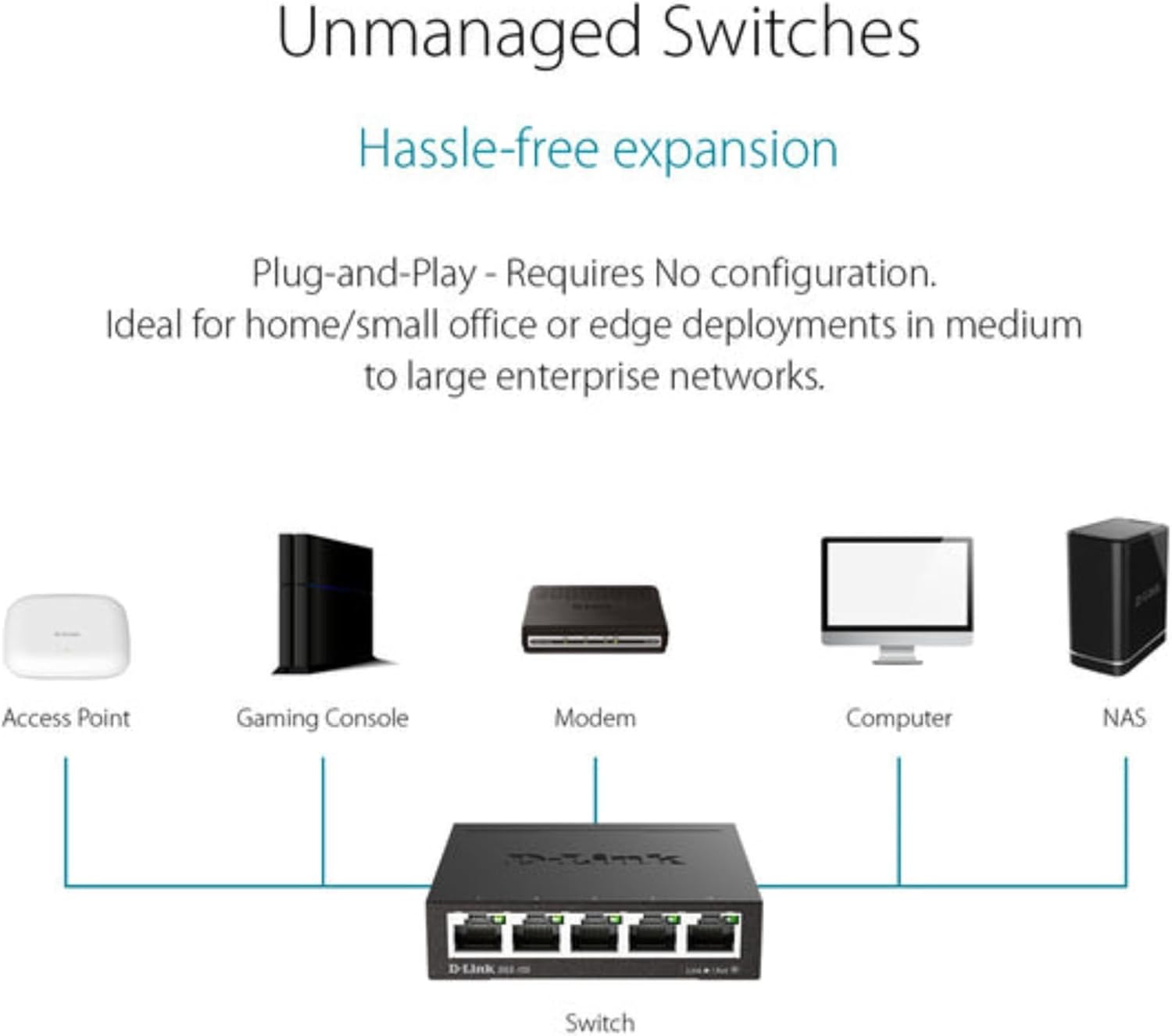
Typical network setup diagram showing the DGS-105 switch connecting multiple devices to a router.
5. Operare
5.1. Indicatoare LED
The DGS-105 switch features LED indicators to provide status information:
- LED de alimentare: Se aprinde când comutatorul este pornit.
- LED-uri Link/Act (per port):
- Solid Green: Indicates a stable Gigabit (1000 Mbps) connection.
- Solid Amber: Indicates a stable Fast Ethernet (100 Mbps) connection.
- Blinking: Indicates data activity on the port.
- Off: No device is connected, or the connected device is powered off.
5.2. Transfer de date
The DGS-105 supports Gigabit Ethernet speeds, allowing for fast data transfer rates of up to 2000 Mbps (full-duplex) per port. Quality of Service (QoS) prioritizes time-sensitive data, ensuring smooth performance for applications like video streaming, VoIP, and online gaming. Jumbo Frame support (9KB) further optimizes throughput for large file transferuri și copii de rezervă.
5.3. Green Ethernet Features
The switch incorporates Energy Efficient Ethernet (IEEE 802.3az) technology, which automatically detects cable length and link status to adjust power usage. This feature can significantly reduce power consumption by up to 80% when ports are idle or connected to shorter cables, contributing to energy savings without compromising performance.

Illustration of D-Link Green technology's energy saving capabilities.
6. Întreținere
To ensure optimal performance and longevity of your DGS-105 switch, follow these maintenance guidelines:
- curatenie: Use a soft, dry cloth to clean the exterior of the switch. Avoid using liquid or aerosol cleaners directly on the device.
- Ventilare: Ensure that the switch's ventilation openings are not blocked. Maintain adequate space around the device for proper airflow.
- Mediu: Operate the switch within its specified temperature and humidity ranges (refer to specifications). Avoid exposing the device to direct sunlight, excessive heat, or moisture.
- Organizare de cabluri: Organize network cables to prevent strain on the ports and to maintain a tidy setup.
7. Depanare
If you encounter issues with your DGS-105 switch, refer to the following common troubleshooting steps:
Fără putere
- Asigurați-vă că adaptorul de alimentare este conectat corect atât la comutator, cât și la o priză funcțională.
- Verificați dacă priza funcționează conectând un alt dispozitiv.
- Check the power LED on the switch. If it is off, try a different power adapter (if available and compatible).
Nicio legătură/activitate pe un port
- Verificați dacă cablul Ethernet este conectat corect atât în portul switch-ului, cât și în dispozitivul conectat.
- Asigurați-vă că dispozitivul conectat este pornit și că adaptorul său de rețea este activat.
- Încercați să utilizați un alt cablu Ethernet.
- Conectați dispozitivul la un alt port de pe switch.
- Check the status of the connected device's network adapter.
Viteză redusă a rețelei
- Asigurați-vă că toate dispozitivele și cablurile conectate acceptă Gigabit Ethernet pentru performanțe optime.
- Check for excessive network traffic or bandwidth-intensive applications running on connected devices.
- Verify that the Ethernet cables are not damaged and are of appropriate quality (e.g., Cat5e or Cat6).
- Reporniți switch-ul și dispozitivele conectate.
8. Specificații
| Caracteristică | Caietul de sarcini |
|---|---|
| Dimensiuni produs (L x l x H) | 3.95 cm x 3.85 cm x 1.1 cm |
| Greutatea articolului | 9.6 uncii |
| Voltage | 5 volți (DC) |
| Evaluare curentă | 1 Amps |
| Materialul carcasei | Metal |
| Tip de interfață | RJ45 |
| Rata de transfer de date | 2000 Megabits Per Second (Full Duplex) |
| Numărul de porturi | 5 |
| Numărul de model | 124889 |
| ASIN | B000BC7QMM |
| Culoare | Negru |
| Dispozitive compatibile | Desktop |
| Prima dată disponibilă | 9 septembrie 2005 |
9. Garanție și asistență
The D-Link DGS-105 switch comes with Limited Lifetime Protection, ensuring long-term reliability. D-Link also provides US-based technical support to assist with any product-related inquiries or issues.
For detailed warranty information, technical support resources, and contact options, please refer to the official D-Link website-ul sau documentația inclusă împreună cu produsul dumneavoastră.
You can typically find support information at us.dlink.com/support.