
D-Link DGS-1005D/B
D-Link DGS-1005D/B 5-Port Gigabit Unmanaged Plastic Desktop Switch
Model: DGS-1005D/B
1. Introducere
The D-Link DGS-1005D/B is a 5-Port Gigabit Unmanaged Plastic Desktop Switch designed to provide high-speed network connectivity for your home or small office. Its plug-and-play design allows for quick and easy installation, enabling fast file transfers and smooth media streaming across up to five devices. This manual provides detailed instructions for setting up, operating, and maintaining your DGS-1005D/B switch.
2. Conținutul pachetului
Vă rugăm să verificați dacă pachetul dumneavoastră conține următoarele articole:
- 1x DGS-1005D Switch
- 4x picioare de cauciuc
- 1x CD-ROM with Product Documentation
- 1x adaptor de alimentare
- 1x Kit de montare
- 1x Ghid de instalare rapidă
3. Caracteristicile produsului
- Energy Efficient Ethernet: Reduces energy consumption without sacrificing performance, contributing to lower power bills.
- Quiet and Economical Design: Features an innovative design that runs cool and quiet, making it an unobtrusive addition to any workspace.
- Viteză Gigabit: Creates a blazing fast network with five Gigabit Ethernet ports, providing high-speed wired connections for up to five PCs or other devices.
- Diagnosticare cablu: Includes a function that notifies users of cable conditions through product LEDs, aiding in troubleshooting.
- Garanție limitată pe viață: Register and enjoy Limited Lifetime Warranty support from D-Link, a global leader in the industry.
4. Produs terminatview
4.1 Panoul frontal

The front panel of the DGS-1005D/B switch features LED indicators for power and each of the five Gigabit Ethernet ports. These LEDs provide visual feedback on the connection status and activity of each port, allowing for quick monitoring of your network.
4.2 Panoul din spate
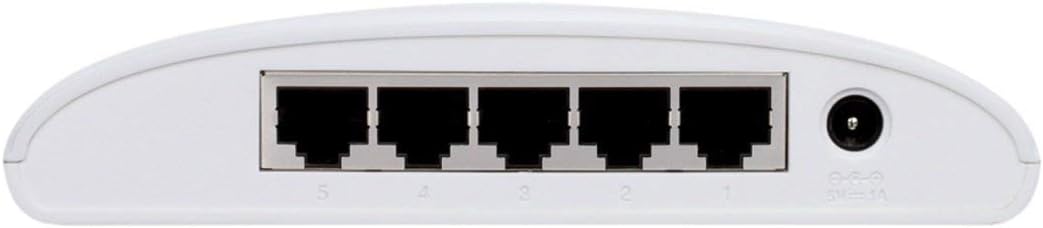
The rear panel houses the five Gigabit Ethernet ports (RJ45) for connecting your network devices and the power input jack. The ports are clearly numbered for easy identification and connection.
4.3 Design compact

The DGS-1005D/B features a compact and lightweight plastic desktop design, making it easy to place on any desk or shelf without taking up much space. Its unobtrusive form factor blends seamlessly into various environments.
5. Configurare
5.1 Înainte de a începe
- Ensure you have a stable power source available.
- Have standard Ethernet cables (Cat5e or Cat6 recommended for Gigabit speeds) ready for connecting your devices.
5.2 Conectarea comutatorului
- Plasare: Așezați comutatorul pe o suprafață plană și stabilă.
- Atașați picioarele de cauciuc: Attach the four rubber feet to the bottom of the switch to prevent slipping and provide adequate ventilation.
- Conectare alimentare: Connect the power adapter to the power input jack on the rear of the switch and then plug the adapter into a power outlet. The Power LED on the front panel should illuminate, indicating the switch is receiving power.
- Conectați dispozitive: Connect your network devices (e.g., computers, network-attached storage, gaming consoles) to any of the five Gigabit Ethernet ports using standard Ethernet cables. The corresponding port LEDs will illuminate when a connection is established and blink to indicate network activity.
- Gata de folosit: The switch is now ready for use. No software configuration is required due to its unmanaged design.
6. Instrucțiuni de utilizare
The D-Link DGS-1005D/B is an unmanaged switch, meaning it operates on a plug-and-play basis without requiring any software configuration. Once connected to power and network devices, it automatically detects network speeds (10/100/1000 Mbps) and adjusts for compatibility, providing seamless data transfer. The switch intelligently manages traffic flow to ensure optimal performance for all connected devices without user intervention.
7. Întreținere
To ensure optimal performance and longevity of your DGS-1005D/B switch, follow these maintenance guidelines:
- Mediu: Keep the switch in a well-ventilated area, away from direct sunlight, heat sources, and excessive moisture.
- curatenie: Curățați periodic exteriorul comutatorului cu o lavetă moale și uscată. Nu utilizați agenți de curățare lichizi sau cu aerosoli.
- Ventilare: Do not block the ventilation slots on the device, as this can lead to overheating.
- Lichide: Evitați vărsarea de lichide pe dispozitiv.
8. Depanare
If you encounter issues with your DGS-1005D/B switch, refer to the following common problems and solutions:
- Fără LED de alimentare:
- Asigurați-vă că adaptorul de alimentare este conectat corect la comutator și la o priză funcțională.
- Verificați dacă priza este activă conectând un alt dispozitiv.
- Port LED Not Illuminating:
- Check if the Ethernet cable is securely connected to both the switch port and the connected device.
- Asigurați-vă că dispozitivul conectat este pornit și că adaptorul său de rețea funcționează corect.
- Încercați un alt cablu Ethernet pentru a exclude un cablu defect.
- Test with a different device to confirm the port's functionality.
- Viteză redusă a rețelei:
- Ensure all connected devices and cables support Gigabit Ethernet (Cat5e or Cat6 cables are recommended for Gigabit speeds).
- Check for excessive network traffic or bandwidth-intensive applications running on connected devices.
- Verify your internet service provider's speed if the issue is related to internet access.
9. Specificații
| Caracteristică | Descriere |
|---|---|
| Marca | D-Link |
| Numărul de model | DGS-1005D/B |
| Numărul de porturi | 5 |
| Tip de interfață | RJ45 |
| Rata de transfer de date | 1000 de megaocteți pe secundă (Gigabit Ethernet) |
| Materialul carcasei | Plastic |
| Voltage | 230 volți |
| Greutatea articolului | 0.01 uncii |
| Dimensiunile produsului (Lxlxh) | 4.53 x 5.59 x 1.18 inci |
| Dispozitive compatibile | Desktop |
| Limbă | engleză |
| UPC | 790069252679 |
10. Garanție și asistență
The D-Link DGS-1005D/B 5-Port Gigabit Unmanaged Plastic Desktop Switch comes with a Limited Lifetime Warranty, providing peace of mind regarding its quality and durability. For technical support, product registration, or warranty claims, please refer to the contact information provided in the included product documentation or visit the official D-Link support webPăstrați bonul fiscal pentru validarea garanției.
Ask a question about this manual
Ask about setup, troubleshooting, compatibility, parts, safety, or missing instructions. Manuals+ will review the question and use this page’s manual context to help answer it.