
1. Introducere
This manual provides detailed instructions for the installation, operation, and maintenance of your Creative Inspire T5400 5.1 Speaker System. Please read this manual thoroughly before using the product to ensure proper setup and optimal performance. Retain this manual for future reference.
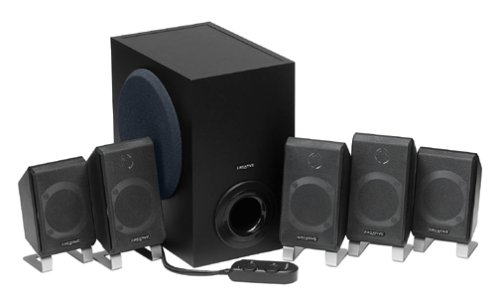
Imaginea 1.1: Pesteview of the Creative Inspire T5400 5.1 Speaker System, showing the subwoofer and satellite speakers.
2. Conținutul pachetului
Verificați dacă toate componentele enumerate mai jos sunt prezente în pachet:
- Creative Inspire T5400 Subwoofer
- Five (5) Satellite Speakers (Front Left, Front Right, Center, Rear Left, Rear Right)
- Telecomanda cu fir
- Adaptor de alimentare
- Audio Cables (3.5mm stereo to 3.5mm stereo cables for 5.1 connection)
- Ghid de pornire rapidă (nu este inclus în acest manual digital)
If any items are missing or damaged, please contact Creative customer support.
3. Instrucțiuni de configurare
Follow these steps to set up your Creative Inspire T5400 5.1 Speaker System:
3.1 Plasarea difuzoarelor
Proper speaker placement is crucial for optimal 5.1 surround sound experience.
- Difuzoare frontale stânga și dreapta: Place these speakers on either side of your monitor or television, equidistant from your listening position.
- Difuzor central: Position the center speaker directly above or below your monitor/television, centered with your listening position.
- Rear Left and Right Speakers: Place these speakers behind your listening position, ideally slightly to the sides and angled towards you.
- Subwoofer: The subwoofer can be placed on the floor, typically near the front speakers. Experiment with placement to find the best bass response for your room.
Image 3.1: Diagram illustrating optimal 5.1 speaker placement around a listening position. (Image not provided, conceptual description)
3.2 Connecting the Speakers to the Subwoofer
Each satellite speaker connects to the subwoofer using its integrated cable. Match the speaker to the corresponding port on the subwoofer:
- Identify the cables from each satellite speaker (Front Left, Front Right, Center, Rear Left, Rear Right).
- Locate the corresponding input jacks on the rear panel of the subwoofer. These are typically color-coded or labeled.
- Firmly insert each speaker cable into its designated jack.
Image 3.2: Close-up of the subwoofer's rear panel showing speaker input jacks. (Image not provided, conceptual description)
3.3 Connecting to an Audio Source (Computer/Television)
The Creative Inspire T5400 requires a 5.1 channel audio output from your source device. This typically involves three 3.5mm stereo jacks (Front, Rear, Center/Subwoofer).
- Locate the three 3.5mm audio input jacks on the rear panel of the subwoofer. These are usually color-coded (e.g., Green for Front, Black for Rear, Orange for Center/Subwoofer).
- Connect the provided audio cables from these jacks to the corresponding 5.1 audio output jacks on your computer's sound card or television.
- Ensure your computer's sound card drivers are installed and configured for 5.1 surround sound output.
Image 3.3: Illustration of connecting audio cables from the subwoofer to a computer sound card. (Image not provided, conceptual description)
3.4 Connecting the Wired Remote Control
The wired remote control connects to a dedicated port on the subwoofer.
- Locate the multi-pin connector for the wired remote on the subwoofer.
- Align the connector from the wired remote with the port and gently push until it clicks into place.
Image 3.4: Close-up of the wired remote control connector and the corresponding port on the subwoofer. (Image not provided, conceptual description)
3.5 Conexiune la alimentare
Connect the power adapter to the subwoofer and then to a power outlet.
- Insert the DC plug of the power adapter into the "DC IN" port on the subwoofer.
- Conectați adaptorul de alimentare la o priză electrică standard de perete.
Sistemul este acum gata de funcționare.
4. Instrucțiuni de utilizare
The wired remote control provides convenient access to the main functions of your speaker system.
4.1 Pornire/Oprire
- Apăsați tasta Buton de pornire on the wired remote control to turn the speaker system on or off. An indicator light on the remote will illuminate when the system is powered on.
4.2 Controlul volumului
- Rotiți cea mai mare Buton de volum on the wired remote control clockwise to increase volume and counter-clockwise to decrease volume.
4.3 Bass Level Adjustment
- Utilizați Buton de control al basului on the wired remote control to adjust the subwoofer's bass output. Rotate clockwise for more bass, counter-clockwise for less bass.
4.4 Mufă pentru căști
- A Mufă pentru căști is located on the wired remote control. Plugging in headphones will automatically mute the speakers, allowing for private listening. Unplugging headphones will restore audio to the speakers.
Image 4.1: Close-up of the wired remote control showing power, volume, bass, and headphone jack. (Image not provided, conceptual description)
5. Întreținere
Proper care ensures the longevity and performance of your speaker system.
5.1 Curățare
- Deconectați alimentarea înainte de curățare.
- Use a soft, dry, lint-free cloth to wipe the surfaces of the speakers and subwoofer.
- Do not use liquid cleaners, aerosols, or abrasive cleaning agents, as these can damage the finish or internal components.
5.2 Depozitare
- Store the speaker system in a cool, dry place away from direct sunlight and extreme temperatures.
- If storing for an extended period, it is recommended to pack the components in their original packaging to protect them from dust and physical damage.
6. Depanare
If you encounter issues with your Creative Inspire T5400, refer to the following common problems and solutions:
| Problemă | Cauza posibila | Soluţie |
|---|---|---|
| Niciun sunet de la niciun difuzor. |
|
|
| Sound from only some speakers (e.g., only front). |
|
|
| Sunet distorsionat sau neclar. |
|
|
If the problem persists after trying these solutions, please contact Creative customer support.
7. Specificații
Key technical specifications for the Creative Inspire T5400 5.1 Speaker System:
- Marca: Creativ
- Număr de model: 51MF4025AA002
- Mod de ieșire audio: 5.1 Înconjoară
- Număr de canale audio: 5.1
- Puterea totală a sistemului: 115 wați
- Speaker Maximum Output Power (per satellite): 25 wați
- Tehnologie de conectivitate: Cablat
- Protocol de conectivitate: RCA, USB, aux (Note: Primary 5.1 audio input uses 3.5mm stereo jacks.)
- Metoda de control: Telecomanda (cu fir)
- Dispozitive compatibile: Desktop, Laptop, Television
- Sursa de alimentare: Electric cu fir
- UPC: 054651062153
8. Garanție și asistență
8.1 Informații despre garanție
The Creative Inspire T5400 5.1 Speaker System comes with a Garanție limitată. Specific terms and conditions of the warranty may vary by region and retailer. Please refer to the warranty card included with your product or visit the official Creative website pentru informații detaliate despre garanție.
8.2 Asistență pentru clienți
For technical assistance, troubleshooting beyond this manual, or warranty claims, please contact Creative customer support:
- Suport online: Visit the official Creative website (us.creative.com/support) for FAQs, driver downloads, and contact options.
- Asistență telefonică: Refer to your product packaging or the Creative website pentru numerele de telefon de asistență regionale.
When contacting support, please have your product model number (T5400 or 51MF4025AA002) and proof of purchase readily available.