
Introducere
The GEFU Optico Timer is a mechanical kitchen timer designed for precise time management in cooking and other activities. Its clear visual display and magnetic back offer convenience and ease of use in any kitchen environment. This manual provides essential information for the safe and effective operation of your timer.
Instrucțiuni de siguranță
- Keep the timer away from water and other liquids. Do not immerse it.
- Do not attempt to disassemble or repair the timer yourself. Refer to qualified personnel for service.
- Acest produs nu este o jucărie. A nu se lăsa la îndemâna copiilor.
- Handle the timer with care to avoid damage to the mechanical components.
- Avoid extreme temperatures and direct sunlight, which can affect the timer's accuracy and lifespan.
Produs terminatview
The GEFU Optico Timer features a robust stainless steel casing and a clear dial for setting time. Key components include:
- Orar cadran: Marked from 0 to 60 minutes for setting desired durations.
- Visual Red Display: A red segment on the dial visually indicates the remaining time.
- Spate magnetic: Allows for convenient attachment to metallic surfaces like refrigerators or oven doors.
- Bell Mechanism: Sounds an alert when the set time has elapsed.
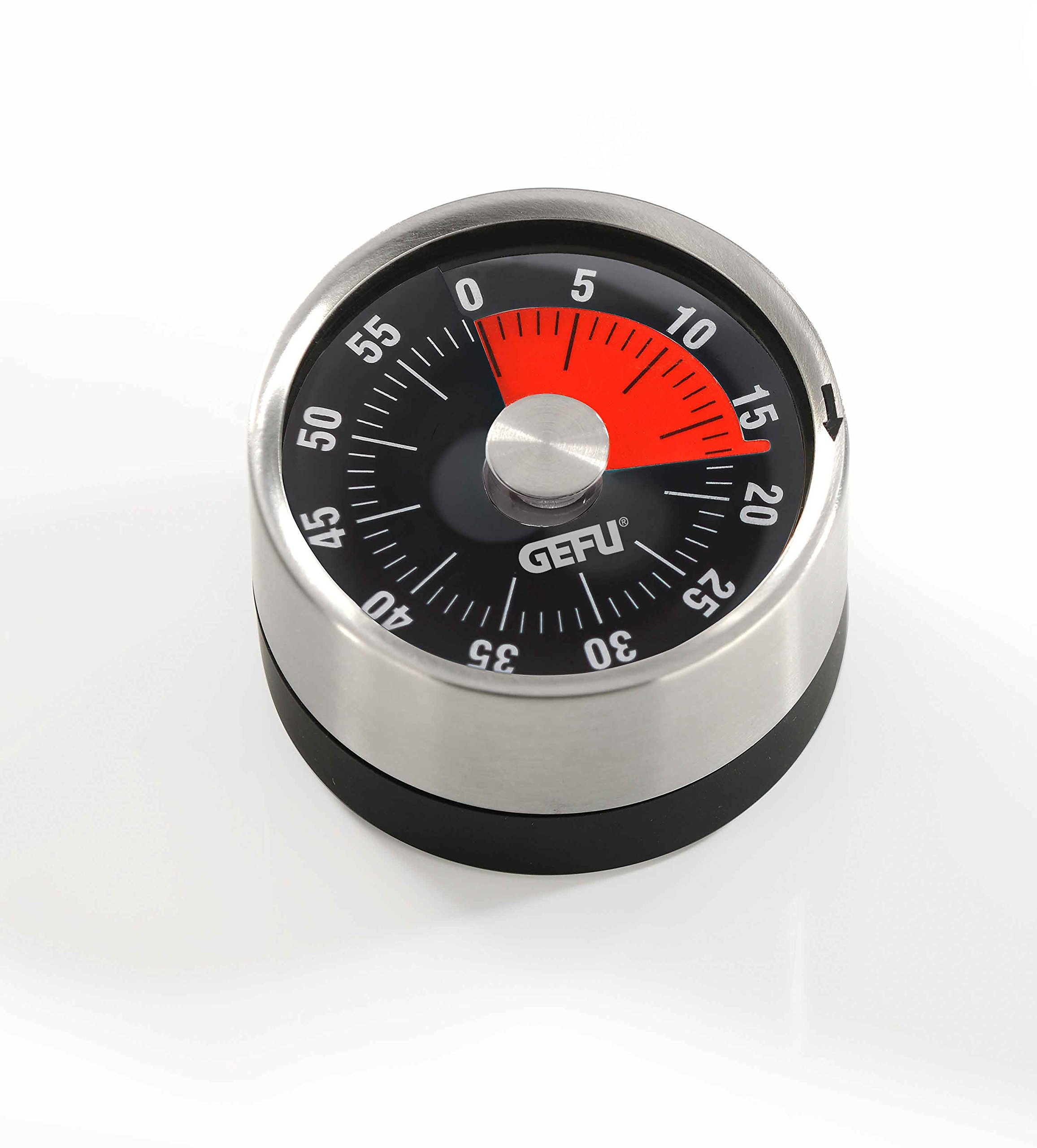
Imagine: față view of the GEFU Optico Timer, showing the minute dial, the red time remaining indicator, and the GEFU logo.
Înființat
The GEFU Optico Timer requires no batteries or complex setup. Simply remove it from its packaging. You can place it on any flat surface or attach it to a magnetic surface for easy access.
Instrucțiuni de operare
To ensure proper operation and accurate timing, follow these steps:
- Wind the Timer: Turn the dial clockwise completely to the 60-minute mark. This action winds the internal spring mechanism, which is essential for the timer to function correctly and for the bell to ring.
- Setați ora dorită: After winding, turn the dial counter-clockwise to your desired time setting, anywhere between 0 and 60 minutes.
- Monitorizare Timp: The red segment on the dial will visually decrease as time elapses, providing a clear indication of the remaining duration.
- Alarma: Once the set time has passed, the timer will sound a bell to alert you.
Notă importantă: Always wind the timer fully to 60 minutes first, even if you only need a short duration (e.g., 5 minutes). Failing to do so may result in the timer not ringing or being inaccurate.
Întreținere și curățare
- To clean the timer, wipe its surface with a soft, damp pânză.
- Nu utilizați produse de curățare abrazive, solvenți sau substanțe chimice dure, deoarece acestea pot deteriora finisajul și componentele interne.
- Ensure the timer is completely dry before storage or next use.
- Store in a dry place away from direct heat sources.
Depanare
| Problemă | Cauza posibila | Soluţie |
|---|---|---|
| Timer does not ring or rings too softly. | Timer was not fully wound to 60 minutes before setting the desired time. | Always wind the timer clockwise to the 60-minute mark first, then turn counter-clockwise to the desired time. |
| Timer is inaccurate. | Mechanical timers may have slight variations. Not fully wound. | Ensure proper winding procedure. For highly precise timing, consider digital alternatives. |
| Dial is stiff or difficult to turn. | Accumulated debris or internal mechanism issue. | Clean the exterior. Do not force the dial. If the issue persists, contact customer support. |
Specificații
- Număr de model: 5412300
- Material: Metal, Oțel inoxidabil
- Dimensiuni: 8 x 4 x 19.1 cm (Diameter 78 mm)
- Greutate: 118 g
- Interval de timp: 0 - 60 de minute
- Caracteristici: Magnetic back, visual red time display
- Marca: Gefu
- Global Trade Item Number (GTIN): 04006664123006
Garanție și suport
The GEFU Optico Timer is covered by a 5 an garanție. For warranty claims, technical support, or any questions regarding your product, please contact your retailer or the manufacturer directly. Please retain your proof of purchase for warranty purposes.
For more information, visit the official Gefu website: www.gefu.com