Introducere
This manual provides essential instructions for the safe and efficient operation of your Sharper Image SO226 Compact CD Stereo with AM/FM Digital Tuner. Please read this manual thoroughly before using the unit and retain it for future reference.
Instrucțiuni importante de siguranță
- Citiți toate instrucțiunile înainte de a utiliza aparatul.
- Păstrați acest manual pentru referințe viitoare.
- Nu utilizați acest aparat lângă apă.
- Curățați numai cu o cârpă uscată.
- Nu blocați niciun orificiu de ventilație. Instalați conform instrucțiunilor producătorului.
- Nu instalați lângă nicio sursă de căldură, cum ar fi calorifere, registre de căldură, sobe sau alte aparate (inclusiv ampliificatori) care produc căldură.
- Protejați cablul de alimentare să nu fie călcat sau ciupit, în special la prize, prize convenabile și la punctul de ieșire din aparat.
- Utilizați numai atașamente/accesorii specificate de producător.
- Consultați toate lucrările de service către personalul de service calificat. Întreținerea este necesară atunci când aparatul a fost deteriorat în vreun fel.
Conținutul pachetului
Verificați dacă toate articolele sunt prezente la despachetare:
- Sharper Image SO226 Compact CD Stereo Unit
- AC Power Adapter (if applicable, check packaging)
- Manual de utilizare (acest document)
Produs terminatview
Familiarize yourself with the components and controls of your SO226 unit.
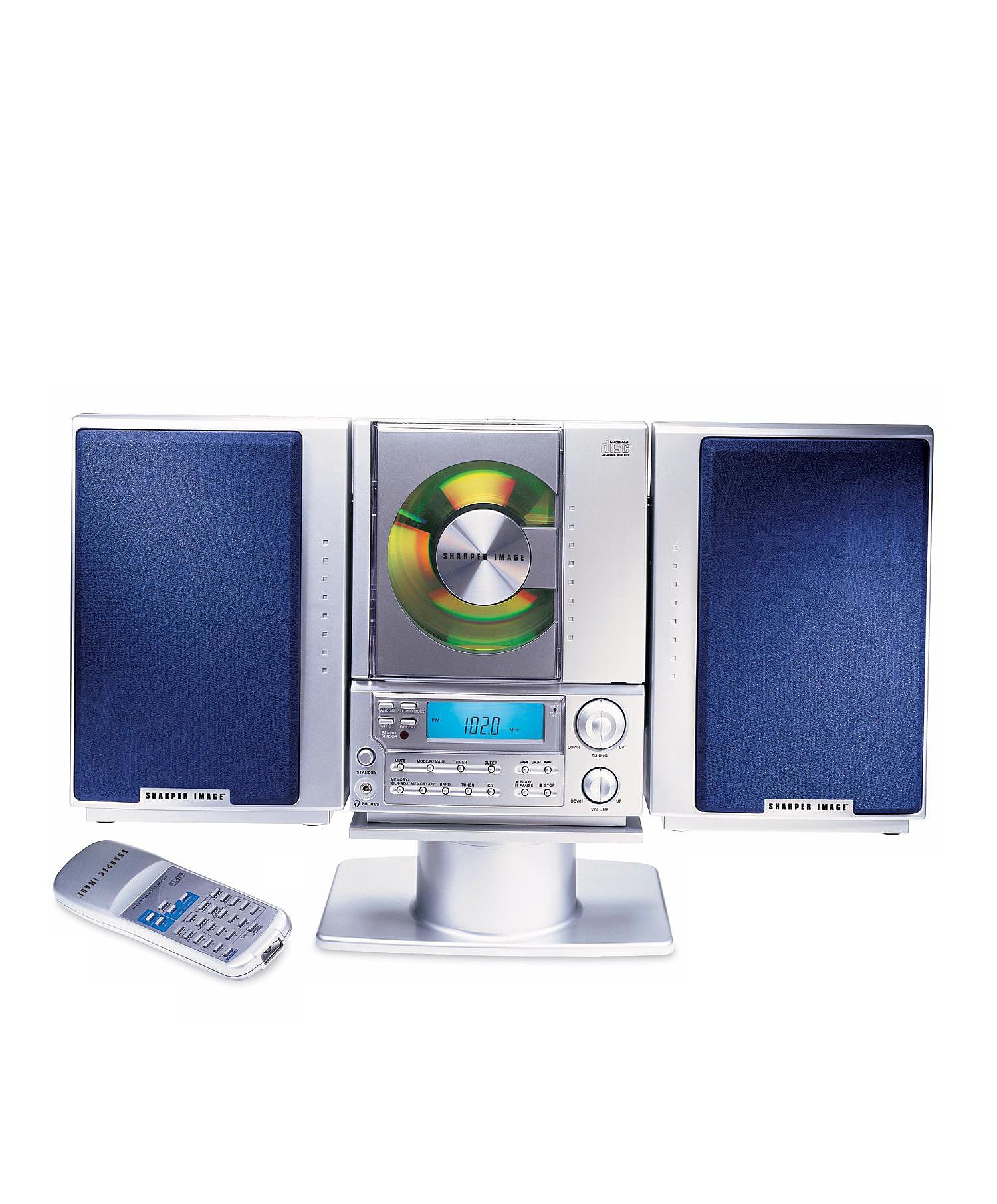
This image displays the front panel of the Sharper Image SO226 Compact CD Stereo. Visible features include the top-loading CD compartment, the digital display for radio frequencies and CD track information, and various control buttons for power, volume, CD playback, and radio tuning.
Control Panel (Typical Layout)
- Butonul de pornire: Pornește sau oprește unitatea.
- Buton FUNCȚIE/MOD: Switches between CD, AM, and FM modes.
- Butoane VOLUM +/-: Reglează nivelul de ieșire audio.
- Buton PLAY/PAUSE: Pornește sau întrerupe redarea CD-ului.
- Butonul STOP: Oprește redarea CD-ului.
- Butoane SKIP/CĂUTARE (◀◀ / ▶▶): Skips tracks on CD or tunes radio frequencies.
- Butonul PROGRAM: Folosit pentru programarea pieselor de pe CD.
- Butonul SLEEP: Activează funcția temporizatorului de somn.
- Butoane TUNING +/-: Fine-tunes radio frequencies.
- Butoane PRESET: Stochează și reia posturile de radio preferate.
- Display LCD: Shows current mode, track number, frequency, and time.
Înființat
Conexiune de alimentare
- Asigurați-vă că unitatea este așezată pe o suprafață stabilă și plană.
- If using batteries (not included), open the battery compartment on the bottom or back of the unit and insert the required batteries, observing correct polarity.
- Alternatively, connect the AC power adapter (if supplied) to the DC IN jack on the unit and then plug the adapter into a standard wall outlet.
Configurarea antenei
- For FM reception, extend the telescopic antenna fully. Adjust its position for optimal reception.
- For AM reception, the unit has a built-in ferrite bar antenna. Rotate the entire unit for best AM reception.
Instrucțiuni de operare
Funcționare CD Player
- Apăsați tasta PUTERE pentru a porni unitatea.
- Apăsați tasta FUNCȚIE/MOD apăsați butonul în mod repetat până când pe afișaj apare „CD”.
- Deschideți capacul compartimentului CD-ului.
- Introduceți un CD în compartiment cu eticheta în sus.
- Close the CD compartment cover. The unit will read the CD, and the total number of tracks will be displayed.
- Apăsați tasta REDARE/PAUZĂ pentru a porni redarea.
- Pentru a întrerupe, apăsați REDARE/PAUZĂ din nou. Apăsați încă o dată pentru a relua.
- Pentru a opri redarea, apăsați tasta STOP buton.
- Pentru a trece la piesa următoare, apăsați tasta SKIP/SEARCH ▶▶ buton.
- To go back to the beginning of the current track or to the previous track, press the SKIP/SEARCH ◀◀ buton.
- To fast forward or rewind within a track, press and hold the SKIP/SEARCH ▶▶ or ◀◀ în timpul redării.
Funcționarea radio AM/FM
- Apăsați tasta PUTERE pentru a porni unitatea.
- Apăsați tasta FUNCȚIE/MOD apăsați butonul în mod repetat până când pe afișaj apare „AM” sau „FM”.
- Reglare manuală: Apăsați tasta TUNING +/- butoane pentru a regla frecvența pas cu pas.
- Scanare automată: Țineți apăsat butonul TUNING +/- buttons for a few seconds. The tuner will scan and stop at the next strong station.
- Stocarea presetărilor: Acordați postul dorit. Apăsați butonul PROGRAM button. The preset number will flash. Use the SALTA / CĂUTĂ pentru a selecta un număr presetat, apoi apăsați butoanele PROGRAM din nou pentru a confirma.
- Reamintirea presetărilor: În modul radio, apăsați tasta PRESETARE butoane pentru a parcurge posturile memorate.
Sleep Funcție Temporizator
The unit features a convenient sleep timer that automatically turns off the sound after a set period.
- While the unit is playing (CD or Radio), press the DORMI buton.
- Fiecare apăsare a DORMI button will cycle through available sleep times (e.g., 10, 20, 30, 60, 90 minutes, or OFF).
- Select your desired sleep duration. The unit will automatically power off after the selected time has elapsed.
Întreţinere
- Curățarea unității: Ștergeți exteriorul unității cu o cârpă moale și uscată. Nu utilizați substanțe de curățare abrazive sau solvenți.
- Îngrijire CD: Handle CDs by their edges. Keep them clean and free of scratches. If a CD is dirty, wipe it gently with a soft, lint-free cloth from the center outwards.
- Depozitare: When not in use for extended periods, disconnect the power adapter and remove batteries. Store the unit in a cool, dry place.
Depanare
Dacă întâmpinați probleme, consultați următoarele probleme și soluții comune:
- Fără putere:
- Ensure the AC power adapter is securely plugged into both the unit and a working wall outlet.
- If using batteries, check if they are inserted correctly and are not depleted. - Fără sunet:
- Check the volume level and increase it if necessary.
- Ensure the correct function mode (CD/AM/FM) is selected. - CD Not Playing / Skipping:
- Ensure the CD is inserted correctly with the label side up.
- Clean the CD for any dirt or scratches.
- Try a different CD to rule out a faulty disc.
- Ensure the CD compartment cover is fully closed. - Recepție radio slabă:
- For FM, fully extend and adjust the telescopic antenna.
- For AM, rotate the entire unit for better signal.
- Move the unit away from other electronic devices that may cause interference. - Butoanele care nu răspund:
- Try turning the unit off and on again.
- Disconnect power for a few minutes, then reconnect.
Specificații
| Numărul de model | SO226 |
| Dimensiuni produs (L x l x H) | 1.3 x 19 x 5.5 inchi (3.3 x 48.3 x 14 cm) |
| Greutatea articolului | 5 lire (2.27 kg) |
| Tip difuzor | Stereo |
| Sursa de alimentare | Battery Powered (AC adapter typically included or sold separately) |
| Color (as per specific variant) | Albastru |
Garanție și suport
Pentru informații despre garanție și asistență pentru clienți, vă rugăm să consultați documentația inclusă odată cu achiziția sau să vizitați site-ul oficial Sharper Image. webPăstrați dovada achiziției pentru reclamații în garanție.


