
1. Introducere
Mulțumesc pentru achizițieasing the Panasonic KP150BK Vertical Electric Pencil Sharpener. This sharpener is designed for efficient and precise sharpening of standard pencils, featuring a space-saving vertical design and an automatic stop function to prevent over-sharpening. Please read this manual thoroughly before use to ensure proper operation and maintenance.
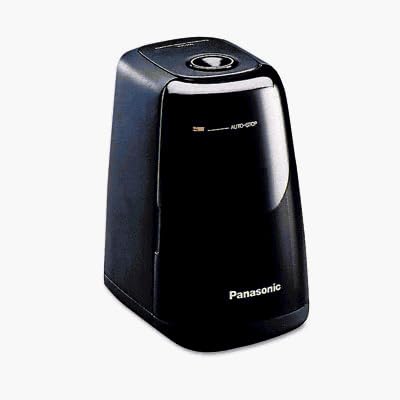
Image: The Panasonic KP150BK Vertical Electric Pencil Sharpener in black, demonstrating its compact vertical design.
2. Informații importante privind siguranța
- Always ensure the sharpener is placed on a stable, flat surface during use.
- Do not insert fingers or foreign objects into the sharpening opening.
- Unplug the sharpener from the power outlet before cleaning or emptying the shaving receptacle.
- Keep the sharpener away from water or other liquids to prevent electric shock.
- Acest aparat nu este destinat utilizării de către persoane (inclusiv copii) cu capacități fizice, senzoriale sau mentale reduse sau cu lipsă de experiență și cunoștințe, cu excepția cazului în care acestea au fost supravegheate sau instruite cu privire la utilizarea aparatului de către o persoană responsabilă pentru siguranța lor. .
- Do not attempt to sharpen crayons, chalk, or soft-lead pencils, as this may clog the blade and damage the sharpener.
3. Caracteristicile produsului
- Vertical Design: Space-saving footprint for efficient desk organization.
- Hardened Steel Cutter Blade: Designed for durability and consistent sharpening.
- Auto-Stop™ Function: Automatically stops sharpening when a perfect 16-degree point is achieved, preventing pencil waste.
- Red Light Indicator: Signals when the pencil is sharpened to the optimal point.
- Semi-Transparent Shaving Receptacle: Allows easy monitoring of shaving levels.
- Întrerupător de siguranță: Prevents operation when the shaving receptacle is removed.
- Heavy Duty Motor: Provides reliable performance for frequent use.
4. Configurare
- Despacheta: Scoateți cu grijă ascuțitoarea din ambalaj.
- Plasare: Place the sharpener on a stable, flat, and dry surface, such as a desk or table. Ensure there is enough space around the unit for proper ventilation.
- Conexiune de alimentare: Conectați cablul de alimentare la o priză electrică standard.
5. Instrucțiuni de utilizare
- Introdu creion: Hold the pencil firmly and insert it straight into the sharpening opening at the top of the unit.
- Ascuţi: Gently push the pencil down into the opening. The motor will start automatically. Apply light, consistent pressure.
- Auto-Stop Indication: Continue to hold the pencil in place until the red light indicator illuminates and the motor stops automatically. This indicates that the pencil has reached a perfect point.
- Scoateți creionul: Carefully remove the sharpened pencil from the opening.
Nota: If the motor does not start, ensure the shaving receptacle is correctly seated and the unit is plugged in. Avoid excessive force when inserting the pencil.
6. Întreținere
Emptying the Shaving Receptacle
- Deconectați: Always unplug the sharpener from the power outlet before emptying the receptacle.
- Remove Receptacle: Gently pull the semi-transparent shaving receptacle away from the main unit. The safety switch will prevent the motor from operating while it is removed.
- Așchii goale: Dispose of the pencil shavings into a waste bin.
- Curat: If necessary, wipe the receptacle with a dry cloth. Do not wash with water.
- Reatașați: Carefully slide the shaving receptacle back into its position until it clicks securely into place. Ensure it is properly seated for the sharpener to operate.
Atenţie: Do not operate the sharpener without the shaving receptacle securely in place.
7. Depanare
| Problemă | Cauza posibila | Soluţie |
|---|---|---|
| Ascuțitorul nu pornește. | 1. Nu este conectat la priză. 2. Shaving receptacle not properly seated. 3. Puterea tatage. | 1. Asigurați-vă că cablul de alimentare este bine conectat la o priză funcțională. 2. Re-seat the shaving receptacle until it clicks into place. 3. Check other electrical devices to confirm power supply. |
| Pencil does not sharpen or sharpens unevenly. | 1. Dull cutter blade. 2. Pencil lead broken inside. 3. Shavings clogging the blade. 4. Incorrect pencil type (e.g., soft lead, crayon). | 1. The steel cutting wheel is designed for long life; if dull, contact support. 2. Gently tap the sharpener to dislodge broken lead. If persistent, carefully remove the receptacle and inspect. 3. Empty the shaving receptacle and ensure no blockages. 4. Use only standard graphite pencils. |
| Motor stops prematurely or runs intermittently. | 1. Overheating (due to continuous use). 2. Sensor sensitivity. | 1. Allow the sharpener to cool down for several minutes before resuming use. 2. Ensure the pencil is inserted straight and with consistent, light pressure. |
8. Specificații
| Caracteristică | Detaliu |
|---|---|
| Marca | Panasonic |
| Numărul de model | KP150BK |
| Culoare | Negru |
| Sursa de alimentare | Electric |
| Material | Oțel aliat |
| Caracteristici speciale | Heavy Duty, Transparent Shaving Receptacle |
| Greutatea articolului | 0.06 lire sterline |
| Număr de unități | 1.0 număr |
9. Garanție și asistență
This Panasonic KP150BK Vertical Electric Pencil Sharpener comes with a manufacturer's limited one-year warranty. For warranty claims, technical support, or service inquiries, please refer to the contact information provided with your purchase documentation or visit the official Panasonic website-ul.
Vă rugăm să păstrați dovada achiziției în scopul garanției.